[v1.5] Unclear Windshield reflection
-
Hi,
I generally like the windshield reflections in the latest version, however there is a permanently red reflection where I cannot identify the source. It is visible from cold-and-dark throughout the entire flight, also with liveries that do not have any red color component.
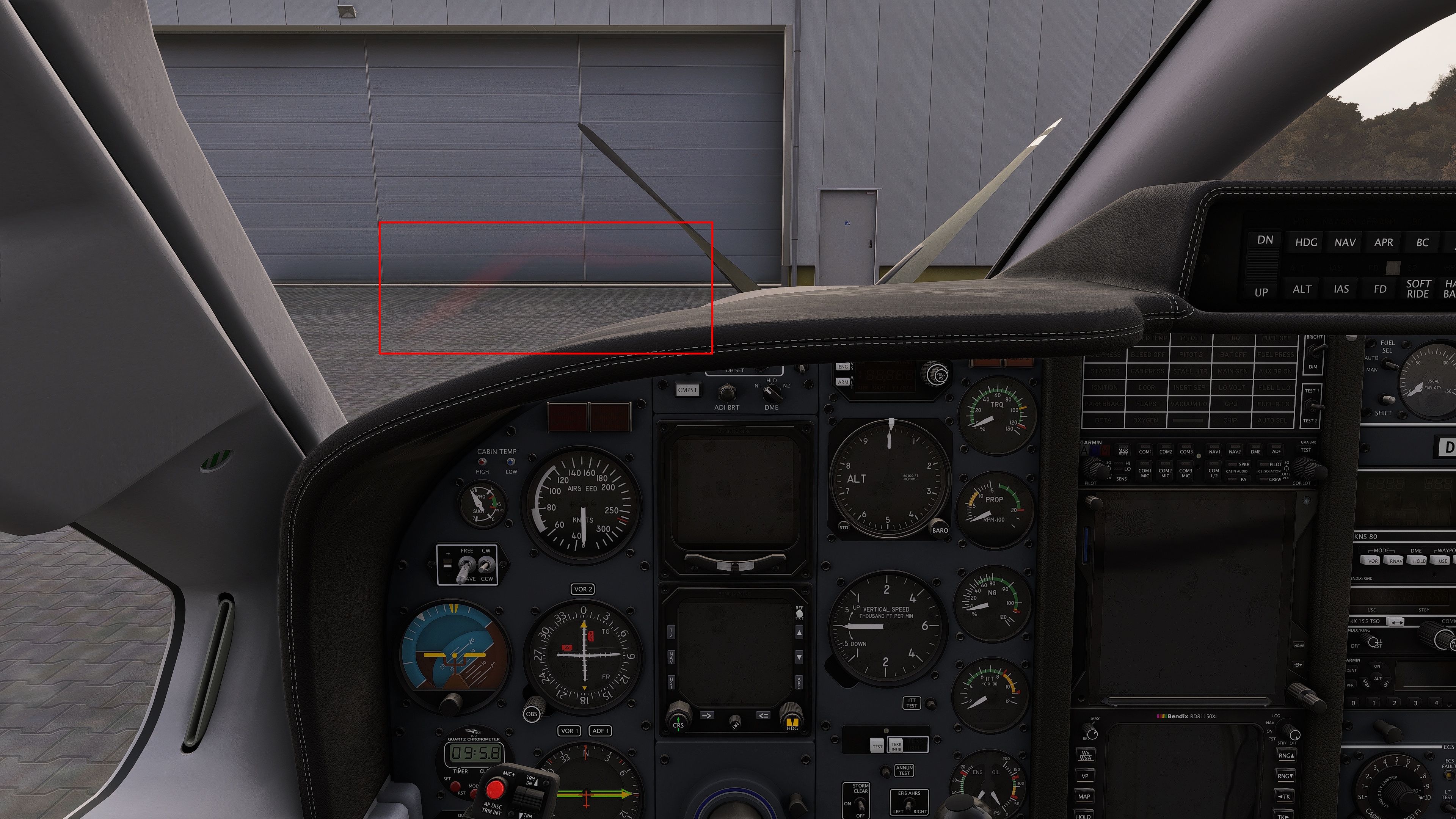
Thanks for looking into this.
Regards,
Stefan
-
Hi,
I generally like the windshield reflections in the latest version, however there is a permanently red reflection where I cannot identify the source. It is visible from cold-and-dark throughout the entire flight, also with liveries that do not have any red color component.
Thanks for looking into this.
Regards,
Stefan
@sg_aviation Hi Stefan. Nothing changed regarding the windshield reflections in this last update. I just checked, and I don't see anything like this on my end. It's hard to tell what we're looking at, but I suspect it might actually be the master warning and caution flashers. The left splash of color looks a little more red, and the right a little more orange. Screen-space reflections work in mysterious ways, and people have been complaining about MSFS 2024's hyperactive windshield reflections since release. Since I'm not seeing it, perhaps your graphics settings might have an impact on it?
-
@sg_aviation Hi Stefan. Nothing changed regarding the windshield reflections in this last update. I just checked, and I don't see anything like this on my end. It's hard to tell what we're looking at, but I suspect it might actually be the master warning and caution flashers. The left splash of color looks a little more red, and the right a little more orange. Screen-space reflections work in mysterious ways, and people have been complaining about MSFS 2024's hyperactive windshield reflections since release. Since I'm not seeing it, perhaps your graphics settings might have an impact on it?
@Black-Square I unfortunately have this too. I noticed after the first load of the new version but I initially thought I just never noticed. It’s definitely there and multiple users I know have also reported this.
-
The issue also persits for me. In the mean time I have re-tried after the following actions:
- Clear community folder (except TBM850 v1.5)
- Clear AMD/DX Shader Cache
- Delete Rolling Cache
- Uninstall ReShade incl. all addons
- Run with original shaders only
- Disabled all external applications
- Re-set AMD Adrenaline to default (on AMD Radeon 7900XT)
The result is exactly the same.
Also, the issue did not occur in my last flight in the previous version few days ago and I did not change any MSFS or system settings in between.
-
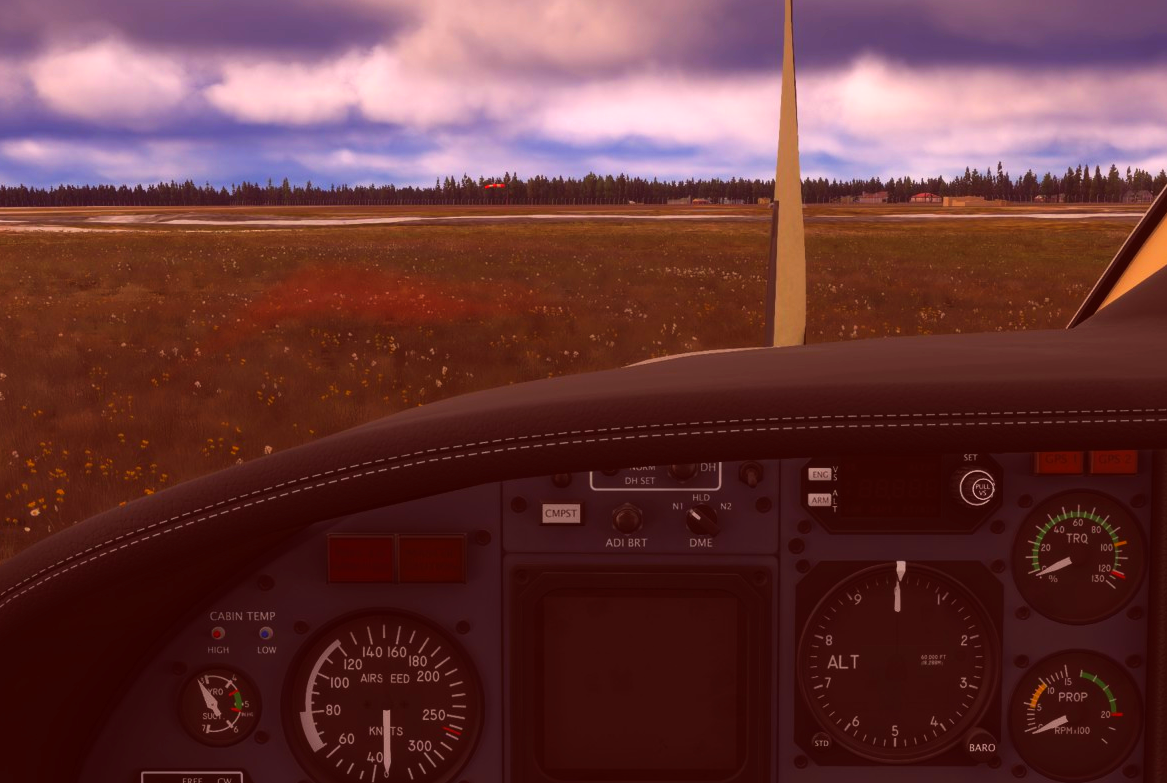
It is definitly there. Just kinda hard to see with a bright background. Putting it on a greenish background it becomes easier to see. I boosted the contrast and the red channel to make it easier to see.
My best guess would be that it is a reflection of the pushbar stowed in the front compartment. Why that is not culled is beyond me though.
-
Hi,
I have the same effect. I tried different graphic settings but haven't found anything that changes the red reflection.
It can be somewhat hard to reproduce though. In my observation it is most visible in a low sun situation where the sun is either directly in front or behind the plane. I'm also guessing it is the master warning or MSG GPS1 lamps that are shining through. -
Sorry you guys are dealing with this distraction! I've tried every lighting condition and simulator setting that I can think of, and can't reproduce it for myself. Clearly, I don't doubt what you're seeing, I just don't know how I can deal with it. I think it's likely the master caution/warning, but there is nothing I can do to control the screen-space reflections. Unlike shadows, if you can see the annunciators, then so can the shader. If you really think this changed with the last update to the TBM, then it would likely be caused by the cubemap I [reluctantly] added for the instrument glass reflections. I can give you two ways to test this, but one is a lot easier than the other:
If you go into the aircraft's community folder and locate
cockpit.cfg, you can try changing the first line tocockpit_type = 0. If that solves the problem, then we know the culprit, but you guys may have to fight my users who want instrument glass reflections for the solution!