Skip to content
  • Categories
  • Recent
  • Tags
  • Popular
Collapse
Just Flight Community Forum
  1. Home
  2. Just Flight
  3. MSFS Products
  4. Black Square Add-Ons
  5. Caravan Professional
  6. Visible passengers?

Visible passengers?

Scheduled Pinned Locked Moved Caravan Professional
51 Posts 19 Posters 9.3k Views 4 Watching
  • Oldest to Newest
  • Newest to Oldest
  • Most Votes
Reply
  • Reply as topic
Log in to reply
This topic has been deleted. Only users with topic management privileges can see it.
  • M MiRexer

    My guess is your using the black square efb. Go to the Microsoft mass and balance section and add your passengers there.

    A
    A
    andyW2025
    wrote on last edited by
    #38

    @MiRexer hi there. I personally tried the Microsoft EFB and then also tried the Blacksquare tablet + a range of different combinations and no passengers show, just the copilots.

    1 Reply Last reply
    0
    • M
      M
      MiRexer
      wrote on last edited by
      #39

      There are two different mods based on the variants - did you install the right one?

      A 1 Reply Last reply
      0
      • M MiRexer

        There are two different mods based on the variants - did you install the right one?

        A
        A
        andyW2025
        wrote on last edited by
        #40

        @MiRexer thanks for the suggestions. Yes I double checked that also. I actually have both mods installed as have the caravan bundle. Same issue in all cases 😞

        1 Reply Last reply
        0
        • M
          M
          MiRexer
          wrote on last edited by
          #41

          Try loading up one of the default asobo aircraft like the 172 and load up passengers in it and then see if they show up in the Caravan. I couldn't see passengers in the Learjet and that solved it for me - maybe it will help here.

          1 Reply Last reply
          0
          • B
            B
            batkizoltan
            wrote on last edited by batkizoltan
            #42

            On my system, the add-on works perfectly; I’ve been using it since its release. I recommend downloading both add-ons from FlightSim.to, then extracting them and copying them into the Community folder. After that, launch the simulator and load the location where you plan to fly. Using the EFB, increase the payload and weight values; once adjusted, the co-pilot and the desired number of passengers will appear.
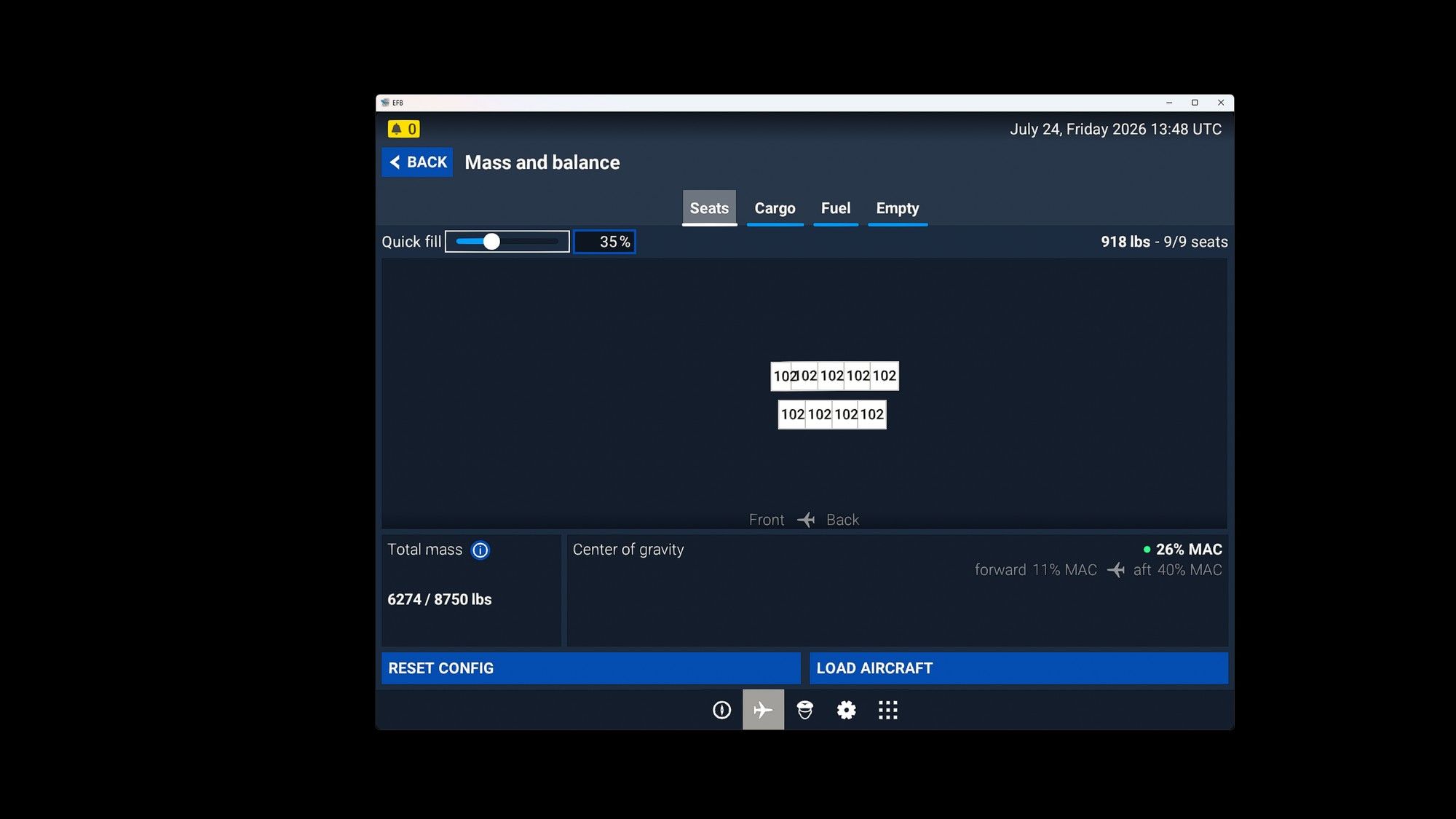
            Microsoft Flight Simulator 2024 Screenshot 2026.03.24 - 14.48.47.13.jpg

            1 Reply Last reply
            0
            • S
              S
              s.mellah
              wrote on last edited by
              #43

              Thanks for your inputs. Unfortunately nothing seems to work. Also, maybe related, the Caravan doesn't recall my preferences from flight to flight (realistic yoke mouvement for exemple).

              1 Reply Last reply
              0
              • S s.mellah

                Good morning,

                I installed the passenger mod, however, only the co-pilot shows up when I load seats on the standard MSFS loading manager. No passenger in the back show up. Can anyone think of something I have missed ?
                Also, the pilot never shows up on the outside view. An that's since the first installation of the Caravn pro. Any idea that could help me ?
                Thank you all.

                Souheil

                hangar_101H
                hangar_101H
                hangar_101
                wrote on last edited by
                #44

                @s.mellah If you have ChasePlane installed, that might be why you don’t see the pilot in the external view.

                Hangar 101

                1 Reply Last reply
                0
                • O
                  O
                  Outermarker
                  wrote on last edited by
                  #45

                  I have Chaseplane installed and got the Pax to show up, but only after loading them via the MSFS EFB, not the Black Square Tablet.

                  hangar_101H 1 Reply Last reply
                  0
                  • O Outermarker

                    I have Chaseplane installed and got the Pax to show up, but only after loading them via the MSFS EFB, not the Black Square Tablet.

                    hangar_101H
                    hangar_101H
                    hangar_101
                    wrote on last edited by
                    #46

                    @Outermarker ChasePlane does hide the pilot only, it does not affect the passengers

                    From //42

                    No pilots in external view? β€” MSFS 2024
                    The pilot is hidden for now due to an internal issue with the sim. Until this reported issue is resolved in the sim, we are hiding the pilot entirely to avoid conflicts when using ChasePlane.

                    Hangar 101

                    O 1 Reply Last reply
                    0
                    • W
                      W
                      Wothan
                      wrote on last edited by Wothan
                      #47

                      Maybe only on my MSFS2024 Stor version install....

                      Having these mod files in my Community folder, causes my Controller bindings to not save properly in the MSFS2024 controller assignment menu for the Caravan's.

                      I need to re-assign them after each Flightsim restart.

                      Removing these mods fixes this.

                      1 Reply Last reply
                      0
                      • hangar_101H hangar_101

                        @Outermarker ChasePlane does hide the pilot only, it does not affect the passengers

                        From //42

                        No pilots in external view? β€” MSFS 2024
                        The pilot is hidden for now due to an internal issue with the sim. Until this reported issue is resolved in the sim, we are hiding the pilot entirely to avoid conflicts when using ChasePlane.

                        O
                        O
                        Outermarker
                        wrote on last edited by
                        #48

                        @hangar_101 I know, but since Andy suspected that Chaseplane may be the reason that only the Copilot shows up for him but no passengers, I wanted to clarify that it does indeed work with Chaseplane installed.

                        1 Reply Last reply
                        1
                        • G
                          G
                          gearup
                          wrote on last edited by gearup
                          #49

                          Maybe there is a solution to finally unite supporters and opposers of visible Passengers in Black Square planes. Got Friends recent Mans Best Freinds mods additional implementation of passangers, seems like a good opportunity. As I understand the msfs24 efb doesn't have impact on the payload of the BS aircraft (It would be just the visuals) , so after implementation of GF mod into Blacksquare planes it would be possible to have visible or hidden passengers with the same payload settings. I checked this GF mod on compatible planes at it works like a charm.

                          1 Reply Last reply
                          0
                          • S s.mellah

                            Good morning,

                            I installed the passenger mod, however, only the co-pilot shows up when I load seats on the standard MSFS loading manager. No passenger in the back show up. Can anyone think of something I have missed ?
                            Also, the pilot never shows up on the outside view. An that's since the first installation of the Caravn pro. Any idea that could help me ?
                            Thank you all.

                            Souheil

                            EsotericE
                            EsotericE
                            Esoteric
                            wrote on last edited by
                            #50

                            @s.mellah Did you press "Load aircraft" in the msfs efb after adding the passenger weights? I forgot this the first time and only saw the copilot, but when trying again now and pressing load aircraft and confirming, I had visible passengers too.

                            1 Reply Last reply
                            0
                            • G
                              G
                              garack
                              wrote on last edited by
                              #51

                              Hey, want to by this plane. Is visible passenger loading fixed? can i load the maximum passenger size in the plane, not only 5 ?

                              1 Reply Last reply
                              0

                              Hello! It looks like you're interested in this conversation, but you don't have an account yet.

                              Getting fed up of having to scroll through the same posts each visit? When you register for an account, you'll always come back to exactly where you were before, and choose to be notified of new replies (either via email, or push notification). You'll also be able to save bookmarks and upvote posts to show your appreciation to other community members.

                              With your input, this post could be even better πŸ’—

                              Register Login
                              Reply
                              • Reply as topic
                              Log in to reply
                              • Oldest to Newest
                              • Newest to Oldest
                              • Most Votes


                              • Login

                              • Don't have an account? Register

                              • Login or register to search.
                              • First post
                                Last post
                              0
                              • Categories
                              • Recent
                              • Tags
                              • Popular