
Propeller feathering in flight
-
I've been able to implement feathering all within MSFS2024 with the bravo throttle:
Propeller 1 axis - Joystick RAXIS Z - set inverted
Propeller 1 Pitch Hi - Joystick button 26 - set control on release
Propeller 2 axis - Joystick RAXIS Y - set inverted
Propeller 2 Pitch Hi - Joystick button 27 - set control on release
Toggle Feather Switch 1 - Joystick button 26
Toggle Feather Switch 2 - Joystick button 27@MiRexer
I’ve tried exactly that with no success, when I bring the propeller below the detent, it doesn’t go in feathered mode in the sim (lever doesn’t move to feather). It works for you? Any other option checked or unchecked that you are not mentioning the message?Thanks a lot!
-
Are you quick with feathering it? When I was first trying I was taking my time and I couldn't get it into feather.
From the manual:
"The propeller blade angle of a constant speed propeller is controlled via high pressure oil
admitted to a cylinder in the propeller hub, metered by a governor. In a multi-engine aircraft, the
absence of oil pressure will reduce the propeller blade pitch to the feathered position, but only
when the oil pressure is reduced quickly; otherwise, counter-weighted feather locking pins will
prevent the blades from feathering during a normal shutdown, or often an intentional shutdown
in flight. For this reason, the propeller levers must be placed in the feather detent quickly during
engine shutdown (while there is still oil in the propeller hub) to overcome the feather locking pins
and feather the propeller. " -
Are you quick with feathering it? When I was first trying I was taking my time and I couldn't get it into feather.
From the manual:
"The propeller blade angle of a constant speed propeller is controlled via high pressure oil
admitted to a cylinder in the propeller hub, metered by a governor. In a multi-engine aircraft, the
absence of oil pressure will reduce the propeller blade pitch to the feathered position, but only
when the oil pressure is reduced quickly; otherwise, counter-weighted feather locking pins will
prevent the blades from feathering during a normal shutdown, or often an intentional shutdown
in flight. For this reason, the propeller levers must be placed in the feather detent quickly during
engine shutdown (while there is still oil in the propeller hub) to overcome the feather locking pins
and feather the propeller. "@MiRexer Well in fact I was trying on the ground, just checking if the blue propeller lever would visibly move to the feather range (which it didn't). You mean that your keybind does engage feathering in flight without moving the lever? Well I guess that's useful, but I was hoping to also use that on planes where the startup sequence calls for feather position for the propellers...
-
You mentioned the animation - and that's why I mentioned the above. No, mine goes right into feather on the ground. I made a video for you:
https://horizon.meta.com/shares/NGFE6yzx9bG4e91Ak8Coi2uXWZn8IJ
@MiRexer said in Propeller feathering in flight:
Unable to access the link on my side. But assuming that it shows the blue propeller lever going all the way down to feather, then I don't know what's up... We're using the same hardware so we should have the same experience... Any other thing toggled/not toggled in the options of either Pitch Hi or Toggle Feather, except "set control on release" for Pitch Hi?
-
I use SPAD.neXt with the Bravo throttle, and I use MSFS 2020 and 2024 controls for the propeller axis, and the following commands for the "reverse" detent (button) for the Bravo, for feathering:
Button pushed:
10 of the following pairs:
Send PROP_PITCH1_DECR-Event (or PROP_PITCH2_DECR-Event for Prop 2)
Delay execution for 100 msButton released:
Send PROP_PITCH1_HI-EventI find this to work in both 2020 and 2024.
@KRoy7 Hello Roy,
I have been trying to feather the prop, and I was able to do it while in flight.. but if this I try while taking off then the prop keeps on going.. is there something else to be done? -
@MiRexer said in Propeller feathering in flight:
Unable to access the link on my side. But assuming that it shows the blue propeller lever going all the way down to feather, then I don't know what's up... We're using the same hardware so we should have the same experience... Any other thing toggled/not toggled in the options of either Pitch Hi or Toggle Feather, except "set control on release" for Pitch Hi?
@brettmercier Hmmm, I'll upload it to youtube - I showed all of the settings in the video as well. Those 3 were the only ones I could find.
-
ok I made it work (feather it after takeoff).. but I have to be extremely fast to put the throttle down and the prop leveller to feather. I wonder if this is as IRL, or after take off if an engine fails, it will continue to spin. Funny tou when I fail the engine already airborne.. IDK 1000ft agl, i dont need to be that fast, I can bring throttle down, then the prop leveller, and then the mixture.. without rush and the prop will feather.
-
@MiRexer said in Propeller feathering in flight:
Unable to access the link on my side. But assuming that it shows the blue propeller lever going all the way down to feather, then I don't know what's up... We're using the same hardware so we should have the same experience... Any other thing toggled/not toggled in the options of either Pitch Hi or Toggle Feather, except "set control on release" for Pitch Hi?
@brettmercier My apologies - I evidently did use spad at some point to set it up - but I don't remember when or HOW lol. Just to be sure today I didn't load up spad to test and it didn't work. So sorry
-
@MiRexer are you able to feather already right after takeoff? or just once in the air?
-
Theoretically the locking pins will not activate so long as the prop lever is moved back from the full fine setting, and then a simple looking and movement of the prop lever with a mouse will allow the engine to be feathered... Other wise for feathering one engine and keeping the other one at high rpm is currently not possible natively in any MSFS version. If this matters to you I highly recommend Spad.neXt
-
Theoretically the locking pins will not activate so long as the prop lever is moved back from the full fine setting, and then a simple looking and movement of the prop lever with a mouse will allow the engine to be feathered... Other wise for feathering one engine and keeping the other one at high rpm is currently not possible natively in any MSFS version. If this matters to you I highly recommend Spad.neXt
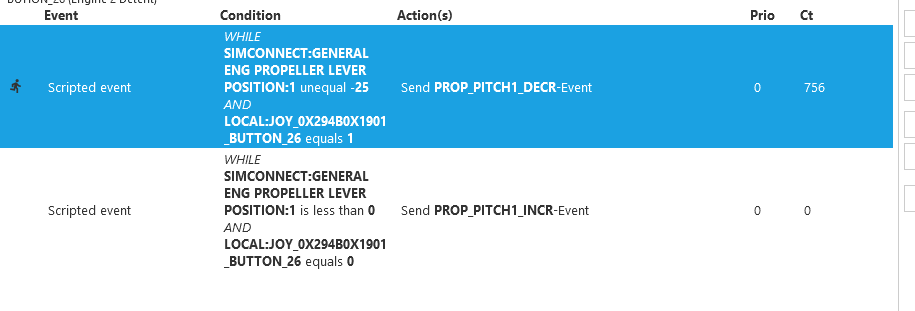
@SadBucket I have my bravo throttle configured with spad.next and i have to send the prop leveler quite fast to the bottom where the button there activates the feather position. So i dont do it with the mouse. Any suggestion on what can be improved?
here is what i do there.
-
@SadBucket I have my bravo throttle configured with spad.next and i have to send the prop leveler quite fast to the bottom where the button there activates the feather position. So i dont do it with the mouse. Any suggestion on what can be improved?
here is what i do there.
@gustavpicora I don't use Spad, but in my FSUIPC binding I use a value greater than 25. I think I decrease by 30 or 50.
-
@gustavpicora I don't use Spad, but in my FSUIPC binding I use a value greater than 25. I think I decrease by 30 or 50.
@jmarkows ok thanks, I will set to higher.. one question tou. do you set the value right away or with some internval as I saw somewhere in another post?
-
My binding is just Propeller X Pitch Decrease 30 or so, no delay. The button is at the end of my propeller axis lever so it's already in coarse pitch at that point.
On release I have it set to Propeller X Pitch Hi, which returns it to full coarse. I've had mixed experience trying to simply add the value I subtract back, especially with twins.
-
Thanks, that gives me a little bit more time, still need to be fast, like within 1-2 secs, so if i follow the memory items for this emergency procedure (if it were to happen randomly), is never gonna get feather as I wouldn't be able to go from step one to 5 in time.
-
I love this plane - Black Square always consistently delivers high quality stuff. Nevertheless, the feather issues do not seem to be resolved. Maybe this is an issue with MSFS 2024. Here is a synopsis of what I've read above and the issues I am seeing (with MSFS 2024 SU4, Baron Pro 58):
-
Native MSFS 2024 profile settings do not seem to work to feather the props. One has to either use the mouse to pull the prop levers back in the sim, or use another utility such as spad.next. I use the latter, but am teaching some other folks on this plane who might not have that. The manual is great and has lots if info on control bindings, but nothing on feathering that I have seen.
-
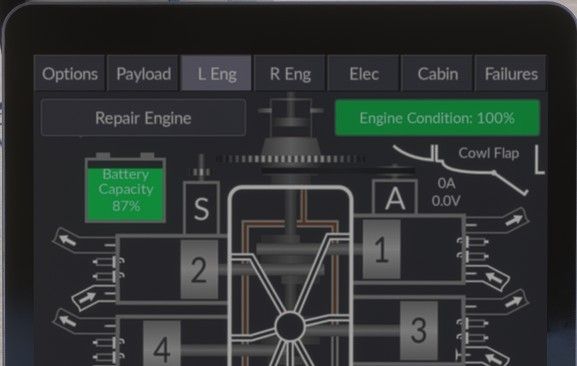
Even using spad.next or using mouse to feather, the prop doesn't always feather. I can monitor the engine analyzer page and confirm under many circumstances that the feather locking pins have not engaged -e.g. if you have the prop pitch not fully fine and the piston is past the locking pins, and then attempt to feather. Even if oil leaves the propeller hub, there is often a gap between piston and oil. Maybe this is the way the real plane works - I'm not sure what actual force moves the piston to feathered position without oil pressure. See photo of engine analyzer below:
-
