TQ6+ and the reverse detent
-
Thanks for having a look, and no worries - I was pretty sure it's me doing something dumb so I appreciated going back to basics!
"Pardon me for starting with the basics, but how have you determined this?"
With my eyes

What I mean is when I pull my physical hardware all the way back, I can see the throttle move just back past the yellow reverser line in game. I can then grab it with the mouse and pull it all the way back, but the physical hardware itself will only ever take it to the that ~20% mark.You mentioned GENERAL ENG THROTTLE LEVER POSITION so I've extracted that for each throttle position of Full throttle, Start of the detent (so where you would expect to be bottom of idle) and full reverse/bottom of the throttle travel. I've done it for a few of your turbo props.
Caveat though - I'm using VirtualFly's software, VFHub along with the TQ6+ as that was always their suggestion - I have no info on what it does to interface with MSFS, AFAIK its a black box that "just works" - until the Caravan.

You can see the only interesting thing is that the Caravan throttle is at -25 instead of -15 when fully reversed. Which I don't think explains the issue at all.
Perhaps VFHub is setting some other simvar when it senses the lever is back in the detent - but I don't know what to look for there?
Anyway, hopefully this is useful but i suspect it's not

Edit to add: in case it's useful, the Prop lever works just fine and is consistent across all those aircraft at 100, 0, -100 for Full forward, idle detent, full backward.
-
@Black-Square - I might be sniffing around the wrong places and barking up the wrong trees here, so please tell me to shut up if that's the case!
Looking at engines.cfg for the various turbine planes I have access to, looking at "min_throttle_limit":
Bonanza Pro Turbine: min_throttle_limit = -0.15
Starship: min_throttle_limit =-0.15
Turbine Duke: min_throttle_limit = -0.15
Caravan (Cargomaster): min_throttle_limit = -1.0Did I find the
 ?
?
Or is it... a red herring?
I'll get my coat.--Edit---
I realise in retrospect that I can just make the change and try it out msyelf - It is indeed the fishy fish!Change that to min_throttle_limit = -0.15 for the Caravan and the throttle axis of the TQ6+ works again! I have full reverse range! HOORAY! There was much rejoicing
Explains why i was seeing around 20% of the reverse range (or more accurately I guess, 15%)
-
I thought that might be the case. That was the next thing I was about to write to you after your chart. The mystery is still why your hardware input acts the way it does, since that number should only be a limit, and not changing the scaling of values outside the reverse range. I planned on changing that configuration value to -1.0 for all my aircraft, since it results in much more realistic fuel control in the reverse range. I wouldn't want to mess up the throttle axis for many of my users, but I also don't really understand why yours is behaving the way that it is.
-
@Black-Square - I might be sniffing around the wrong places and barking up the wrong trees here, so please tell me to shut up if that's the case!
Looking at engines.cfg for the various turbine planes I have access to, looking at "min_throttle_limit":
Bonanza Pro Turbine: min_throttle_limit = -0.15
Starship: min_throttle_limit =-0.15
Turbine Duke: min_throttle_limit = -0.15
Caravan (Cargomaster): min_throttle_limit = -1.0Did I find the
?
Or is it... a red herring?
I'll get my coat.--Edit---
I realise in retrospect that I can just make the change and try it out msyelf - It is indeed the fishy fish!Change that to min_throttle_limit = -0.15 for the Caravan and the throttle axis of the TQ6+ works again! I have full reverse range! HOORAY! There was much rejoicing
Explains why i was seeing around 20% of the reverse range (or more accurately I guess, 15%)
-
@Jiblet
If I want to try your fix again, which engine.cfg do I need to change, all of them?@brettsan - Yep, all of them.
Or at least all the ones you want to fly - each engines.cft is for a different variant. So one for the cargomaster, one for the amphib, etc.@Black-Square - Yeah I'm not sure what VFHub is actually doing under the hood. Annoyingly its a blackbox that appears to have no documentation for that. Which for a £700/$800 unit is ... a choice.
Can I ask why your planes have that -0.15 value in the first place? It seems like a very deliberate value from what you've said there.
-
@brettsan - Yep, all of them.
Or at least all the ones you want to fly - each engines.cft is for a different variant. So one for the cargomaster, one for the amphib, etc.@Black-Square - Yeah I'm not sure what VFHub is actually doing under the hood. Annoyingly its a blackbox that appears to have no documentation for that. Which for a £700/$800 unit is ... a choice.
Can I ask why your planes have that -0.15 value in the first place? It seems like a very deliberate value from what you've said there.
@Jiblet said in TQ6+ and the reverse detent:
Can I ask why your planes have that -0.15 value in the first place? It seems like a very deliberate value from what you've said there.
Not sure, to be honest. I searched for this parameter in all of the default aircraft, and they all either have -0.15 or -0.25. In my experience, the reverse system in MSFS is one of the most antiquated, with a mixture of the new propeller simulation, and code from at least 25 years ago.
Unfortunately, it does make a substantial difference to the performance of my aircraft, so I would like to roll out this change to the entire fleet. I would hate to leave you guys editing configuration files as a solution, though.
Do you think the issue here is that Virtual Fly assumed aircraft only use this -15% number, and somehow scaled their reverse input to that?
-
@Jiblet said in TQ6+ and the reverse detent:
Can I ask why your planes have that -0.15 value in the first place? It seems like a very deliberate value from what you've said there.
Not sure, to be honest. I searched for this parameter in all of the default aircraft, and they all either have -0.15 or -0.25. In my experience, the reverse system in MSFS is one of the most antiquated, with a mixture of the new propeller simulation, and code from at least 25 years ago.
Unfortunately, it does make a substantial difference to the performance of my aircraft, so I would like to roll out this change to the entire fleet. I would hate to leave you guys editing configuration files as a solution, though.
Do you think the issue here is that Virtual Fly assumed aircraft only use this -15% number, and somehow scaled their reverse input to that?
I know another person in Virtual Fly and he used to more the "face" of the company. I will send an email to him and explain what we are trying to accomplish as best I can and see if he replies. As I said above, I was shocked by this one support experience as it was certainly not what I was used to. The only issue, it has been years since I spoke with him.
I will get back to you with my results.
-
Thanks @Black-Square I've jsut done some 6am testing on a bunch of non-Black-Square aircraft and found some "interesting" results. And by "interesting I mean "annoying".
Basically VFHub seems to just send raw values of between +100 at full forward throttle, to -25 at full reverse, with 0 at idle. And that's that. No logic, no scaling, no looking at the aircraft type or its engine values and doing anything clever.
I think they may have done something like you mentioned - looked at the values for default planes and said "yeah that'll work".
This is "ok" with a lot of aircraft - eg most of yours, the Avanti Piagio and the King Air 350, which all have it set to -15. Even then, its not perfect. It leaves the hardware throttle with about 40% of it's rearward travel left to go, because it's scaled form 0 to -25, so you hit -15 at 60% travel.
Then for some planes, like your Caravan Pro, the Kodiak, and the Twin Otter where they all have max reverse values of over -25 (if over is the right word), eg the Twotter is -34, the Kodiak -65. For those planes I just get a partial reverse because I'm maxing out at -25.
Annoying. I'll try to write a useful support ticket for Virtual Fly but I don't expect a useful answer. Perhaps the real solution would be to learn Spad.next but that UI gives me the heebyjeebies.
Thanks for all your help with this. And everyone else who had some input!
-
Thanks @Black-Square I've jsut done some 6am testing on a bunch of non-Black-Square aircraft and found some "interesting" results. And by "interesting I mean "annoying".
Basically VFHub seems to just send raw values of between +100 at full forward throttle, to -25 at full reverse, with 0 at idle. And that's that. No logic, no scaling, no looking at the aircraft type or its engine values and doing anything clever.
I think they may have done something like you mentioned - looked at the values for default planes and said "yeah that'll work".
This is "ok" with a lot of aircraft - eg most of yours, the Avanti Piagio and the King Air 350, which all have it set to -15. Even then, its not perfect. It leaves the hardware throttle with about 40% of it's rearward travel left to go, because it's scaled form 0 to -25, so you hit -15 at 60% travel.
Then for some planes, like your Caravan Pro, the Kodiak, and the Twin Otter where they all have max reverse values of over -25 (if over is the right word), eg the Twotter is -34, the Kodiak -65. For those planes I just get a partial reverse because I'm maxing out at -25.
Annoying. I'll try to write a useful support ticket for Virtual Fly but I don't expect a useful answer. Perhaps the real solution would be to learn Spad.next but that UI gives me the heebyjeebies.
Thanks for all your help with this. And everyone else who had some input!
Thanks for your earlier reply about changing the engine.cfg... going to give that a go...
I tried support previously but didn't get anyway... likely because I probably didn't explain the issue well enough. I have since sent another email to someone else in the company that I worked with previously to see if he would be willing to help. His email didn't bounce, so I hope that means he still works with the company.
"Yes, I saw your email above.... but thought I would send anyway to confirm... can't hurt right?"
-
I know another person in Virtual Fly and he used to more the "face" of the company. I will send an email to him and explain what we are trying to accomplish as best I can and see if he replies. As I said above, I was shocked by this one support experience as it was certainly not what I was used to. The only issue, it has been years since I spoke with him.
I will get back to you with my results.
-
Thanks for your earlier reply about changing the engine.cfg... going to give that a go...
I tried support previously but didn't get anyway... likely because I probably didn't explain the issue well enough. I have since sent another email to someone else in the company that I worked with previously to see if he would be willing to help. His email didn't bounce, so I hope that means he still works with the company.
"Yes, I saw your email above.... but thought I would send anyway to confirm... can't hurt right?"
@brettsan I'd suggest going for -0.25 on the min_throttle_limit
I've not actually tested that on the Caravan yet, but it should mean that the reverse section of your TQ6+ behaves perfectly (full travel with no deadzone at the end). And hey it gets you a tiny bit closer to the -1.0 Nick wants to get to

-
I heard back from VirtualFly:
"We have spoken with our software development team, and they have confirmed that this is one of the points they have noted for improvement in VFHub. However, they currently have other priorities, so work on this will not begin until after the summer.
We really appreciate the level of detail and analysis you have provided, as it helps us identify and prioritize these kinds of improvements."
So I guess we'll see.
For the record and to close this out at least for now, here's what I sent them:
Hardware: TQ6+
Serial: 310540
Software: VFHub (v1.3.9)
Sim: MSFS 2024Description of Issue: I am experiencing a significant scaling issue with the throttle reverse axis on the TQ6+ when using VFHub in Microsoft Flight Simulator.
It appears that VFHub sends a fixed throttle variable range of +100 (Full Forward) to -25 (Full Reverse). While this worked for older default aircraft, many modern high-fidelity turboprops (specifically from Black Square, SWS, and Aerosoft) use different min_throttle_limit values in their engines.cfg files.
The Problem:
Incomplete Reverse Range: For aircraft like the Black Square Caravan, Kodiak 100, or Twin Otter, the min_throttle_limit is set between -0.65 and -1.0. Because VFHub caps the output at -25, I can only access about 25% to 50% of the actual reverse thrust power available, depending on the aircraft.Dead Zones: For aircraft using the -0.15 limit, the hardware lever reaches the sim's maximum reverse value at only 60% of its physical travel past the detent, leaving a large dead zone at the back of the hardware's range.
Evidence: Through testing with the Black Square developers, we confirmed that manually changing an aircraft's min_throttle_limit from -1.0 to -0.25 fixes the physical axis behavior for the Black Square Caravan, but ruins the aircraft's flight model and fuel flow realism. Indeed, setting that value for any aircraft is what you have to do to make the throttle line up.
The Black Square developer has indicated he intends to move the entire fleet to a -1.0 limit for realism (see https://community.justflight.com/post/49046), which will effectively break the reverse functionality for all TQ6+ users unless VFHub is updated.
Steps to reproduce: If you have the Black Square Caravan, it's very noticeable in that. Alternatively the DHC6 Twin Otter included in MSFS 2024 also displays similar behaviour.
- Run MSFS 2024 and VFHub, with the TQ6+ connected
- Load in to the game on any runway in the DHC6 Twin Otter or Black Square Caravan - these aircraft show it best but it does affect most turboprops
- Look at the throttles in game and bring your physical TQ6+ throttles back into reverse, all the way to the bottom of the travel
- Look at the throttle(s) in game and you'll see that they are not at the full reverse. In fact you can grab them with the mouse and pull them further back.
You may also want to use a tool to show the changing value of (A:GENERAL ENG THROTTLE LEVER POSITION:1, percent). That will let you see the data rather than just eyeballing the throttles in game.
Requested Solution: Could VFHub be updated to allow for dynamic scaling of the reverse axis? Ideally:
VFHub should detect or allow a setting to map the full physical travel of the TQ6+ reverse range (past the detent) to the full available range defined by the aircraft's min_throttle_limit.
Alternatively, perhaps provide a user-configurable "Scale" setting for the reverse portion of the axis within VFHub.
Or perhaps there's a better way that your team could come up with, I'm not fussy about the solution, I'd just like it fixed
I realise that you don't support third party planes directly, but that's not really the issue here. Any plane using a value other than -0.25 for the min_throttle_limit in engines.cfg will have the issues I described above, and I'm yet to find a default plane that uses -0.25 - at best they use -0.15, so this issue is widespread. As a user of VirtualFly hardware, I would love to see the software black box opened up or updated to support these modern aircraft standards.
-
I heard back from VirtualFly:
"We have spoken with our software development team, and they have confirmed that this is one of the points they have noted for improvement in VFHub. However, they currently have other priorities, so work on this will not begin until after the summer.
We really appreciate the level of detail and analysis you have provided, as it helps us identify and prioritize these kinds of improvements."
So I guess we'll see.
For the record and to close this out at least for now, here's what I sent them:
Hardware: TQ6+
Serial: 310540
Software: VFHub (v1.3.9)
Sim: MSFS 2024Description of Issue: I am experiencing a significant scaling issue with the throttle reverse axis on the TQ6+ when using VFHub in Microsoft Flight Simulator.
It appears that VFHub sends a fixed throttle variable range of +100 (Full Forward) to -25 (Full Reverse). While this worked for older default aircraft, many modern high-fidelity turboprops (specifically from Black Square, SWS, and Aerosoft) use different min_throttle_limit values in their engines.cfg files.
The Problem:
Incomplete Reverse Range: For aircraft like the Black Square Caravan, Kodiak 100, or Twin Otter, the min_throttle_limit is set between -0.65 and -1.0. Because VFHub caps the output at -25, I can only access about 25% to 50% of the actual reverse thrust power available, depending on the aircraft.Dead Zones: For aircraft using the -0.15 limit, the hardware lever reaches the sim's maximum reverse value at only 60% of its physical travel past the detent, leaving a large dead zone at the back of the hardware's range.
Evidence: Through testing with the Black Square developers, we confirmed that manually changing an aircraft's min_throttle_limit from -1.0 to -0.25 fixes the physical axis behavior for the Black Square Caravan, but ruins the aircraft's flight model and fuel flow realism. Indeed, setting that value for any aircraft is what you have to do to make the throttle line up.
The Black Square developer has indicated he intends to move the entire fleet to a -1.0 limit for realism (see https://community.justflight.com/post/49046), which will effectively break the reverse functionality for all TQ6+ users unless VFHub is updated.
Steps to reproduce: If you have the Black Square Caravan, it's very noticeable in that. Alternatively the DHC6 Twin Otter included in MSFS 2024 also displays similar behaviour.
- Run MSFS 2024 and VFHub, with the TQ6+ connected
- Load in to the game on any runway in the DHC6 Twin Otter or Black Square Caravan - these aircraft show it best but it does affect most turboprops
- Look at the throttles in game and bring your physical TQ6+ throttles back into reverse, all the way to the bottom of the travel
- Look at the throttle(s) in game and you'll see that they are not at the full reverse. In fact you can grab them with the mouse and pull them further back.
You may also want to use a tool to show the changing value of (A:GENERAL ENG THROTTLE LEVER POSITION:1, percent). That will let you see the data rather than just eyeballing the throttles in game.
Requested Solution: Could VFHub be updated to allow for dynamic scaling of the reverse axis? Ideally:
VFHub should detect or allow a setting to map the full physical travel of the TQ6+ reverse range (past the detent) to the full available range defined by the aircraft's min_throttle_limit.
Alternatively, perhaps provide a user-configurable "Scale" setting for the reverse portion of the axis within VFHub.
Or perhaps there's a better way that your team could come up with, I'm not fussy about the solution, I'd just like it fixed
I realise that you don't support third party planes directly, but that's not really the issue here. Any plane using a value other than -0.25 for the min_throttle_limit in engines.cfg will have the issues I described above, and I'm yet to find a default plane that uses -0.25 - at best they use -0.15, so this issue is widespread. As a user of VirtualFly hardware, I would love to see the software black box opened up or updated to support these modern aircraft standards.
Thanks for all that you are doing as well on this... much appreciated. I didn't hear from my contact at VF, so very happy that you did, but a little disappointing their reply was "umm-humm we'll see" not very encouraging.
Because I am not fully getting it thru my head all the way, what would need to happen if we take the other route, and not use VFHub? I have always been confused why MSFS and our throttles have to have some axis reversed and others we don't, especially when looking at the windows calibration from control panel... since all 6 axis simply give a value of 0 to 4096. Is M$ the one to blame for things also being screwy there? I think I now understand though why sometimes axis work full range and other times they don't based on you point about values.
Perhaps it's time to admit the purchase mistake, Ebay them off to someone else to have fun with and look for something new.
-
Thanks for all that you are doing as well on this... much appreciated. I didn't hear from my contact at VF, so very happy that you did, but a little disappointing their reply was "umm-humm we'll see" not very encouraging.
Because I am not fully getting it thru my head all the way, what would need to happen if we take the other route, and not use VFHub? I have always been confused why MSFS and our throttles have to have some axis reversed and others we don't, especially when looking at the windows calibration from control panel... since all 6 axis simply give a value of 0 to 4096. Is M$ the one to blame for things also being screwy there? I think I now understand though why sometimes axis work full range and other times they don't based on you point about values.
Perhaps it's time to admit the purchase mistake, Ebay them off to someone else to have fun with and look for something new.
The problem as far as I can see - and I may be very wrong - is that MSFS, under the hood, is ancient.
Take a look at XPlane for example, the control config in XP11 at least (I've not tried 12) was just brilliant. Full control of everything. "Want a little flat spot on the curve for a detent here? Have at it". And so it handled the TQ6+ and other hardware just fine.
MSFS just seems to be stuck in the 90s as far as control goes. Assumes everyone has maybe a very basic joystick and that's that.
I think there's probably a solution for all of this using Axes and Ohs or Spad.next but both of those have UIs that are best described as being "created by engineers" if you get me
Makes actually trying to get started with either of those quite intimidating - I can already hear the "RTFM" comments from their permanent Discord residents.I love the TQ6+ for its size on the desk and its metal construction. I work from home from the same desk, so being able to setup and rip down quickly every day, twice a day, is great. I have honeycomb stuff too but it's all so bulky, so it makes it on to the desk for high days and holidays.
but a little disappointing their reply was "umm-humm we'll see" not very encouraging.
That's quite funny to me in a way - I work in software support for a large enterprise software vendor and we often have to say things like "it's on the roadmap", "We'll see what we can do to get that into a future version". All very wooly, No time lines ever if we can help it. So seeing this:
"They have confirmed that this is one of the points they have noted for improvement in VFHub. However, they currently have other priorities, so work on this will not begin until after the summer."
Was actually quite encouraging to me. It's way more of a response than I expected! Even though it's not exactly a contractual commitment that I can use to hold their feet to the fire come October. I may be reading far too much in to it!
Anyway, for now I'm setting every plane I care about to -0.25 min_throttle_limit and enjoying the sim, while I pluck up the courage to delve into Spad/AAO
-
The problem as far as I can see - and I may be very wrong - is that MSFS, under the hood, is ancient.
Take a look at XPlane for example, the control config in XP11 at least (I've not tried 12) was just brilliant. Full control of everything. "Want a little flat spot on the curve for a detent here? Have at it". And so it handled the TQ6+ and other hardware just fine.
MSFS just seems to be stuck in the 90s as far as control goes. Assumes everyone has maybe a very basic joystick and that's that.
I think there's probably a solution for all of this using Axes and Ohs or Spad.next but both of those have UIs that are best described as being "created by engineers" if you get me
Makes actually trying to get started with either of those quite intimidating - I can already hear the "RTFM" comments from their permanent Discord residents.I love the TQ6+ for its size on the desk and its metal construction. I work from home from the same desk, so being able to setup and rip down quickly every day, twice a day, is great. I have honeycomb stuff too but it's all so bulky, so it makes it on to the desk for high days and holidays.
but a little disappointing their reply was "umm-humm we'll see" not very encouraging.
That's quite funny to me in a way - I work in software support for a large enterprise software vendor and we often have to say things like "it's on the roadmap", "We'll see what we can do to get that into a future version". All very wooly, No time lines ever if we can help it. So seeing this:
"They have confirmed that this is one of the points they have noted for improvement in VFHub. However, they currently have other priorities, so work on this will not begin until after the summer."
Was actually quite encouraging to me. It's way more of a response than I expected! Even though it's not exactly a contractual commitment that I can use to hold their feet to the fire come October. I may be reading far too much in to it!
Anyway, for now I'm setting every plane I care about to -0.25 min_throttle_limit and enjoying the sim, while I pluck up the courage to delve into Spad/AAO
@Jiblet
That all makes a lot of sense... MSFS taking a page out of the ol' PMDG SOP, "Why do it over if we already did it once.... A port will be just fine"And you are probably very right, AAO was invented for a reason and I should also get over the learning curve and take the attitude of "Pro-Simmer plus Pro-Hardware requires Pro-software.... But was just so hoping I wouldn't need to use FSUIPC and the likes anymore.
-
If you need some encouragement to try the 3rd party binding options, I'll tell you that Axis and Ohs has a bit of a learning curve up front, but in the end it's great to have the control I do over my peripherals. And for both Spad and AaO, there are already profiles available for many aircraft -- maybe moreso for Spad.
Another option to look at though might be MobiFlight. I use it for my WinCtrl stuff for certain planes, and it's also quite good especially for the price of free. Its UI isn't amazing, but for some people at least it might be more intuitive than AaO. It also recently had a major update that I haven't checked out yet. I do also have Spad, but the times I've attempted to learn it, I've grown discouraged a bit too quickly. Not a reflection on the product itself so much as my ability to wrap my brain around certain things.
-
I have working throttles in SPAD.next. And it makes my brain itch.
This should not work: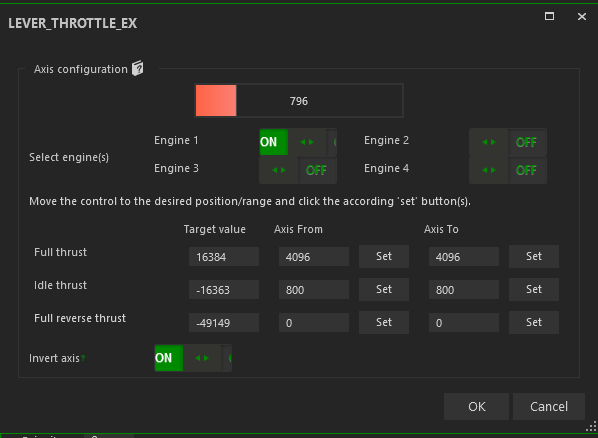
But it does.
(This is for the Caravan with min_throttle_limit = -1.0 as @Black-Square intended)It seems to be that forward throttle range goes from +16383 (fully forward) to -16383 (idle point).
And Reverse goes from -16383 (idle point) to -49149 (full reverse, or -16383 -16383*2)).I'm going to be sick. That just feels so many kinds of wrong but it's working in sim.
I think I'll need a lie down before tackling the Prop levers.
Note that you'd need a different Full Reverse Thrust value (the -49149) depending on the engine's min_throttle_limit. So the standard -0.15 would be -21300 I think...

Correction: -49153 gets you -100%, full reverse.
If I do get all 3 levers working I'll publish a profile on SPAD
The snippet above is posted under #16443 if anyone wants it. Id be interested to know if it works for you too.Edits ahoy...
Snippet #16444 for prop handling. It's nasty but it seems to work perfectly.
Snippet #16445 for the condition lever, and I'm done!
Snippet #16446 for the whole device. Go nuts! I'm done for the day

Works perfectly (i think) for the Caravan. Works great for Starship and will be better once that -1.0 for the min engine. Its pretty good for the Duke and Bonanza turbines but the condition levers could be improved for those
-
I have working throttles in SPAD.next. And it makes my brain itch.
This should not work:But it does.
(This is for the Caravan with min_throttle_limit = -1.0 as @Black-Square intended)It seems to be that forward throttle range goes from +16383 (fully forward) to -16383 (idle point).
And Reverse goes from -16383 (idle point) to -49149 (full reverse, or -16383 -16383*2)).I'm going to be sick. That just feels so many kinds of wrong but it's working in sim.
I think I'll need a lie down before tackling the Prop levers.
Note that you'd need a different Full Reverse Thrust value (the -49149) depending on the engine's min_throttle_limit. So the standard -0.15 would be -21300 I think...
Correction: -49153 gets you -100%, full reverse.
If I do get all 3 levers working I'll publish a profile on SPAD
The snippet above is posted under #16443 if anyone wants it. Id be interested to know if it works for you too.Edits ahoy...
Snippet #16444 for prop handling. It's nasty but it seems to work perfectly.
Snippet #16445 for the condition lever, and I'm done!
Snippet #16446 for the whole device. Go nuts! I'm done for the day
Works perfectly (i think) for the Caravan. Works great for Starship and will be better once that -1.0 for the min engine. Its pretty good for the Duke and Bonanza turbines but the condition levers could be improved for those
-
J jmarkows referenced this topic on
-
Hey guys, I don't know exactly how the throttle axis is configured on your TQ6s, but I had good results with my Velocity One quadrant using the MSFS 2024 sensitivity settings. I posted the results here if anyone would be interested in taking a look. This gives me the entire range of forward and reverse travel on one axis and roughly matches the virtual detents with the proper positions on my physical axis, though I don't have physical detents.
If you guys have physical detents, this same method should, if I'm understanding it right, allow you to tweak it such that you can match the physical detents to the virtual ones, it might just require a different neutral and Sensitivity+/- settings.
-
After understanding how the damn Reverse Polish Notation works, I managed to configure, using Mobiflight, the prop axis to include the prop feather once the detent is passed. You can program it several ways, even in a single action, but I prefer two actions to keep the expressions simpler. To get these values I used the Mobiflight app "Potentiometer RPN-Tool" which you can find at the link
Prop lever:
@ -3.2312 / 16383 + 0 max 16383 min (>K:PROP_PITCH_SET)Prop feather:
@ 57000 > if{ -16383 (>K:PROP_PITCH1_SET) }
The same goes for the flaps. I configured the Mix2 lever as if it were the flaps lever. The configuration is as follows:
Flaps 0 > At the top of the lever
Flaps 10 > a little lower (value 2000)
Flaps 20 > At the detent (between 50000 - 53000)
Flaps 30 > In its lowest position (beyond 57000)You can adjust these values to your liking. The four actions I created in Mobiflight are:
Flaps up:
@ 2000 < if{ (>K:FLAPS_UP) }Flaps 10:
@ 2000 > if{ @ 45000 < if{ (>K:FLAPS_1) } }Flaps 20:
@ 50000 > if{ @ 53000 < if{ (>K:FLAPS_2) } }Flaps 30:
@ 57000 > if{ (>K:FLAPS_3) }
For the power and condition lever , I’m still using the configuration I mentioned earlier in this post. I could do something similar to the flaps, but I prefer to keep the beta range configured this way to play with it during taxi.
Hope this helps.