TQ6+ and the reverse detent
-
After understanding how the damn Reverse Polish Notation works, I managed to configure, using Mobiflight, the prop axis to include the prop feather once the detent is passed. You can program it several ways, even in a single action, but I prefer two actions to keep the expressions simpler. To get these values I used the Mobiflight app "Potentiometer RPN-Tool" which you can find at the link
Prop lever:
@ -3.2312 / 16383 + 0 max 16383 min (>K:PROP_PITCH_SET)Prop feather:
@ 57000 > if{ -16383 (>K:PROP_PITCH1_SET) }
The same goes for the flaps. I configured the Mix2 lever as if it were the flaps lever. The configuration is as follows:
Flaps 0 > At the top of the lever
Flaps 10 > a little lower (value 2000)
Flaps 20 > At the detent (between 50000 - 53000)
Flaps 30 > In its lowest position (beyond 57000)You can adjust these values to your liking. The four actions I created in Mobiflight are:
Flaps up:
@ 2000 < if{ (>K:FLAPS_UP) }Flaps 10:
@ 2000 > if{ @ 45000 < if{ (>K:FLAPS_1) } }Flaps 20:
@ 50000 > if{ @ 53000 < if{ (>K:FLAPS_2) } }Flaps 30:
@ 57000 > if{ (>K:FLAPS_3) }
For the power and condition lever , I’m still using the configuration I mentioned earlier in this post. I could do something similar to the flaps, but I prefer to keep the beta range configured this way to play with it during taxi.
Hope this helps.
@Chotter
Thanks for this but I am not a mobi expert and am rather lost on what to put where. I have used Mobi, but only with things from the HUB. Your code makes sense to me with what you are doing though.With that said:
I think that first I create a new project:

Create a new "Add Input Config":
Choose Input: In the module, be lazy and scan for input, move a blue prop lever:After that I am at a loss where to go to input the actions you have mentioned. Hope you can drop a little more help.
-
@brettsan @Black-Square and anyone else interested:
I've heard back from the lovely people at Virtual-Fly who have been hard at work coming up with a fix native to VF Hub:
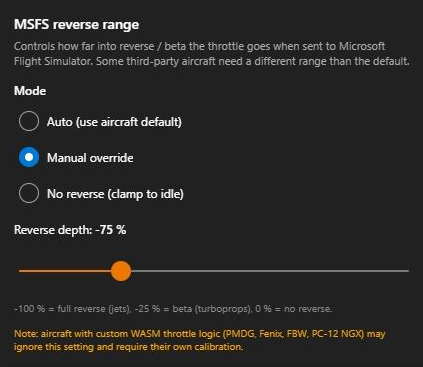
They sent me a beta version what I've tried it out in the Caravan and a few other planes now to see how it handled thing and it's great!
Roger also confirmed they'd be happy with me sharing the file here, so here is their dropbox link:
https://www.dropbox.com/scl/fi/w2mqbgu9evgd4fb9b7uih/VFHub.exe?rlkey=i8tuyo3pz97p2c5j96gd41q82&dl=1Obviously don't blindly trust me, or indeed them nor anyone else, especially when it comes to .exes. So scan it with whatever you usually scan things with.