TQ6+ and the reverse detent
-
Hi!
If there's one thing I miss from XPlane its the axis configuration...
I have a VirtualFly TQ6+, yes I'm spoiled. But maybe not in this case. It's a 6 lever TPM module with fixed detents. Behind that detent is a little bit of axis, maybe 10% or so.
In the Caravan when I come back past the detent, it goes in to reverse a little tiny bit and no more. The first 15% of the FORWARD axis is used for Beta and I get that, that's all cool. I just get a bit of a dead reverser. It's hard to describe so hopefully that makes sense.
Any ideas gratefully received!.
-
Hi!
If there's one thing I miss from XPlane its the axis configuration...
I have a VirtualFly TQ6+, yes I'm spoiled. But maybe not in this case. It's a 6 lever TPM module with fixed detents. Behind that detent is a little bit of axis, maybe 10% or so.
In the Caravan when I come back past the detent, it goes in to reverse a little tiny bit and no more. The first 15% of the FORWARD axis is used for Beta and I get that, that's all cool. I just get a bit of a dead reverser. It's hard to describe so hopefully that makes sense.
Any ideas gratefully received!.
@Jiblet For what it's worth, I just discovered this is also the case with my HC Bravo. The culprit may be the curve I've applied to match beta with the detent notch on the King Air addon handles I use. Unfortunately I don't have time to test it until tomorrow (maybe), but I wanted to let you know you're not alone in this.
-
I have the same throttles. And while they are good, I find that they cause more issues with configuration then they are worth. I am still trying to find that balance between VFHUB configuration and MSFS configuration. However, I don't think either are really going to work. I already opened a ticket with VF, but the only reply I got was for someone else's ticket. Not exactly impressed.
I might try and learn mobi-flight as I don't own axis and o's. Will update if I make any headway.
-
Another TQ6+ user here. They work really well for me. If at all, the 208 goes too hard into beta when I use it after touchdown.
@qqwertzde said in TQ6+ and the reverse detent:
Another TQ6+ user here. They work really well for me. If at all, the 208 goes too hard into beta when I use it after touchdown.
So do you get full travel through the reverse portion of the throttle?
I can pull my TQ6 all the way back through the detent and the caravan will juuuuust come in to reverse a little way. -
Throttle
I managed to assign Power + beta + reverse to one of the TQ6 throttle lever in FS24 as follows:
- I don't use VFHub because it doesn't allow me to adjust the sensitivity curves.
- In the MSFS settings, I assign the command Throttle 1 (0 to 100%) to the lever that you wish.
- Important, you should invert the axis you have assigned to that command.
- In the option hardware settings of the TQ6 (inside msfs config) I select the lever I assigned that command to and set the NEUTRAL value to 0.9.
This way, the TQ6 detent becomes the Caravan's IDLE detent, and the TQ6's reverse section is used for BETA and for reverse when I move the lever to its lowest point.
Prop
For the prop lever, I haven't been able to match the detent to correctly simulate feathering, since I haven't found a command similar to the throttle one (0–100%).
Condition lever
I matched the TQ6 detent to low idle:
- Assign the Condition lever command to the TQ6 lever you want.
- Like with the throttle lever, set the NEUTRAL value to 0.45 for the condition lever.
Flaps
Flaps have 4 positions (up, 10°, 20° and full), so it's not possible to map them with our axes that only have 3. As with the previous axes, there are ways to make three of those positions work, but it wouldn't be realistic, so I prefer to use keyboard assignments.
Emergency power
For this option I haven't yet investigated the command needed to assign it to one of the axes. I don't know if a command for it even exists.
I hope it helps.
Regards -
Throttle
I managed to assign Power + beta + reverse to one of the TQ6 throttle lever in FS24 as follows:
- I don't use VFHub because it doesn't allow me to adjust the sensitivity curves.
- In the MSFS settings, I assign the command Throttle 1 (0 to 100%) to the lever that you wish.
- Important, you should invert the axis you have assigned to that command.
- In the option hardware settings of the TQ6 (inside msfs config) I select the lever I assigned that command to and set the NEUTRAL value to 0.9.
This way, the TQ6 detent becomes the Caravan's IDLE detent, and the TQ6's reverse section is used for BETA and for reverse when I move the lever to its lowest point.
Prop
For the prop lever, I haven't been able to match the detent to correctly simulate feathering, since I haven't found a command similar to the throttle one (0–100%).
Condition lever
I matched the TQ6 detent to low idle:
- Assign the Condition lever command to the TQ6 lever you want.
- Like with the throttle lever, set the NEUTRAL value to 0.45 for the condition lever.
Flaps
Flaps have 4 positions (up, 10°, 20° and full), so it's not possible to map them with our axes that only have 3. As with the previous axes, there are ways to make three of those positions work, but it wouldn't be realistic, so I prefer to use keyboard assignments.
Emergency power
For this option I haven't yet investigated the command needed to assign it to one of the axes. I don't know if a command for it even exists.
I hope it helps.
Regards -
@qqwertzde said in TQ6+ and the reverse detent:
Another TQ6+ user here. They work really well for me. If at all, the 208 goes too hard into beta when I use it after touchdown.
So do you get full travel through the reverse portion of the throttle?
I can pull my TQ6 all the way back through the detent and the caravan will juuuuust come in to reverse a little way.@Jiblet said in TQ6+ and the reverse detent:
@qqwertzde said in TQ6+ and the reverse detent:
Another TQ6+ user here. They work really well for me. If at all, the 208 goes too hard into beta when I use it after touchdown.
So do you get full travel through the reverse portion of the throttle?
I can pull my TQ6 all the way back through the detent and the caravan will juuuuust come in to reverse a little way.I just realize that I never looked down on the throttle lever during landing, so I can't even tell if the levers in the VC go all the way back. However, I believe so since I get a very strong deceleration effect. And that's what I care about in that moment

-
@Jiblet said in TQ6+ and the reverse detent:
@qqwertzde said in TQ6+ and the reverse detent:
Another TQ6+ user here. They work really well for me. If at all, the 208 goes too hard into beta when I use it after touchdown.
So do you get full travel through the reverse portion of the throttle?
I can pull my TQ6 all the way back through the detent and the caravan will juuuuust come in to reverse a little way.I just realize that I never looked down on the throttle lever during landing, so I can't even tell if the levers in the VC go all the way back. However, I believe so since I get a very strong deceleration effect. And that's what I care about in that moment
@qqwertzde Im going to guess the answer is no then. You get partial deceleration. I mean you do you bud, but saying "They work really well" while not having a clue if they actually work properly is a bit much, sorry.
-
I opened a ticket with Virtual Fly, however, they lost my original ticket so starting over with them. However will give Chotter's settings a try. If VirtualFly comes back with anything amazing, will post it here.
*** Update ***
Virtual fly says, don't use VFHub and they don't offer support for 3rd party add-ons, so SOoL getting help there. Left pretty a pretty sour taste to be honest for a premier product. -
Actually, this is a limitation of MSFS, not the tq6 or the addon. In X-Plane you can easily configure these kinds of settings (you can even assign four positions to a single axis to emulate the flaps’ four positions). I don’t know if this is possible with Mobiflight or other payware options.
In any case, it would be very helpful if they provided a "curve-configuration" tool in VFHub. -
@jmarkows said in TQ6+ and the reverse detent:
$2000 for a throttle quadrant and that's the response???
It's more like $850 but yeah this isn't a problem with the quadrant, its MSFS being just so half-arsed in places like controller config. As I mentioned in my OP and as another commenter has said, Xplane handles things just fine. Cleverly even. MSFS is just out dated in that respect.
-
Oh my bad, I've been eyeballing the TQ Neo for a while which is that higher price.
And no, I didn't suspect it was the quadrant, but still for the premium price "we don't support third party add-ons" is quite the damn statement. Nobody is buying these for stock aircraft.
-
I opened a ticket with Virtual Fly, however, they lost my original ticket so starting over with them. However will give Chotter's settings a try. If VirtualFly comes back with anything amazing, will post it here.
*** Update ***
Virtual fly says, don't use VFHub and they don't offer support for 3rd party add-ons, so SOoL getting help there. Left pretty a pretty sour taste to be honest for a premier product.There's definitely something fishy going on.
Sorry to ping but perhaps @Black-Square and @brettsan would be interested in my specific woes!
You see, the Bonanza TP, the Turbine Duke and (my beloved) Starship all work just fine with the TQ6+ using VF Hub, and I think I'm right in saying all have that 15% ground idle axis thing going on, right? The same as the Caravan. I think?
But the caravan goes maybe 20% (a guess) in to its reverse range when you pull the TQ6+ throttle all the way back past the detent to the stop.
@Black-Square - For the record I love your work and I'm not blaming you, working with everyone's different hardware is hard and MSFS makes it harder than it needs to be. But all ideas appreciated because your other planes work fine with it.
@brettsan - I wonder if they DID do something specific in VF Hub for the other planes and haven't done it for the Caravan (yet)?
@Chotter - Thanks for your work on this too. It does seem to work great but like you say you lose the ability to feather (which works with VF Hub) and you have to set that stuff at the top level, sot it affects all aircraft which puts me right off as I fly a lot of different stuff, and that setting isn't profile-based.
-
There's definitely something fishy going on.
Sorry to ping but perhaps @Black-Square and @brettsan would be interested in my specific woes!
You see, the Bonanza TP, the Turbine Duke and (my beloved) Starship all work just fine with the TQ6+ using VF Hub, and I think I'm right in saying all have that 15% ground idle axis thing going on, right? The same as the Caravan. I think?
But the caravan goes maybe 20% (a guess) in to its reverse range when you pull the TQ6+ throttle all the way back past the detent to the stop.
@Black-Square - For the record I love your work and I'm not blaming you, working with everyone's different hardware is hard and MSFS makes it harder than it needs to be. But all ideas appreciated because your other planes work fine with it.
@brettsan - I wonder if they DID do something specific in VF Hub for the other planes and haven't done it for the Caravan (yet)?
@Chotter - Thanks for your work on this too. It does seem to work great but like you say you lose the ability to feather (which works with VF Hub) and you have to set that stuff at the top level, sot it affects all aircraft which puts me right off as I fly a lot of different stuff, and that setting isn't profile-based.
Sorry I'm a little behind on this thread.
@Jiblet said in TQ6+ and the reverse detent:
But the caravan goes maybe 20% (a guess) in to its reverse range when you pull the TQ6+ throttle all the way back past the detent to the stop.
Pardon me for starting with the basics, but how have you determined this? Are you reading the
(A:GENERAL ENG THROTTLE LEVER POSITION:1, percent)variable to see what your hardware is actually setting? If the variable is reading zero when your throttle is against the reverse stop, then the Caravan is not in reverse. Sorry if I sound doubtful. This part of the code should be the same as all my other aircraft, which breaks the throttle input range at exactly 0% and 20% (5% deadband over 15%). Just looking for any hints that might help find you a solution. -
There's definitely something fishy going on.
Sorry to ping but perhaps @Black-Square and @brettsan would be interested in my specific woes!
You see, the Bonanza TP, the Turbine Duke and (my beloved) Starship all work just fine with the TQ6+ using VF Hub, and I think I'm right in saying all have that 15% ground idle axis thing going on, right? The same as the Caravan. I think?
But the caravan goes maybe 20% (a guess) in to its reverse range when you pull the TQ6+ throttle all the way back past the detent to the stop.
@Black-Square - For the record I love your work and I'm not blaming you, working with everyone's different hardware is hard and MSFS makes it harder than it needs to be. But all ideas appreciated because your other planes work fine with it.
@brettsan - I wonder if they DID do something specific in VF Hub for the other planes and haven't done it for the Caravan (yet)?
@Chotter - Thanks for your work on this too. It does seem to work great but like you say you lose the ability to feather (which works with VF Hub) and you have to set that stuff at the top level, sot it affects all aircraft which puts me right off as I fly a lot of different stuff, and that setting isn't profile-based.
I think they might, because when I fly PMDG, I can't get things in MSFS to work correctly using default configurations. My solution was to either use FSUIPC or VFHub. I think years ago when PMDG first came out I also asked for assistance from VF, and was told to use VFHub. (I'll double check to make sure I am not making things up as I have it buried somewhere in my gmail)
-
Oh my bad, I've been eyeballing the TQ Neo for a while which is that higher price.
And no, I didn't suspect it was the quadrant, but still for the premium price "we don't support third party add-ons" is quite the damn statement. Nobody is buying these for stock aircraft.
@jmarkows
My two cents... the hardware is good, won't deny that. However, the configuration for different planes is a pain and I find myself always having to tweak things to get things working. My recent experience with support was a first, as in the past things have been fine. VF is a small company that "did" care about service, so not sure what happened this last time.With that said, the competition in the market know is fierce, and I think you should look at other options. The main features of the TQ6's where the hall sensors and being able to apply friction to the throttle... O and everything is metal. This is something now you can find in other throttles for a lot less.
-
Not to derail the topic too much, but my GA setup is a TB Velocity One, which I enjoy, but I need more for twins. I think the Bravo is overhyped and I'm waiting with bated breath for this new Meridian line, but I'm open to suggestions if you have them.
Been eyeballing the TQ Neo for a long time, but the price and lack of buttons has put me off.
-
@Black-Square
First, thank you for having our back on this issue. I don't know if this will help but I'd like to provide additional information and sorry if it isn't useful. First, I am configuring the TQ6 only in MSFS. I am using Throttle 1 Axis 0-100%, Prop and Mixture 0-100%. The reason for the 0-100 is because the TQ6 has a "fake" detent at around 20% of the full axis movement to simulate a gate. Using the windows calibration tool from control panel and then looking at the Behaviors windows from the SDK I have the following values: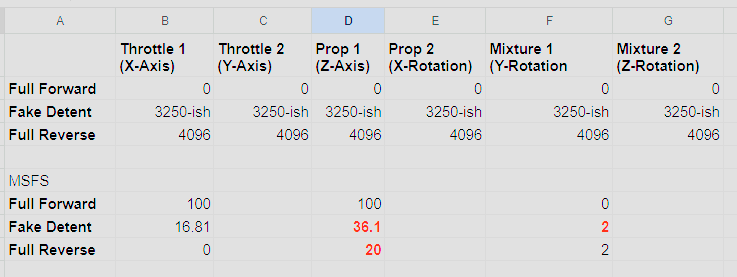
When looking at these, I might guess that the prop will not work as we don't have a 0-100 axis option in the sim so 0 on that axis will only get us 20 which translates to only the gate. For the Fuel cutoff, it seems to also be off in that 100 is high idol, 50 is low idol and anything below I am guessing 45-ish is considered cutoff. This has the effect on the axis as being able to go fuel cutoff before getting to the gate.
From a dev/programming side I don't know what you want to put into this as to how complicated it would be, but if there could be the possibility of adding some kind of controller configuration, either like Fenix or INI comes to mind to help us minority TQ6 throttle owners that would be great.
Also if you know of a way to do this natively in MSFS 24 with their, sorry to say hard to know what is what settings, very happy to try that as well. Finally, and don't really want too do, I do own FSUIPC and can reinstall and have a go at that but I would much prefer a native solution.
With regards..