
Duke COM 1&2 receiver (RX) issue on VATSIM
-
Hi everyone,
I wanted to do an IFR flight on VATSIM with the Grand Duke by Black Square Simulations. While tuning the frequencies before departure, I noticed that I couldn't hear any ATC or other VATSIM audio through the aircraft's radios.
I'm using the free GTN750 mod from PMS50, but I also tried the other available instrument/radio configurations in the Grand Duke, and the issue was the same with all of them.
I've already checked and tried pretty much everything I could think of:
- Volume and squelch settings
- Different COM frequencies
- The headphone/speaker switch
- Different radio/instrument configurations
- vPilot audio input/output settings
- The "Monitor All" function on the iPad in the aircraft
Unfortunately, enabling Monitor All on the iPad didn't make any difference either.
The interesting part is that TX seems to work perfectly. ATC could understand me without any problems, so my transmissions were definitely reaching VATSIM. In vPilot, the correct frequencies were also shown and updated when I changed the frequency in the aircraft.
I also noticed that the TX indicator lights up when transmitting, and RX lights up when, for example, tuning an ATIS frequency. However, I still don't hear any audio.
To rule out an issue with MSFS or vPilot itself, I tried the Fenix A320 in the same MSFS 2020 setup, and the radios worked immediately there. So it seems to be something specific to the Grand Duke.
Another interesting detail: I do receive audio from the NAV radios. For example, when tuning a VOR, I can hear the VOR Morse/audio normally as well as any other aircraft sounds. So the aircraft's general radio audio seems to be working, it is just the VATSIM/COM receiver audio that isn't coming through.
Has anyone experienced something similar with the Grand Duke or knows if there is a specific setting I might be missing?
Any ideas would be greatly appreciated!
-
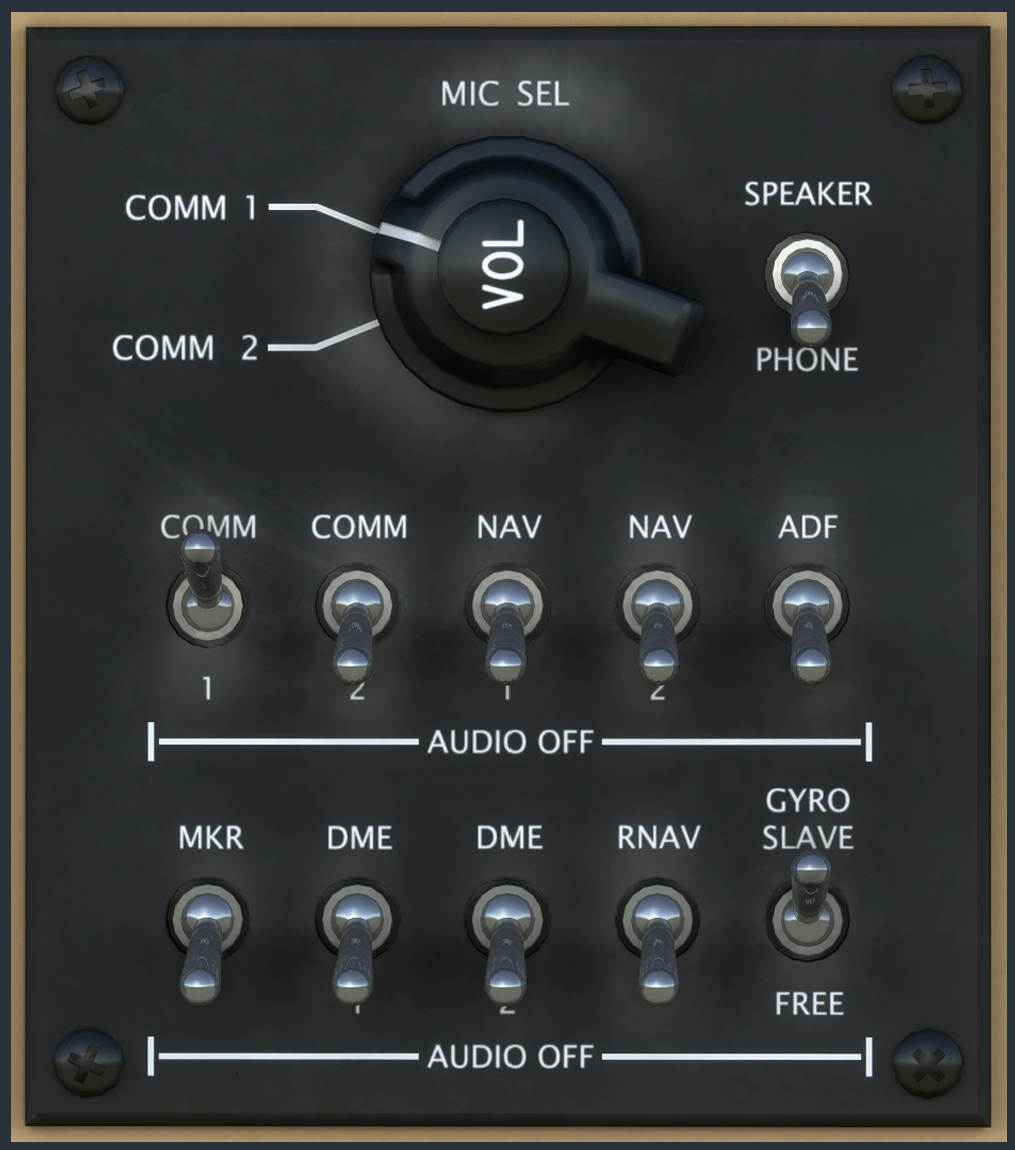
Last I checked this worked for me with monitor all checked on in the tablet and using the integrated audio control panel controls. The knob is a mic select and the switches below when flicked up should turn on the audio. I will gladly check when I am back home tomorrow as I just went back to flying the duke again recently. You can also try with the pms750 removed from you community folder in the meantime to see if that may be the cause.
-
I use the G530/G430 combo with COMM 1 and 2 selected, respectively without issue.
-
Continuing the thread. I was originally visiting the board to post a thread my own, but this seems fitting.
The mic selector (on Turbine, at least) doesn't always match the pit setting. This has occurred upon loading the aircraft several times. By default, it seems to be on the TEL position, but vPilot shows COM2 TX.
Likewise, when going to avatar mode and returning, there is often a mismatch like this:

Consequently, you have to check the vpilot window before every transmission, which adds surprisingly lot into mental load.
Therefore
- Would make sense to have COM1 as default?
- Synchronization mechanism could need a revisit?
-
Last I checked this worked for me with monitor all checked on in the tablet and using the integrated audio control panel controls. The knob is a mic select and the switches below when flicked up should turn on the audio. I will gladly check when I am back home tomorrow as I just went back to flying the duke again recently. You can also try with the pms750 removed from you community folder in the meantime to see if that may be the cause.
@SadBucket I tried all the switches, and unfortunately, it made no difference for me. But I’ll try again tomorrow with the PMS750 removed to see if that’s the problem.
