
Electrical system issue
-
I’ve just purchased the Professional Cargo/Floatplane variant from the XBox 2020 Marketplace. There is a global issue with the electrical functionality.
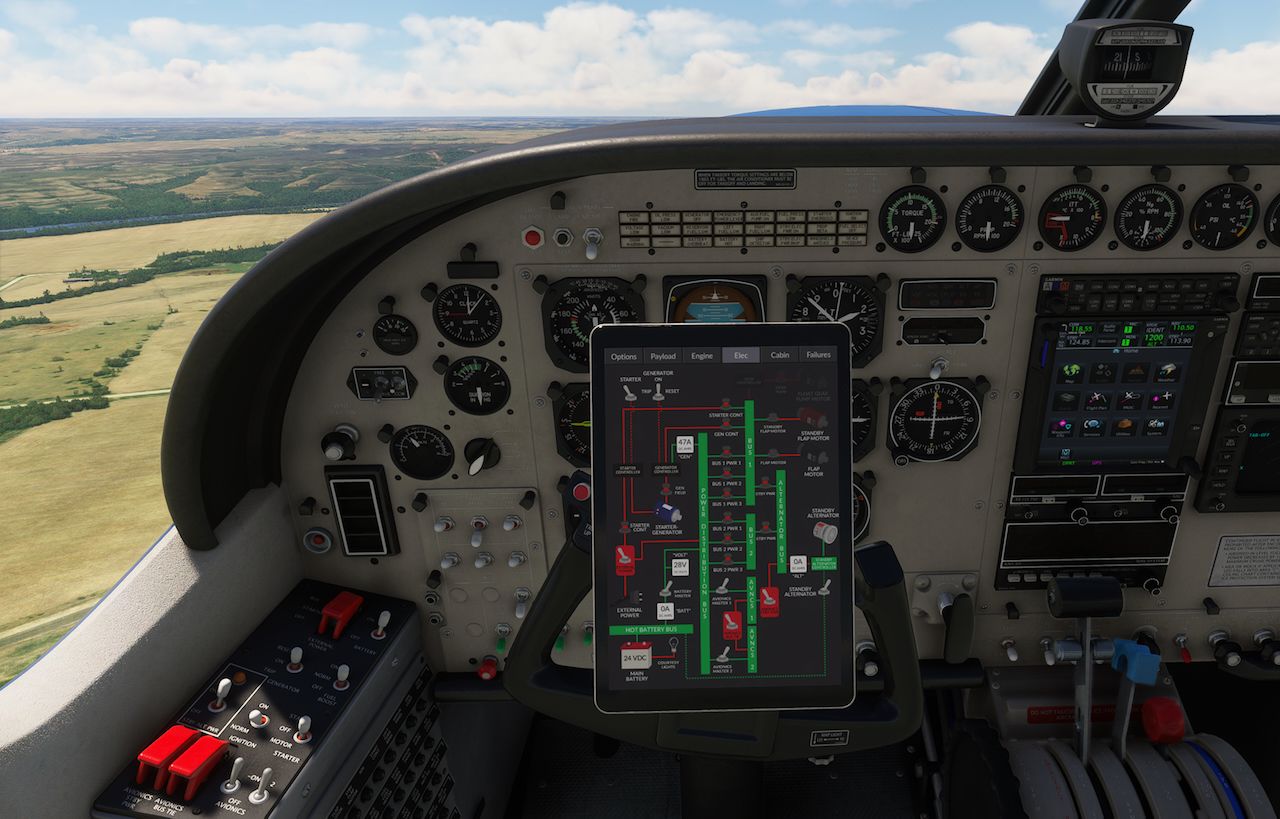
When the plane loads, either on the ramp or the runway, the EFB shows all circuit breakers except for the flap motor and standby flap motor as pulled, but they don’t appear that way on the physical panel and only the flap motor circuit breakers are functional.
Consequently, nothing electrical works except for GTN, GNS, transponder, and radar avionics and related avionics switches, and lights. No other avionics (KX 155B, AP), engine-related switches and gauges, annunciator panel, etc. work. No failures are shown in the EFB. I have reset all potential failures.
The plane will load on the runway with the engine running and flies beautifully but no engine-related gauges work. On the ramp, no engine-related switches work for a cold and dark start.
I have reinstalled the file several times, reset the XBox console, and finally reinstalled the sim itself and all add-on files. The presence or absence of add-ons has no effect.
I have had zero issues with previous BS releases, including the recent Baron/Bonanza Professional bundle, which I just used for a circumnavigation of the continental US.
Not sure what I am missing at this point. Any suggestions are welcome. Thank you!
-
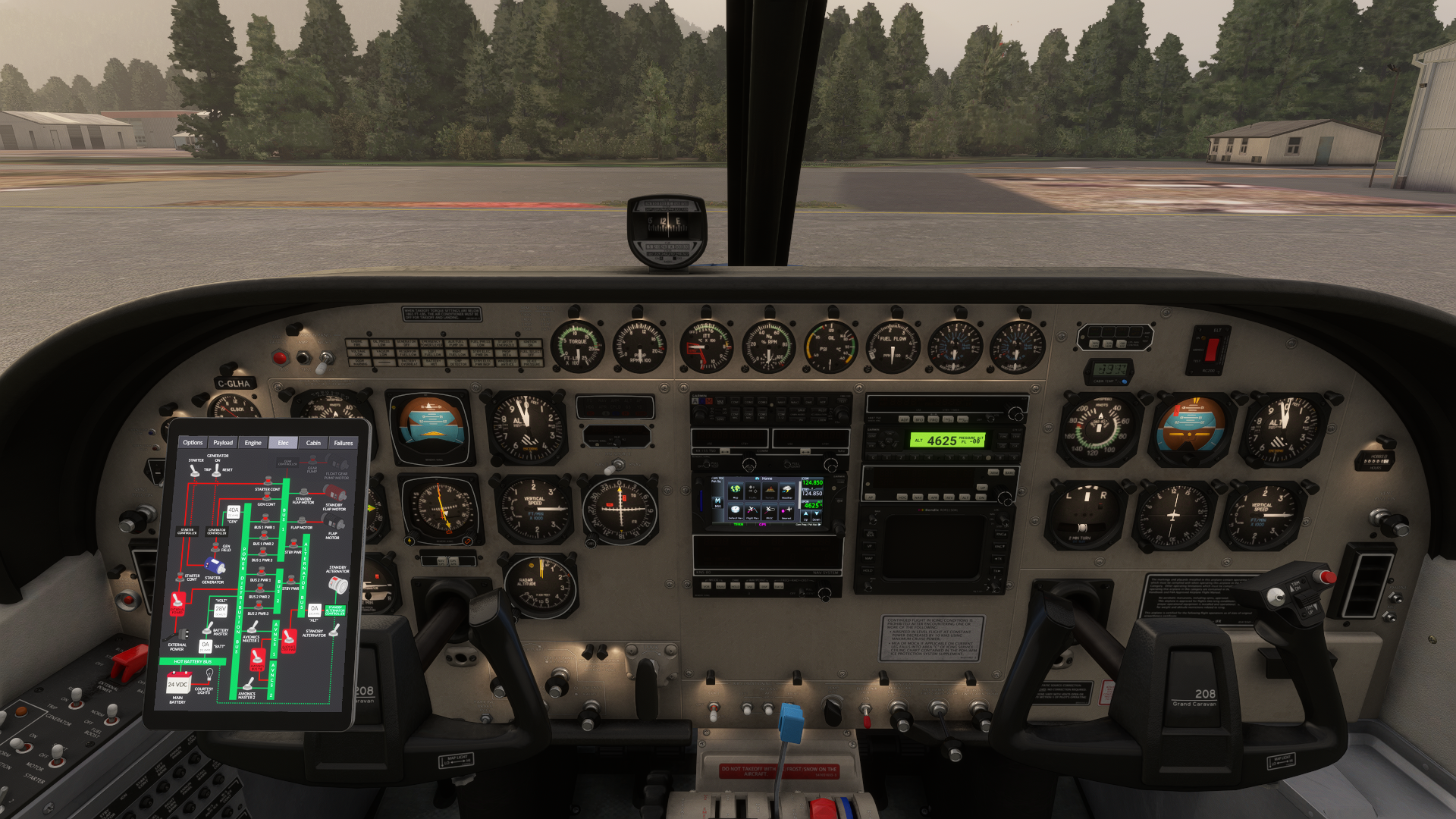
I’ll add a couple of more clues: the numbers on the LCD thermometer are garbled; the EFB can’t be moved (it can be placed in the VR static position though); and the instrument/cabin lights don’t work, when you spawn cold and dark, but they do work if you spawn with the engine running.
-
It's actually extremely rare that I use the words "corrupt installation", but I think that's the only explanation here. The real giveaways are the immovable tablet, and the engine instruments being stuck at their zero animation position, rather than their programmed zero position. This means that the model behavior file is literally not being loaded or interpreted by the simulator.
Since we can see the altimeter working, which is one of the only Asobo default templates left that I use in any of my aircraft, I would guess the problem is that my "templates" file is not being loaded. In this case,
CaravanProfessional_Templates.xml.Do you have access to developer mode on XBOX, do you know? @ploodovic, are you also on XBOX? I would really like to know if
CaravanProfessional_Templates.xmlexists in the virtual file system, and where.Am I correct that this is affecting only the Cargomaster in MSFS 2020 for both of you? I hope so, because at least that would give me something to go on.
I would also like to take a moment to acknowledge how helpful screenshots are. It's understandable why you might have guessed this was an electrical problem, but it actually has nothing to do with electricity at all, and it was the screenshots that made that so clear.
EDIT: I had a vague memory of encountering this problem in MSFS 2024, and I found a comment in a file for myself about MSFS 2024 requiring a redundant reference to that template file that MSFS 2020 did not need. I suppose it's possible that XBOX somehow also needs this redundant reference, but I find it unlikely that this wouldn't have presented itself with my other aircraft that are structured similarly.
-
It's actually extremely rare that I use the words "corrupt installation", but I think that's the only explanation here. The real giveaways are the immovable tablet, and the engine instruments being stuck at their zero animation position, rather than their programmed zero position. This means that the model behavior file is literally not being loaded or interpreted by the simulator.
Since we can see the altimeter working, which is one of the only Asobo default templates left that I use in any of my aircraft, I would guess the problem is that my "templates" file is not being loaded. In this case,
CaravanProfessional_Templates.xml.Do you have access to developer mode on XBOX, do you know? @ploodovic, are you also on XBOX? I would really like to know if
CaravanProfessional_Templates.xmlexists in the virtual file system, and where.Am I correct that this is affecting only the Cargomaster in MSFS 2020 for both of you? I hope so, because at least that would give me something to go on.
I would also like to take a moment to acknowledge how helpful screenshots are. It's understandable why you might have guessed this was an electrical problem, but it actually has nothing to do with electricity at all, and it was the screenshots that made that so clear.
EDIT: I had a vague memory of encountering this problem in MSFS 2024, and I found a comment in a file for myself about MSFS 2024 requiring a redundant reference to that template file that MSFS 2020 did not need. I suppose it's possible that XBOX somehow also needs this redundant reference, but I find it unlikely that this wouldn't have presented itself with my other aircraft that are structured similarly.
-
@Black-Square I’m also on Xbox, yes. No, we don’t have any developer tool, or any access to the file system.
It’s only the Cargomaster for me, all other variants are fine. And it’s only in 2020 it’s broken.
@ploodovic I suppose there could be something wrong with our MSFS 2020 Marketplace package too, but I find that unlikely. Just Flight assembles these packages for me, and test them, so I will inquire. Maybe adding that redundant reference might fix the problem too, as it shouldn't hurt anything for it to be there. Hopefully we can find the issue asap. I'll keep you posted.
-
Sorry, I don't have developer mode access either.
EDIT: The amphibian version is fine here too, it's just the Cargomaster that has the issue.
I have deleted the Caravan file and reinstalled from the Marketplace several times. -
@ploodovic I suppose there could be something wrong with our MSFS 2020 Marketplace package too, but I find that unlikely. Just Flight assembles these packages for me, and test them, so I will inquire. Maybe adding that redundant reference might fix the problem too, as it shouldn't hurt anything for it to be there. Hopefully we can find the issue asap. I'll keep you posted.
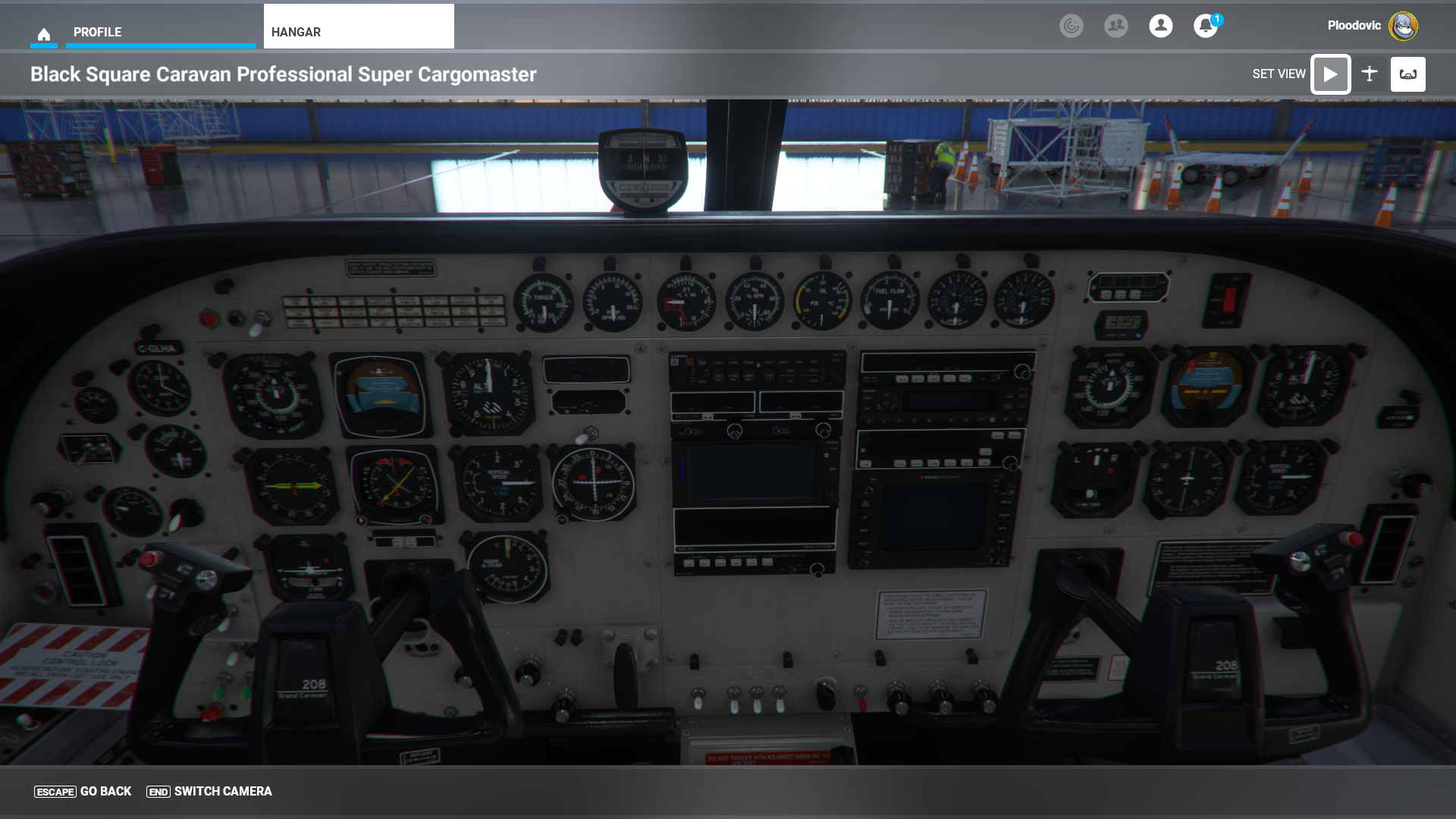
@Black-Square I tried to reinstall the Cargomaster, but it made no difference. Also, I’m not sure if it adds any additional information, but I took a screenshot from the hangar as well. Looks about the same.
-
Thanks for getting back to me, both of you. The screenshots really help. I'm very confident of what's happening here. We just have to figure out why the link to the template file is not being made. Given what you've told me, this seems like a single point of failure to investigate, so hopefully we can figure it out quickly.
-
Working with my blind hypothesis above, we are awaiting a new XBOX build to be approved that will hopefully fix the issue. I will let you guys know as soon as I know!
-
@arnage1998 @julio71 @ploodovic Oh, I just heard back, actually! Sounds like the problem is fixed! Of course, this is very concerning to me that something so fundamental would be different on one specific version of the simulator... but at least we know what it is now.
Thanks for your help, guys!
-
@arnage1998 @julio71 @ploodovic Oh, I just heard back, actually! Sounds like the problem is fixed! Of course, this is very concerning to me that something so fundamental would be different on one specific version of the simulator... but at least we know what it is now.
Thanks for your help, guys!
@Black-Square I do almost all my flying in 2024 these days, so it didn’t really affect me. Nonetheless, I’m glad it’s getting fixed, and that I could be of some help.
I’m hauling cargo in Hawaii, US west coast, and the Caribbean. Love this plane!
-
The update is already on the Marketplace and I'm trying out the Mountain Air routes this morning.
Thank you for the quick fix @Black-Square! -
On the amphibious Caravan version, the electrical system works perfectly, but on the Cargomaster version, the electrical system does NOT work. I just bought the passenger version and its electrical system works perfectly; the cargo version doesn't work—it won't turn on. I don't know what else to do.
-
Hello, I just bought on June 19th the Bundle. MSFS2020 Steam version. Bought the bundle through the marketplace. All the Variants work except the Cargomaster. Same as everyone else. Dead needles on the gauges. Screenshot above is also what i get. I have reinstalled today 6.20 everything, and still the same problem. So there doesn't seem to be any fix yet for this as mentioned above for PC Marketplace. This affects just the Cargomaster variant, but it's a bummer.
 Hoping for a fix. Pretty please :). Not sure what to do. I have tried so many uninstalls and also uninstalled the native caravan and added it back too. No go. Dead cockpit on the Cargomaster. MSfs2020 steam version. Please advise
. -
On the amphibious Caravan version, the electrical system works perfectly, but on the Cargomaster version, the electrical system does NOT work. I just bought the passenger version and its electrical system works perfectly; the cargo version doesn't work—it won't turn on. I don't know what else to do.
@julio71 Unless I am mistaken, you're experiencing the exact same problem as already reported? Like I said, we seem to have the fix already, but it might take some time to propagate on the Asobo side to all versions of the marketplace. Perhaps @arnage1998 can let us know where/when you were able to access the new version first?
@lagin I suspect the bundle will be the last version to be updated, but since the other update appeared very quickly (<48hrs) after we submitted it, hopefully the bundle will be updated quickly as well.
I will keep you all posted if I hear any updates on my end, but I suspect that you might just have to wait for the update to propagate. Sorry again for the inconvenience. I'm just as surprised as anyone that there are fundamental software differences like this lurking in only the MSFS 2020 XBOX version. Thanks for working with me to find the solution.
-
I downloaded the update last night, after @arnage1998 posted about it. Works like a charm. Marketplace for Xbox.
