Skip to content
  • Categories
  • Recent
  • Tags
  • Popular
  • Users
Collapse
Just Flight Community Forum
  1. Home
  2. Just Flight
  3. MSFS Products
  4. Black Square Add-Ons
  5. Caravan Professional
  6. Caravan Professional changelog - v1.2 released 05.05.26

Caravan Professional changelog - v1.2 released 05.05.26

Scheduled Pinned Locked Moved Caravan Professional
12 Posts 7 Posters 365 Views 1 Watching
  • Oldest to Newest
  • Newest to Oldest
  • Most Votes
Reply
  • Reply as topic
Log in to reply
This topic has been deleted. Only users with topic management privileges can see it.
  • G Offline
    G Offline
    gustavpicora
    wrote last edited by
    #3

    Why not changing the install app? Every single time I wanna install/update something from JF install app, it just doesn't works.. Now I get a install failure that it can't find some file.. seriously fix that install app of yours, or ask Claude how to do it.
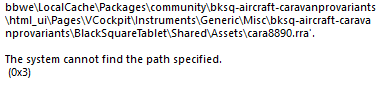
    image.png

    R 1 Reply Last reply
    0
    • G gustavpicora

      Why not changing the install app? Every single time I wanna install/update something from JF install app, it just doesn't works.. Now I get a install failure that it can't find some file.. seriously fix that install app of yours, or ask Claude how to do it.
      image.png

      R Offline
      R Offline
      RealPax
      wrote last edited by
      #4

      @gustavpicora
      I am not sure if this is the case, but as far as I remember this is a windows issue due to long folder names. If you move your community folder to a shorter location it should be fine.

      f.e. I did move mine to c:\xboxgames\msfs2024….
      You can do this from the inside of the sim if I remember correctly.

      1 Reply Last reply
      0
      • aeysimA Offline
        aeysimA Offline
        aeysim
        wrote last edited by
        #5

        Before running the update file, I remove the old version from Control Panel/Programs/Remove.
        Then, during the new installation, I choose one of the options to install to my desired location or the default MSFS 2024 location.
        But first, I remove the old version.

        S 1 Reply Last reply
        0
        • S Offline
          S Offline
          SenaCE
          wrote last edited by
          #6

          Taking advantage of the comments, and despite already having a separate location for the "community" folder, I still uninstalled the previous version and tried the new version I received today, but it didn't help at all; the new version 0.1.2 didn't work and showed the same error as before.
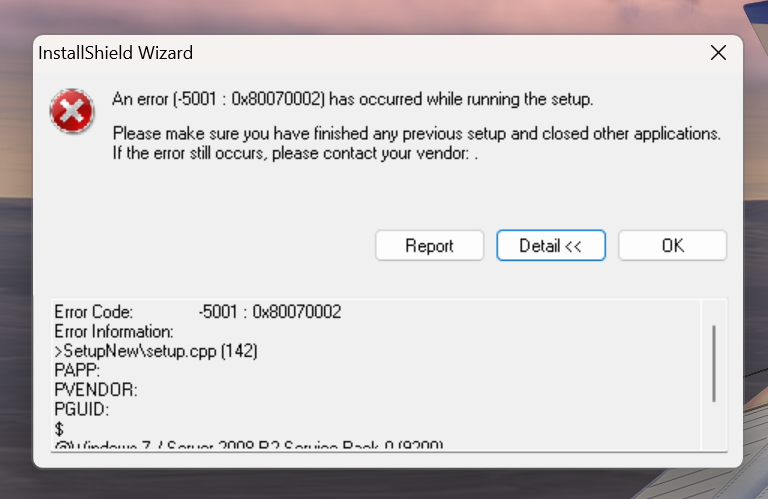
          image.png

          1 Reply Last reply
          0
          • aeysimA aeysim

            Before running the update file, I remove the old version from Control Panel/Programs/Remove.
            Then, during the new installation, I choose one of the options to install to my desired location or the default MSFS 2024 location.
            But first, I remove the old version.
            S Offline
            S Offline
            SenaCE
            wrote last edited by
            #7

            0c0b3f52-1568-4b62-a92a-7bede762e5a3-image.png

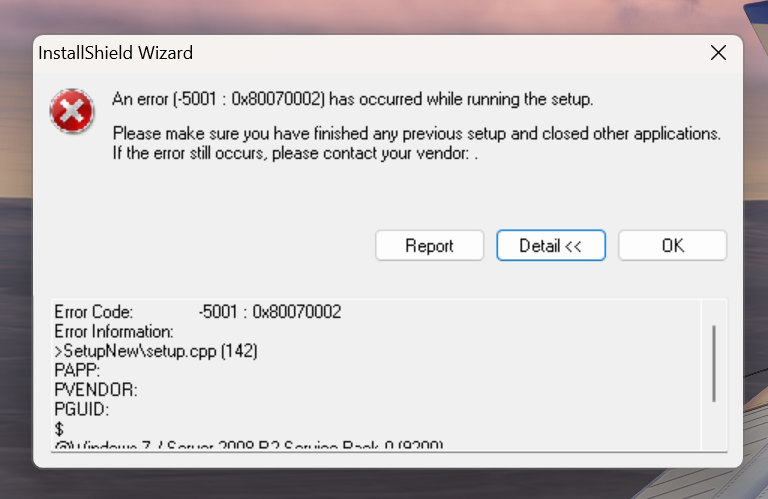
            Taking advantage of the comments, and despite already having a separate location for the "community" folder, I still uninstalled the previous version and tried the new version I received today, but it didn't help at all; the new version 0.1.2 didn't work and showed the same error as before.

            DerekD aeysimA 2 Replies Last reply
            0
            • S SenaCE

              0c0b3f52-1568-4b62-a92a-7bede762e5a3-image.png

              Taking advantage of the comments, and despite already having a separate location for the "community" folder, I still uninstalled the previous version and tried the new version I received today, but it didn't help at all; the new version 0.1.2 didn't work and showed the same error as before.

              DerekD Online
              DerekD Online
              Derek
              JF Staff
              wrote last edited by
              #8

              @SenaCE

              I would recommend contacting Just Flight support. There is a link on their website at www.justflight.com

              1 Reply Last reply
              0
              • S SenaCE

                0c0b3f52-1568-4b62-a92a-7bede762e5a3-image.png

                Taking advantage of the comments, and despite already having a separate location for the "community" folder, I still uninstalled the previous version and tried the new version I received today, but it didn't help at all; the new version 0.1.2 didn't work and showed the same error as before.

                aeysimA Offline
                aeysimA Offline
                aeysim
                wrote last edited by
                #9

                To uninstall the old version, you shouldn't delete the file directly, but rather uninstall it via Control Panel/Programs/Uninstall or by running the airplane's installation file (.exe).

                1 Reply Last reply
                0
                • S Offline
                  S Offline
                  SJK91
                  wrote last edited by
                  #10

                  Simmarket MSFS2020 version is botched as explained by SenaCE. Two files, both named MSFS2024, one is the actual 2024 product and the other says missing download link.

                  DerekD 1 Reply Last reply
                  0
                  • S SJK91

                    Simmarket MSFS2020 version is botched as explained by SenaCE. Two files, both named MSFS2024, one is the actual 2024 product and the other says missing download link.

                    DerekD Online
                    DerekD Online
                    Derek
                    JF Staff
                    wrote last edited by
                    #11

                    @SJK91

                    I would recommend contacting Just Flight support. There is a link on their website at www.justflight.com

                    1 Reply Last reply
                    0
                    • S Offline
                      S Offline
                      SenaCE
                      wrote last edited by
                      #12

                      Finally problem solved, I contacted JustFlight support directly and the correct file was made available. They claimed that they sent the correct files to simMarket, in short it was a problem with the store's support, and only today (8) did they correct the problem by making the correct aircraft file available.

                      1 Reply Last reply
                      0
                      Reply
                      • Reply as topic
                      Log in to reply
                      • Oldest to Newest
                      • Newest to Oldest
                      • Most Votes


                      • Login

                      • Don't have an account? Register

                      • Login or register to search.
                      • First post
                        Last post
                      0
                      • Categories
                      • Recent
                      • Tags
                      • Popular
                      • Users