
VR speed gauge is blurry
-
Can you share a screenshot, please? All the main instruments occupy the same amount of texture space, so there shouldn't be any noticeable difference between them.
-
Hi Nick!
Yes, I noticed this too, maybe SU5 related because I never noticed this before and it's very obvious - and haven't flown the Baron for a month or so, blame the Caravan

The LOD steps appear to be different vs the rest of the cockpit and other gauges, but note: it's only the white on black part that is affected. The outer black on white dials stay sharp.
I had a heck of a time figuring out how to get a screenshot so my HMD is propped at angle to trigger it, it's a terrible screenshot sorry. You can just about make out a difference if you compare the white on black to the black on white, the former is fuzzier - in-game I would say it is 1/4 resolution.
It's a dynamic change, it's fine and then it'll drop, then look at it a bit closer and it corrects itself. It's quite jarring in VR it's like you got dirt on your lens or eye. The screenshot really doesn't do it justice - sorry.
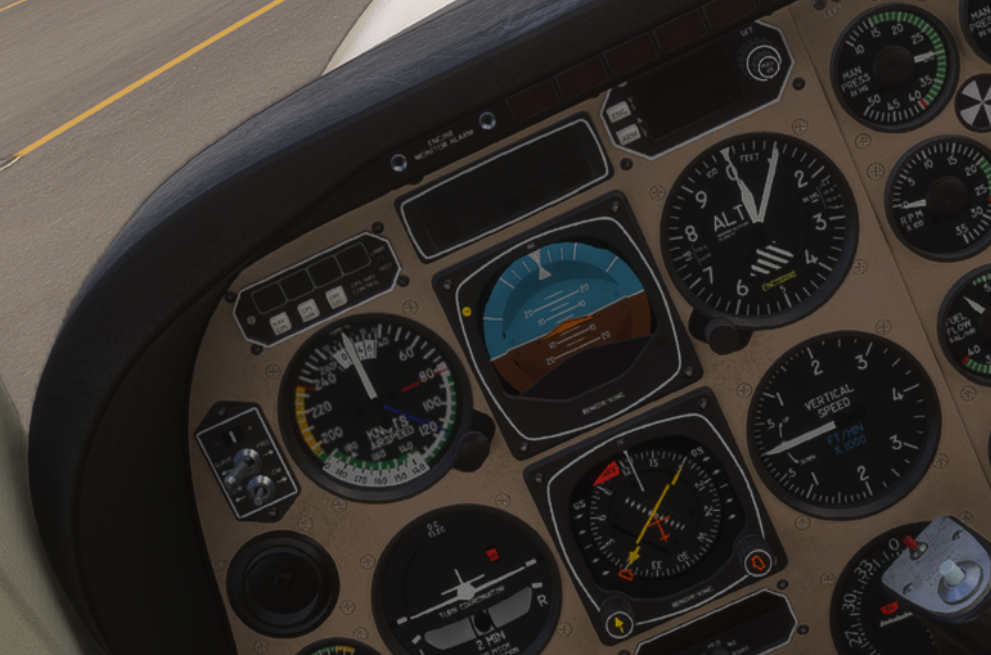
Yeah it's a bad screenshot, zoomed it, compare the inner and outer numbers, it's clear there is a res drop.
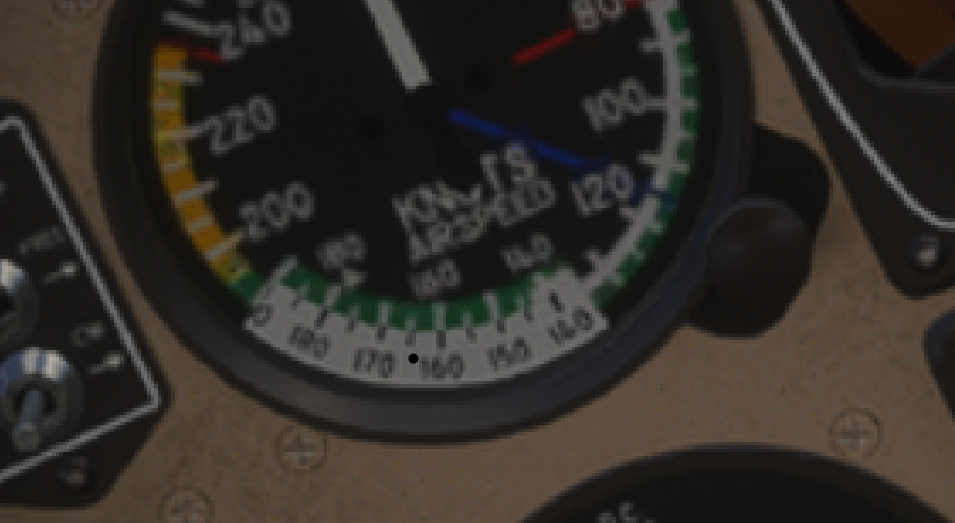
Stuart.
-
Hi, Stuart. Thanks for the screenshot. Unfortunately, I've checked everything here, and there is absolutely no difference between the instrument face, and the rotating card in texture, material, object, or anything else I can think of. From my perspective, they should be treated identically to each other. Additionally, there should be no LOD drop of the interior when seated inside the aircraft, only small object culling. I know that's not a very satisfying answer, but I genuinely don't think there is anything I can do to improve the situation on my end, sorry to say.
-
Hi, Stuart. Thanks for the screenshot. Unfortunately, I've checked everything here, and there is absolutely no difference between the instrument face, and the rotating card in texture, material, object, or anything else I can think of. From my perspective, they should be treated identically to each other. Additionally, there should be no LOD drop of the interior when seated inside the aircraft, only small object culling. I know that's not a very satisfying answer, but I genuinely don't think there is anything I can do to improve the situation on my end, sorry to say.
@Black-Square How weird is that! I'll enable Nvidia overlay and try to capture a clear video of it happening - just for the record.
Hmm. I wonder with all the recent optimization so get the game to run smoothly on more constrained systems, whether Asobo is triggering automated texture resolution downgrades based on VRAM usage? In some aircraft, setting the texture resolution lower in the graphical settings triggers a major downgrade in cockpit resolution (JF Hawk is affected badly by this). It doesn't make much sense why it would only pick on airspeed unless there is something specific about the size of the texture that triggers a heuristic... anyway I could try a different texture resolution and see if that has any impact. -
No difference between Ultra and High texture setting. This is on Ultra:
Go fullscreen and select 4K playback and it's clear. Approx. timestamps:
40s
1m10s
1m40s
2m26
2m55
3m09sIt seems distance related, it drops as I move away and recovers as I move closer, but it also seemed to recover when I looked away. Toward the end I wondered about the copilot AS indicator, but that's inconclusive.
-
Just want to chime in and say I have this exact same issue with the speed gauge. I also notice it on both the kFC-150 (the red screen text, not the buttons) and the autopilot annunciator panel. Now here’s the weird thing - two days ago this happened no matter what I did. Then yesterday, everything was clear. No changes to settings, anything else.
I’ve also had this on the A2A Aerostar, so my guess it’s an Asobo bug and not aircraft. It happens to only certain instruments or text, but not others. There must be something common with these gauges or text that makes them blurry. If you look away momentarily and then back the gauges become clear for a few seconds, then go blurry again.
-
Perhaps the smoking gun that this is on Asobo's side is the problem doesn't exist in flatscreen...
Asobo made changes to object culling in SU5 and perhaps that affects mipmapping too. This was almost certainly motivated by PSVR2 on PS5 - and thus could explain the difference between flatscreen and VR.
The problem with complaining to Asobo is they'll most likely kneejerk blame it on the third party aircraft and I haven't seen it in first-party aircraft so it'll just get deflected back.
I have seen this exact behavior in one other aircraft: Taogs Hangar A365. One panel behaves exactly the same as what I see with the A/S indicator in the Baron; it's one or two mipmap levels lower than the rest of the cockpit, in VR only. I'm hoping they'll dig into it and find something that points a finger at something.
Note: aircraft are downloaded so it's not a streaming issue, rolling cache reset - just in case, dynamic settings off, foveated rendering off, off-screen terrain caching set to ultra - just in case.
