
Caravan issue
-
I just purchased the Caravan pro package for MSFS2024. I love it and have completed 3 flights in the passenger variant without issue.
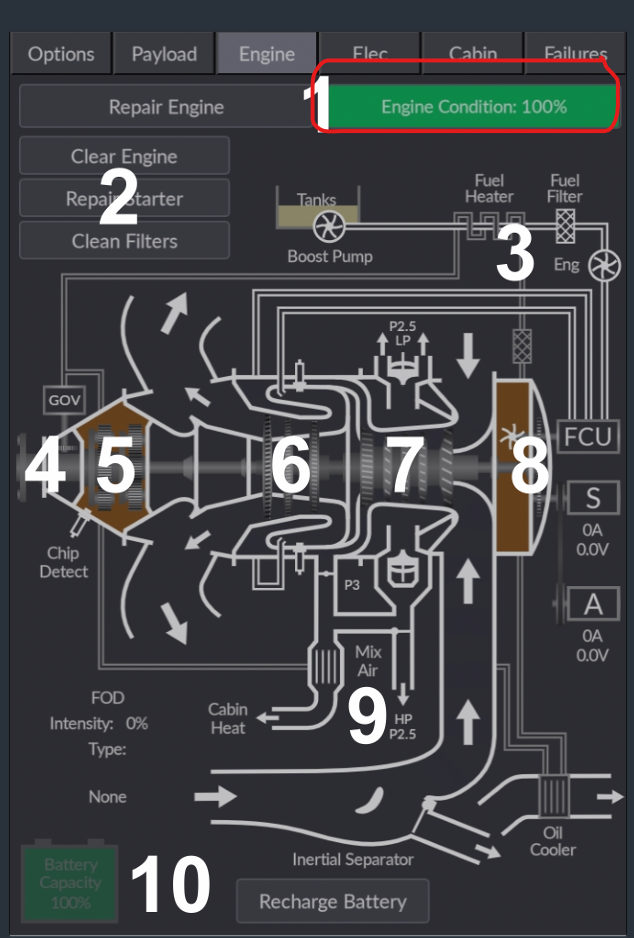
I first noted the annunciator light for Chip Detector on but everything seemed to function normally otherwise. I understand stand this might have been caused by over torquing the engine. I tried to administer repairs but the light won’t clear.
Also, not sure if related but now I can’t get enough torque/power to take off. I tried the amphibian variant and it worked fine and took off and landed. I restarted several times but to no avail. I also did a clean install of passenger variant but no change and the light was still on.
Help would be appreciated.
Steve C
-
Do you have any damage other than Engine Stress damage on in the assistance menu? There's an issue with the core Sim where having one of the airframe or aircraft stress damage enabled (e.g. not checked) in that menu will damage the engine outside of the Black Square damage modeling.
Seems like it was usually accompanied by an in sim message about engine or turbine failure that you haven't mentioned, so perhaps not the issue, but worth checking.
-
-
And as I mentioned in my first post, I have no torque so I cannot get enough sleep to takeoff. All variations have the same issue and I have reinstalled twice. When I load the aircraft after the reinstall, it retains the same problems.
@scanham Sorry for letting some others respond to you before I stepped in. This sounded like the usual "have you checked the engine health" solution to me from your description. Are you still seeing the chip detect light? There are two ways for that light to illuminate: either the engine has failed, or the engine health is below 25%. If you have any way to observe these two variables (such as 3rd party hardware binding software like SPAD, please take a look at
L:var_engineDamageandA:ENG FAILED:1. Repairing the engine via the tablet should take care of the first, and that should un-trigger the second, unless there is something at the simulator level which is triggering an engine failure. -
I have "Repaired Engine" and Health is 100%. The Chip Detector is illuminated in the enunciator panel and it appears RED on the tablet engine diagram.
I do not have any 3rd party binding software.
@scanham That's a very interesting combination of things. Looking at the code, both cannot be true at the same time. The red chip detector on the tablet visualizer and the engine health bar read the exact same variable in the same block of code, and depend on no other variables. Can you provide some screenshots or video to help troubleshoot this? A picture is always worth a thousand words.
-
Well, at least I appreciate that you took the courage to confess this publicly. A lot of people would have taken the easy way out and just don’t replay anymore. Thank you!
Enjoy this fantastic plane and have fun with it.
Oh and BTW you owe us one.
-
Well, at least I appreciate that you took the courage to confess this publicly. A lot of people would have taken the easy way out and just don’t replay anymore. Thank you!
Enjoy this fantastic plane and have fun with it.
Oh and BTW you owe us one. -
The engine has been repaired in Petersburg, AK. Will be departing for Ketchikan later today. Thanks again.
@scanham In Petersburg? Maybe I know the mechanic! One of my favorite towns anywhere, and Southeast Alaska, probably my favorite place to fly.

 . (I still can sleep).