Skip to content
  • Categories
  • Recent
  • Tags
  • Popular
  • Users
Collapse
Just Flight Community Forum
  1. Home
  2. Just Flight
  3. MSFS Products
  4. Black Square Add-Ons
  5. Caravan Professional
  6. Caravan issue

Caravan issue

Scheduled Pinned Locked Moved Caravan Professional
12 Posts 4 Posters 266 Views 1 Watching
  • Oldest to Newest
  • Newest to Oldest
  • Most Votes
Reply
  • Reply as topic
Log in to reply
This topic has been deleted. Only users with topic management privileges can see it.
  • R Offline
    R Offline
    RealPax
    wrote last edited by
    #2

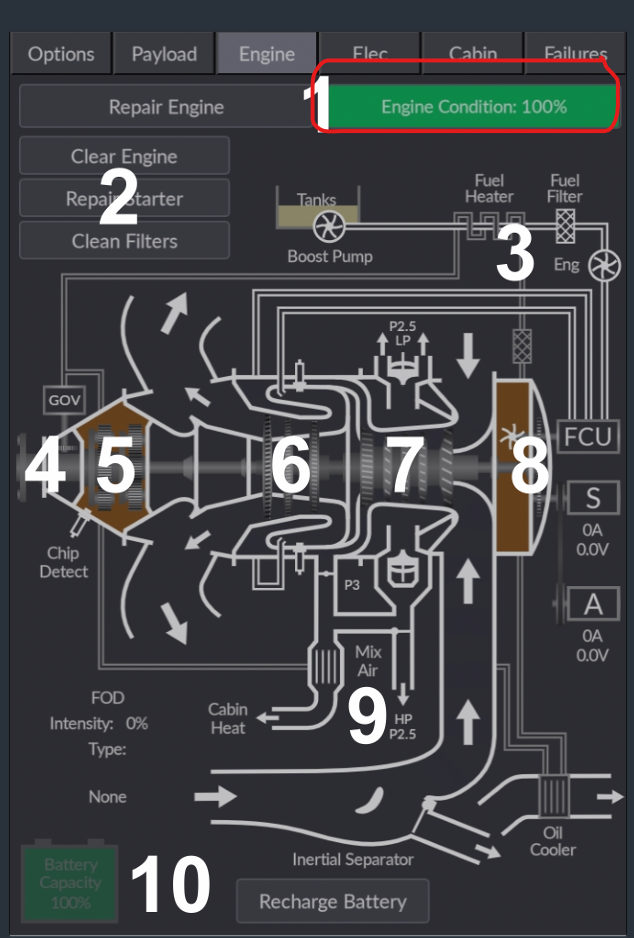
    Have you checked if the Engine is still ok?
    What does it show on the condition?

    image.png

    1 Reply Last reply
    0
    • S Offline
      S Offline
      scanham
      wrote last edited by
      #3

      Engine is at 100%. Failures are turned off.

      1 Reply Last reply
      0
      • R Offline
        R Offline
        RealPax
        wrote last edited by
        #4

        Did you also Clear Engine and Clean Filters?

        1 Reply Last reply
        0
        • S Offline
          S Offline
          scanham
          wrote last edited by
          #5

          My Chip Protect is β€œred”.
          I have Cleared Engine and Cleaned Filters. Nothing fixes it. I also did a clean. Reinstall.
          Nothing helps.

          1 Reply Last reply
          0
          • R Offline
            R Offline
            RealPax
            wrote last edited by
            #6

            Sorry I am out of ideas. Hopefully someone with more knowledge then me will help you.

            1 Reply Last reply
            0
            • S Offline
              S Offline
              scanham
              wrote last edited by
              #7

              Thanks, I appreciate your help. There must be a solution.

              1 Reply Last reply
              0
              • J Offline
                J Offline
                jmarkows
                wrote last edited by
                #8

                Do you have any damage other than Engine Stress damage on in the assistance menu? There's an issue with the core Sim where having one of the airframe or aircraft stress damage enabled (e.g. not checked) in that menu will damage the engine outside of the Black Square damage modeling.

                Seems like it was usually accompanied by an in sim message about engine or turbine failure that you haven't mentioned, so perhaps not the issue, but worth checking.

                1 Reply Last reply
                1
                • S Offline
                  S Offline
                  scanham
                  wrote last edited by
                  #9

                  Thanks, but I have Engine Stress Damage & Aircraft Stress Damage disabled in the sim assistance menu.

                  1 Reply Last reply
                  0
                  • S Offline
                    S Offline
                    scanham
                    wrote last edited by
                    #10

                    And as I mentioned in my first post, I have no torque so I cannot get enough sleep to takeoff. All variations have the same issue and I have reinstalled twice. When I load the aircraft after the reinstall, it retains the same problems.

                    Black SquareB 1 Reply Last reply
                    0
                    • S Offline
                      S Offline
                      scanham
                      wrote last edited by
                      #11

                      SpeedπŸ˜ƒ. (I still can sleep).

                      1 Reply Last reply
                      0
                      • S scanham

                        And as I mentioned in my first post, I have no torque so I cannot get enough sleep to takeoff. All variations have the same issue and I have reinstalled twice. When I load the aircraft after the reinstall, it retains the same problems.

                        Black SquareB Online
                        Black SquareB Online
                        Black Square
                        Black Square Developer
                        wrote last edited by
                        #12

                        @scanham Sorry for letting some others respond to you before I stepped in. This sounded like the usual "have you checked the engine health" solution to me from your description. Are you still seeing the chip detect light? There are two ways for that light to illuminate: either the engine has failed, or the engine health is below 25%. If you have any way to observe these two variables (such as 3rd party hardware binding software like SPAD, please take a look at L:var_engineDamage and A:ENG FAILED:1. Repairing the engine via the tablet should take care of the first, and that should un-trigger the second, unless there is something at the simulator level which is triggering an engine failure.

                        1 Reply Last reply
                        0
                        Reply
                        • Reply as topic
                        Log in to reply
                        • Oldest to Newest
                        • Newest to Oldest
                        • Most Votes


                        • Login

                        • Don't have an account? Register

                        • Login or register to search.
                        • First post
                          Last post
                        0
                        • Categories
                        • Recent
                        • Tags
                        • Popular
                        • Users