
Turbine Duke single Engine
-
I think the piston duke is pretty good...kill an engine and the ball pivots immediately toward the dead engine. Lots of yaw to trim and it flys better once the prop is feathered. The Turbine Duke however...nothing. Kill an engine and the ball stays perfectly centered...even at red line. The Msfs 2020 version was better. Something has happened to the flight model in 2024.
-
What a bummer. The TDuke did perform OEI as expected in 2020, but I guess it's a bit botched in 2024. I just confirmed it. No matter what I did, I could not get the plane to yaw or roll into the inop engine. Maybe @Black-Square can throw this on his list?
-
What a bummer. The TDuke did perform OEI as expected in 2020, but I guess it's a bit botched in 2024. I just confirmed it. No matter what I did, I could not get the plane to yaw or roll into the inop engine. Maybe @Black-Square can throw this on his list?
@Buzz There are no flight model configuration differences between MSFS 2020 and 2024, so this would be the result of another undocumented change in MSFS 2024, if so.
-
@Buzz There are no flight model configuration differences between MSFS 2020 and 2024, so this would be the result of another undocumented change in MSFS 2024, if so.
I kind of expected that to be the case.
-
I'm going to take a guess that @Black-Square has way too much on his plate to fix this, so... I am willing to pitch in to find a solution. Does anyone know where to start in the config file?
-
I haven't much flown the turbine version (yet) nor used 2024 much (yet), but I had 15 mins to burn so took a quick look through the dev mode options (of which I am not well acquainted either). Curiosity sometimes gets the better of me!
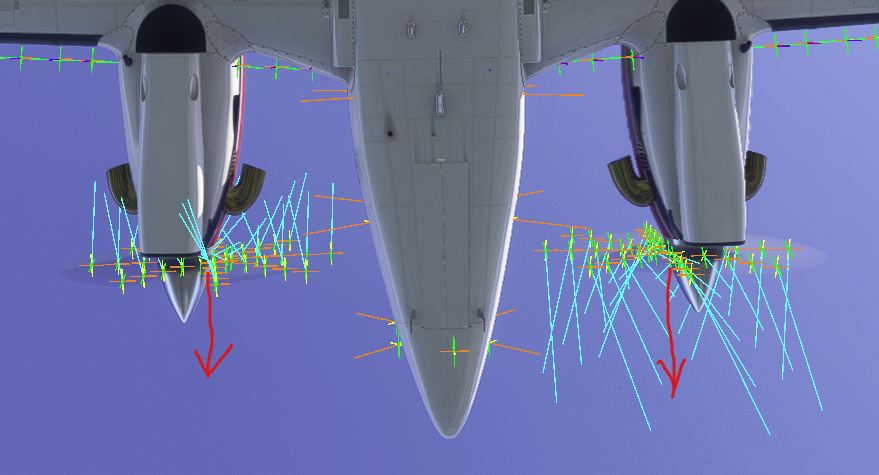
The complete lack of yaw when doing drastic things with either engine is very apparent. I didn't find anything of real use, but the 'sim forces' visualiser shows that the prop forces on the turbine version might be acting too close to the centreline (likely in the same location as the piston version's props; perhaps a carryover), but this wouldn't cause the issue alone of course. Thought I'd post it nevertheless, in case relevant for a future fix.
I've drawn the approximate centres of the prop blade force animations. Here's one engine running and one at cut-off. No yaw at all as mentioned.
-
I haven't much flown the turbine version (yet) nor used 2024 much (yet), but I had 15 mins to burn so took a quick look through the dev mode options (of which I am not well acquainted either). Curiosity sometimes gets the better of me!
The complete lack of yaw when doing drastic things with either engine is very apparent. I didn't find anything of real use, but the 'sim forces' visualiser shows that the prop forces on the turbine version might be acting too close to the centreline (likely in the same location as the piston version's props; perhaps a carryover), but this wouldn't cause the issue alone of course. Thought I'd post it nevertheless, in case relevant for a future fix.
I've drawn the approximate centres of the prop blade force animations. Here's one engine running and one at cut-off. No yaw at all as mentioned.
@Mustang I just checked the model and the configurations, and the correct thrust centerline distance should be 6.8ft, whereas it's currently 6.0ft. It's not a holdover from the piston engines, which have the same centerlines, so I'm not sure where that came from. I've fixed it for the next version, but I suspect the change in performance will be pretty minimal. You're welcome to test it yourself. Look for the
Engine.0, andEngine.1lines near the top of the engines.cfg, and replace them with the following lines:Engine.0 = 6.9, -6.8, 0.7 Engine.1 = 6.9, 6.8, 0.7 -
I haven't much flown the turbine version (yet) nor used 2024 much (yet), but I had 15 mins to burn so took a quick look through the dev mode options (of which I am not well acquainted either). Curiosity sometimes gets the better of me!
The complete lack of yaw when doing drastic things with either engine is very apparent. I didn't find anything of real use, but the 'sim forces' visualiser shows that the prop forces on the turbine version might be acting too close to the centreline (likely in the same location as the piston version's props; perhaps a carryover), but this wouldn't cause the issue alone of course. Thought I'd post it nevertheless, in case relevant for a future fix.
I've drawn the approximate centres of the prop blade force animations. Here's one engine running and one at cut-off. No yaw at all as mentioned.
@Mustang Thank you for looking in to this. I actually opened the sim object editor and tried to have a go at editing the aircraft and honestly, when it got to the point of importing a project, I realized I was way in over my head. So I held off going further.
-
You're both welcome, though I didn't do much beyond a glance at .cfg files and trying out various dev mode debug tools in the menu. Thanks Nick for the corrections. I'll make them just for the warm fuzzy feeling that fixing incorrect data always gives

Besides the 'show sim forces' debug option (earlier image), it's very interesting to see the different CFD visualisations at work. With one engine inop there is clearly a sudden loss in thrust, even a loss in the downward deflection on the adjacent air flow from the lack of prop wash over the inop engine's wing, but no yaw tendency or rudder forces/effects show up whatsoever (whether AP is engaged or not, in case of a hidden yaw damper interfering). A roll tendency occurs into the dead engine as you might expect, just no yaw.
That's in itself is interesting because it seems to show that MSFS decouples various aspects of the flight model; the forces and moments acting on the aircraft may not be purely a result of all the aerodynamic forces shown (else something else is blocking it from occurring). I know there are legacy and modern flight models, and various settings that are old or new - it must be a nightmare to keep track of which settings actually influence the aircraft and which are deprecated (and catching the undocumented ones) - so I don't envy any developer's job there (well I kind of do, in a different life).
I'm sure this one is 'on the list' to be investigated in due course anyway.
Regards,
Martyn -
Go into your engines.cfg and change this ilne to read this:
prop_mod_moment_scalar_yaw = 1
Vmc is rather close with this set to 1 (at least with my setup with a few other minor tweaks). It had previously been set to 0 which turns off all asymmetric thrust effects
-
Go into your engines.cfg and change this ilne to read this:
prop_mod_moment_scalar_yaw = 1
Vmc is rather close with this set to 1 (at least with my setup with a few other minor tweaks). It had previously been set to 0 which turns off all asymmetric thrust effects
@CdnCptMoustache I just looked into this, and that variable is only set to zero in the Turbine Duke, and Starship. There's a high probability it was a mistake, and I copied it over to Starship, but I will test things out and see if that's the proper solution before the next update. Thanks for pointing it out. This problem was on my list, but I haven't thought about it in a while.


