Skip to content
  • Categories
  • Recent
  • Tags
  • Popular
  • Users
Collapse
Just Flight Community Forum
  1. Home
  2. Just Flight
  3. MSFS Products
  4. Black Square Add-Ons
  5. Caravan Professional
  6. fs 2024 Vanilla Turbine Failure With No Blacksquare Failure

fs 2024 Vanilla Turbine Failure With No Blacksquare Failure

Scheduled Pinned Locked Moved Caravan Professional
20 Posts 5 Posters 119 Views 1 Watching
  • Oldest to Newest
  • Newest to Oldest
  • Most Votes
Reply
  • Reply as topic
Log in to reply
This topic has been deleted. Only users with topic management privileges can see it.
  • B Online
    B Online
    Buzz
    wrote last edited by
    #1

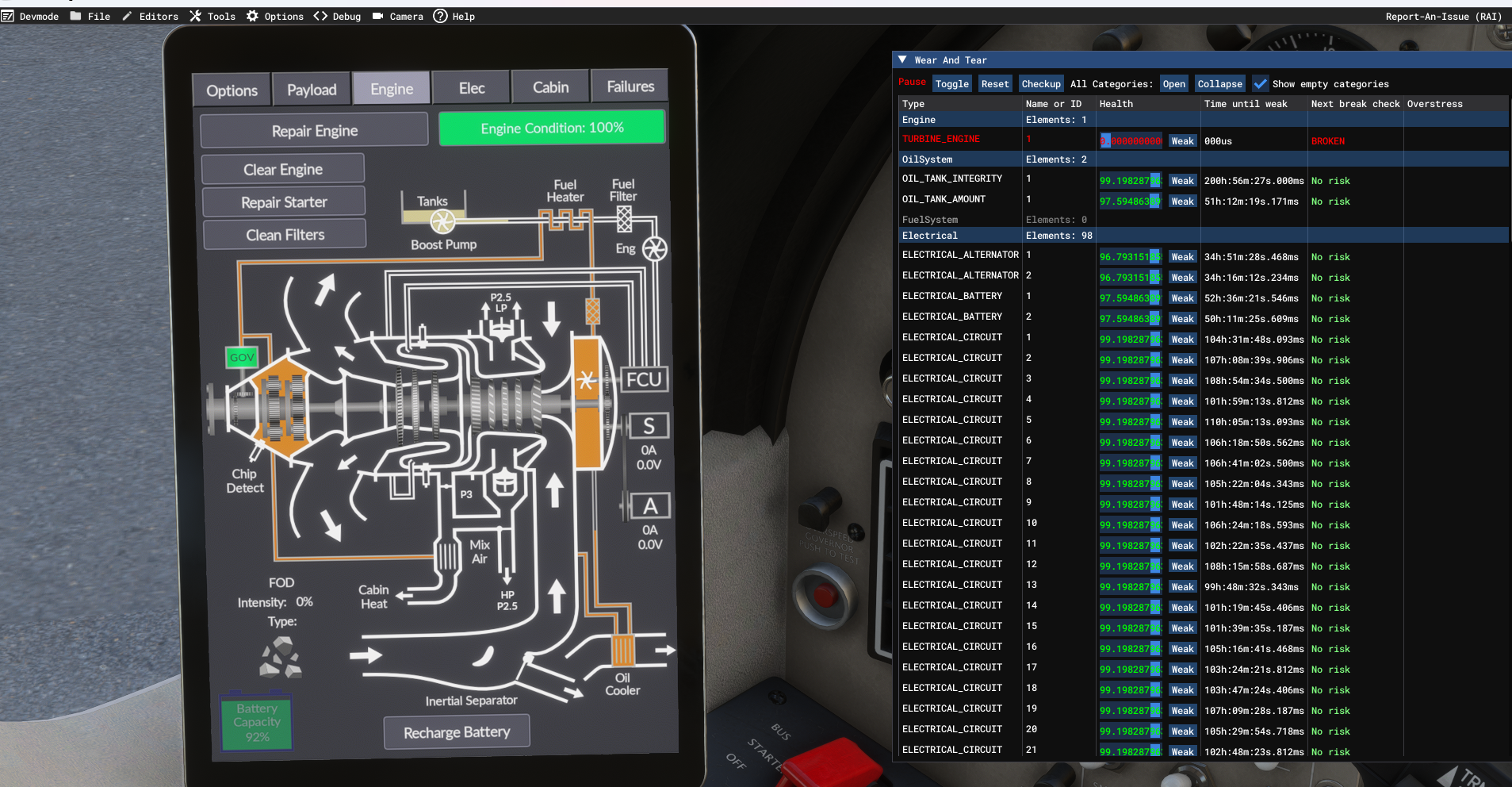
    Enroute at cruise settings 140ft/lbs, 1800rpm and MSFS 2024 threw a turbine failure. Landed KSMX and opened the Dev Mode Wear and Tear window to find the engine at 0%. Opened BSQ tablet to find no failure anywhere with engine at 100%.

    Thoughts?

    Screenshot 2026-03-19 072458.png

    1 Reply Last reply
    0
    • Black SquareB Offline
      Black SquareB Offline
      Black Square
      Black Square Developer
      wrote last edited by
      #2

      The two engine condition numbers are not connected at all, but the MSFS 2024 engine failure event acts on the simulation the same way as triggering an engine failure from my tablet. If you trigger an engine failure from my tablet, you will also see the displayed condition remain at 100%. I choose to interpret this as the extremely rare (in PT6's) fluke engine shutdown, which remains unexplained, even after the aircraft is inspected, and had nothing to do with improper operation.

      B 1 Reply Last reply
      1
      • Black SquareB Black Square

        The two engine condition numbers are not connected at all, but the MSFS 2024 engine failure event acts on the simulation the same way as triggering an engine failure from my tablet. If you trigger an engine failure from my tablet, you will also see the displayed condition remain at 100%. I choose to interpret this as the extremely rare (in PT6's) fluke engine shutdown, which remains unexplained, even after the aircraft is inspected, and had nothing to do with improper operation.

        B Online
        B Online
        Buzz
        wrote last edited by
        #3

        @Black-Square So the solution is to turn off FS2024 default engine damage?

        Black SquareB 1 Reply Last reply
        0
        • B Buzz

          @Black-Square So the solution is to turn off FS2024 default engine damage?

          Black SquareB Offline
          Black SquareB Offline
          Black Square
          Black Square Developer
          wrote last edited by
          #4

          @Buzz As you've probably seen in my FAQ, you need the engine damage option enable, in order for my failure system to trigger a complete engine failure, but MSFS should not just be triggering random catastrophic engine failures.

          1 Reply Last reply
          0
          • B Online
            B Online
            Buzz
            wrote last edited by
            #5

            Thanks Nick!

            1 Reply Last reply
            0
            • D Offline
              D Offline
              DoubleG01
              wrote last edited by
              #6

              I also experienced a seemingly random engine failure, on my first "full" flight (had only messed around w/ the aircraft for maybe 10-15 min prior) and about 30 minutes or so into this flight, with proper operation, a "default" MSFS 2024 engine failure occurred, seemingly without any reason. Just wanted to confirm - is it a bug? Or is it "supposed" to have this random failure? Thanks in advance! Loving the Caravan so far.

              1 Reply Last reply
              0
              • B Online
                B Online
                Buzz
                wrote last edited by
                #7

                @Black-Square
                Nick, the Caravan is consistently chewing away at the condition of the default FS2024 Turbine engine.

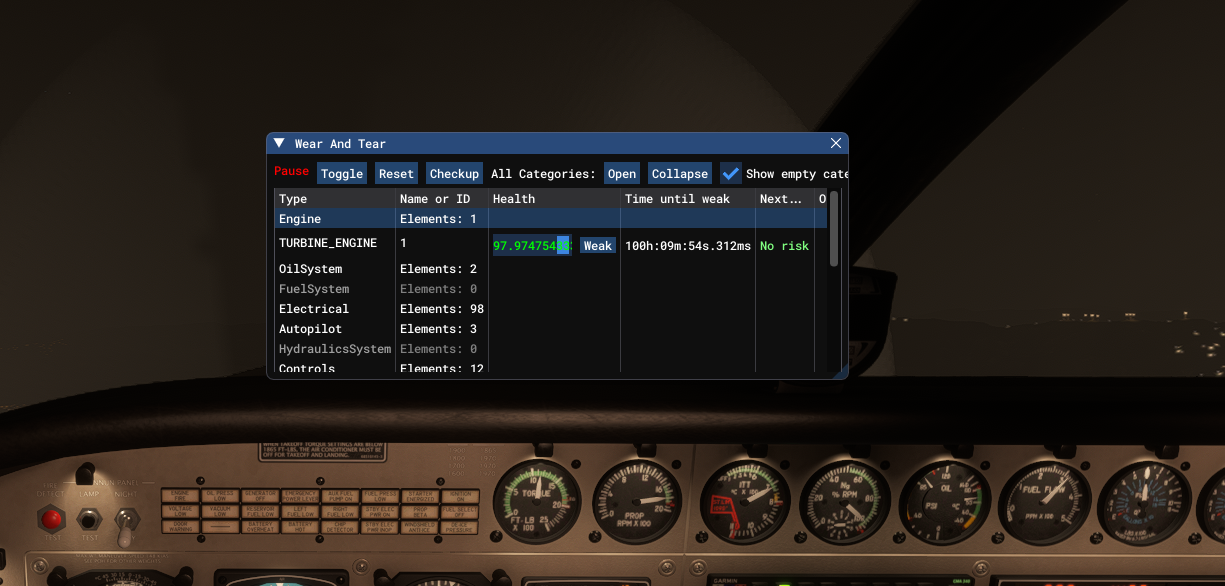
                I just did a test with the Wear and Tear window open and as long as the caravan engine is running, the wear and tear value is decreasing regardless of where the engine is operating at.

                Steps to test:

                1. Load caravan on the ground cold and dark..
                2. Turn on fs2024 Dev mode, goto Debug/Aircraft/Wear and Tear
                3. Move the wear and tear window to another screen to view..
                4. Normal startup on caravan, taxi, takeoff, climbout and cruise.
                5. Note the Turbine engine condition in the fs2024 W&T window decreasing until it gets to zero triggering a catastrophic failure.
                Black SquareB 1 Reply Last reply
                0
                • B Buzz

                  @Black-Square
                  Nick, the Caravan is consistently chewing away at the condition of the default FS2024 Turbine engine.

                  I just did a test with the Wear and Tear window open and as long as the caravan engine is running, the wear and tear value is decreasing regardless of where the engine is operating at.

                  Steps to test:

                  1. Load caravan on the ground cold and dark..
                  2. Turn on fs2024 Dev mode, goto Debug/Aircraft/Wear and Tear
                  3. Move the wear and tear window to another screen to view..
                  4. Normal startup on caravan, taxi, takeoff, climbout and cruise.
                  5. Note the Turbine engine condition in the fs2024 W&T window decreasing until it gets to zero triggering a catastrophic failure.
                  Black SquareB Offline
                  Black SquareB Offline
                  Black Square
                  Black Square Developer
                  wrote last edited by
                  #8

                  @Buzz Very interesting... I just did all of this exactly earlier, and found no problem, then let the simulator run for about two hours with no problem. Can you also tell me which variant you just tested with, just so there is no chance for error?

                  B 1 Reply Last reply
                  0
                  • B Online
                    B Online
                    Buzz
                    wrote last edited by
                    #9
                    This post is deleted!
                    1 Reply Last reply
                    0
                    • Black SquareB Black Square

                      @Buzz Very interesting... I just did all of this exactly earlier, and found no problem, then let the simulator run for about two hours with no problem. Can you also tell me which variant you just tested with, just so there is no chance for error?

                      B Online
                      B Online
                      Buzz
                      wrote last edited by
                      #10

                      @Black-Square The FedEx Livery of the cargomaster. Failures at 1x in MTBF mode

                      1 Reply Last reply
                      0
                      • B Online
                        B Online
                        Buzz
                        wrote last edited by
                        #11

                        And even under active or static pause while the sim is stopped, the W&T keeps decreasing. Screenshot 2026-03-20 052920.png
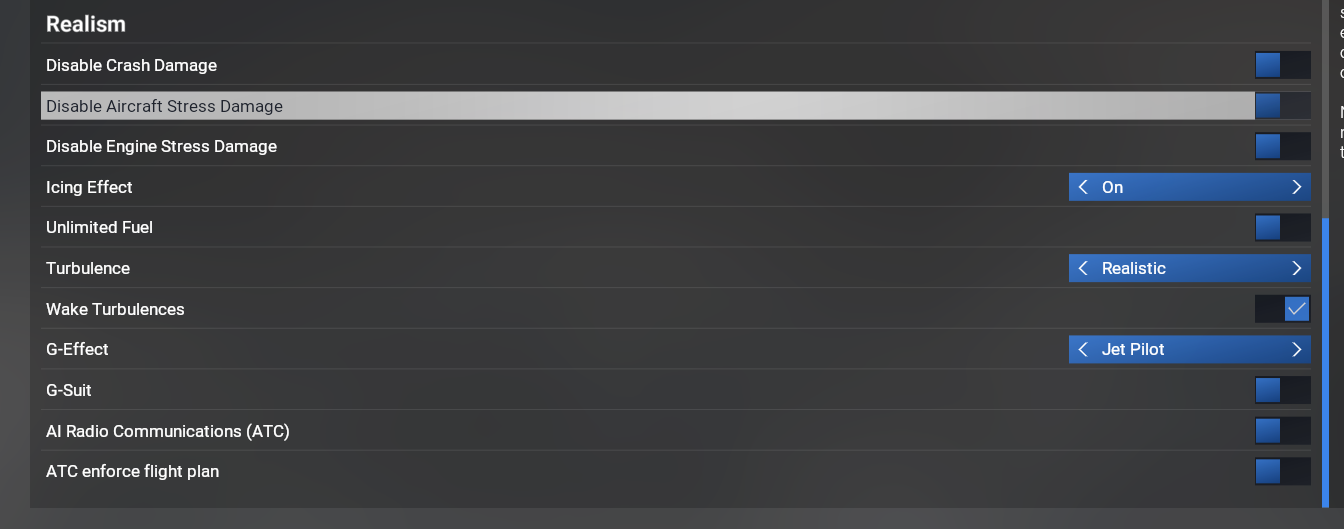
                        Using the "Modern" flight model, with these settings .
                        Screenshot 2026-03-20 055144.png

                        Black SquareB 1 Reply Last reply
                        0
                        • B Buzz referenced this topic
                        • B Buzz referenced this topic
                        • B Buzz

                          And even under active or static pause while the sim is stopped, the W&T keeps decreasing. Screenshot 2026-03-20 052920.png

                          Using the "Modern" flight model, with these settings .
                          Screenshot 2026-03-20 055144.png

                          Black SquareB Offline
                          Black SquareB Offline
                          Black Square
                          Black Square Developer
                          wrote last edited by Black Square
                          #12

                          @Buzz Thank you for the screenshot of your setting page! It's not the engine damage option, it's the airframe damage! Another completely sensical behavior from MSFS 2024!

                          I saw a post on the developer forums a while ago about spontaneous failures due to the simulator using the incorrect configuration speed for this mysterious "airframe damage", which I imagine is related. The damage begins as soon as the propeller is spinning, even before the engine is started.

                          Now we just need to find what undocumented configuration value is being used to determine that a propeller RPM of 0.0001 should damage the ""airframe"". More to come...

                          B 2 Replies Last reply
                          0
                          • Black SquareB Black Square

                            @Buzz Thank you for the screenshot of your setting page! It's not the engine damage option, it's the airframe damage! Another completely sensical behavior from MSFS 2024!

                            I saw a post on the developer forums a while ago about spontaneous failures due to the simulator using the incorrect configuration speed for this mysterious "airframe damage", which I imagine is related. The damage begins as soon as the propeller is spinning, even before the engine is started.

                            Now we just need to find what undocumented configuration value is being used to determine that a propeller RPM of 0.0001 should damage the ""airframe"". More to come...

                            B Online
                            B Online
                            Buzz
                            wrote last edited by
                            #13

                            @Black-Square Copy. I need to run to work, but will be back later today after my flight. Let me know if there is anything I can help test.

                            Cheers

                            1 Reply Last reply
                            0
                            • Black SquareB Black Square

                              @Buzz Thank you for the screenshot of your setting page! It's not the engine damage option, it's the airframe damage! Another completely sensical behavior from MSFS 2024!

                              I saw a post on the developer forums a while ago about spontaneous failures due to the simulator using the incorrect configuration speed for this mysterious "airframe damage", which I imagine is related. The damage begins as soon as the propeller is spinning, even before the engine is started.

                              Now we just need to find what undocumented configuration value is being used to determine that a propeller RPM of 0.0001 should damage the ""airframe"". More to come...

                              B Online
                              B Online
                              Buzz
                              wrote last edited by
                              #14

                              @Black-Square said in fs 2024 Vanilla Turbine Failure With No Blacksquare Failure:

                              Now we just need to find what undocumented configuration value is being used to determine that a propeller RPM of 0.0001 should damage the ""airframe"". More to come...

                              Thats odd since it's actually the "Engine Health" that's decreasing, not anything related to the airframe.

                              Black SquareB 1 Reply Last reply
                              0
                              • B Buzz

                                @Black-Square said in fs 2024 Vanilla Turbine Failure With No Blacksquare Failure:

                                Now we just need to find what undocumented configuration value is being used to determine that a propeller RPM of 0.0001 should damage the ""airframe"". More to come...

                                Thats odd since it's actually the "Engine Health" that's decreasing, not anything related to the airframe.

                                Black SquareB Offline
                                Black SquareB Offline
                                Black Square
                                Black Square Developer
                                wrote last edited by
                                #15

                                @Buzz said in fs 2024 Vanilla Turbine Failure With No Blacksquare Failure:

                                Thats odd

                                You're telling me.

                                1 Reply Last reply
                                0
                                • Black SquareB Offline
                                  Black SquareB Offline
                                  Black Square
                                  Black Square Developer
                                  wrote last edited by Black Square
                                  #16

                                  No, I take it all back. If you open the other drop-downs in your Wear and Tear debugger, I think you will see that all the aircraft's components are being degraded at the same time and the same rate, as soon as the propeller is spinning. It indicates that a failure would not be expected for ~120 hours, though (yikes, what is this wear and tear system?) Did you ever see the TURBINE_ENGINE health declining at a rate faster than in the default aircraft? I think what I'm seeing right now is just how this default wear and tear systems is supposed to function.

                                  EDIT: Yes, I see the same behavior with the default TBM. Also, the condition keeps declining after you exit the flight and you're in the main menu...

                                  Sorry for the false alarm, everyone. I've become very sleep deprived while working on this tonight.

                                  1 Reply Last reply
                                  0
                                  • Black SquareB Offline
                                    Black SquareB Offline
                                    Black Square
                                    Black Square Developer
                                    wrote last edited by
                                    #17

                                    Here is a post on the Official Forums that seems to be at the intersection of what's being described here. Last post 19 hours ago. If anyone wants to engage, let me know what you can learn. I have already invested a substantial amount of time in this, but I would still rather is be a MSFS 2024 fluke than something I neglected.

                                    1 Reply Last reply
                                    0
                                    • B Online
                                      B Online
                                      Buzz
                                      wrote last edited by
                                      #18

                                      @Black-Square So shutting off Airframe damage should solve the issue?
                                      1 Reply Last reply
                                      0
                                      • P Online
                                        P Online
                                        pequenyo
                                        wrote last edited by pequenyo
                                        #19

                                        The malfunction was engine in msfs 24. Maybe turn them both off (engine and airframe)

                                        1 Reply Last reply
                                        0
                                        • J Online
                                          J Online
                                          jmarkows
                                          wrote last edited by
                                          #20

                                          Engine Damage needs to remain enabled for the full Black Square engine stuff to work fully.

                                          1 Reply Last reply
                                          0
                                          Reply
                                          • Reply as topic
                                          Log in to reply
                                          • Oldest to Newest
                                          • Newest to Oldest
                                          • Most Votes


                                          • Login

                                          • Don't have an account? Register

                                          • Login or register to search.
                                          • First post
                                            Last post
                                          0
                                          • Categories
                                          • Recent
                                          • Tags
                                          • Popular
                                          • Users