Skip to content
  • Categories
  • Recent
  • Tags
  • Popular
  • Users
Collapse
Just Flight Community Forum
  1. Home
  2. Just Flight
  3. MSFS Products
  4. Black Square Add-Ons
  5. Caravan Professional
  6. fs 2024 Vanilla Turbine Failure With No Blacksquare Failure - SOLVED See First Post Edit

fs 2024 Vanilla Turbine Failure With No Blacksquare Failure - SOLVED See First Post Edit

Scheduled Pinned Locked Moved Caravan Professional
38 Posts 7 Posters 1.8k Views 1 Watching
  • Oldest to Newest
  • Newest to Oldest
  • Most Votes
Reply
  • Reply as topic
Log in to reply
This topic has been deleted. Only users with topic management privileges can see it.
  • B Offline
    B Offline
    Buzz
    wrote on last edited by
    #11

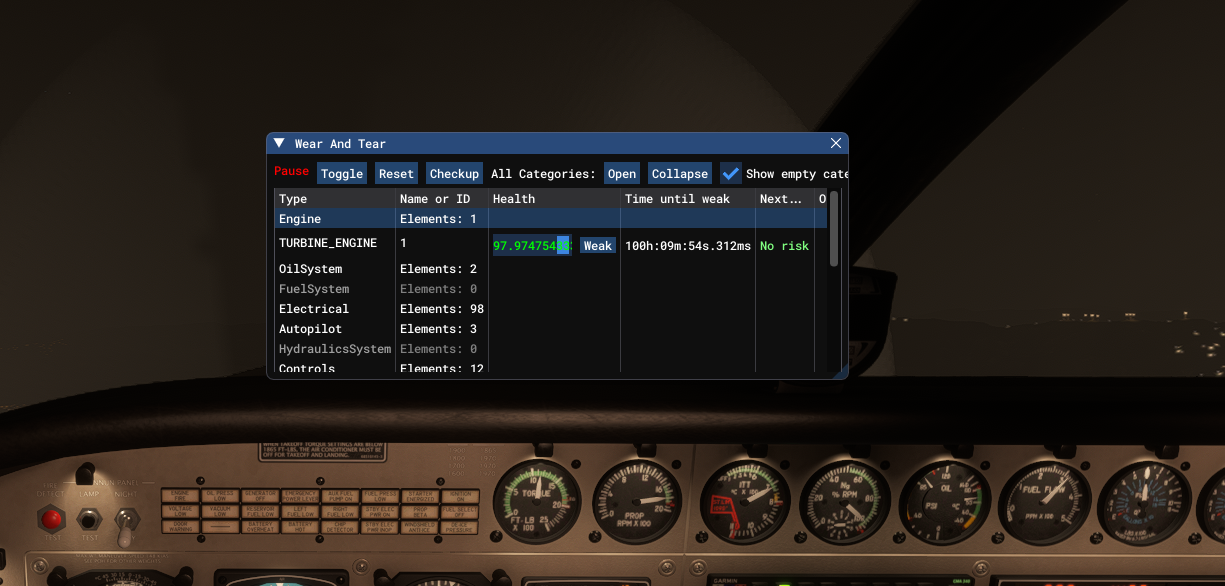
    And even under active or static pause while the sim is stopped, the W&T keeps decreasing. Screenshot 2026-03-20 052920.png
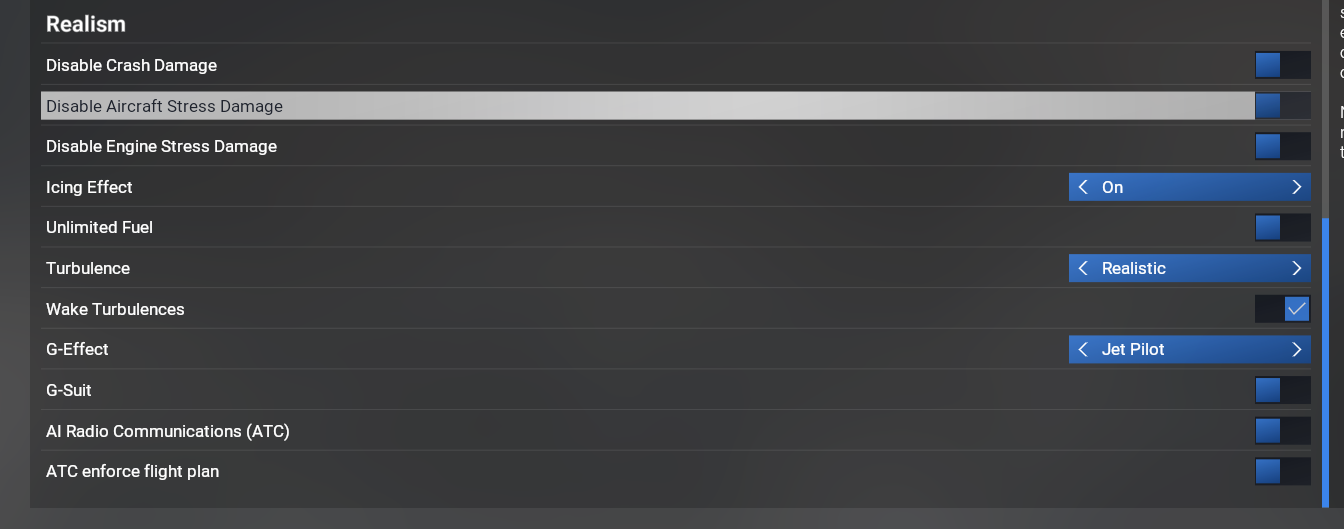
    Using the "Modern" flight model, with these settings .
    Screenshot 2026-03-20 055144.png

    Black SquareB 1 Reply Last reply
    0
    • B Buzz referenced this topic on
    • B Buzz referenced this topic on
    • B Buzz

      And even under active or static pause while the sim is stopped, the W&T keeps decreasing. Screenshot 2026-03-20 052920.png

      Using the "Modern" flight model, with these settings .
      Screenshot 2026-03-20 055144.png

      Black SquareB Offline
      Black SquareB Offline
      Black Square
      Black Square Developer
      wrote on last edited by Black Square
      #12

      @Buzz Thank you for the screenshot of your setting page! It's not the engine damage option, it's the airframe damage! Another completely sensical behavior from MSFS 2024!

      I saw a post on the developer forums a while ago about spontaneous failures due to the simulator using the incorrect configuration speed for this mysterious "airframe damage", which I imagine is related. The damage begins as soon as the propeller is spinning, even before the engine is started.

      Now we just need to find what undocumented configuration value is being used to determine that a propeller RPM of 0.0001 should damage the ""airframe"". More to come...

      B 2 Replies Last reply
      0
      • Black SquareB Black Square

        @Buzz Thank you for the screenshot of your setting page! It's not the engine damage option, it's the airframe damage! Another completely sensical behavior from MSFS 2024!

        I saw a post on the developer forums a while ago about spontaneous failures due to the simulator using the incorrect configuration speed for this mysterious "airframe damage", which I imagine is related. The damage begins as soon as the propeller is spinning, even before the engine is started.

        Now we just need to find what undocumented configuration value is being used to determine that a propeller RPM of 0.0001 should damage the ""airframe"". More to come...

        B Offline
        B Offline
        Buzz
        wrote on last edited by
        #13

        @Black-Square Copy. I need to run to work, but will be back later today after my flight. Let me know if there is anything I can help test.

        Cheers

        1 Reply Last reply
        0
        • Black SquareB Black Square

          @Buzz Thank you for the screenshot of your setting page! It's not the engine damage option, it's the airframe damage! Another completely sensical behavior from MSFS 2024!

          I saw a post on the developer forums a while ago about spontaneous failures due to the simulator using the incorrect configuration speed for this mysterious "airframe damage", which I imagine is related. The damage begins as soon as the propeller is spinning, even before the engine is started.

          Now we just need to find what undocumented configuration value is being used to determine that a propeller RPM of 0.0001 should damage the ""airframe"". More to come...

          B Offline
          B Offline
          Buzz
          wrote on last edited by
          #14

          @Black-Square said in fs 2024 Vanilla Turbine Failure With No Blacksquare Failure:

          Now we just need to find what undocumented configuration value is being used to determine that a propeller RPM of 0.0001 should damage the ""airframe"". More to come...

          Thats odd since it's actually the "Engine Health" that's decreasing, not anything related to the airframe.

          Black SquareB 1 Reply Last reply
          0
          • B Buzz

            @Black-Square said in fs 2024 Vanilla Turbine Failure With No Blacksquare Failure:

            Now we just need to find what undocumented configuration value is being used to determine that a propeller RPM of 0.0001 should damage the ""airframe"". More to come...

            Thats odd since it's actually the "Engine Health" that's decreasing, not anything related to the airframe.

            Black SquareB Offline
            Black SquareB Offline
            Black Square
            Black Square Developer
            wrote on last edited by
            #15

            @Buzz said in fs 2024 Vanilla Turbine Failure With No Blacksquare Failure:

            Thats odd

            You're telling me.

            1 Reply Last reply
            0
            • Black SquareB Offline
              Black SquareB Offline
              Black Square
              Black Square Developer
              wrote on last edited by Black Square
              #16

              No, I take it all back. If you open the other drop-downs in your Wear and Tear debugger, I think you will see that all the aircraft's components are being degraded at the same time and the same rate, as soon as the propeller is spinning. It indicates that a failure would not be expected for ~120 hours, though (yikes, what is this wear and tear system?) Did you ever see the TURBINE_ENGINE health declining at a rate faster than in the default aircraft? I think what I'm seeing right now is just how this default wear and tear systems is supposed to function.

              EDIT: Yes, I see the same behavior with the default TBM. Also, the condition keeps declining after you exit the flight and you're in the main menu...

              Sorry for the false alarm, everyone. I've become very sleep deprived while working on this tonight.

              1 Reply Last reply
              0
              • Black SquareB Offline
                Black SquareB Offline
                Black Square
                Black Square Developer
                wrote on last edited by
                #17

                Here is a post on the Official Forums that seems to be at the intersection of what's being described here. Last post 19 hours ago. If anyone wants to engage, let me know what you can learn. I have already invested a substantial amount of time in this, but I would still rather is be a MSFS 2024 fluke than something I neglected.

                1 Reply Last reply
                0
                • B Offline
                  B Offline
                  Buzz
                  wrote on last edited by
                  #18

                  @Black-Square So shutting off Airframe damage should solve the issue?

                  1 Reply Last reply
                  0
                  • P Offline
                    P Offline
                    pequenyo
                    wrote on last edited by pequenyo
                    #19

                    The malfunction was engine in msfs 24. Maybe turn them both off (engine and airframe)

                    1 Reply Last reply
                    0
                    • J Offline
                      J Offline
                      jmarkows
                      wrote on last edited by
                      #20

                      Engine Damage needs to remain enabled for the full Black Square engine stuff to work fully.

                      1 Reply Last reply
                      0
                      • J Offline
                        J Offline
                        jmarkows
                        wrote on last edited by
                        #21

                        Ooh, reading that post linked above, are people who are seeing this on SU4 or the SU5 beta? I cannot contribute a data point because I have aircraft and airframe stress damage off by default, but also despite owning the Caravan since day 1 I have been unable to find flying time this week, so I'm waiting until 1.1 drops next week.

                        1 Reply Last reply
                        0
                        • P Offline
                          P Offline
                          pequenyo
                          wrote on last edited by pequenyo
                          #22

                          I am on su4

                          1 Reply Last reply
                          1
                          • M Offline
                            M Offline
                            Mik75
                            wrote on last edited by Mik75
                            #23

                            On the last 4 flights, I had 4 engine failures. On the last 2, the engine stress damage in MSFS2024 (SU4) was turned off. The tablet showed no failure at all. In 2 of the 4 cases, I could restart the engine in flight. All 4 flights were done with the passenger variant.

                            P 1 Reply Last reply
                            0
                            • M Mik75

                              On the last 4 flights, I had 4 engine failures. On the last 2, the engine stress damage in MSFS2024 (SU4) was turned off. The tablet showed no failure at all. In 2 of the 4 cases, I could restart the engine in flight. All 4 flights were done with the passenger variant.

                              P Offline
                              P Offline
                              pequenyo
                              wrote on last edited by pequenyo
                              #24

                              @Mik75 try only with aircraft dmg off and let us know... I am also testing that way...

                              M 2 Replies Last reply
                              1
                              • P pequenyo

                                @Mik75 try only with aircraft dmg off and let us know... I am also testing that way...

                                M Offline
                                M Offline
                                Mik75
                                wrote on last edited by
                                #25

                                @pequenyo Ok, I'm not sure if I have that set to on. Engine damage is definitely off. I'll recheck later tonight and report back here. 🙂

                                1 Reply Last reply
                                0
                                • L Offline
                                  L Offline
                                  londuncombe
                                  wrote on last edited by
                                  #26

                                  Hi. I'm experiencing the same thing. Random MSFS generated engine failures even though engine says 100%. Frustrating, impossible to do a full flight.

                                  1 Reply Last reply
                                  1
                                  • P pequenyo

                                    @Mik75 try only with aircraft dmg off and let us know... I am also testing that way...

                                    M Offline
                                    M Offline
                                    Mik75
                                    wrote on last edited by
                                    #27

                                    @pequenyo
                                    I can confirm, that I had "Disable Crash Damage" and "Disable Aircraft Stress Damage" turned ON on these flights.

                                    1 Reply Last reply
                                    1
                                    • P Offline
                                      P Offline
                                      pequenyo
                                      wrote on last edited by pequenyo
                                      #28

                                      So, I did a couple of flights today. What I have seen is that if u treat the engine with love, wear and tear of msfs diminishes very slowly. At the same rate of other variables. But if u treat it increasingly worse that starts to increase the rate of descend, to the point it diminishes almost to 0 in a few minutes. However the Caravan tablet seems to work differently and damage is almost none. Probably thats what got us confused.

                                      1 Reply Last reply
                                      0
                                      • B Offline
                                        B Offline
                                        Buzz
                                        wrote on last edited by
                                        #29

                                        Follow these steps to test please.

                                        Load caravan on the ground cold and dark..
                                        Turn on fs2024 Dev mode, goto Debug/Aircraft/Wear and Tear

                                        1. Move the wear and tear window to another screen to view..
                                        2. Normal startup on caravan, taxi, takeoff, climbout and cruise.
                                        3. Note the Turbine engine condition in the fs2024 W&T window decreasing until it gets to zero triggering a catastrophic failure.

                                        Do this test with FS2024 engine and aircraft stress damage off. Is the default fs2024 wear and tear values decreasing?

                                        1 Reply Last reply
                                        0
                                        • P Offline
                                          P Offline
                                          pequenyo
                                          wrote on last edited by pequenyo
                                          #30

                                          I did try. If u disable aircraft dmg wear and tear numbers dont decrease. If u only disable engine dmg they decrease.
                                          So, with aircraft dmg disabled if u ovestress the engine u see some yellow overstress numbers on the wear and tear. They do make decrease engine health on BS EFB and wear and tear green numbers remain at 100.

                                          But if u dont disable aircraft dmg wear and tear decreases and can go very high down. But that is not what the BS EFB computes. So u can destroy the engine in wear and tear but not in the BS EFB.

                                          Pay attention that even if numbers dont decrease if u press toggle once u activate the damage and they decrease.

                                          Black SquareB 1 Reply Last reply
                                          0
                                          Reply
                                          • Reply as topic
                                          Log in to reply
                                          • Oldest to Newest
                                          • Newest to Oldest
                                          • Most Votes


                                          • Login

                                          • Don't have an account? Register

                                          • Login or register to search.
                                          • First post
                                            Last post
                                          0
                                          • Categories
                                          • Recent
                                          • Tags
                                          • Popular
                                          • Users