Skip to content
  • Categories
  • Recent
  • Tags
  • Popular
  • Users
Collapse
Just Flight Community Forum
  1. Home
  2. Just Flight
  3. MSFS Products
  4. Black Square Add-Ons
  5. Commander 114
  6. BATC not Recognizing COM2

BATC not Recognizing COM2

Scheduled Pinned Locked Moved Commander 114
19 Posts 4 Posters 457 Views 1 Watching
  • Oldest to Newest
  • Newest to Oldest
  • Most Votes
Reply
  • Reply as topic
Log in to reply
This topic has been deleted. Only users with topic management privileges can see it.
  • WooliesW Offline
    WooliesW Offline
    Woolies
    wrote last edited by Woolies
    #10

    I was using both MX170B the other day with BATC with no issues. Had radio comms on 1 and ATIS on 2

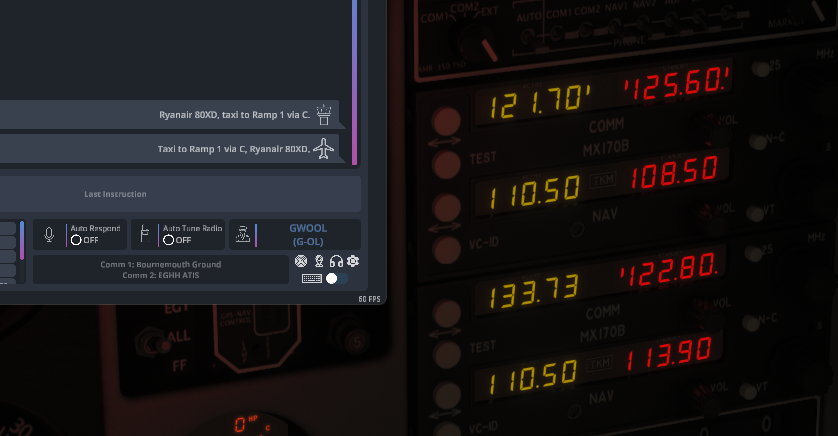
    Just logged in quickly. In attached, EGHH Ground on Comm1 and EGHH ATIS on Comm2. All coming through fine.
    Screenshot 2026-08-09 230154.png

    https://www.twitch.tv/woolies

    N 1 Reply Last reply
    0
    • WooliesW Woolies

      I was using both MX170B the other day with BATC with no issues. Had radio comms on 1 and ATIS on 2

      Just logged in quickly. In attached, EGHH Ground on Comm1 and EGHH ATIS on Comm2. All coming through fine.

      Screenshot 2026-08-09 230154.png

      N Offline
      N Offline
      NixonRedgrave
      wrote last edited by
      #11

      @Woolies

      Not sure what to say. This is what I see right now.

      Default is the MX170B set. Swapped to TDS GTN set. Same message for COM2 with either set.

      BeyondATC 08_11_26 10_54_29.png

      There are some inconsistencies here, for me. For example, in this thread I've noted that the COM1 won't see the tuned frequency without messing about with BATC's in-app tuning function and/or swapping avionics. Today, I launch the sim, load into the 114 with the MX170B as the default and it's seeing COM1 tuned correctly, but no COM2.

      It's inconsistent for me.

      1 Reply Last reply
      0
      • WooliesW Offline
        WooliesW Offline
        Woolies
        wrote last edited by
        #12

        @NixonRedgrave

        Hi, it is very strange. For me every time I have used BATC and the Commander all has worked perfectly. So the hooks between the 2 are definitely there correctly.

        Are you running any other apps that could be interfering with the setup somehow? I am not sure what but there must be something creating this issue for you somehow.

        https://www.twitch.tv/woolies

        N 1 Reply Last reply
        0
        • YankeeTendy35Y Offline
          YankeeTendy35Y Offline
          YankeeTendy35
          wrote last edited by
          #13

          BATC currently doesn't recognize Comm 2 unless you're listening to an ATIS frequency. You cannot receive or transmit on comm 2 otherwise. Actually just read that this morning, while reading about their VFR progress. I can't for the life of me find a link to the article now, but I know that's what it said.

          1 Reply Last reply
          0
          • WooliesW Offline
            WooliesW Offline
            Woolies
            wrote last edited by
            #14

            Yep comm 2 is currently only atis for the moment

            https://www.twitch.tv/woolies

            1 Reply Last reply
            0
            • WooliesW Woolies

              @NixonRedgrave

              Hi, it is very strange. For me every time I have used BATC and the Commander all has worked perfectly. So the hooks between the 2 are definitely there correctly.

              Are you running any other apps that could be interfering with the setup somehow? I am not sure what but there must be something creating this issue for you somehow.

              N Offline
              N Offline
              NixonRedgrave
              wrote last edited by NixonRedgrave
              #15

              @Woolies

              I’m not running any apps. I have a very lean system with minimal add-ons, and those from highly reputable developers.

              I can trim everything away and retest with just the 114 installed.

              @YankeeTendy35

              I had ATIS tuned on COM2 when I made my post today, yet it indicated COM2 was off.

              I don’t know if the issue is the experimental version of BATC vs. the early access version, but I’d really doubt it since the radios aren’t what BATC are even working on within the experimental branch.

              I’m also on SU6 beta, so I don’t know if that is also a differing factor.

              1 Reply Last reply
              1
              • WooliesW Offline
                WooliesW Offline
                Woolies
                wrote last edited by
                #16

                @NixonRedgrave

                I am using the experimental BATC so wouldn't seem to be an issue with that version. I am on the SU5.1. Perhaps it is SU6 related then. Didn't realise you were on the beta. I wouldn't normally expect everything to work correctly on the beta channel of MSFS.

                https://www.twitch.tv/woolies

                N 1 Reply Last reply
                0
                • WooliesW Woolies

                  @NixonRedgrave

                  I am using the experimental BATC so wouldn't seem to be an issue with that version. I am on the SU5.1. Perhaps it is SU6 related then. Didn't realise you were on the beta. I wouldn't normally expect everything to work correctly on the beta channel of MSFS.

                  N Offline
                  N Offline
                  NixonRedgrave
                  wrote last edited by
                  #17

                  @Woolies

                  If it's SU6 Beta, then it's still the 114. I'm flying the A2A Comanche, and its radios behave as expected.

                  Again, I'll look further into the 114 and do some testing when I'm in the mood for it. For now, I'd rather be flying.

                  1 Reply Last reply
                  0
                  • WooliesW Offline
                    WooliesW Offline
                    Woolies
                    wrote last edited by
                    #18

                    Sure, but betas are betas and some things just dont work properly for whatever reason. Hope you find your issue soon. Happy flying

                    https://www.twitch.tv/woolies

                    1 Reply Last reply
                    0
                    • WooliesW Offline
                      WooliesW Offline
                      Woolies
                      wrote last edited by
                      #19

                      @NixonRedgrave

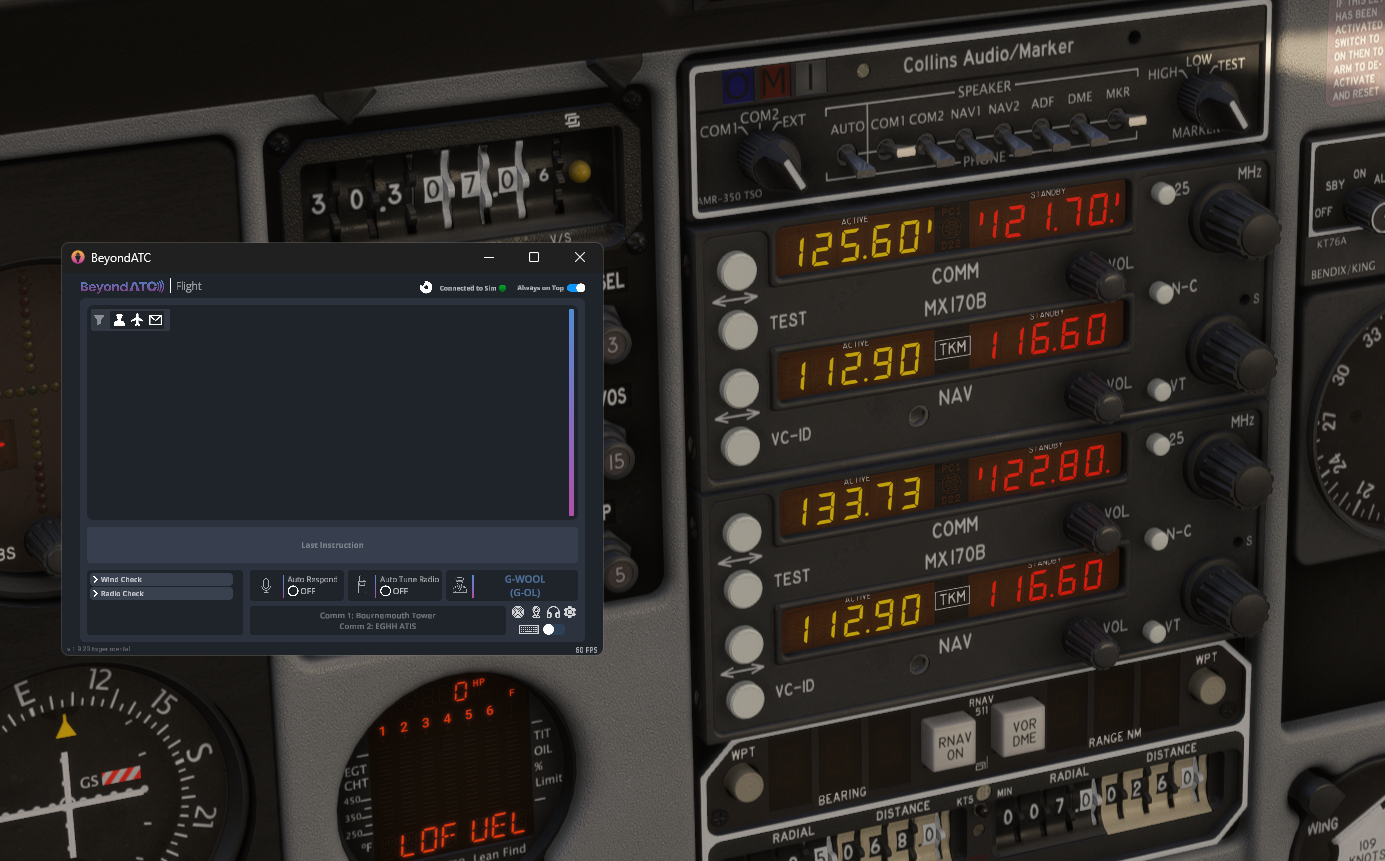
                      SU6 now installed as live and BATC still working just fine with EGHH Tower on Comm 1 and EGHH ATIS on Comm 2. So doesn't seem to be a general issue. Must be something in your install of MSFS or the 114 that is causing you the issue? Hope you resolve soon.
                      Screenshot 2026-08-14 081008.png

                      https://www.twitch.tv/woolies

                      1 Reply Last reply
                      0
                      Reply
                      • Reply as topic
                      Log in to reply
                      • Oldest to Newest
                      • Newest to Oldest
                      • Most Votes


                      • Login

                      • Don't have an account? Register

                      • Login or register to search.
                      • First post
                        Last post
                      0
                      • Categories
                      • Recent
                      • Tags
                      • Popular
                      • Users