Skip to content
  • Categories
  • Recent
  • Tags
  • Popular
  • Users
Collapse
Just Flight Community Forum
  1. Home
  2. Just Flight
  3. MSFS Products
  4. Black Square Add-Ons
  5. Commander 114
  6. Commander Paintkit

Commander Paintkit

Scheduled Pinned Locked Moved Commander 114
14 Posts 5 Posters 361 Views 1 Watching
  • Oldest to Newest
  • Newest to Oldest
  • Most Votes
Reply
  • Reply as topic
Log in to reply
This topic has been deleted. Only users with topic management privileges can see it.
  • WooliesW Offline
    WooliesW Offline
    Woolies
    wrote last edited by
    #3

    Can't wait to design my own livery for it. I hope the Commander drops early tomorrow so we can all get going flying and learning it as soon as ....

    https://www.twitch.tv/woolies

    1 Reply Last reply
    0
    • WooliesW Offline
      WooliesW Offline
      Woolies
      wrote last edited by
      #4

      Commander installed and ready to go. I hope we get a paint kit soon so we can customise our lovely new aircraft.

      https://www.twitch.tv/woolies

      1 Reply Last reply
      0
      • McOatmealM Offline
        McOatmealM Offline
        McOatmeal
        wrote last edited by
        #5

        Yeah I gotta get an ATP Livery for the commander!

        Callsign “Career Track”
        17% APR Sallie Mae Special

        1 Reply Last reply
        0
        • T Offline
          T Offline
          Tim-HH
          wrote last edited by Tim-HH
          #6

          Unfortunately, flightsim.to has introduced new restrictions, so I can't upload the paint kit today.

          However, I have uploaded it to my Google Drive for now 🙂

          https://drive.google.com/file/d/19l8XJHxkHHYYAaT7IUBKXN5Y-Ku5Tsti/view?usp=sharing

          1 Reply Last reply
          0
          • WooliesW Offline
            WooliesW Offline
            Woolies
            wrote last edited by
            #7

            Legend, thank you!

            https://www.twitch.tv/woolies

            1 Reply Last reply
            0
            • WooliesW Offline
              WooliesW Offline
              Woolies
              wrote last edited by
              #8

              Ok, just downloaded, again thanks. I have not used FBX and Blender before. Most paint kits I have used have PSD files that I work from. Is there a way to create PSD or similar via Blender and an FBX?

              Appreciate any help

              https://www.twitch.tv/woolies

              F T 2 Replies Last reply
              0
              • WooliesW Woolies

                Ok, just downloaded, again thanks. I have not used FBX and Blender before. Most paint kits I have used have PSD files that I work from. Is there a way to create PSD or similar via Blender and an FBX?

                Appreciate any help

                F Offline
                F Offline
                Flak
                wrote last edited by Flak
                #9

                @Woolies In lieu of an official PSD paintkit you can roll your own using my new MSFS Livery Toolkit. I recently added the ability to extract the relevant parts of an aircraft, into a 2D and/or 3D paintkit.

                You can download it here
                https://theflaknine.github.io/MSFS-Livery-Toolkit/

                Go through the setup to ensure it can find your aircraft folder(s), then go to the Paintkit Builder tab (bottom left). From there, hit DISCOVER AIRCRAFT and find the Commander 114 and pick the textures you want to generate into a paintkit. It will extract them and build layered PSD files, also with UV wireframe and paintable area layers (useful as a mask). You can optionally include AO, Roughness and Metal layers if you want.

                Obviously it's not as clean as a real paintkit that has nice separate layers for dirt, panel lines, etc, but it'll give you something to get started.
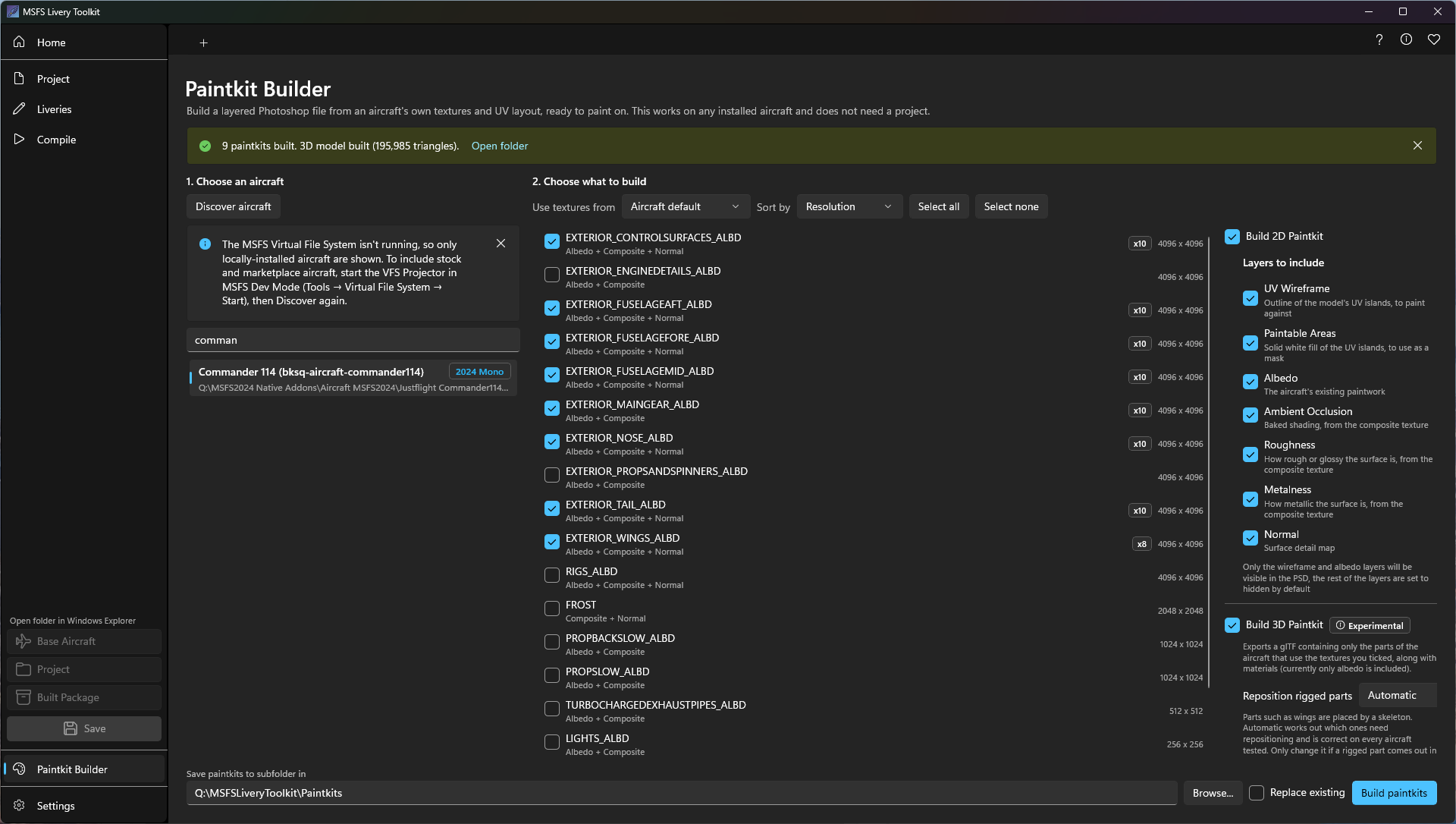
                865bbaaf-d745-41ad-9113-abd94c7101a9-image.png

                Here's an example of the PSD it will generate.
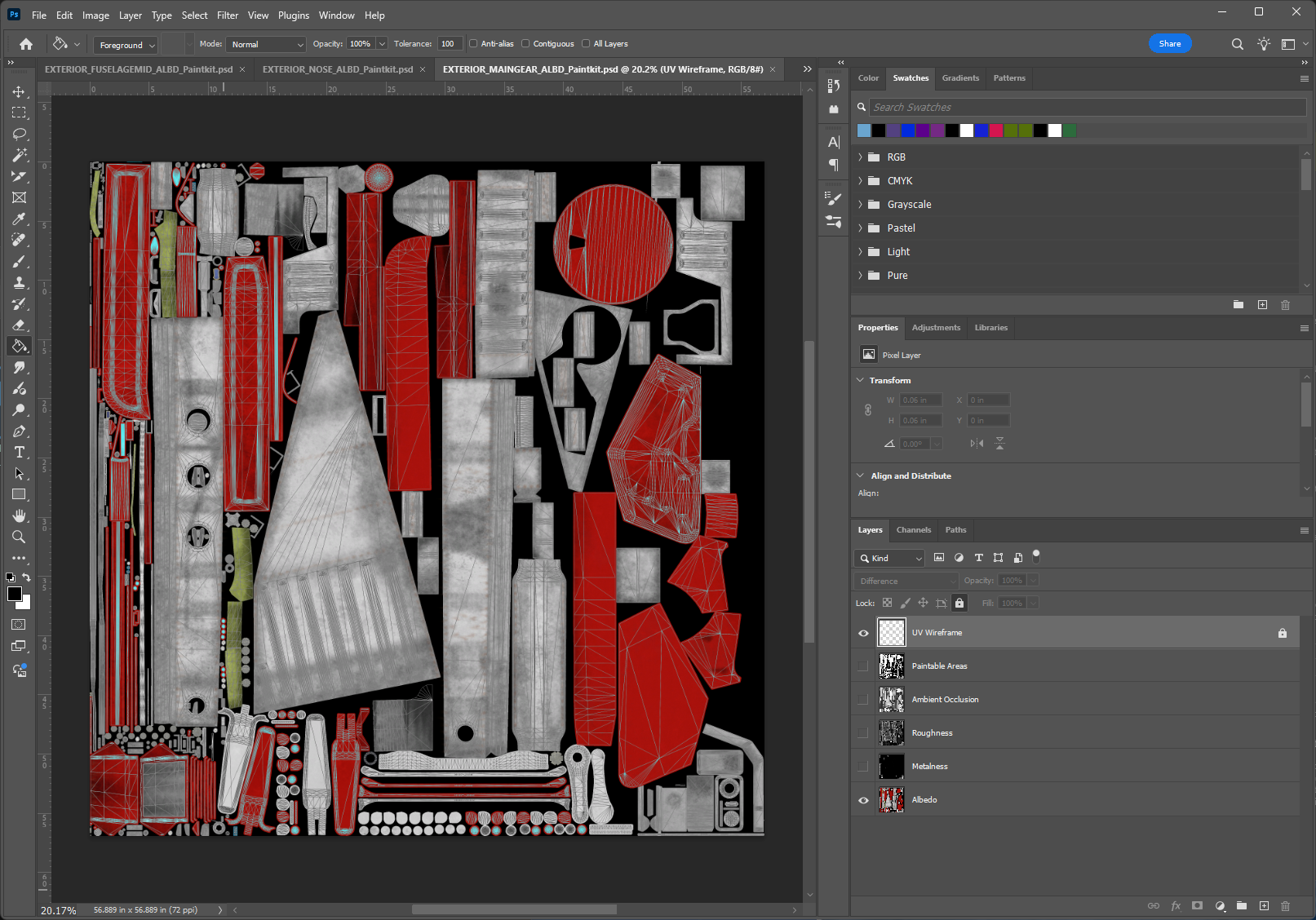
                ba39e47a-8db5-4fc4-9552-ef3ed6104c8e-image.png

                1 Reply Last reply
                0
                • WooliesW Offline
                  WooliesW Offline
                  Woolies
                  wrote last edited by
                  #10

                  Oh, wow, cool. Will take a look. Many thanks

                  https://www.twitch.tv/woolies

                  1 Reply Last reply
                  0
                  • WooliesW Woolies

                    Ok, just downloaded, again thanks. I have not used FBX and Blender before. Most paint kits I have used have PSD files that I work from. Is there a way to create PSD or similar via Blender and an FBX?

                    Appreciate any help

                    T Offline
                    T Offline
                    Tim-HH
                    wrote last edited by Tim-HH
                    #11

                    @Woolies Yes, PSD files are not available. In Photoshop, you can set the layer option to 'Multiply' to retain the details of the base textures when painting over them.

                    The paintkit is now available on flightsim.to as well: https://flightsim.to/addon/112753/black-square-commander-114-paintkit

                    1 Reply Last reply
                    0
                    • WooliesW Offline
                      WooliesW Offline
                      Woolies
                      wrote last edited by Woolies
                      #12

                      @Tim-HH Great, many thanks for all that and the amazing liveries you create. Just wanted to ask. I am going to try and teach myself Blender going fwd, what version can be used without issues. Seen many discussions on this but couldn't really come to a conclusion. Thanks again.

                      @Flak I will also have a look at your amazing utility. Congrats on creating it!

                      https://www.twitch.tv/woolies

                      T 1 Reply Last reply
                      0
                      • WooliesW Woolies

                        @Tim-HH Great, many thanks for all that and the amazing liveries you create. Just wanted to ask. I am going to try and teach myself Blender going fwd, what version can be used without issues. Seen many discussions on this but couldn't really come to a conclusion. Thanks again.

                        @Flak I will also have a look at your amazing utility. Congrats on creating it!

                        T Offline
                        T Offline
                        Tim-HH
                        wrote last edited by
                        #13

                        @Woolies Thanks a lot! I'm glad that you like my liveries 🙂

                        I use Blender 3.6, which is fully compatible with the two existing MSFS glTF importers.

                        If you haven't found a good Blender tutorial yet, I think this is the best one and the one I used to learn to create repaints in Blender.

                        https://www.youtube.com/watch?v=3atVWEEITQ0

                        1 Reply Last reply
                        0
                        • WooliesW Offline
                          WooliesW Offline
                          Woolies
                          wrote last edited by
                          #14

                          @Tim-HH Cool thanks. I think 3.6 is the one I grabbed anyway after reading about the importers. Will check the tutorial, thanks!

                          https://www.twitch.tv/woolies

                          1 Reply Last reply
                          0
                          Reply
                          • Reply as topic
                          Log in to reply
                          • Oldest to Newest
                          • Newest to Oldest
                          • Most Votes


                          • Login

                          • Don't have an account? Register

                          • Login or register to search.
                          • First post
                            Last post
                          0
                          • Categories
                          • Recent
                          • Tags
                          • Popular
                          • Users