
Shared Cockpit help for KR87
-
I am trying to make a profile for the Shared Cockpit application called FSCopilot. In the definitions for the profiles they use get: and then set: to monitor for change and initiate events to change the values in the second aircraft. The get: usually uses LVARS, A:events, B:events or H:events to monitor and K: or B: events to set the changes.
I have noticed that 98% of your TBM850 is set up perfectly for this type of automation to sync the second plane while flying, which is outstanding. Functions like turning a knob or pushing a button are set up slightly different regarding knobs/buttons that are synching vs when they cannot be synched for shared cockpit. This doesn’t mean you can’t make/manipulate them in the sim for setting up spadnext or mobiflight, etc. I am only referring to the ability to synch using shared cockpit application. I am not a programmer just an interested person in getting this to work to fly with others so hopefully I can explain this correctly.
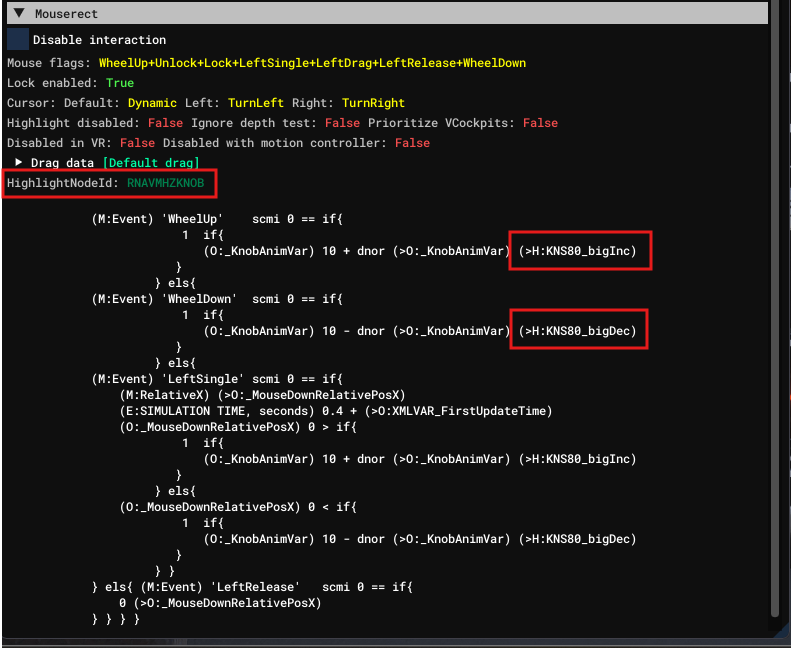
As an example, on the KX155 the interaction knobs (Large and Small) work great due to them having an H:event for increase or decrease movement independent of the K:event for setting the value to sync. This works well because the H:Event can be monitored for change in the get: and then actioned in the set:.
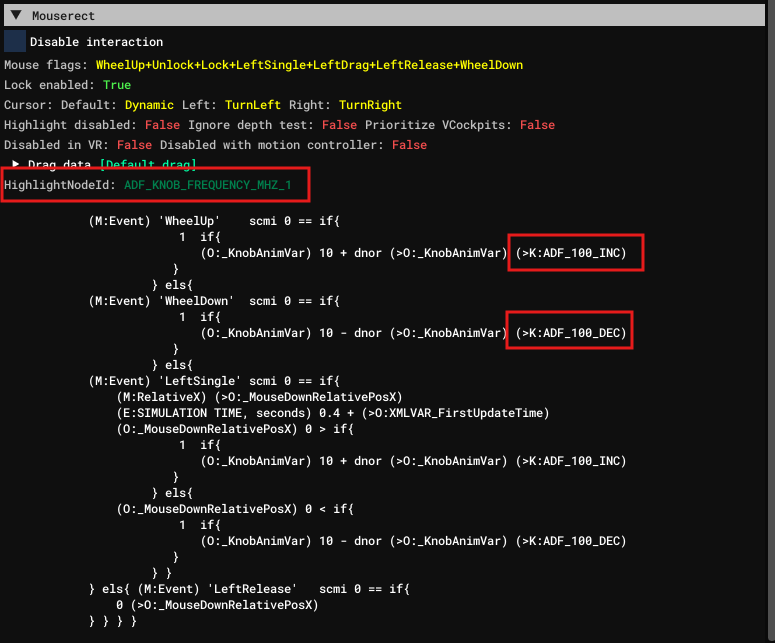
This in contrast, when looking at the KR87 ADF Knobs. Noice the knobs are set to change on movement using the K:event only. There is no other event to see the knob move to use as the get: below is the events on the large and small knobs.
K:ADF_1_INC or DEC (Small knob with var_adfKnobPulled “0”)
K:ADF_10_INC or DEC (Small knob with var_adfKnobPulled “1”)
K:ADF_100_INC or DEC (Needed for Large Knob)The PULL event and action for the Small button is working perfectly as it has an LVAR tied to it.
What I would like to ask for H:events for movement along with the K:events for setting like you did the KX155 Large and Small knobs. IE H:kr87_bigInc, H:kr87_bigDec for big and H:kr87_smallInc, H:kr87_smallDec
Another simple example is the SWAP buttons on the KX155’s to change frequencies don’t have an action change to monitor unlike the KR87 <-FRQ-> button has both and that works well. If you could add the following H events it would be super helpful
H:RADIO1_COM_SWAP
H:RADIO1_NAV_SWAP
H:RADIO2_COM_SWAP
H:RADIO2_NAV_SWAP
I hope this is something that you can entertain and help with to get this further along in the shared cockpit environment. I have some other areas/items similar to the items above and would be happy to provide further info as needed. I am attaching the screenshots for the K155 Large KNOB interaction and the KR87 Large knob to help illustrate the difference.
Thank you in advance for your help -
I didn't want to leave your thorough post without a reply, but I also wanted to be honest about expectations. I'm glad you shared this, because it's a new concept to me regarding how some shared cockpit applications work. Like anything that is shared with me, I try to keep it in mind while designing new aircraft systems; however, making a change like this across all my aircraft would probably required editing ~70 files, a couple hours of testing across platforms, and documenting my changes. I make similar changes to my entire fleet frequently, but I like to do them universally, for all interactions, and across all aircraft. Otherwise, I will end up duplicating my work when someone else asks about a specific event for another piece of equipment in another aircraft. I've been trending that way over time, but I know there are still a few instances of the old method in my new aircraft too.
I will absolutely keep this in mind, and try to be conscious of this in the future, but I didn't want you to think that I was ignoring a simple request either. I hope that makes sense, and that my explanation is clear. Finally, I would be happy to help you create your own solution if you were willing to be adventurous with editing code. Just because it would take a lot of effort for me to make this change to all my aircraft and push updates to all platforms/marketplaces doesn't mean you can't have the exact solution you're looking for in the meantime!
-
I didn't want to leave your thorough post without a reply, but I also wanted to be honest about expectations. I'm glad you shared this, because it's a new concept to me regarding how some shared cockpit applications work. Like anything that is shared with me, I try to keep it in mind while designing new aircraft systems; however, making a change like this across all my aircraft would probably required editing ~70 files, a couple hours of testing across platforms, and documenting my changes. I make similar changes to my entire fleet frequently, but I like to do them universally, for all interactions, and across all aircraft. Otherwise, I will end up duplicating my work when someone else asks about a specific event for another piece of equipment in another aircraft. I've been trending that way over time, but I know there are still a few instances of the old method in my new aircraft too.
I will absolutely keep this in mind, and try to be conscious of this in the future, but I didn't want you to think that I was ignoring a simple request either. I hope that makes sense, and that my explanation is clear. Finally, I would be happy to help you create your own solution if you were willing to be adventurous with editing code. Just because it would take a lot of effort for me to make this change to all my aircraft and push updates to all platforms/marketplaces doesn't mean you can't have the exact solution you're looking for in the meantime!
@Black-Square I am ready whenever you are to dig deeper. I appreciate you offer and would like to learn/work with you on this. Thanks again for your very kind offer. Is this better handled outside of this thread?
-
Sorry for the delay. I was not sure if this would really be feasible to tutorialize, but after looking at the code, I think you will be able to figure it out.
Here is the process. Let me know if you have any trouble following it. This is probably one of the more complicated things I have ever offered to walk someone through, so I apologize if I'm assuming any knowledge or skills that you don't already possess.
- Locate the following block of text in KR87.js:
case "frqTransfert": if(this.multiMode != 0) this.multiMode = 0; else SimVar.SetSimVarValue("K:ADF" + this.radioIndex + "_RADIO_SWAP", "Boolean", 0); break;-
Copy this block below the
break;, and rename thecasefor what you want to call your HTML event. For example,bigInc, will correspond to the HTML event,>H:adf_bigInc. -
Edit the second to last line of the code block to trigger the native K:Event that you would like. For example...
SimVar.SetSimVarValue("K:ADF" + this.radioIndex + "100_INC", "Boolean", 0);- For the small knob, which depends on the state of the knob being pulled or not, it would be...
if(SimVar.GetSimVarValue("L:var_adfKnobPulled", "bool")){ SimVar.SetSimVarValue("K:ADF" + this.radioIndex + "10_INC", "Boolean", 0); else SimVar.SetSimVarValue("K:ADF" + this.radioIndex + "1_INC", "Boolean", 0);-
Now, search for
ADF_Knob_Frequency_MHz_1in AnalogTBM.XML. -
Here, replace the two following K:Events...
<CLOCKWISE_CODE>(>K:ADF_100_INC)</CLOCKWISE_CODE> <ANTICLOCKWISE_CODE>(>K:ADF_100_DEC)</ANTICLOCKWISE_CODE>With your own new HTML events:
<CLOCKWISE_CODE>(>H:adf_bigInc)</CLOCKWISE_CODE> <ANTICLOCKWISE_CODE>(>H:adf_bigDec)</ANTICLOCKWISE_CODE>- This is the basic principle for all the changes that you want to make. Please let me know how this goes, and what else I can help you with. Thanks for being willing to experiment with this on your own! Like I said, I will consider doing this for all my aircraft in the future when I see exactly how many interactions would have to be updated across all my aircraft, but in the meantime, I am happy to help!
-
Sorry for the delay. I was not sure if this would really be feasible to tutorialize, but after looking at the code, I think you will be able to figure it out.
Here is the process. Let me know if you have any trouble following it. This is probably one of the more complicated things I have ever offered to walk someone through, so I apologize if I'm assuming any knowledge or skills that you don't already possess.
- Locate the following block of text in KR87.js:
case "frqTransfert": if(this.multiMode != 0) this.multiMode = 0; else SimVar.SetSimVarValue("K:ADF" + this.radioIndex + "_RADIO_SWAP", "Boolean", 0); break;-
Copy this block below the
break;, and rename thecasefor what you want to call your HTML event. For example,bigInc, will correspond to the HTML event,>H:adf_bigInc. -
Edit the second to last line of the code block to trigger the native K:Event that you would like. For example...
SimVar.SetSimVarValue("K:ADF" + this.radioIndex + "100_INC", "Boolean", 0);- For the small knob, which depends on the state of the knob being pulled or not, it would be...
if(SimVar.GetSimVarValue("L:var_adfKnobPulled", "bool")){ SimVar.SetSimVarValue("K:ADF" + this.radioIndex + "10_INC", "Boolean", 0); else SimVar.SetSimVarValue("K:ADF" + this.radioIndex + "1_INC", "Boolean", 0);-
Now, search for
ADF_Knob_Frequency_MHz_1in AnalogTBM.XML. -
Here, replace the two following K:Events...
<CLOCKWISE_CODE>(>K:ADF_100_INC)</CLOCKWISE_CODE> <ANTICLOCKWISE_CODE>(>K:ADF_100_DEC)</ANTICLOCKWISE_CODE>With your own new HTML events:
<CLOCKWISE_CODE>(>H:adf_bigInc)</CLOCKWISE_CODE> <ANTICLOCKWISE_CODE>(>H:adf_bigDec)</ANTICLOCKWISE_CODE>- This is the basic principle for all the changes that you want to make. Please let me know how this goes, and what else I can help you with. Thanks for being willing to experiment with this on your own! Like I said, I will consider doing this for all my aircraft in the future when I see exactly how many interactions would have to be updated across all my aircraft, but in the meantime, I am happy to help!
@Black-Square thanks for responding. I will dig in and see how it goes
