
EDM 800 LOP, ROP, no EGT. Not Working
-
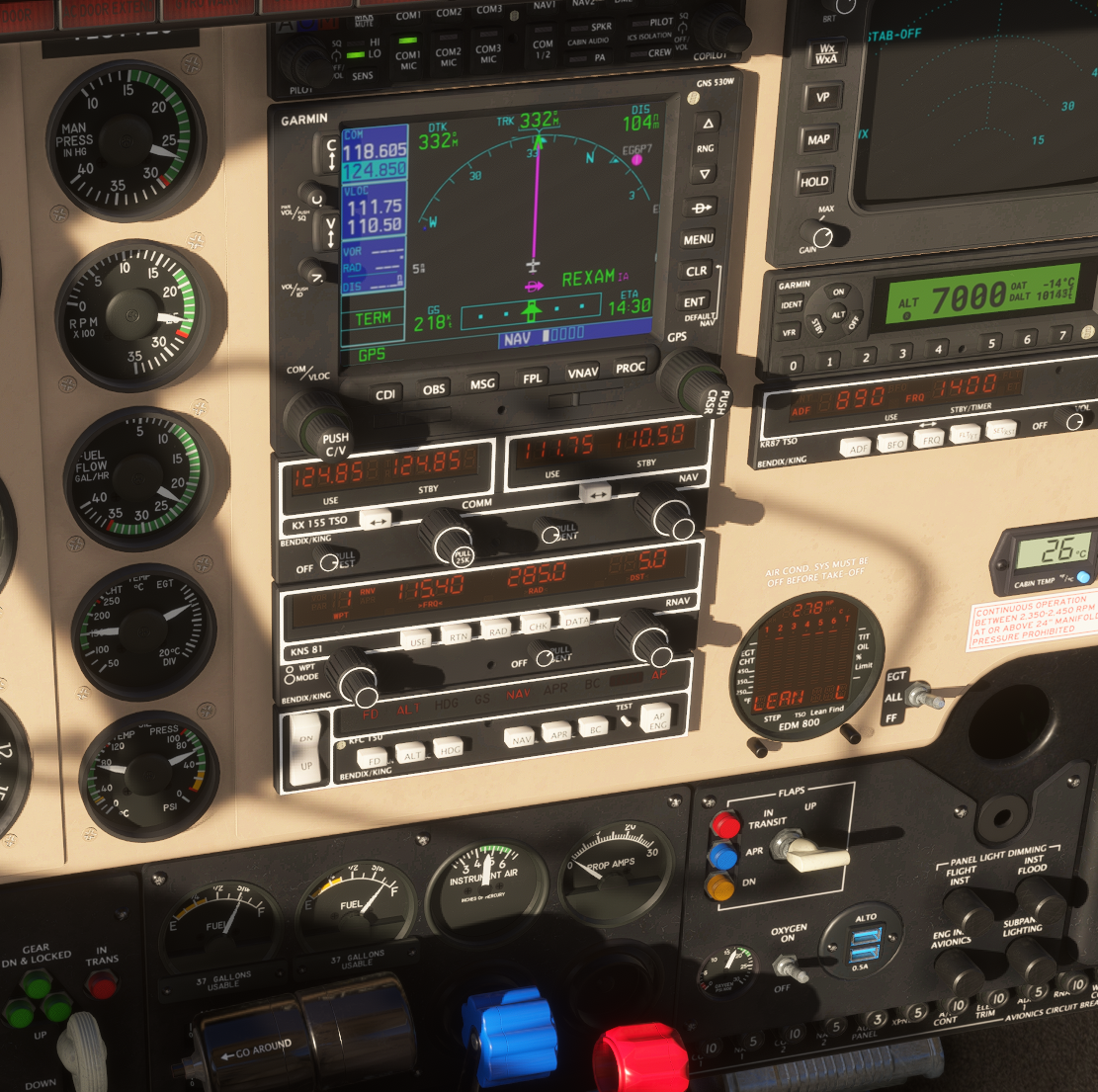
Please, I would really like to resolve this once and for all. English is not my native language, but I believe that after reading the manual and watching several videos, I understand the principle.
In all the videos, everyone always has very tall EGT bars on the screen, and then it’s enough to slightly pull the mixture and the peak appears. But as you can see, in my case there is nothing that can appear.
Please, is this some kind of BUG, or am I still missing something? The bars are not there when the mixture is rich, and they are not there when the mixture is lean either. It doesn’t matter where I put the lever — the only thing that happens is that when I pull it all the way back, the engine shuts down.
Could someone please explain this to me? ROP obviously doesn’t work either. It’s the same situation again: I can see the EGT bars, but reducing the mixture does absolutely nothing.
-
I think the best possible way to help you get an answer as quickly as possible would be for you to post a video for myself and others to review. I know that can be difficult if you're not used to recording videos, so you could also try posting your exact steps or screenshots of every step. I've never seen any behavior like you're describing, so I'm inclined to thing that it's a procedural issue, and not a bug, but anything is possible! Also, your English is better than many native speakers that I know

-
@Black-Square Haha, thank you
 I guess you are on the American continent since you are online when it’s evening for me.
Now to the point: after re-reading my post, I realized I didn’t explain it very clearly.
Takeoff – full RPM, full throttle, full rich mixture.
Climb (for example to FL150) – still full RPM, full throttle, full rich mixture.
Cruise – I stabilize the aircraft, set RPM to about 2500, reduce the throttle, and slightly pull the mixture back so it is not at the full forward stop.
After letting the aircraft stabilize in this configuration for some time, I press the Lean Find button on the EDM-800.
I want Lean L, so I press both buttons.
I am now in Lean L mode and the display shows what you can see in the screenshot.
Here is where the problem starts – I gently pull the mixture lever back and expect the EGT bars to appear. However, no bars appear at all; none show up, and instead even the small amount that is there disappears. I can pull the mixture lever all the way back and the aircraft just starts losing power and descending.
So, simply put, my problem is that when I lean the mixture, the EGT columns do not appear, unlike what I see in all the videos and tutorials.
I have the impression that this might be a bug, but I still believe it is just me and that I am missing something. I will try to record a video.
-
I think the best possible way to help you get an answer as quickly as possible would be for you to post a video for myself and others to review. I know that can be difficult if you're not used to recording videos, so you could also try posting your exact steps or screenshots of every step. I've never seen any behavior like you're describing, so I'm inclined to thing that it's a procedural issue, and not a bug, but anything is possible! Also, your English is better than many native speakers that I know
@Black-Square I suspect this might be some kind of bug, but I would really like to be wrong. It’s even harder for me to judge because I’m a beginner in aviation. I have the impression that the mixture lever does not affect EGT at all. Instead, EGT seems to react to the throttle lever.
I’m basing this purely on all the videos and also on your manual: everyone pulls the mixture lever back and their EGT reacts immediately, while nobody touches the throttle. I recorded a video where I show how it behaves for me when I do it the way it’s supposed to be done, and then I show a second scenario where I can get the EGT bars to appear only by adding throttle.
However, even in that case, the mixture lever still does not respond when I pull it back, and the EGT column does not start flashing. It only starts flashing when the aircraft begins to descend.
Please judge for yourself:
https://www.youtube.com/watch?v=vFC2HhadsCgPlease help me resolve this issue, whatever the cause may be. It is very frustrating
-
Thank thank you so much for the video! You have no idea how helpful it is for diagnosing these kind of problems.
I dropped everything I was doing to respond to this message, because I think I figured out the problem! Please go into your settings menu and see if you have the "Automixture" feature enabled under "Assistances". I think it might be as simple as that, as you seem to have on/off mixture control, but no gradual mixture control. Please let me know if that solves the problem!
-
@Black-Square Of course that was it

Such a silly thing, and my brain completely skipped over that possibility — but at least the whole time I knew something was wrong.
You’re my lifesaver. Thank you so much, I really appreciate your quick response and your willingness to help. -
So glad that was it! I really wasn't thinking about that at all until I watched your video. I may have never thought of it without your video, in fact. The brain responds to the smallest visual stimulus. Let me know if you have any other questions!
-
So glad that was it! I really wasn't thinking about that at all until I watched your video. I may have never thought of it without your video, in fact. The brain responds to the smallest visual stimulus. Let me know if you have any other questions!
@Black-Square Yeah
everything is completely fine now. I just wanted to ask, even though it’s a bit of a different topic and I don’t want to create a new thread for it—I noticed that the aircraft is already a bit dirty by default, which is nice, but does it no longer get visually dirtier along the way?
