
Keyboard inputs
-
If I understand the original poster correctly, this is actually a long-standing bug on xbox, for all Black Square planes, and I now feel bad for never having brought it up before.
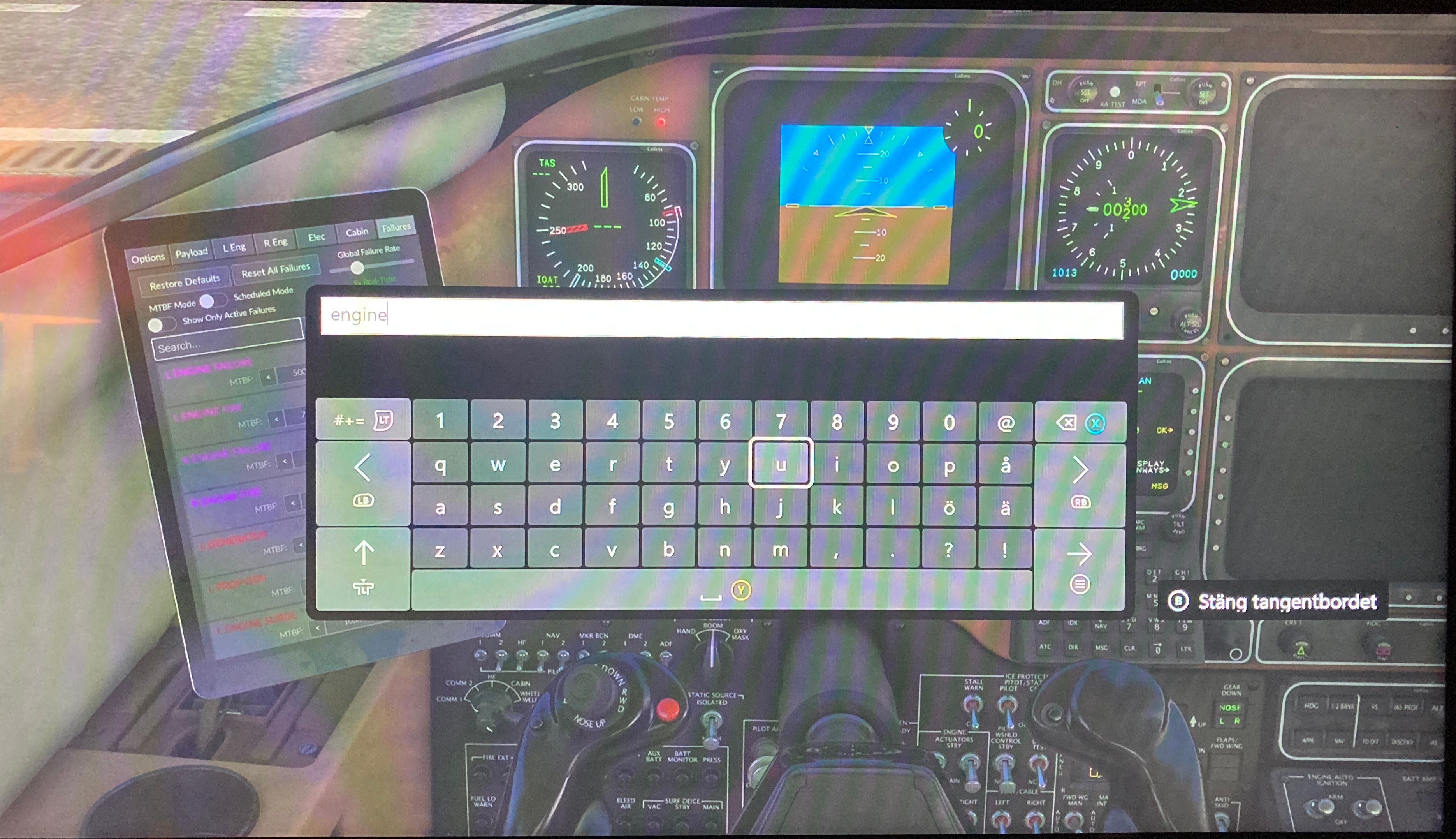
When you click on a text field on an xbox, the xbox interface brings up a software keyboard on screen, so you can type just using a controller. Even if you connect a physical keyboard, you’re still getting the software keyboard on screen. When you hit ‘enter’ on either the physical or software keyboard, the software keyboard gets dismissed, and whatever you typed should populate the text box. But on Black Square planes, that doesn’t happen. The text field remains empty.
Now, there is sort of a workaround, which is why I’ve never brought it up before. If you’re quick, you can actually type in the text field, after hitting ‘enter’ because focus is still there for a brief period. This, however, only works if you’re using a physical keyboard.
So, it’s not only for typing in the Starship CDU, the text field on the failure page, on the EFB, is another example. For clarity, clicking the keys on the CDU itself to enter letters and numbers works as expected, it’s using a keyboard to the enter text, that doesn’t really work.
I can’t actually take screenshots or clips of the software keyboard, because the screenshots don’t include it, so I had to snap a photo with my phone. Apologies for the absolute dodgy image quality. A clip would probably explain it a lot better than I could with words.
-
Do I understand correctly that you are able to type and the characters appear on screen? When you say "nothing happens", what are you expecting to happen when you press enter?
I expect what I typed to appear in the FMS so I can confirm it. It simply does nothing. The Xbox virtual keyboard pops up on the screen, I can type, but when I hit ENTER, the text doesn't show up there.
I don't know if you've ever had the chance to fly on Xbox, but when using a keyboard, anything I type makes that virtual on-screen keyboard pop up. I never use it; I only use my physical keyboard.
-
If I understand the original poster correctly, this is actually a long-standing bug on xbox, for all Black Square planes, and I now feel bad for never having brought it up before.
When you click on a text field on an xbox, the xbox interface brings up a software keyboard on screen, so you can type just using a controller. Even if you connect a physical keyboard, you’re still getting the software keyboard on screen. When you hit ‘enter’ on either the physical or software keyboard, the software keyboard gets dismissed, and whatever you typed should populate the text box. But on Black Square planes, that doesn’t happen. The text field remains empty.
Now, there is sort of a workaround, which is why I’ve never brought it up before. If you’re quick, you can actually type in the text field, after hitting ‘enter’ because focus is still there for a brief period. This, however, only works if you’re using a physical keyboard.
So, it’s not only for typing in the Starship CDU, the text field on the failure page, on the EFB, is another example. For clarity, clicking the keys on the CDU itself to enter letters and numbers works as expected, it’s using a keyboard to the enter text, that doesn’t really work.
I can’t actually take screenshots or clips of the software keyboard, because the screenshots don’t include it, so I had to snap a photo with my phone. Apologies for the absolute dodgy image quality. A clip would probably explain it a lot better than I could with words.
@ploodovic I'm on FS2020. Yes, that's exactly what I'm doing. I have a mouse and keyboard connected to my Xbox; they work perfectly in the simulator, but in the Starship, specifically, whatever I type on the keyboard is not transferred to the FMS.
-
@alanfernandes Hi. Just for info, I am on Xbox and keyboard functionality works fine.
Pic below shows me entering EGGP then clicking the “Enter” soft key:
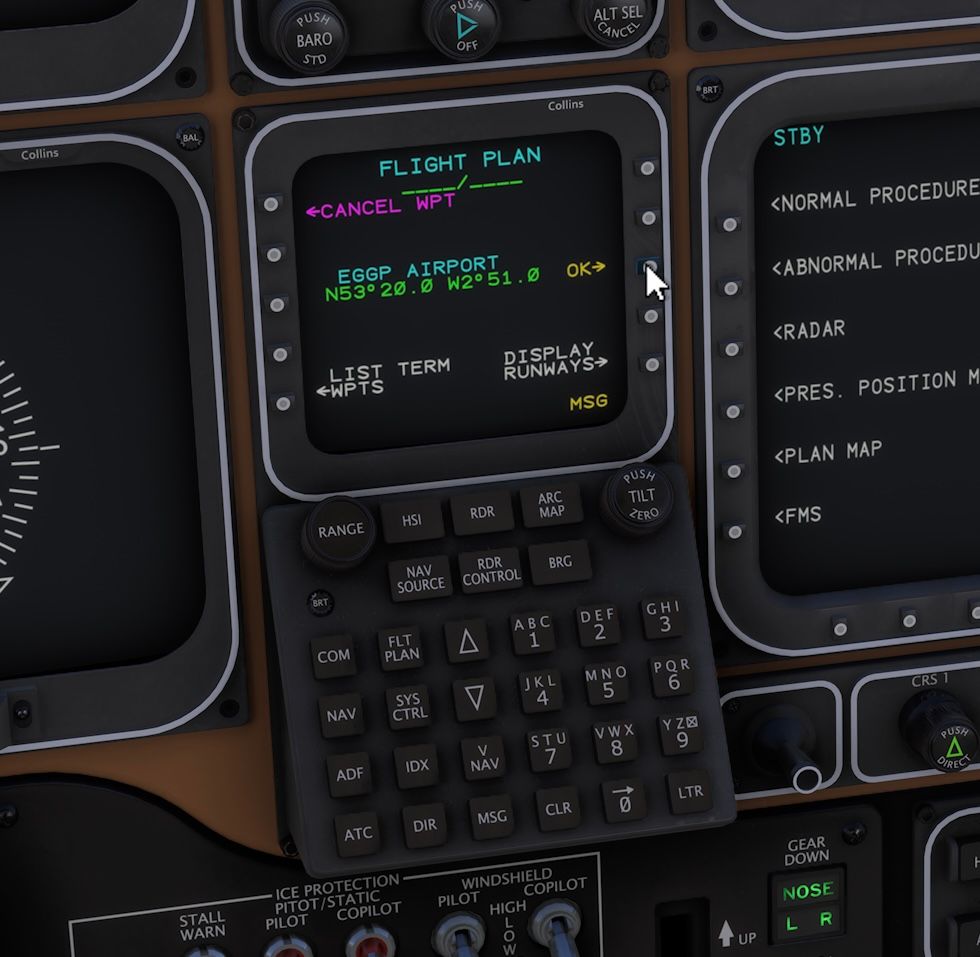
I’m now using the native 2024 version, but have never encountered any issue with the keyboard in 2020 or 2024.
@AlphaEcho FS2020 here on XBOX Series X.
-
Oh OK, apologies. I’ve not played 2020 in quite a while.
Edit: Just tested in 2024. The same issue exists. The pop up keyboard appears and allows you to enter text, but when you press enter the field you expect to be populated remains blank.
I’ve never clicked there before as I just use the mouse on the graphical keyboard.
-
If I understand the original poster correctly, this is actually a long-standing bug on xbox, for all Black Square planes, and I now feel bad for never having brought it up before.
When you click on a text field on an xbox, the xbox interface brings up a software keyboard on screen, so you can type just using a controller. Even if you connect a physical keyboard, you’re still getting the software keyboard on screen. When you hit ‘enter’ on either the physical or software keyboard, the software keyboard gets dismissed, and whatever you typed should populate the text box. But on Black Square planes, that doesn’t happen. The text field remains empty.
Now, there is sort of a workaround, which is why I’ve never brought it up before. If you’re quick, you can actually type in the text field, after hitting ‘enter’ because focus is still there for a brief period. This, however, only works if you’re using a physical keyboard.
So, it’s not only for typing in the Starship CDU, the text field on the failure page, on the EFB, is another example. For clarity, clicking the keys on the CDU itself to enter letters and numbers works as expected, it’s using a keyboard to the enter text, that doesn’t really work.
I can’t actually take screenshots or clips of the software keyboard, because the screenshots don’t include it, so I had to snap a photo with my phone. Apologies for the absolute dodgy image quality. A clip would probably explain it a lot better than I could with words.
@ploodovic said in Keyboard inputs:
Now, there is sort of a workaround, which is why I’ve never brought it up before. If you’re quick, you can actually type in the text field, after hitting ‘enter’ because focus is still there for a brief period. This, however, only works if you’re using a physical keyboard.
Could you explain that in other words? Sorry, I'm Brazilian and my English isn't the best.

-
Oh OK, apologies. I’ve not played 2020 in quite a while.
Edit: Just tested in 2024. The same issue exists. The pop up keyboard appears and allows you to enter text, but when you press enter the field you expect to be populated remains blank.
I’ve never clicked there before as I just use the mouse on the graphical keyboard.
@AlphaEcho said in Keyboard inputs:
Oh OK, apologies. I’ve not played 2020 in quite a while.
No problem!
-
I know it’s not a solution but I would highly recommend trying using a mouse.
Edit: Especially with all the heartfelt effort that has gone into creating these masterpieces of electronic recreation!
This post is deleted! -
Oh OK, apologies. I’ve not played 2020 in quite a while.
Edit: Just tested in 2024. The same issue exists. The pop up keyboard appears and allows you to enter text, but when you press enter the field you expect to be populated remains blank.
I’ve never clicked there before as I just use the mouse on the graphical keyboard.
@AlphaEcho said in Keyboard inputs:
Oh OK, apologies. I’ve not played 2020 in quite a while.
Edit: Just tested in 2024. The same issue exists. The pop up keyboard appears and allows you to enter text, but when you press enter the field you expect to be populated remains blank.
I’ve never clicked there before as I just use the mouse on the graphical keyboard.
Yes, that's exactly what happens here. I type on the keyboard, but nothing is transferred to the FMS. If the Black Square team could test and adjust this, it would be excellent, as it's a very convenient feature.
-
-
When you guys say that it happens "with all my aircraft", are you implying that this happens with keyboard entry in the GNS 530, PMS50 GTN, and KLN 90B, for example? If so, then I doubt that this is a problem with my aircraft, since I have nothing to do with the functioning of those other GPS units. Of course I'm happy to look into it, and ask those 3rd party developers if they are familiar with the problem. It's just my understanding that there is nothing I could do as an aircraft developer that would affect the keyboard input into a piece of 3rd party avionics.
-
I’ve not tried every combination, but it’s not a generic issue. For example, I’ve just tried the virtual keyboard entry in the Baron (GNS430) and it works fine.
The only instance I’ve discovered so far of the virtual keyboard not populating the target field is in the Starship. Noting my testing is not extensive.
Just in the Baron. The sounds are amazing!
-
@ploodovic said in Keyboard inputs:
Now, there is sort of a workaround, which is why I’ve never brought it up before. If you’re quick, you can actually type in the text field, after hitting ‘enter’ because focus is still there for a brief period. This, however, only works if you’re using a physical keyboard.
Could you explain that in other words? Sorry, I'm Brazilian and my English isn't the best.
@alanfernandes It’s okay, I’m swedish, and english is also not my first language.
Basically, hit ‘enter’ and just type. But be quick. What you wrote before enter doesn’t matter.
I recorded a short clip with my phone in one hand and typed with the other.

Hopefully you see what happens.
-
When you guys say that it happens "with all my aircraft", are you implying that this happens with keyboard entry in the GNS 530, PMS50 GTN, and KLN 90B, for example? If so, then I doubt that this is a problem with my aircraft, since I have nothing to do with the functioning of those other GPS units. Of course I'm happy to look into it, and ask those 3rd party developers if they are familiar with the problem. It's just my understanding that there is nothing I could do as an aircraft developer that would affect the keyboard input into a piece of 3rd party avionics.
@Black-Square No, what I mean is functions specific to your aircraft. So, failure page in your EFB, the CDU in the Starship, can’t think of any other text field off the top of my head.
The keyboard entry on the 430 in Starship works, for example. I didn’t actually know you could use a keyboard with the GTN 750 or the KLN 90B. Never tried it.
Edit: can’t figure out how/where to use a keyboard with PMS GTN or KLN 90, so can’t test that.
-
When you guys say that it happens "with all my aircraft", are you implying that this happens with keyboard entry in the GNS 530, PMS50 GTN, and KLN 90B, for example? If so, then I doubt that this is a problem with my aircraft, since I have nothing to do with the functioning of those other GPS units. Of course I'm happy to look into it, and ask those 3rd party developers if they are familiar with the problem. It's just my understanding that there is nothing I could do as an aircraft developer that would affect the keyboard input into a piece of 3rd party avionics.
@Black-Square said in Keyboard inputs:
When you guys say that it happens "with all my aircraft", are you implying that this happens with keyboard entry in the GNS 530, PMS50 GTN, and KLN 90B, for example? If so, then I doubt that this is a problem with my aircraft, since I have nothing to do with the functioning of those other GPS units. Of course I'm happy to look into it, and ask those 3rd party developers if they are familiar with the problem. It's just my understanding that there is nothing I could do as an aircraft developer that would affect the keyboard input into a piece of 3rd party avionics.
In all the other aircraft I own from you (TBM, Duke, and King), for example, if I open the GNS430/530, I can use my keyboard just fine. I type, press ENTER, and what I typed is right there in the GPS. However, specifically in the Starship's Collins unit on Xbox, this isn't happening.
Please, don't take this as a criticism! I think your work is INCREDIBLE. I'm a loyal customer who always recommends Black Square to all my friends here in Brazil who fly the sim. In fact, your planes are the reason I stay on Xbox; I have Study Level aircraft with unbelievable performance that are extremely well-optimized. On Xbox, it doesn't even feel like I'm running something so complex because it's truly LIGHTWEIGHT.
If you could check what might be happening, I’d be very happy, but if it turns out to be a specific limitation of the Collins on Xbox, I won't stop using it!
-
@alanfernandes It’s okay, I’m swedish, and english is also not my first language.
Basically, hit ‘enter’ and just type. But be quick. What you wrote before enter doesn’t matter.
I recorded a short clip with my phone in one hand and typed with the other.
Hopefully you see what happens.
@ploodovic said in Keyboard inputs:
@alanfernandes It’s okay, I’m swedish, and english is also not my first language.
Basically, hit ‘enter’ and just type. But be quick. What you wrote before enter doesn’t matter.
I recorded a short clip with my phone in one hand and typed with the other.
Hopefully you see what happens.
Thank you so much, my friend! I’ll test it as soon as possible, since it's already past 10 PM here in Brazil and I have to work tomorrow! Thanks for the assistance!
-
I just tested it, and there isn't actually a 'problem' on Xbox, but you have to be EXTREMELY fast for it to work. It goes like this:
• Click the mouse on the _ _ _ _ _ field.
• The 'KYBD' acronym appears.
• From that moment on, you have only a few seconds to type.I also noticed that as long as the 'KYBD' message (which I assume stands for Keyboard) is visible, no mouse clicks on the _ _ _ _ _ field are accepted.
To make it ideal, would it be possible to extend the duration of this keyboard function? For instance, if I have to type a custom waypoint (which is usually long), I have to type very fast. If you pause halfway through, it disables the function.
In short: I think that when clicking to enable the keyboard function, it should stay active for longer, and it could be disabled at any time just by clicking with the mouse again.It sounds a bit confusing, but tomorrow I'll try to record a video so you can better understand what I mean.
-
I just tested it, and there isn't actually a 'problem' on Xbox, but you have to be EXTREMELY fast for it to work. It goes like this:
• Click the mouse on the _ _ _ _ _ field.
• The 'KYBD' acronym appears.
• From that moment on, you have only a few seconds to type.I also noticed that as long as the 'KYBD' message (which I assume stands for Keyboard) is visible, no mouse clicks on the _ _ _ _ _ field are accepted.
To make it ideal, would it be possible to extend the duration of this keyboard function? For instance, if I have to type a custom waypoint (which is usually long), I have to type very fast. If you pause halfway through, it disables the function.
In short: I think that when clicking to enable the keyboard function, it should stay active for longer, and it could be disabled at any time just by clicking with the mouse again.It sounds a bit confusing, but tomorrow I'll try to record a video so you can better understand what I mean.
@alanfernandes Not confusing at all! I know exactly what you're talking about. The only thing I don't know is if the timeout is any shorter on Xbox than on PC, but I doubt that it is. Unfortunately, being locked out of other keyboard and mouse interactions while the keyboard entry is enabled just comes with the territory. That's why it has a timeout at all, since otherwise I would be getting complaints about how no mouse input works (including view panning), when all they had to do was click the screen again. If you want to check the timing, it should be five seconds from seeing KYBD to it disappearing.
