I'm confused about some of the BKSQ variables.
-
I'll start with oil temp.
The manual says the correct Var is 'L:BKSQ_OIL_TEMP_1'
When setting up my Streamdeck I see the temp reported as 347.147If I use 'SIMCONNECT:ENG_OIL_TEMP' I see 74, which matches the oil temp gauge in the cockpit.
I have no idea what the correct math is to convert 347.147 to the C° number that shows up in the gauge.
So I just use the SIMCONNECT Var. But I'd prefer to use the BKSQ Var shown in the manual.
-
I believe this is the same circumstance as discussed here. I hope you will find that the units work correctly when converted from Kelvin! Let me know if they continue to cause you any trouble.
-
Thanks for the quick reply! It indeed appears to be the same issue.
I'll work on it later this week.I want to reiterate how much I LOVE this plane. It's my go-to, and once I get the SPAD programming done I'll get into the A36TC, and finally, the Baron Pro.
I own 13 Black Square aircraft, and as long as you keep building them, I will continue buying them.
-
Thanks for the quick reply! It indeed appears to be the same issue.
I'll work on it later this week.I want to reiterate how much I LOVE this plane. It's my go-to, and once I get the SPAD programming done I'll get into the A36TC, and finally, the Baron Pro.
I own 13 Black Square aircraft, and as long as you keep building them, I will continue buying them.
@eracer1111 said in I'm confused about some of the BKSQ variables.:
I own 13 Black Square aircraft
I'm glad someone is keeping count
 Thanks again, and let me know if there is ever anything else I can do for you!
 -
@eracer1111 said in I'm confused about some of the BKSQ variables.:
I own 13 Black Square aircraft
I'm glad someone is keeping count
Thanks again, and let me know if there is ever anything else I can do for you!I'm still working on my Bonanza Pro Streamdeck buttons. I created a SPAD event that tests most of the circuit breaker conditions and changes the button color from green to red when any of the breakers are tripped, and from red to green when they are reset.
I found the Vars for all of them except:
Aux Fuel Pump
Vent Blowers
Air Cond
Air Cond Blower
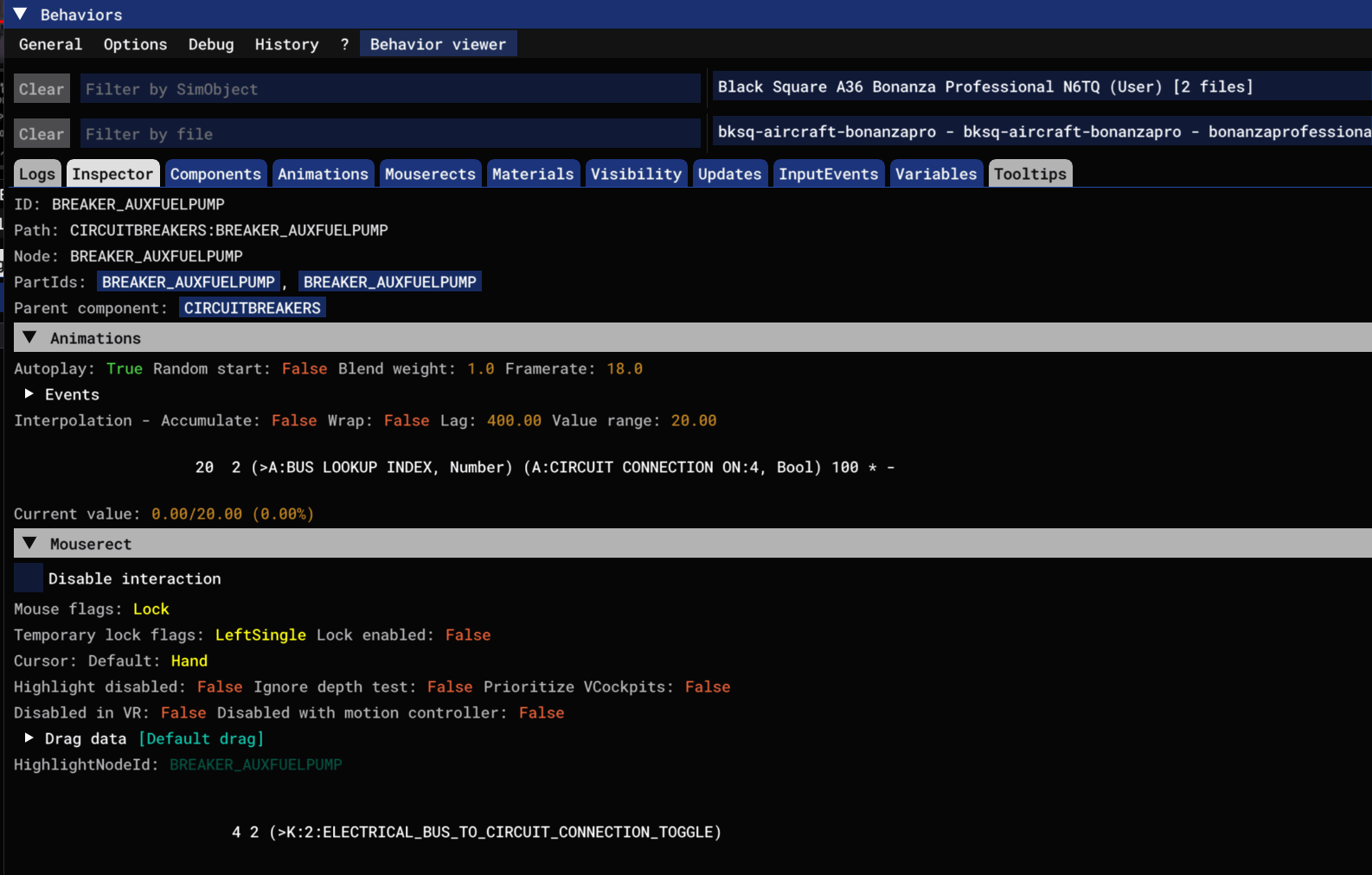
STBY GyroHere's what I see when I look at the Aux Fuel Pump. I can find the 'A:Circuit Connection On:4' variable, but it doesn't respond when I manually trip the breaker. I'm not sure SPAD can control A-Vars.
Any help figuring this out is appreciated.