
Periodic Micro Stutters in multiple black square aircraft
-
i encounter periodic (like every second) microstutters in the tbm and the bonanza, often being worse after landing. i fly a lot of other aircraft (fenix, pmdg 777, CJ4) but these work smooth without problems.
i tested with the pms50 and without it, same problem. i see that the render thread does something every second.
my system is VERY powerful. (rtx 5090 and AMD Ryzen 9 9950X3D, 96gb ram)
i had the problem at the orbx LOWS airport (not very powerhungry) for example and at GAYA LOWW.
-
Sorry that you're experiencing something like that. I can't recall anyone reporting that symptom with my aircraft in the last few years. Perhaps someone else will post here with something else that could help us investigate. Given that it's the render thread, the issue isn't likely to be anything I have encountered in the past with avionics or systems code. The only thing that comes to mind is a BIOS setting that some of my beta testers for Starship discovered that could make a significant difference to periodic hiccups. Also, are you using any third party applications alongside the simulator, or in the simulator, like an AI traffic, ATC, passenger, or even camera application? Sometimes those can create unexpected outcomes.
-
Sorry that you're experiencing something like that. I can't recall anyone reporting that symptom with my aircraft in the last few years. Perhaps someone else will post here with something else that could help us investigate. Given that it's the render thread, the issue isn't likely to be anything I have encountered in the past with avionics or systems code. The only thing that comes to mind is a BIOS setting that some of my beta testers for Starship discovered that could make a significant difference to periodic hiccups. Also, are you using any third party applications alongside the simulator, or in the simulator, like an AI traffic, ATC, passenger, or even camera application? Sometimes those can create unexpected outcomes.
@Black-Square thank you for your reply!
i will try with an empty community folder, just with the TBM in the next few days when i am back home!
but i tested without any other add ons active (except the orbx scenery, which works fine with all other add on aircraft). i had no traffic active (no vanilla and no third party), no other mods active, i even uninstalled pms50 from the community folder.
the only things in the comminity folder are other aircraft like fenix and pmdg, the aig models (but as i said not used in these tests), sayintentions plugins (also not used in these tests) and the navigraph stuff.
one thing i noticed is, that it is not with every airport. iniBuilds LOWI for example is fine, also the EDDM payware scenery didn't have problems with it. so far it tends to happen on ORBX scenery.
i play on msfs 2024 standard ultra settings, DLSS Quality enabled and frame gen x2.
i have not changed any BIOS settings at all. i have the latest nvidia driver installed.i have between 150-200fps on said airports with the tbm and the fps drops bring it down every second about 30-50fps. (which is annoying)
i also tried to limit the fps to 100fps, but even then same hickups, even worse.
it happens in the cockpit and even on drone view when i am a little away from the aircraft. although i think it gets a little bit better when i am a little away in drone view, but still noticeable) it feels like some calculation is happening periodically every second.
i'll report back in the next few days after an empty community folder test.
-
Sorry that you're experiencing something like that. I can't recall anyone reporting that symptom with my aircraft in the last few years. Perhaps someone else will post here with something else that could help us investigate. Given that it's the render thread, the issue isn't likely to be anything I have encountered in the past with avionics or systems code. The only thing that comes to mind is a BIOS setting that some of my beta testers for Starship discovered that could make a significant difference to periodic hiccups. Also, are you using any third party applications alongside the simulator, or in the simulator, like an AI traffic, ATC, passenger, or even camera application? Sometimes those can create unexpected outcomes.
@Black-Square what is this bios setting you are talking about? Resizeable bar?
should reBar be enabled or disabled in your opinion for msfs 2024?
-
Sorry that you're experiencing something like that. I can't recall anyone reporting that symptom with my aircraft in the last few years. Perhaps someone else will post here with something else that could help us investigate. Given that it's the render thread, the issue isn't likely to be anything I have encountered in the past with avionics or systems code. The only thing that comes to mind is a BIOS setting that some of my beta testers for Starship discovered that could make a significant difference to periodic hiccups. Also, are you using any third party applications alongside the simulator, or in the simulator, like an AI traffic, ATC, passenger, or even camera application? Sometimes those can create unexpected outcomes.
@Black-Square Ok so i just tested with an empty community folder just with the TBM (only thing still loading are the scenery stuff i bought in the MSFS marketplace becuase these are not in the community folder, but i doubt it's scenery causing this anyways), and unfortunately still the same perdiodic stutters. oh and sorry my mistake i was wrong, it was the "Graphics queue" doing something every second, not render thread. mixed that up, sorry. you can see it in the screenshot where the graphics queue has these yellow small spikes every second, and when it's doing that i am "limited by render queue". but as i said, that is not happening in other add on aircraft.
as you can see my vram is fine (which would be an explanation for this) and even if i load the "vanilla ini builds a310" (which is very badly optimized) i don't have this weird graphics queue spikes. as i said, this only happens on black square aircraft. it's like the tbm does something every second to this "graphics queue". and it's also not permanent. it can stop for some seconds and than start again. but it's very annoying and breaks immersion.
it's really a pitty because i think the black square aircraft are awesome and i love them, but like this it spoils it for me
 the sim runs SO SMOOTH for me for every other aircraft and airport. it's definetly not my system or wrong msfs 2024 settings/graphics settings because then i would have the problem with other aircraft too. (as i said i also fly complex stuff like fenix, pmdg, ...)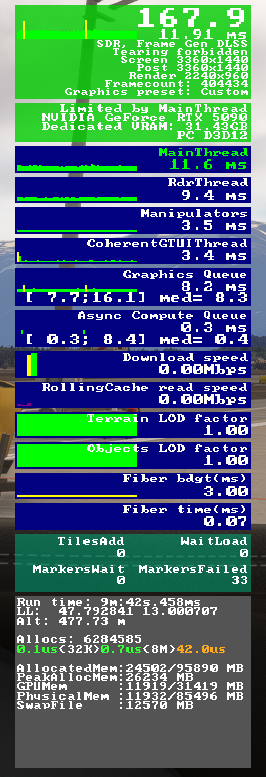
and to be honest, i don't want to mess with BIOS settings, because the sim, and other games work great and i don't want to break other things too.
only one thing i could imagine, maybe Resizeable BAR could cause this? i didn't touch any BIOS settings, but i looked into the Nvidia control panel system information and it says rebar is on. maybe this is causing this? i don't want to mess with bios tho, unless you think this is most probably the cause for this.hope this information can bring some light into this.
-
No issues with stutters on my end. May be a dumb idea, but try limiting your frame rate to 60fps. You'll still get 120fps with frame gen and it might free up some overhead for stutters.
9900x
64gb 6000mt CL30
4090TS@SadBucket i already tried that and it made it even worse because these microstutters were more noticeable.
-
@SadBucket i already tried that and it made it even worse because these microstutters were more noticeable.
@dave_pilot I find it very strange that you only see studders in blksqr, but not in more performance demanding aircraft like the fenix or 777... When I had performance issues I did this. You can try if you want:
-Ran DDU and reinstalled an older confirmed stable driver from scratch since the latest Nvidia driver is pretty broken last I heard. Say Intentions Recommends 581.80 and that is what I'm on right now with no issues:
https://www.nvidia.com/en-gb/geforce/drivers/results/257569/
*run DDU with internet disconnected to ensure windows doesn't install any compatibility drivers:
https://www.guru3d.com/download/display-driver-uninstaller-download/
-Try turning off G-Sync under monitor technology in Nvidia Control Panel for MSFS2024
-Delete ROLLINGCACHE.CCC in %AppData%... \Local\Packages\Microsoft.Limitless_8wekyb3d8bbwe\LocalCache
-I also recommend running TAA instead of DLSS and turning on Dynamic Settings in MSFS graphics settings and in Online settings set Rolling Cache to 32GB. -
@dave_pilot I find it very strange that you only see studders in blksqr, but not in more performance demanding aircraft like the fenix or 777... When I had performance issues I did this. You can try if you want:
-Ran DDU and reinstalled an older confirmed stable driver from scratch since the latest Nvidia driver is pretty broken last I heard. Say Intentions Recommends 581.80 and that is what I'm on right now with no issues:
https://www.nvidia.com/en-gb/geforce/drivers/results/257569/
*run DDU with internet disconnected to ensure windows doesn't install any compatibility drivers:
https://www.guru3d.com/download/display-driver-uninstaller-download/
-Try turning off G-Sync under monitor technology in Nvidia Control Panel for MSFS2024
-Delete ROLLINGCACHE.CCC in %AppData%... \Local\Packages\Microsoft.Limitless_8wekyb3d8bbwe\LocalCache
-I also recommend running TAA instead of DLSS and turning on Dynamic Settings in MSFS graphics settings and in Online settings set Rolling Cache to 32GB.@SadBucket yup that's what i find very strange too. that's why i thought it might be some aircraft related bug... i did 3 flights yesterday with the fenix a320, even with 100% sai intentions traffic and like always butter smooth. no problems whatsoever.
i then thought maybe it's because i have TOO many fps in the tbm, but when using "cheap" vanilla stuff it does not happen either.
and limiting frames didn't help as i already said. so the problem is also not a high fps count.i don't want to mess with any driver stuff right now, because as i said, i don't want to risk that other things might break, because in general i am very happy with the sim and its performance and i don't want to introduce problems to something that works well right now. and i also don't want to sacrifice DLSS for 1 plane tbh.
yes, i already tried deleting the rolling cache file. and created a new one. i always had a rolling cache of 64GB. problem still persists in the tbm and i disabled gsync in general because i don't like it.
at this point i think it might be just my exact system configuration reacting allergic to black square aircraft. lol because i can't explain why it happens and as it seems no one else can. i don't even run anti virus software, only windows defender so i am basically clueless at this point...
i also don't run other software in the background. no browser, no background tasks, no steam, no iCue, nothing. just msfs.
for now i just give up and fly other stuff until the next sim update and then try again. maybe this will change something in the background which resolves this. it's a pitty because i would love to fly the tbm, but at this point as it seems to be my only option.
-
@SadBucket yup that's what i find very strange too. that's why i thought it might be some aircraft related bug... i did 3 flights yesterday with the fenix a320, even with 100% sai intentions traffic and like always butter smooth. no problems whatsoever.
i then thought maybe it's because i have TOO many fps in the tbm, but when using "cheap" vanilla stuff it does not happen either.
and limiting frames didn't help as i already said. so the problem is also not a high fps count.i don't want to mess with any driver stuff right now, because as i said, i don't want to risk that other things might break, because in general i am very happy with the sim and its performance and i don't want to introduce problems to something that works well right now. and i also don't want to sacrifice DLSS for 1 plane tbh.
yes, i already tried deleting the rolling cache file. and created a new one. i always had a rolling cache of 64GB. problem still persists in the tbm and i disabled gsync in general because i don't like it.
at this point i think it might be just my exact system configuration reacting allergic to black square aircraft. lol because i can't explain why it happens and as it seems no one else can. i don't even run anti virus software, only windows defender so i am basically clueless at this point...
i also don't run other software in the background. no browser, no background tasks, no steam, no iCue, nothing. just msfs.
for now i just give up and fly other stuff until the next sim update and then try again. maybe this will change something in the background which resolves this. it's a pitty because i would love to fly the tbm, but at this point as it seems to be my only option.
@dave_pilot I don't understand what you mean by "sacrifice DLSS", it is a buggy AI upscaling mess that causes higher VRAM usage, horrendous ghosting, and crashes... Also latest Nvidia drives are confirmed to cause audio driver crashes, audio stutters, and frame stutters while using frame gen in multiple games including msfs2024. I do not know if you are new to black square and have always had these issues even before frame gen, but as of right now, roll back to 581.80 and only update when drivers are confirmed to not brick your PC by community in the future. Nvidia cards have been a nightmare to get working without constant issues since release of 5000 series.
-
@dave_pilot I don't understand what you mean by "sacrifice DLSS", it is a buggy AI upscaling mess that causes higher VRAM usage, horrendous ghosting, and crashes... Also latest Nvidia drives are confirmed to cause audio driver crashes, audio stutters, and frame stutters while using frame gen in multiple games including msfs2024. I do not know if you are new to black square and have always had these issues even before frame gen, but as of right now, roll back to 581.80 and only update when drivers are confirmed to not brick your PC by community in the future. Nvidia cards have been a nightmare to get working without constant issues since release of 5000 series.
@SadBucket quite frankly i don't have any issues other than black square atm. i don't have any crashes, audio stutters, vram problems, frame stutters with frame gen and dlss and latest driver. (only the slight ghosting on displays with dlss, but that's no big deal for me) i couldn't be happier atm with the sim and for now i just quit black square and fly my other planes which work fine.
i may sound a little bit ignorant here, but i started simming back in fs9 days and i am tired of the constant "fixing" and "optimizing" so meanwhile i just fly the sim and if problems occur i quit on that add on quite qickly and fly other stuff.
and i will definitely not start messing with drivers or settings now or something else which potentially breaks all my planes.
i mainly started this thread just to report a bug and ask if there is maybe a common solution for this or something else but as it seems there is not, i give up for now and try after the next sim update or something like that.
thanks for your help! -
@SadBucket quite frankly i don't have any issues other than black square atm. i don't have any crashes, audio stutters, vram problems, frame stutters with frame gen and dlss and latest driver. (only the slight ghosting on displays with dlss, but that's no big deal for me) i couldn't be happier atm with the sim and for now i just quit black square and fly my other planes which work fine.
i may sound a little bit ignorant here, but i started simming back in fs9 days and i am tired of the constant "fixing" and "optimizing" so meanwhile i just fly the sim and if problems occur i quit on that add on quite qickly and fly other stuff.
and i will definitely not start messing with drivers or settings now or something else which potentially breaks all my planes.
i mainly started this thread just to report a bug and ask if there is maybe a common solution for this or something else but as it seems there is not, i give up for now and try after the next sim update or something like that.
thanks for your help!@dave_pilot I have been flight simming since FS9 too and have avoided trying new experimental AI features for the same reason. Good luck

-
Sorry that you're experiencing something like that. I can't recall anyone reporting that symptom with my aircraft in the last few years. Perhaps someone else will post here with something else that could help us investigate. Given that it's the render thread, the issue isn't likely to be anything I have encountered in the past with avionics or systems code. The only thing that comes to mind is a BIOS setting that some of my beta testers for Starship discovered that could make a significant difference to periodic hiccups. Also, are you using any third party applications alongside the simulator, or in the simulator, like an AI traffic, ATC, passenger, or even camera application? Sometimes those can create unexpected outcomes.
This post is deleted! -
i recently got a new PC (AMD 9950X3d2, 64GB DDR5-6400 RAM, RTX 5090) and on this new system i also have these very subtle periodic microstutters every second like before. fresh system, no other software except for windows and flight sim.
it's very subtle so maybe a lot of people don't notice it and it varies in intensity. sometimes it's gone, then it comes back. basically i just use MSFS 2024 ultra settings. nothing changed from these settings.
and like before, only with black square aircraft (in this case i only tested the TBM unlike last time)

