
Baron Mixture LVARS
-
-
-
This from the manual FAQs chaps...
Microsoft Flight Simulator’s turbocharger simulation has been significantly flawed for several generations. This aircraft has a custom turbocharger that fixes nearly all of these issues, and is much more realistic, as a result. To make these changes, the new “Input Event” system is used to intercept hardware and key-bindings for the mixture control axis. Please make sure that your hardware bindings are using the Key Events, such as “K:MIXTURE1_DECR_SMALL”, or “K:MIXTURE1_SET” to set the mixture, and not setting either “A:GENERAL ENG MIXTURE LEVER POSITION:1”, or “B:FUEL_Mixture_1_Set”. Alternatively, setting “L:BKSQ_MixtureLeverPosition_1” from 0-100 will also work to set the mixture axis"
@voice-of-reason said in Baron Mixture LVARS:
L:BKSQ_MixtureLeverPosition_1
Where can I find out more about the syntax of the above variable.
I got it to work once but after shutting down and restarting it has not worked since.tia
-
@meh1951 I don‘t know exactly out of my head, but they are easy to find. Something with bksq and mixture.

And you have to scale the output of the custom axis to 0-1. -
-
-
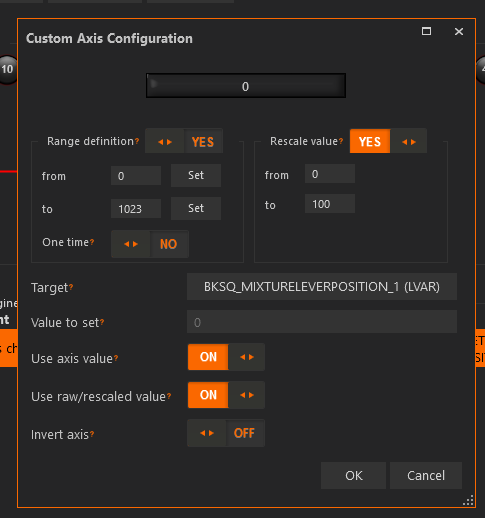
@bjratchf Simply add a custom axis with 0-100 scaling and BKSQ_MixtureLeverPosition_1 & 2 as target.
-
@bjratchf Simply add a custom axis with 0-100 scaling and BKSQ_MixtureLeverPosition_1 & 2 as target.
-
-
@meh1951 I am not on my gaming rig ATM, but AFAIR try
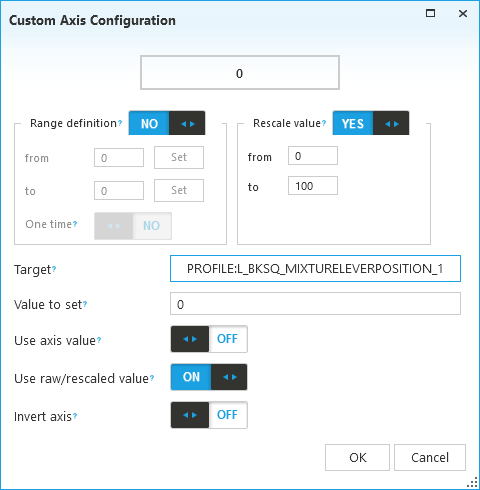
Range definition: NO
Rescale value: YES -> from: 0 to: 100
Target: L:BKSQ_MixtureLeverPosition_1 -
-
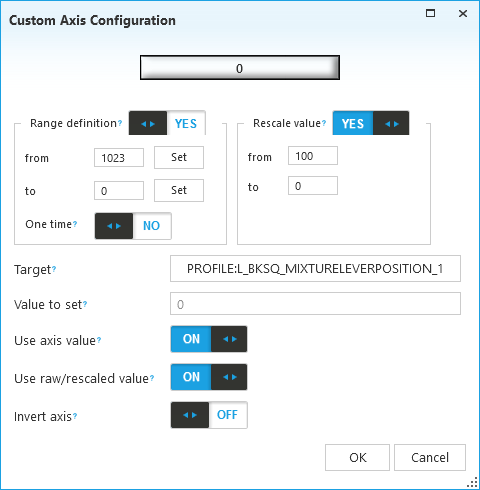
@meh1951 I am not sure if your target is correct. Looks like a "Profile" variable and not the regular LVar.
-
@lemny said in Baron Mixture LVARS:
Looks like a "Profile" variable and not the regular LVar.
Thank You! My eyes were playing tricks on me...it's working for now with current update.
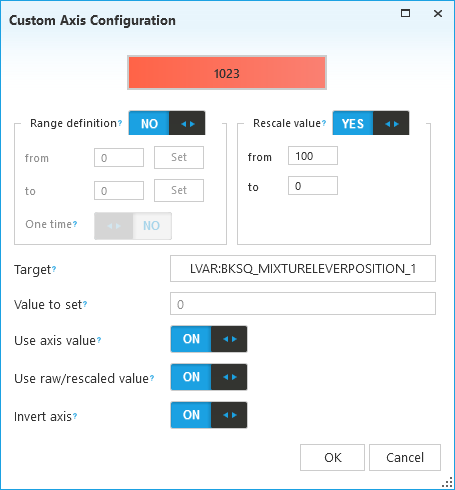
-
-
@meh1951 I am not on my gaming rig ATM, but AFAIR try
Range definition: NO
Rescale value: YES -> from: 0 to: 100
Target: L:BKSQ_MixtureLeverPosition_1 -
-
-
Hello! It looks like you're interested in this conversation, but you don't have an account yet.
Getting fed up of having to scroll through the same posts each visit? When you register for an account, you'll always come back to exactly where you were before, and choose to be notified of new replies (either via email, or push notification). You'll also be able to save bookmarks and upvote posts to show your appreciation to other community members.
With your input, this post could be even better 💗
Register Login