Config buttom STDY ALT PWR Caravan C208BEX
-
Could someone help me understand the Grand Caravan's Standby Alternator button configuration? I've already configured it in the FS2024 controls and also tried configuring it using the manual's instructions: Standby Alternator Switch L:var_StandbyAlternatorSwitch Boolean, but it doesn't respond to the configured command either.
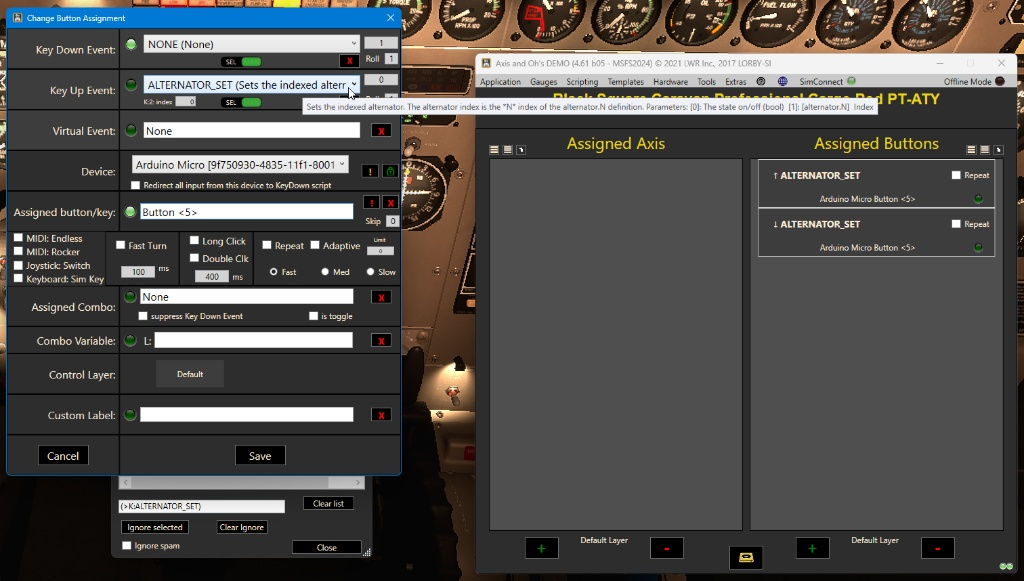
In the FS2024 settings, it alternates the button, but the animation doesn't move the button. I tried configuring it using the K: that I captured in FS, but it also doesn't move the button; it makes changes behind the scenes in other systems.
Could you help me configure it, or is this a bug?
Arduino na chave On Off
(>K:ELECTRICAL_BUS_TO_BUS_CONNECTION_TOGGLE)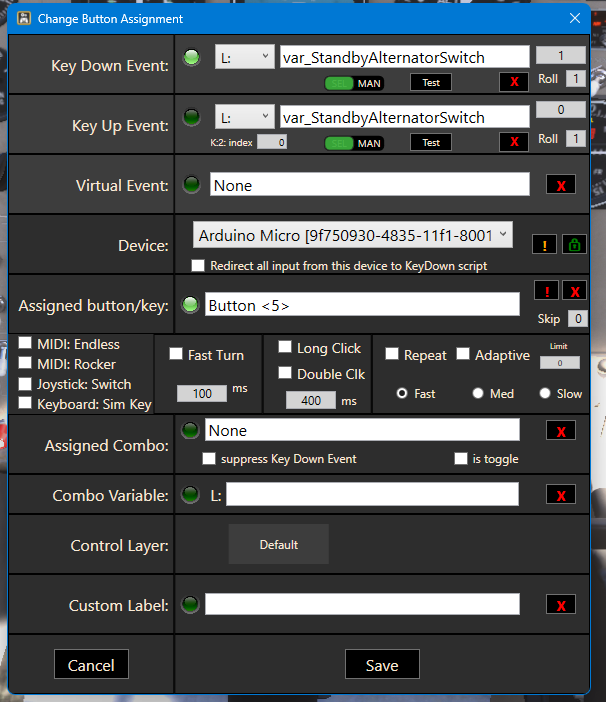
-
Could someone help me understand the Grand Caravan's Standby Alternator button configuration? I've already configured it in the FS2024 controls and also tried configuring it using the manual's instructions: Standby Alternator Switch L:var_StandbyAlternatorSwitch Boolean, but it doesn't respond to the configured command either.
In the FS2024 settings, it alternates the button, but the animation doesn't move the button. I tried configuring it using the K: that I captured in FS, but it also doesn't move the button; it makes changes behind the scenes in other systems.
Could you help me configure it, or is this a bug?
Arduino na chave On Off
(>K:ELECTRICAL_BUS_TO_BUS_CONNECTION_TOGGLE)@MarcosSantos Unfortunately, I'm not an expert at cockpit building, so hopefully someone else will chime in. I just wanted to confirm that I've looked at the code, and L:var_StandbyAlternatorSwitch is the correct way to interact with the system, and it will control the switch animation in the cockpit (they are directly connected). My only advice is to make sure you have the latest version of the Caravan, in case I changed something recently.