IMM DES Function Not Working
-
As far as I know there's no requirement other than being in CRZ and before TOD. I make sure to set preselect a lower altitude, arm DES mode (blue square surrounding DES) and then press IMM DES. It works for me.
Sometimes when it's not I need to finnick with the ALT button to make sure the descent mode is actually armed.
-
Hello everyone,
I'm having some trouble getting the IMM DES (Immediate Descent) function to work in the Just Flight Fokker 70/100.
I'm using the latest release of the aircraft and have been following the procedures in the manual to the letter. However, whenever I try to activate IMM DES, the aircraft simply doesn't initiate a descent.
Could someone explain how this function is supposed to work? Are there any specific conditions that need to be met before IMM DES becomes available? For example, is there a certain distance or time before Top of Descent (TOD) when the function won't activate?
I'm not sure whether I'm missing something in the procedure or if this might be an issue with the aircraft.
Any help or clarification would be greatly appreciated!
Thanks in advance!
Hello @Airmils4774 i am a current F100 FO operator. Just so we are clear on the procedure you are using. In order to see immediate descent function on the FMS the following has to occur;
The INIT page is filled out and on the
PROG page a CRZ altitude is selected
MODE page has a Cost IndexNext the aircraft has to be at the selected ALT and in PROF mode. That means that the Flight Mode Annunciators or FMAs such as Mt, ALT, NAV are boxed on the top of the primary display
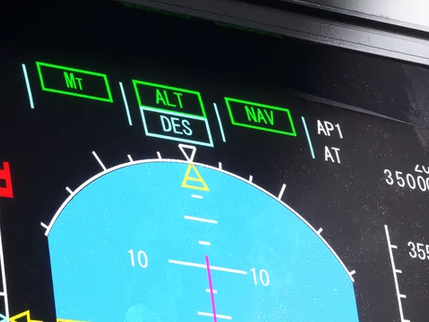
In order to see the IMM DES, you will have to select a lower altitude say the commencement of the STAR arrival and then pull the altitude knob to ARM the descent. You will know you have done it correctly when you see ALT BOXED and DES BOXED underneath it but in blue. As below pictured.
Hope this helps
-
Thank you all for your answers!
This is exactly the configuration I'm in , I do see the IMM DES option in de CDU but after enabling it i see the Vnav scale on the PFD but the plane will not decend , also not seeying the 1000 ft/min on the CDU
@Gatlingorange you have the same workflow i assume?
-
Thank you all for your answers!
This is exactly the configuration I'm in , I do see the IMM DES option in de CDU but after enabling it i see the Vnav scale on the PFD but the plane will not decend , also not seeying the 1000 ft/min on the CDU
@Gatlingorange you have the same workflow i assume?
@Airmils4774 When you are flying are you seeing any status errors or warning lights on the overhead panel?
-
@JabbyJabara , no warning lights or status errors.
Seems like I’m the only one having this issue. I’m starting to think there might be a conflict with one of my installed mods or something. I’m going to remove all the mods from the Community folder and give it another try. I’ll let you know how it goes!
-
@JabbyJabara , no warning lights or status errors.
Seems like I’m the only one having this issue. I’m starting to think there might be a conflict with one of my installed mods or something. I’m going to remove all the mods from the Community folder and give it another try. I’ll let you know how it goes!
@Airmils4774 Yes that is a possibility. I myself am not heavily modded so it could be that. Good luck. Feel free for any other questions
-
Testing with a vanilla sim and zero mods active brought no success.
A short video clip is attached below—any help spotting the issue would be greatly appreciated!https://limewire.com/d/yENRM#2cLkBoisy2
-
Testing with a vanilla sim and zero mods active brought no success.
A short video clip is attached below—any help spotting the issue would be greatly appreciated!https://limewire.com/d/yENRM#2cLkBoisy2
@Airmils4774 I don't see anything off. I have just landed the F70 on ENVA and had no troubles with the IMM DES. I will fire up the sim and fiddle around to see if I can troubleshoot anything.
-
Testing with a vanilla sim and zero mods active brought no success.
A short video clip is attached below—any help spotting the issue would be greatly appreciated!https://limewire.com/d/yENRM#2cLkBoisy2
@Airmils4774 I managed to replicate your issue by following my normal procedure, but by leaving out any approach planning. IMM DES will engage, however it will not descent (see screenshot).
I then loaded in another flight and purposely left the INIT page blank (yikes) and flew without PROF. Just to rule out that you might have missed something there. I then proceeded to load in the STAR and RWY, and nothing else descent/approach related in the FMS. In this flight DES armed and went down to 1000V/S.
Could that be your problem? I purposely dumbed down the workload and only missing STAR + RWY seemed to trigger it.
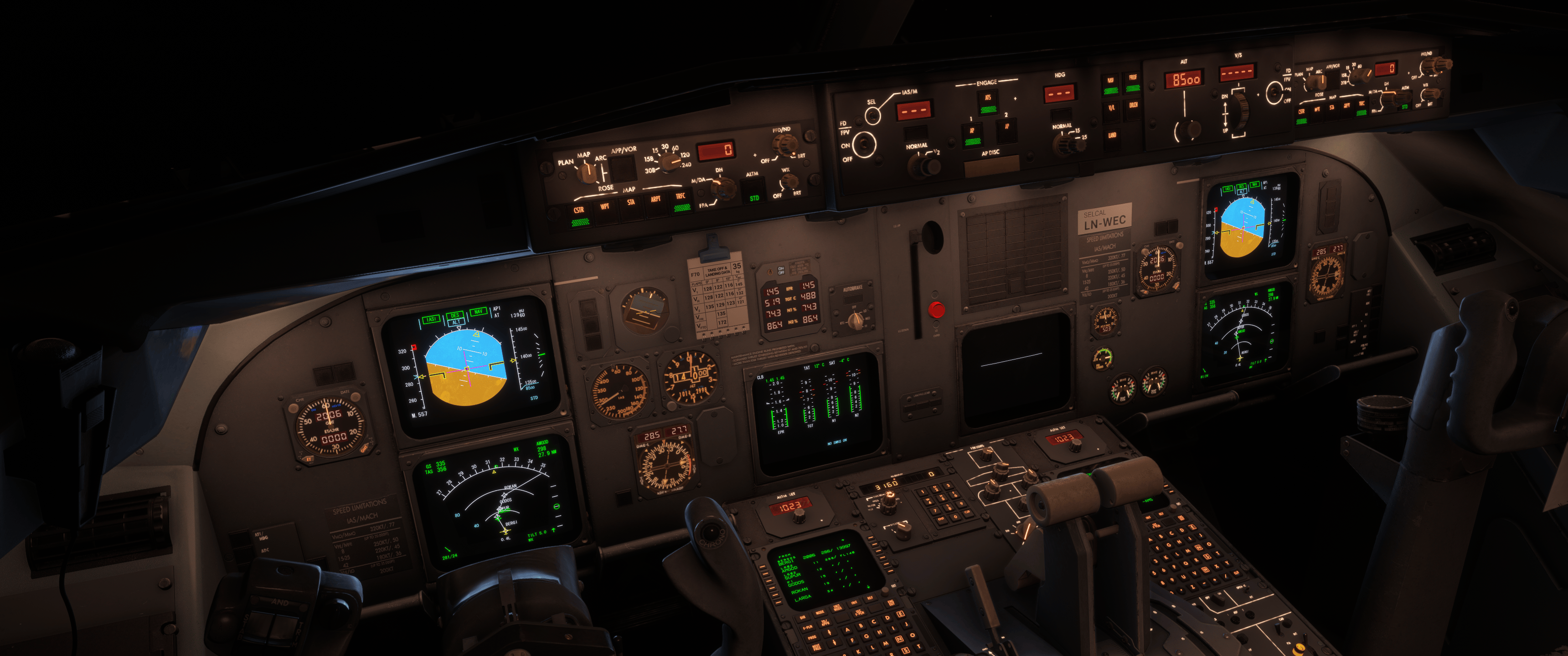
According to @JabbyJabara it shouldn't have worked without the INIT page. Guess that's on JF's end. Might open a ticket for the next patch then!
-
Thank you very much for all the effort you took to test this.
I think the problem might actually be caused by the SimBrief import option then.
My workflow is to use the simbrief import option and then program the SID / RWY and expected STAR and arrival RWY before departure, with the Init A and B pages completely filled out, of course.So, at the moment of activation (in PROF mode), the STAR and runway are already known.
Do you program the CDU manually, or do you also use the import function?
-
Thank you very much for all the effort you took to test this.
I think the problem might actually be caused by the SimBrief import option then.
My workflow is to use the simbrief import option and then program the SID / RWY and expected STAR and arrival RWY before departure, with the Init A and B pages completely filled out, of course.So, at the moment of activation (in PROF mode), the STAR and runway are already known.
Do you program the CDU manually, or do you also use the import function?
@Airmils4774 I import the OFP through the EFB, load with GSX and import the simbrief route through the CDU. At cruise I load the expected STAR and RWY and plan accordingly. If it's a short hop, like EHAM-EBBR, I preload. Can't remember if I used IMM DES on that particular flight.