IMM DES Function Not Working
-
@JabbyJabara , no warning lights or status errors.
Seems like I’m the only one having this issue. I’m starting to think there might be a conflict with one of my installed mods or something. I’m going to remove all the mods from the Community folder and give it another try. I’ll let you know how it goes!
-
@JabbyJabara , no warning lights or status errors.
Seems like I’m the only one having this issue. I’m starting to think there might be a conflict with one of my installed mods or something. I’m going to remove all the mods from the Community folder and give it another try. I’ll let you know how it goes!
@Airmils4774 Yes that is a possibility. I myself am not heavily modded so it could be that. Good luck. Feel free for any other questions
-
Testing with a vanilla sim and zero mods active brought no success.
A short video clip is attached below—any help spotting the issue would be greatly appreciated!https://limewire.com/d/yENRM#2cLkBoisy2
-
Testing with a vanilla sim and zero mods active brought no success.
A short video clip is attached below—any help spotting the issue would be greatly appreciated!https://limewire.com/d/yENRM#2cLkBoisy2
@Airmils4774 I don't see anything off. I have just landed the F70 on ENVA and had no troubles with the IMM DES. I will fire up the sim and fiddle around to see if I can troubleshoot anything.
-
Testing with a vanilla sim and zero mods active brought no success.
A short video clip is attached below—any help spotting the issue would be greatly appreciated!https://limewire.com/d/yENRM#2cLkBoisy2
@Airmils4774 I managed to replicate your issue by following my normal procedure, but by leaving out any approach planning. IMM DES will engage, however it will not descent (see screenshot).
I then loaded in another flight and purposely left the INIT page blank (yikes) and flew without PROF. Just to rule out that you might have missed something there. I then proceeded to load in the STAR and RWY, and nothing else descent/approach related in the FMS. In this flight DES armed and went down to 1000V/S.
Could that be your problem? I purposely dumbed down the workload and only missing STAR + RWY seemed to trigger it.
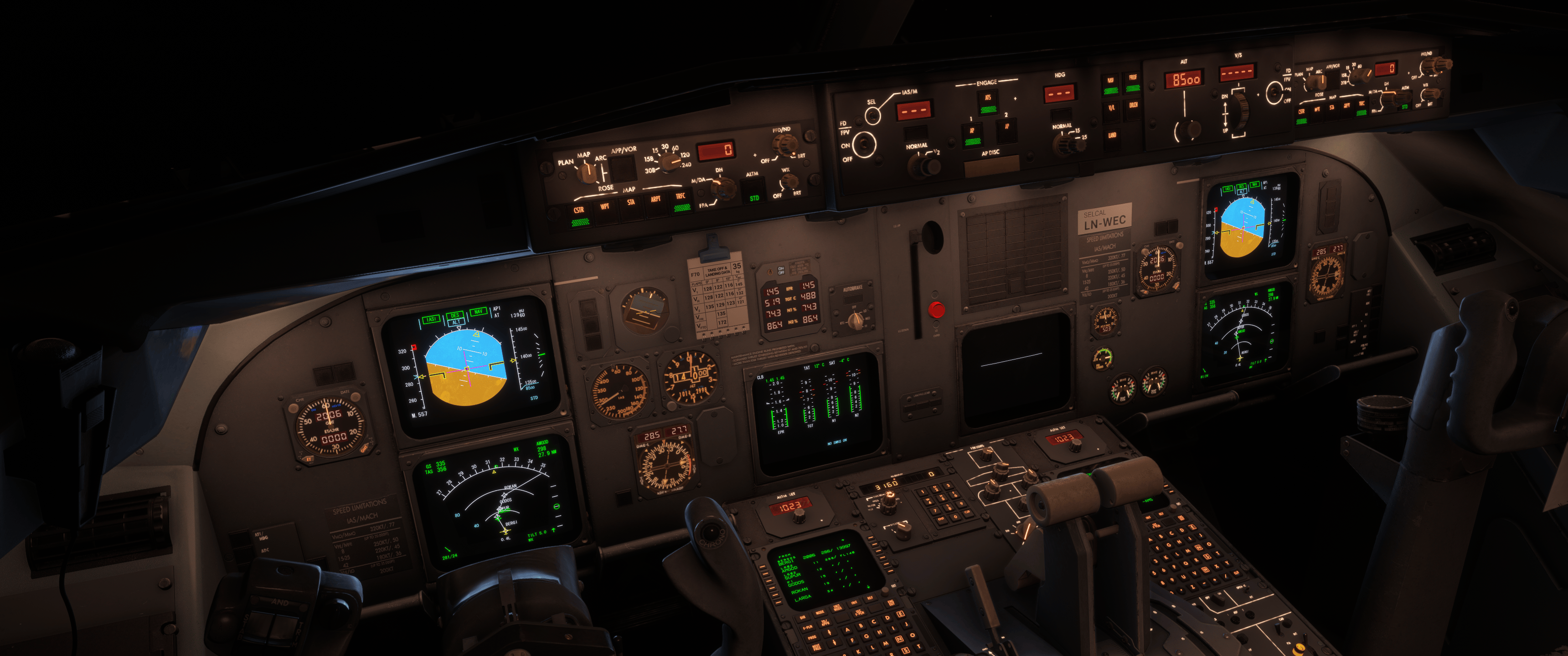
According to @JabbyJabara it shouldn't have worked without the INIT page. Guess that's on JF's end. Might open a ticket for the next patch then!
-
Thank you very much for all the effort you took to test this.
I think the problem might actually be caused by the SimBrief import option then.
My workflow is to use the simbrief import option and then program the SID / RWY and expected STAR and arrival RWY before departure, with the Init A and B pages completely filled out, of course.So, at the moment of activation (in PROF mode), the STAR and runway are already known.
Do you program the CDU manually, or do you also use the import function?
-
Thank you very much for all the effort you took to test this.
I think the problem might actually be caused by the SimBrief import option then.
My workflow is to use the simbrief import option and then program the SID / RWY and expected STAR and arrival RWY before departure, with the Init A and B pages completely filled out, of course.So, at the moment of activation (in PROF mode), the STAR and runway are already known.
Do you program the CDU manually, or do you also use the import function?
@Airmils4774 I import the OFP through the EFB, load with GSX and import the simbrief route through the CDU. At cruise I load the expected STAR and RWY and plan accordingly. If it's a short hop, like EHAM-EBBR, I preload. Can't remember if I used IMM DES on that particular flight.
-
So that's almost exactly the same workflow I use, except that I load the STAR and runway before takeoff.
I'm going to test your method to see if I can get it working, and I'll report back here with my findings.
If it works, that suggests the IMM DES function is pretty finicky.
I cannot believe that this is the case in the real aircraft.
It's pretty standard for fuel and VNAV calculations to include the STAR and runway in the CDU before departure i thought?I will also file a ticket with Just Flight regarding the empty INIT page finding.
To be continued... -
Cool, let us know!
-
Well, I've tried entering the STAR and runway mid-flight, but unfortunately, that didn't help either.
I could see the TOD marker, and after ATC confirmed which STAR and runway I should use, I entered them into the CDU. I then selected a lower altitude and pulled the altitude knob. IMM DES became active, but after activating it, I ran into exactly the same issue as before.
I've also completely reinstalled the simulator after Sim Update 7, as well as the F70 and F100, but I still can't get it to work.
I'm honestly running out of ideas, and I really don't know what I'm doing differently from you.
If it's not too much trouble, would you mind giving me a step-by-step explanation of how you do it? I'd really appreciate it!