Skip to content
  • Categories
  • Recent
  • Tags
  • Popular
  • Users
Collapse
Just Flight Community Forum
  1. Home
  2. Just Flight
  3. MSFS Products
  4. Black Square Add-Ons
  5. Commander 114
  6. Commander Update v0.1.1

Commander Update v0.1.1

Scheduled Pinned Locked Moved Commander 114
14 Posts 10 Posters 461 Views 2 Watching
  • Oldest to Newest
  • Newest to Oldest
  • Most Votes
Reply
  • Reply as topic
Log in to reply
This topic has been deleted. Only users with topic management privileges can see it.
  • M Offline
    M Offline
    Myslr95
    wrote last edited by
    #4

    Awesome update! Thank-you Black-Square. We appreciate the attention to detail & responsiveness to your customers. This plane is becoming my new favorite over the Piston Duke.

    1 Reply Last reply
    1
    • A Offline
      A Offline
      andyW2025
      wrote last edited by
      #5

      Anyone having problems installing this update?
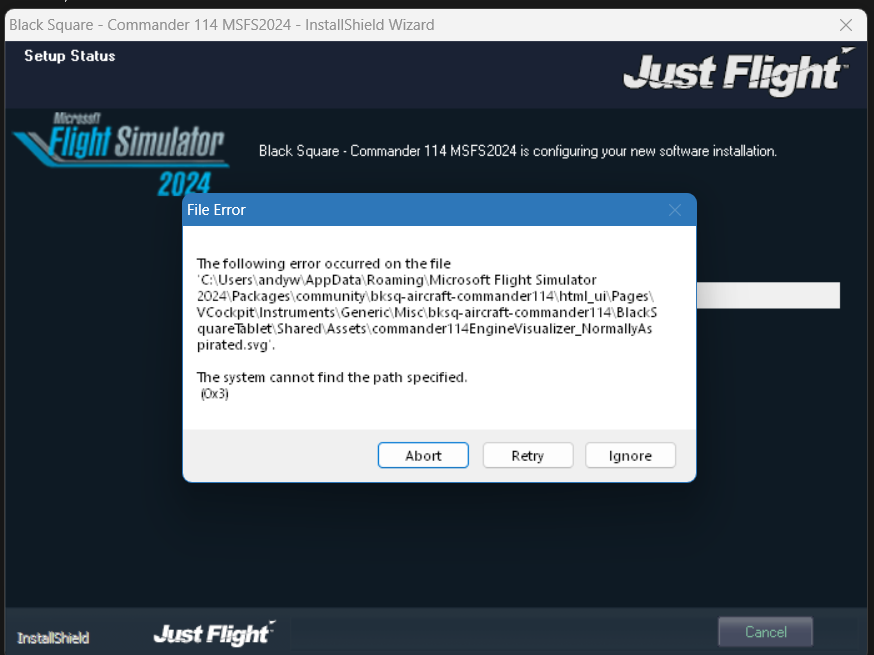
      image.png

      R 1 Reply Last reply
      0
      • M Offline
        M Offline
        MatzeH84
        wrote last edited by
        #6

        I had to de-and reinstall.
        Great Update!!

        A 1 Reply Last reply
        0
        • M MatzeH84

          I had to de-and reinstall.
          Great Update!!

          A Offline
          A Offline
          andyW2025
          wrote last edited by
          #7

          @MatzeH84
          Yes I have spent last hour sorting it but now resolved. Now onto the flying! The fun part 😁

          1 Reply Last reply
          0
          • WooliesW Offline
            WooliesW Offline
            Woolies
            wrote last edited by
            #8

            Smile n fly boys ... smile n fly 🙂

            https://www.twitch.tv/woolies

            1 Reply Last reply
            1
            • A andyW2025

              Anyone having problems installing this update?

              image.png

              R Offline
              R Offline
              rinkerbuck
              wrote last edited by
              #9

              @andyW2025 said in Commander Update v0.1.1:

              Anyone having problems installing this update?

              image.png

              I had the exact same error. Hit ignore and it seemed to continue and completely normally. Really weird filename it mentions also.

              1 Reply Last reply
              0
              • R Offline
                R Offline
                rogerabram
                wrote last edited by
                #10

                Yes, I've got that same install message. Interesting that Black Square didn't catch this.

                1 Reply Last reply
                1
                • J Offline
                  J Offline
                  jmarkows
                  wrote last edited by
                  #11

                  There's nothing to catch, it's an OS limitation and there is a well-known workaround: https://support.justflight.com/support/solutions/articles/17000153015-file-error-0x3-during-the-installation

                  Many of us don't have that issue.

                  F 1 Reply Last reply
                  0
                  • J jmarkows

                    There's nothing to catch, it's an OS limitation and there is a well-known workaround: https://support.justflight.com/support/solutions/articles/17000153015-file-error-0x3-during-the-installation

                    Many of us don't have that issue.

                    F Offline
                    F Offline
                    Fabbi
                    wrote last edited by Fabbi
                    #12

                    @jmarkows said in Commander Update v0.1.1:

                    There's nothing to catch, it's an OS limitation and there is a well-known workaround: https://support.justflight.com/support/solutions/articles/17000153015-file-error-0x3-during-the-installation

                    Many of us don't have that issue.

                    But with the previous aircraft we never had this issue...that's weird why some users have this and others don't.

                    RichR 1 Reply Last reply
                    0
                    • F Fabbi

                      @jmarkows said in Commander Update v0.1.1:

                      There's nothing to catch, it's an OS limitation and there is a well-known workaround: https://support.justflight.com/support/solutions/articles/17000153015-file-error-0x3-during-the-installation

                      Many of us don't have that issue.

                      But with the previous aircraft we never had this issue...that's weird why some users have this and others don't.

                      RichR Offline
                      RichR Offline
                      Rich
                      JF Staff
                      wrote last edited by Rich
                      #13

                      @Fabbi It's down to how long the paths get inside the package folder. In the case of the Commander, this html path often pushes users over the limit:
                      bksq-aircraft-commander114\html_ui\Pages\VCockpit\Instruments\Generic\Misc\bksq-aircraft-commander114\BlackSquareTablet\Shared\Assets\commander114ElectricalVisualizer.svg

                      If you add the path to your Community folder to that, in my case it becomes 271 characters long and Windows won't allow it, even with 64bit versions of the installation software.

                      Other aircraft have shorter names and more people fall under the path size limit. As this is one of the longest we've had, more people are seeing it.

                      For the Commander, I've expanded the default installation option in the installer to pre-check whether the package will fit inside the path limit, and if it won't it will send you to the custom location option that will get you around this limit.

                      Hope that helps explain what's going on.

                      F 1 Reply Last reply
                      2
                      • RichR Rich

                        @Fabbi It's down to how long the paths get inside the package folder. In the case of the Commander, this html path often pushes users over the limit:
                        bksq-aircraft-commander114\html_ui\Pages\VCockpit\Instruments\Generic\Misc\bksq-aircraft-commander114\BlackSquareTablet\Shared\Assets\commander114ElectricalVisualizer.svg

                        If you add the path to your Community folder to that, in my case it becomes 271 characters long and Windows won't allow it, even with 64bit versions of the installation software.

                        Other aircraft have shorter names and more people fall under the path size limit. As this is one of the longest we've had, more people are seeing it.

                        For the Commander, I've expanded the default installation option in the installer to pre-check whether the package will fit inside the path limit, and if it won't it will send you to the custom location option that will get you around this limit.

                        Hope that helps explain what's going on.

                        F Offline
                        F Offline
                        Fabbi
                        wrote last edited by
                        #14

                        @Rich said in Commander Update v0.1.1:

                        @Fabbi It's down to how long the paths get inside the package folder. In the case of the Commander, this html path often pushes users over the limit:
                        bksq-aircraft-commander114\html_ui\Pages\VCockpit\Instruments\Generic\Misc\bksq-aircraft-commander114\BlackSquareTablet\Shared\Assets\commander114ElectricalVisualizer.svg

                        If you add the path to your Community folder to that, in my case it becomes 271 characters long and Windows won't allow it, even with 64bit versions of the installation software.

                        Other aircraft have shorter names and more people fall under the path size limit. As this is one of the longest we've had, more people are seeing it.

                        For the Commander, I've expanded the default installation option in the installer to pre-check whether the package will fit inside the path limit, and if it won't it will send you to the custom location option that will get you around this limit.

                        Hope that helps explain what's going on.

                        Thank you so much for this information. 👍

                        1 Reply Last reply
                        0
                        Reply
                        • Reply as topic
                        Log in to reply
                        • Oldest to Newest
                        • Newest to Oldest
                        • Most Votes


                        • Login

                        • Don't have an account? Register

                        • Login or register to search.
                        • First post
                          Last post
                        0
                        • Categories
                        • Recent
                        • Tags
                        • Popular
                        • Users