Skip to content
  • Categories
  • Recent
  • Tags
  • Popular
  • Users
Collapse
Just Flight Community Forum
  1. Home
  2. Just Flight
  3. MSFS Products
  4. Black Square Add-Ons
  5. Starship
  6. CDU Numeric pad events?

CDU Numeric pad events?

Scheduled Pinned Locked Moved Starship
13 Posts 3 Posters 253 Views 1 Watching
  • Oldest to Newest
  • Newest to Oldest
  • Most Votes
Reply
  • Reply as topic
Log in to reply
This topic has been deleted. Only users with topic management privileges can see it.
  • M MiRexer

    Thanks much 🙂

    Black SquareB Offline
    Black SquareB Offline
    Black Square
    Black Square Developer
    wrote last edited by
    #4

    @MiRexer I try to be faster with my replies than ordering a pizza 🙂

    1 Reply Last reply
    1
    • M Offline
      M Offline
      MiRexer
      wrote last edited by
      #5

      On the ball tonight for sure lol

      1 Reply Last reply
      0
      • M Offline
        M Offline
        MiRexer
        wrote last edited by
        #6

        Screenshot 2026-08-19 152831.jpg

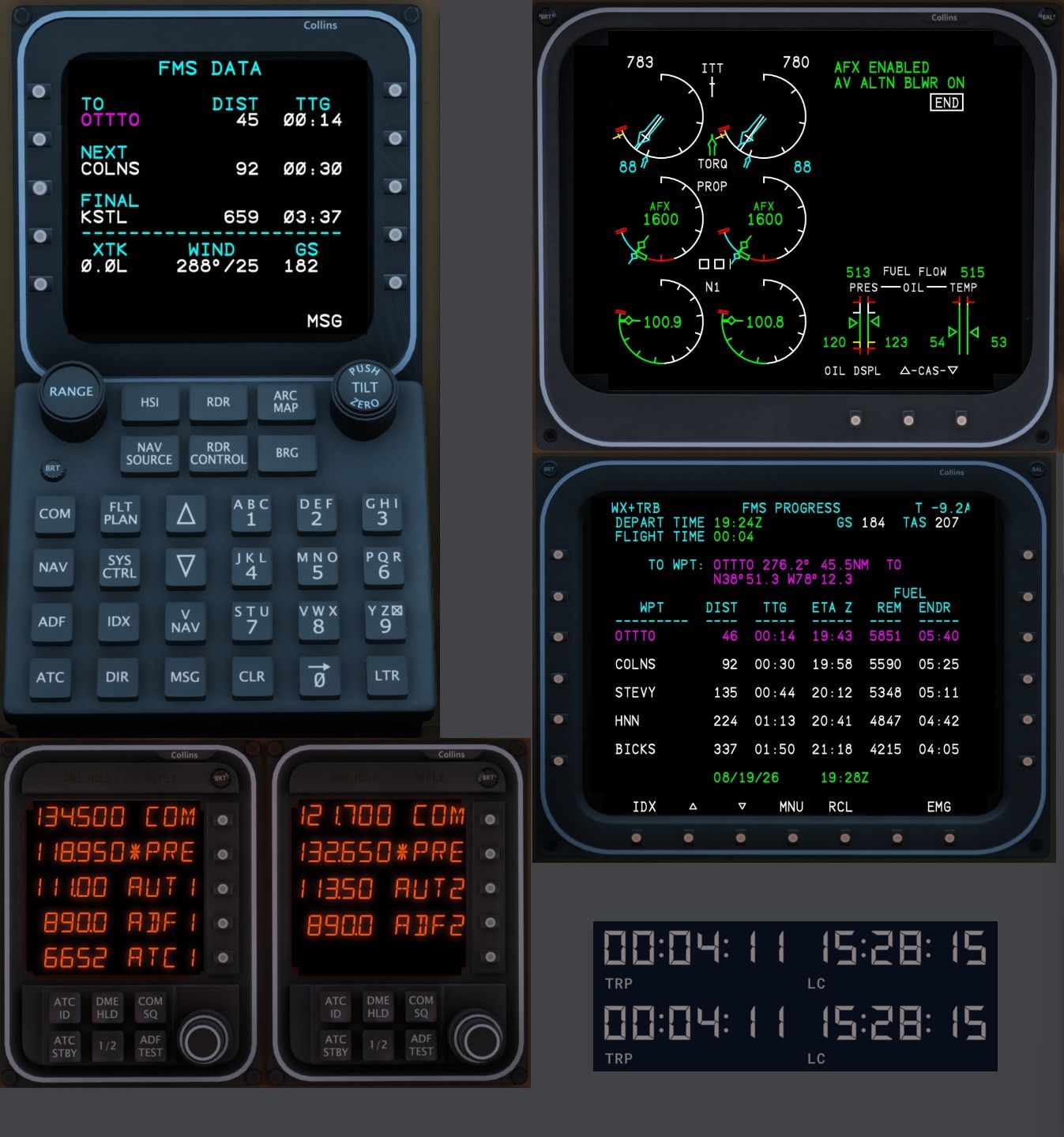
        I'm making good progress - have the CDU, RTU, MFD, and EICAS nearly fully functional (haven't messed with the brightness yet). This is my first attempt at coding buttons etc in air manager. I'll clean up the graphics later - just getting things functional for now.

        Question though - this is based on the RTU but I would assume applies to everything else. How are you handling the reversionary modes? It "seems" like what happens is you swap the display and buttons etc from the other unit?

        Z 1 Reply Last reply
        0
        • M MiRexer

          Screenshot 2026-08-19 152831.jpg

          I'm making good progress - have the CDU, RTU, MFD, and EICAS nearly fully functional (haven't messed with the brightness yet). This is my first attempt at coding buttons etc in air manager. I'll clean up the graphics later - just getting things functional for now.

          Question though - this is based on the RTU but I would assume applies to everything else. How are you handling the reversionary modes? It "seems" like what happens is you swap the display and buttons etc from the other unit?

          Z Offline
          Z Offline
          Zajcek100
          wrote last edited by
          #7

          @MiRexer Your panels look really nice! Are you planning to share them when you finish?

          1 Reply Last reply
          0
          • M Offline
            M Offline
            MiRexer
            wrote last edited by
            #8

            Well as far as the look they are just screenshots of the Starship cockpit. Then I'm using glassout to display the screens and air manager to make the buttons work. It'll be up to Nick/Black Square/Justflight if I can share them given that it's their images (although it'll be useless without the Starship purchase).

            Z 1 Reply Last reply
            0
            • M MiRexer

              Well as far as the look they are just screenshots of the Starship cockpit. Then I'm using glassout to display the screens and air manager to make the buttons work. It'll be up to Nick/Black Square/Justflight if I can share them given that it's their images (although it'll be useless without the Starship purchase).

              Z Offline
              Z Offline
              Zajcek100
              wrote last edited by
              #9

              @MiRexer Well, that's the same technique I used when creating Turbine Duke panels 😂. But I still think the results are preety nice

              1 Reply Last reply
              0
              • M Offline
                M Offline
                MiRexer
                wrote last edited by
                #10

                @Black-Square Nick - is it ok for me to share the Starship instruments for air manager on the Siminnovations playground store for other users? I'm using screenshots of your panel from the sim and just enabling the buttons as seen above.

                Black SquareB 1 Reply Last reply
                0
                • M MiRexer

                  @Black-Square Nick - is it ok for me to share the Starship instruments for air manager on the Siminnovations playground store for other users? I'm using screenshots of your panel from the sim and just enabling the buttons as seen above.

                  Black SquareB Offline
                  Black SquareB Offline
                  Black Square
                  Black Square Developer
                  wrote last edited by
                  #11

                  @MiRexer Be my guest! I know it's not my place to share suggestions on freeware projects, but if you wanted to make my day, you could try using some tool (or just trial-and-error) to match the colors across all the screenshots a little better. I say this because I just saw your KNS-81 instrument too, which appeared darker than the ones next to it. I think that would be a simple improvement that could make the whole package look very professional.

                  1 Reply Last reply
                  0
                  • M Offline
                    M Offline
                    MiRexer
                    wrote last edited by
                    #12

                    Yep, that was my plan. This was an initial stab at just getting things to work. Planned on regrabbing the images. Yeah, the KNS81 doesn't quite match the AVNX panel either - have to play with the image to get it closer. It's actually pretty close at the angle it is on my screen - but when I see it on the browser now it looks a lot different lol - the joys of color matching (why I'm NOT a graphics guy)

                    1 Reply Last reply
                    0
                    • M Offline
                      M Offline
                      MiRexer
                      wrote last edited by MiRexer
                      #13

                      Trying to decide what I want the starship avionics to look like though - how lit up, etc. That was part of the mismatch above - have some different ones to look at while flying and decide which way I want to go.

                      1 Reply Last reply
                      0
                      Reply
                      • Reply as topic
                      Log in to reply
                      • Oldest to Newest
                      • Newest to Oldest
                      • Most Votes


                      • Login

                      • Don't have an account? Register

                      • Login or register to search.
                      • First post
                        Last post
                      0
                      • Categories
                      • Recent
                      • Tags
                      • Popular
                      • Users