Condition Levers to Honeycomb Bravo in FSUIPC
-
So I've spent a few hours now coming up with nothing but frustration. Using FSUIPC I can't get the Condition levers to bind to two of my axis.
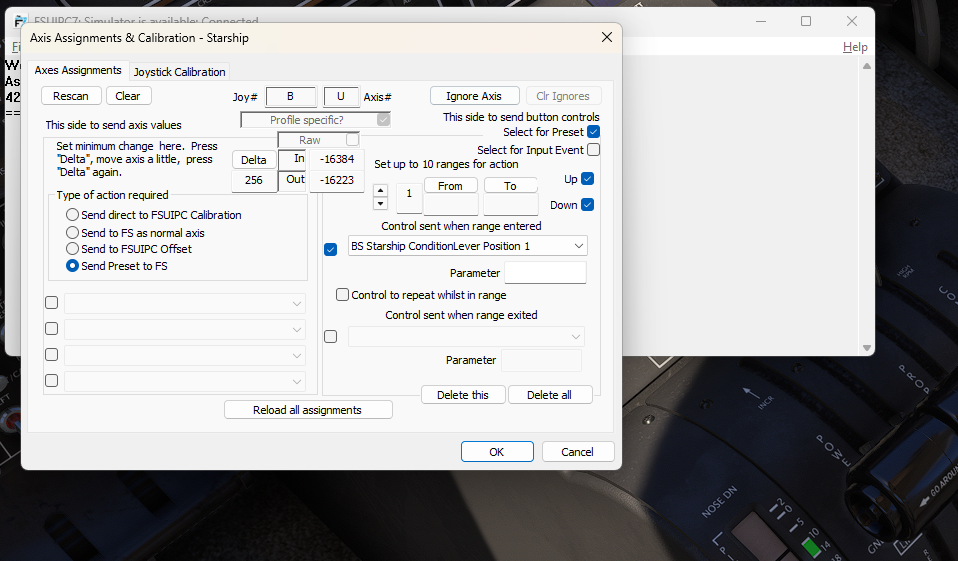
I've tried binding it to the axis straight out, I've tried using the event, I have tried setting a button range within the axis... the in-sim lever moves about so I'm pretty sure I'm near the right commands, but I can't get 3-positions working and I'm tearing out my hair on these hot sweaty heatwave nights... What am I doing wrong?
-
As often happens with my bindings, it turns out I'm not using the ones listed in the manual. This is with Axis and Ohs, but may still help you: FUEL_1_CONDITION_LEVER and FUEL_2_CONDITION_LEVER, they're listed under MSFS IEs for the Starship in the Axis and Ohs event selector. I have both axes reversed, with a minimum of 0 and a maximum of 2.
-
I assume you've been trying to use
K:CONDITION_LEVER_SET? The mixture axis should work without any difficulties, as well. If all else fails, then you can useL:BKSQ_ConditionLever_1. Let me know if that helps at all! -
Thank you everyone. I can only blame it to a later night and something I missed which was simple.
I haven't been successful using the FSUIPC binding - but it wet through the default bindings just fine. I'm going to wait ten minutes for my brain to calm down. MD82, can I see your bindings when you get a free moment?
-
Thank you everyone. I can only blame it to a later night and something I missed which was simple.
I haven't been successful using the FSUIPC binding - but it wet through the default bindings just fine. I'm going to wait ten minutes for my brain to calm down. MD82, can I see your bindings when you get a free moment?
-
So, in FSUIPC I have the condition levers set in Axis as "Send to FS Preset". And the preset being "BS Starship Condition Lever 1 (2) Axis". No ranges or anything. Just like that. In the profile, they show up as:
x=xU,256,F,PBS_Starship_Condition Lever 1 Axis,0,0,0,(star character)-1 -{ TO SIM: Preset Control }-
x=xZ,256,F,PBS_Starship_Condition Lever 2 Axis,0,0,0,(star character)-1 -{ TO SIM: Preset Control }-Where the "x" will be different in your case. I also type (star character) instead of the actual character as the forum interprets it as Italic. But yes, I mean the Shift-8 sign to invert the movement.
-
So, in FSUIPC I have the condition levers set in Axis as "Send to FS Preset". And the preset being "BS Starship Condition Lever 1 (2) Axis". No ranges or anything. Just like that. In the profile, they show up as:
x=xU,256,F,PBS_Starship_Condition Lever 1 Axis,0,0,0,(star character)-1 -{ TO SIM: Preset Control }-
x=xZ,256,F,PBS_Starship_Condition Lever 2 Axis,0,0,0,(star character)-1 -{ TO SIM: Preset Control }-Where the "x" will be different in your case. I also type (star character) instead of the actual character as the forum interprets it as Italic. But yes, I mean the Shift-8 sign to invert the movement.