Starship Generator Switch Configuration in SPAD.neXt
-
I'm trying to configure the alternator switch in my flight sim cockpit for the Starship using SPAD.neXt.
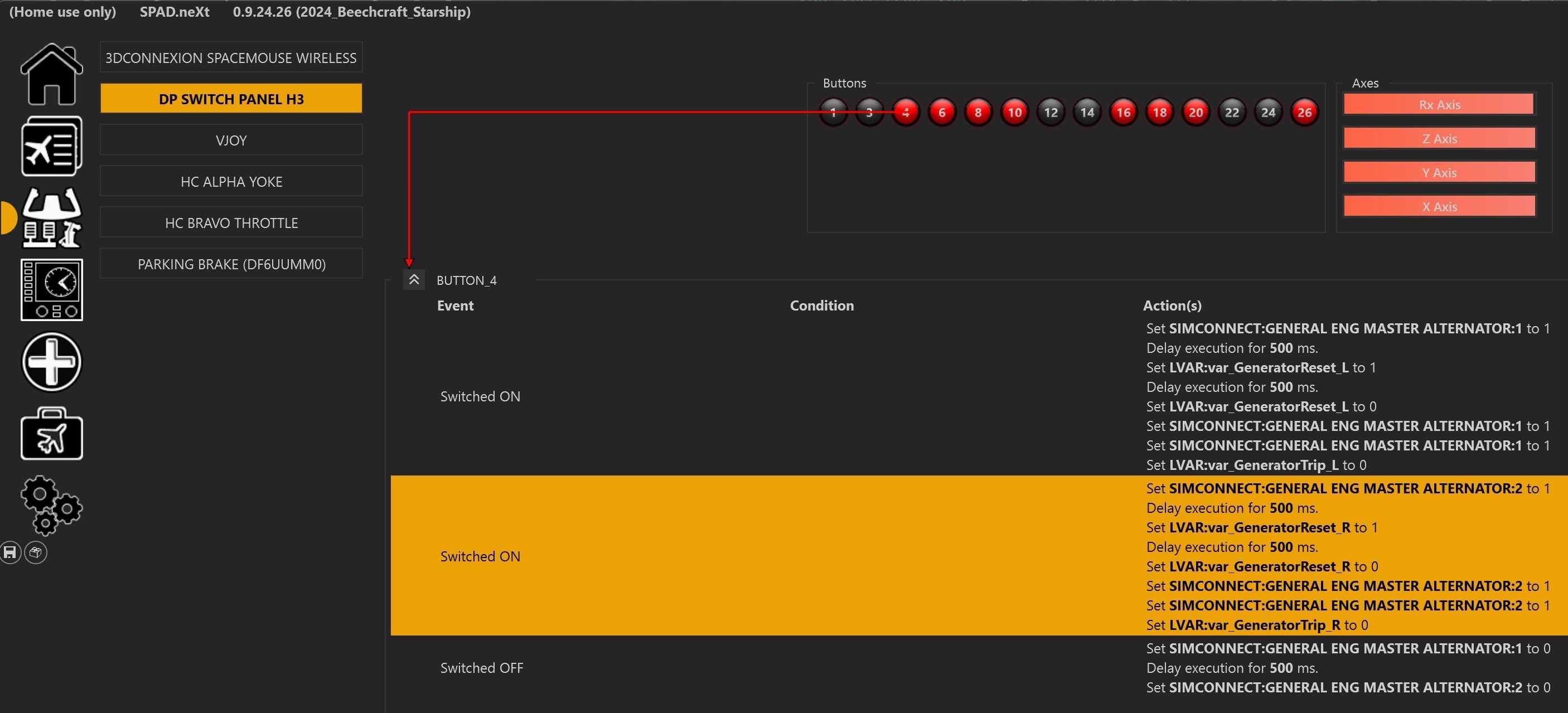
The commands I have implemented so far are shown below.
I can't get past the issue indicated.Switched ON
Set SIMCONNECT:GENERAL ENG MASTER ALTERNATOR:1 to 1 ;Turns the Left Generator switch to the ON position
Delay execution for 500 ms ;Pause execution momentarily to see each action happen
Set LVAR:var GeneratorReset L to 1 ;Set the Left Generator switch to the RESET position
Delay execution for 500 ms ;Pause execution momentarily to see each action happen
Set LVAR:var GeneratorReset L to 0 ;Return the Left Generator switch to the ON position (Intent)Switched OFF
Set SIMCONNECT:GENERAL ENG MASTER ALTERNATOR:1 to 0 ;Turns the Left Generator switch to the OFF positionISSUE:
Setting LVAR:var GeneratorReset L to 0 turns the Generator switch to OFF, not back to the ON position.
Without the Set LVAR:var GeneratorReset L to 0 command, the Generator switch stays stuck in the RESET position.
Adding another Set SIMCONNECT:GENERAL ENG MASTER ALTERNATOR:1 to 1 in place of the Set LVAR:var GeneratorReset L to 0 command doesn't resolve it either. It still stays stuck in the RESET position.Do you have any thoughts on how to resolve this?
-
Try monitoring the status of the L:Var
L:var_GeneratorTrip_Lwhile you're trying to get this to work. I think that's what the reset position is actually toggling (with some other logic), so you should be able to turn the alternator on, the setL:var_GeneratorTrip_Lto zero, and that should have the same effect as moving the switch to the reset position. -
Nick,
I tried the following as you suggested.Switched ON
Set SIMCONNECT:GENERAL ENG MASTER ALTERNATOR:1 to 1 ;Turns the Left Generator switch to the ON position
Delay execution for 500 ms ;Pause execution momentarily to see each action happen
Set LVAR:var GeneratorTrip L to 0This functionally worked, but it doesn't display the switch being put up into the Reset position, and then back to the On position.
What I ended up doing was the following.
It puts the switch into the on position, momentarily into the Reset position, then "visually" back to the on position.
Removing the delays after setting LVAR:var GeneratorReset L to 0 prevents me from "seeing" the switch actually turn back off and then back on. The first Set SIMCONNECT:GENERAL ENG MASTER ALTERNATOR:1 to 1 leaves the switch in the off position for some reason (I don't know why), but the second Set SIMCONNECT:GENERAL ENG MASTER ALTERNATOR:1 to 1 moves it back to the on position as desired. Then the Set LVAR:var GeneratorTrip L to 0 tells the system that the reset was done.
I published a snippet online in SPAD for just this switch, so anybody else that ran into this issue can use this solution.I'm glad that I was finally able to get this working. Thanks for your help.
Switched ON
Set SIMCONNECT:GENERAL ENG MASTER ALTERNATOR:1 to 1 ;Turns the Left Generator switch to the ON position
Delay execution for 500 ms
Set LVAR:var GeneratorReset L to 1 ;Set the Left Generator switch to the RESET position
Delay execution for 500 ms
Set LVAR:var GeneratorReset L to 0 ;Return the Left Generator switch to the ON position (Actually turns it off)
Set SIMCONNECT:GENERAL ENG MASTER ALTERNATOR:1 to 1 ;Turns the Left Generator switch to the ON position
Set SIMCONNECT:GENERAL ENG MASTER ALTERNATOR:1 to 1 ;Turns the Left Generator switch to the ON position
Set LVAR:var GeneratorTrip L to 0 ; Tells the system that the reset was done.