
Commander 114 black tablet screen
-
Did you encounter errors during installation? The tablet resides at the deepest part of the file tree, so it's usually what's affected by the long path issue. When the tablet fails to work, do all the other avionics work?
@Black-Square said in Commander 114 black tablet screen:
Did you encounter errors during installation? The tablet resides at the deepest part of the file tree, so it's usually what's affected by the long path issue. When the tablet fails to work, do all the other avionics work?
Hi,
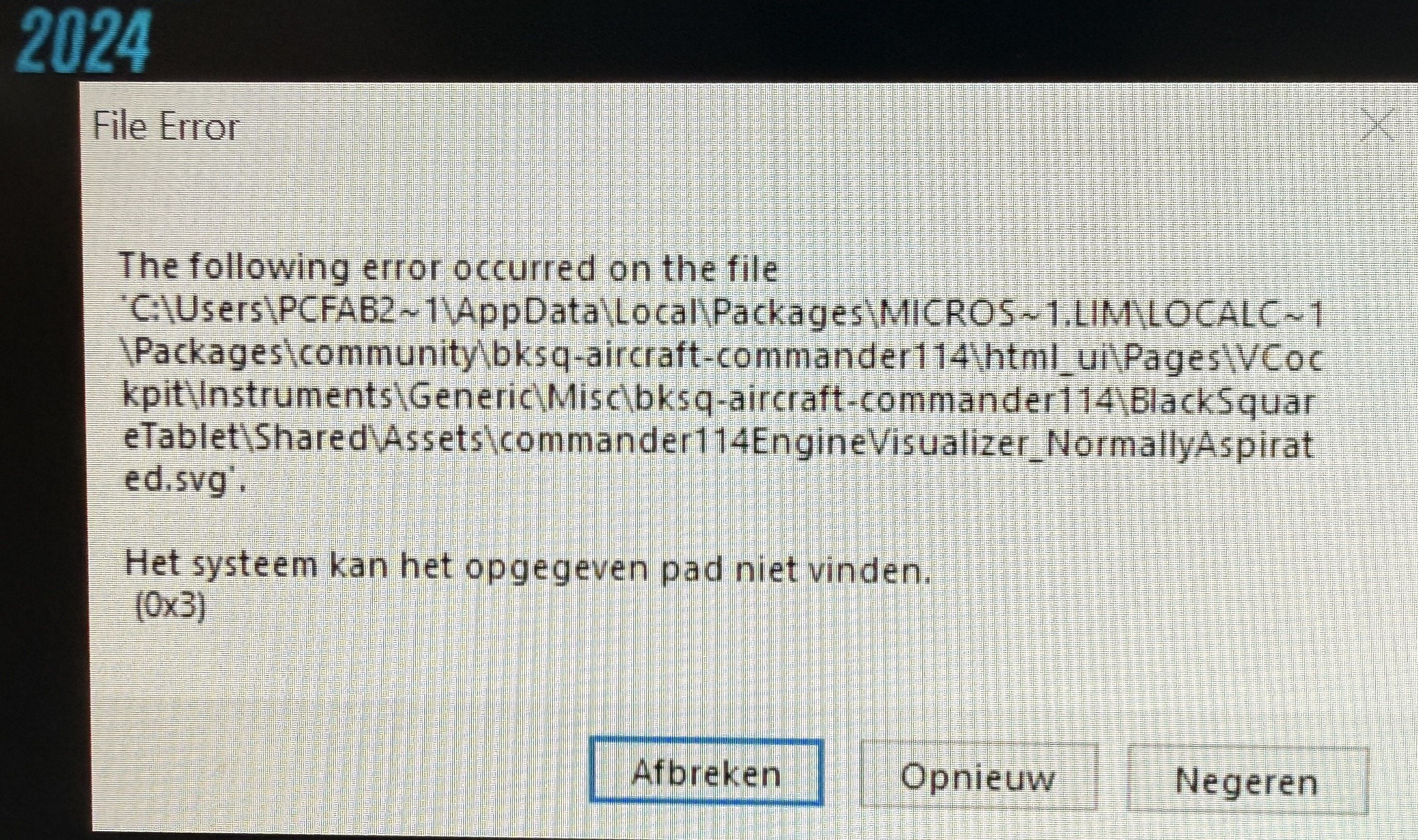
Yes I did, from the first installation I had this error (see picture for my error during installation).
Then with a second install the installation continued, was able to load the plane but the engine page on the tablet was missing.Uninstalled again, then the solution came from Derek (JF Staff) :
https://support.justflight.com/support/solutions/articles/17000153015-file-error-0x3-during-the-installationI followed his solution and the plane was loading fine, except that the tablet is sometimes black and sometimes not.
I took a flight today after having to reload the plane a few times until my tablet was working. When the tablet was active, I did not have the impression during my flight that anything was wrong with the plane.
Installing the setup file at the default location, which I normally do for all Black Square planes, wouldn't work for the Commander 114.
However, when the tablet was black, I didn't perform a flight, so I have no idea if the plane would work properly with a black tablet.So currently, something is probably still not right.
Kind reagrds.
-
I have the same problem: on the naturally aspirated engine variant, the EFB side of the engine unit is blank! On the turbo variant, everything is fine.
@Kamow52 said in Commander 114 black tablet screen:
I have the same problem: on the naturally aspirated engine variant, the EFB side of the engine unit is blank! On the turbo variant, everything is fine.
Hi,
For me, it happened at the Commander 114TC, I am not sure if it happened at the aspirated engine variant, I need to check it out.
-
@Black-Square @Kamow52
Ok, I took the naturally aspirated engine variant, 1st time loading the aircraft at a random airport and the 2nd time also the tablet was working, 3rd time strike, tablet was black.
So it happens on both aircraft versions.If you have a black tablet and you simple click restart this seems to help also to get the tablet working.
-
@Black-Square @Kamow52
Ok, I took the naturally aspirated engine variant, 1st time loading the aircraft at a random airport and the 2nd time also the tablet was working, 3rd time strike, tablet was black.
So it happens on both aircraft versions.If you have a black tablet and you simple click restart this seems to help also to get the tablet working.
@Fabbi Thank you for doing some experiments. The most important thing I need to diagnose this, however, is whether the other avionics in the aircraft are functioning properly when the tablet is black, or if it's only the tablet that's not working.
-
@Fabbi Thank you for doing some experiments. The most important thing I need to diagnose this, however, is whether the other avionics in the aircraft are functioning properly when the tablet is black, or if it's only the tablet that's not working.
@Black-Square said in Commander 114 black tablet screen:
@Fabbi Thank you for doing some experiments. The most important thing I need to diagnose this, however, is whether the other avionics in the aircraft are functioning properly when the tablet is black, or if it's only the tablet that's not working.
Ok I will test this.
-
@Black-Square
Hi, I will try to test the avionics when the tablet is black and report back, but for now it seems no matter what I try, the tablet is always working. Been loading the aircraft to different airports and apron spots, tablet is working.
Did even restart MSFS2024 but for now at the moment it doesn't give me a black tablet but as soon the tablet is black I will test. -
@Black-Square
Hi, I will try to test the avionics when the tablet is black and report back, but for now it seems no matter what I try, the tablet is always working. Been loading the aircraft to different airports and apron spots, tablet is working.
Did even restart MSFS2024 but for now at the moment it doesn't give me a black tablet but as soon the tablet is black I will test.said in Commander 114 black tablet screen:
@Black-Square
Hi, I will try to test the avionics when the tablet is black and report back, but for now it seems no matter what I try, the tablet is always working. Been loading the aircraft to different airports and apron spots, tablet is working.
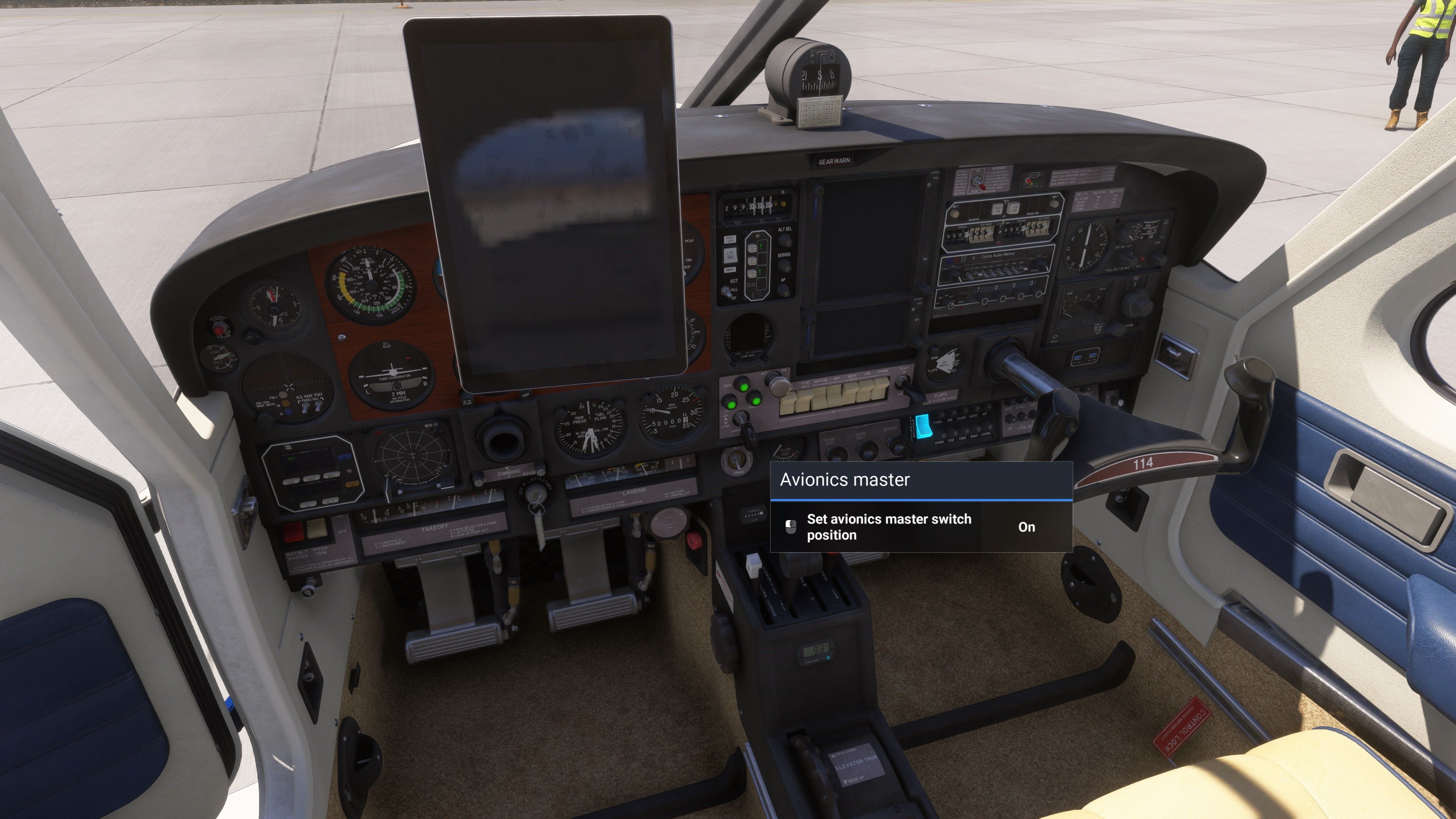
Did even restart MSFS2024 but for now at the moment it doesn't give me a black tablet but as soon the tablet is black I will test.Ok result black tablet, no avionics.
-
said in Commander 114 black tablet screen:
@Black-Square
Hi, I will try to test the avionics when the tablet is black and report back, but for now it seems no matter what I try, the tablet is always working. Been loading the aircraft to different airports and apron spots, tablet is working.
Did even restart MSFS2024 but for now at the moment it doesn't give me a black tablet but as soon the tablet is black I will test.Ok result black tablet, no avionics.
@Fabbi Thank you. That is what I expected. I know this is a lot to ask, but do you think you could run some tests with an empty community folder when you have a chance? I've never seen my tablet do that once on any of my aircraft after literally tens of thousands of reloads, so I'm inclined to think it's something local.
-
@Fabbi Thank you. That is what I expected. I know this is a lot to ask, but do you think you could run some tests with an empty community folder when you have a chance? I've never seen my tablet do that once on any of my aircraft after literally tens of thousands of reloads, so I'm inclined to think it's something local.
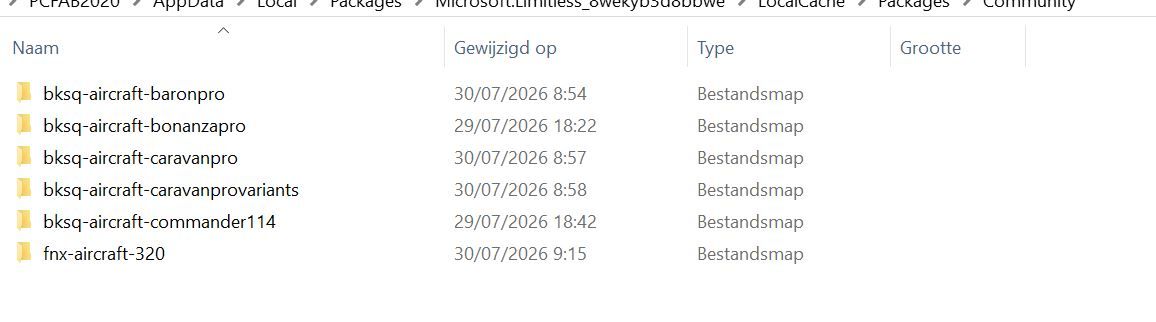
Well I had a fresh installation of MSFS2024 a few days ago.
At the moment that's all that is installed for now in the community folder :
-
@Black-Square
"I've never seen my tablet do that once on any of my aircraft after literally tens of thousands of reloads"I never had this issue before with all the Black Square aircraft either. It all started with this error in installation with Commander 114.
Also I had to use the solution from Derek, Installing the commander 114 on the default location is a no go. -
@Black-Square said in Commander 114 black tablet screen:
Did you encounter errors during installation? The tablet resides at the deepest part of the file tree, so it's usually what's affected by the long path issue. When the tablet fails to work, do all the other avionics work?
Hi,
Yes I did, from the first installation I had this error (see picture for my error during installation).
Then with a second install the installation continued, was able to load the plane but the engine page on the tablet was missing.Uninstalled again, then the solution came from Derek (JF Staff) :
https://support.justflight.com/support/solutions/articles/17000153015-file-error-0x3-during-the-installationI followed his solution and the plane was loading fine, except that the tablet is sometimes black and sometimes not.
I took a flight today after having to reload the plane a few times until my tablet was working. When the tablet was active, I did not have the impression during my flight that anything was wrong with the plane.
Installing the setup file at the default location, which I normally do for all Black Square planes, wouldn't work for the Commander 114.
However, when the tablet was black, I didn't perform a flight, so I have no idea if the plane would work properly with a black tablet.So currently, something is probably still not right.
Kind reagrds.
-
@Kamow52 said in Commander 114 black tablet screen:
I encountered the same error during installation. I bypassed it!
I did this also once, the problem was, no engine page on the tablet.
The best way for now is to uninstall it again and use this solution :
https://support.justflight.com/support/solutions/articles/17000153015-file-error-0x3-during-the-installationBut from time to time sometimes still a black tablet, I hit restart and the tablet is working.
Most of the time the tablet is fine, just in a few times I get a black tablet. -
Well I had a fresh installation of MSFS2024 a few days ago.
At the moment that's all that is installed for now in the community folder :
said in Commander 114 black tablet screen:
Well I had a fresh installation of MSFS2024 a few days ago.
At the moment that's all that is installed for now in the community folder :
Hi Black Square, as you can see that's all that is installed in my community folder.
Do you want me to uninstall the Fenix A320 and the other Black Square aircraft ?
I think I will let it be like it is for now and wait when a new update comes out, then I will uninstall the Commander 114 and install the newer version. -
@Black-Square said in Commander 114 black tablet screen:
Did you encounter errors during installation? The tablet resides at the deepest part of the file tree, so it's usually what's affected by the long path issue. When the tablet fails to work, do all the other avionics work?
Hi,
Yes I did, from the first installation I had this error (see picture for my error during installation).
Then with a second install the installation continued, was able to load the plane but the engine page on the tablet was missing.Uninstalled again, then the solution came from Derek (JF Staff) :
https://support.justflight.com/support/solutions/articles/17000153015-file-error-0x3-during-the-installationI followed his solution and the plane was loading fine, except that the tablet is sometimes black and sometimes not.
I took a flight today after having to reload the plane a few times until my tablet was working. When the tablet was active, I did not have the impression during my flight that anything was wrong with the plane.
Installing the setup file at the default location, which I normally do for all Black Square planes, wouldn't work for the Commander 114.
However, when the tablet was black, I didn't perform a flight, so I have no idea if the plane would work properly with a black tablet.So currently, something is probably still not right.
Kind reagrds.
