
F100/70 EFB weights issue
-
Are you using the SimBrief Import logic built into our EFB tablet, or are you perhaps attempting a SimBrief Import from another external source (such as the SimBrief Dispatch in-game app)?
We use a custom fuel and payload manager built into the EFB tablet, which is the only method we support for adjusting the aircraft's fuel and payload. Other tools such as the simulator's default Weight & Balance app or the SimBrief Dispatch in-game app aren't supported and are likely to cause incorrect weights to be imported.
Mark - Just Flight
-
Are you using the SimBrief Import logic built into our EFB tablet, or are you perhaps attempting a SimBrief Import from another external source (such as the SimBrief Dispatch in-game app)?
We use a custom fuel and payload manager built into the EFB tablet, which is the only method we support for adjusting the aircraft's fuel and payload. Other tools such as the simulator's default Weight & Balance app or the SimBrief Dispatch in-game app aren't supported and are likely to cause incorrect weights to be imported.
Mark - Just Flight
@Mark Thanks for your reply - can confirm I am only trying to use the Just Flight onboard EFB to try and alter the weights - not using the MSFS EFB or the simbrief in-game app
-
In that case, could I kindly ask you to raise a support ticket for this with Just Flight Support at the following link: https://www.justflight.com/support
In the ticket, could you please include any screenshots/videos of the behaviour. Then our support team will be best positioned to attempt to replicate this on our end.
Mark - Just Flight
-
I have submitted a ticket about 8 days ago #98305 is the reference thankyou
-
I’m having the same issue sometimes, I’ve noticed it is tied to when you enter a zfw that exceeds 100pax. I’m assuming there’s a 100 pax cap but we know some operators had more than 100 seats so hoping a future update will enable us to exceed that passenger cap from a weight perspective. (I know JF only modeled up to 100 seats in the cabin).
-
That could definitely be an issue if more than 100 passengers are loaded, but we do have protections in place that should prevent more than 70 passengers (F70) or 100 passengers (F100) from ever being loaded.
Please note that the F70 & F100 use a custom fuel and payload manager on the EFB/Tablet, and the fuel and payload must be loaded through that in order for it to be loaded correctly. Loading fuel/payload through the default MSFS Weight and Balance manager, or other in-game tools such as the SimBrief EFB app, is not supported and can cause issues.
We don't have any plans at the moment to add additional passenger cabin configurations. The current maximum passenger numbers are set based on the number of seats in our cabin models.
Mark - Just Flight
-
That could definitely be an issue if more than 100 passengers are loaded, but we do have protections in place that should prevent more than 70 passengers (F70) or 100 passengers (F100) from ever being loaded.
Please note that the F70 & F100 use a custom fuel and payload manager on the EFB/Tablet, and the fuel and payload must be loaded through that in order for it to be loaded correctly. Loading fuel/payload through the default MSFS Weight and Balance manager, or other in-game tools such as the SimBrief EFB app, is not supported and can cause issues.
We don't have any plans at the moment to add additional passenger cabin configurations. The current maximum passenger numbers are set based on the number of seats in our cabin models.
Mark - Just Flight
@Mark I'm personally not all concerned with different passenger configurations from cabin / visual perspective. I just want to be able to add a ZFW in simbrief for example that exceeds the default 100pax weight in the fokker f100 without breaking the aircraft loading logic, and for the fokker f70 (since many carriers used 80 seat configs in their F70 for example). Let me know if that makes sense
-
As far as I'm aware, it shouldn't be possible for SimBrief to generate passenger numbers above the limit set in the profile.
With our custom SimBrief profiles, we have set a limit of 100 passengers for the F100 (98 for the L2 Door variant) and 70 passengers for the F70, so even if the ZFW field was updated to the maximum value, SimBrief should still only load the maximum number of passengers as set in the profile.
It may be worth double-checking that you are using our custom SimBrief profiles when generating an OFP for the F70 & F100. Our custom profiles will appear in the "Airframe" drop-down list with "Just Flight (MSFS)" prefixes.
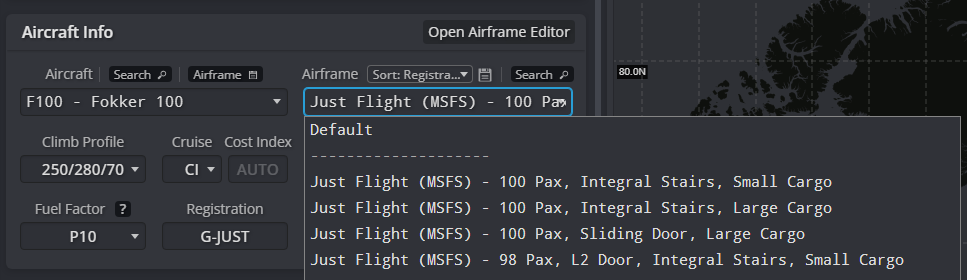
Hope that helps.
Mark - Just Flight
-
As far as I'm aware, it shouldn't be possible for SimBrief to generate passenger numbers above the limit set in the profile.
With our custom SimBrief profiles, we have set a limit of 100 passengers for the F100 (98 for the L2 Door variant) and 70 passengers for the F70, so even if the ZFW field was updated to the maximum value, SimBrief should still only load the maximum number of passengers as set in the profile.
It may be worth double-checking that you are using our custom SimBrief profiles when generating an OFP for the F70 & F100. Our custom profiles will appear in the "Airframe" drop-down list with "Just Flight (MSFS)" prefixes.
Hope that helps.
Mark - Just Flight
@Mark thanks and not to pester but if I take the JF simbrief profiles for the Fokker and manually edit them to enable more PAX, e.g., 108 seats in the Fokker F100, why does the EFB/JF logic have to prevent that? Could you not just remove that cap (so long as the number stays below the max ZFW). I understand the plane has a limit in place and that it’s only modeled for 100 seats in the cabin etc. But from a realism perspective, would it be too much trouble to enable us to add more pax than that hard 100 person cap?
In my humble opinion, ZFW caps are much more relevant than a seat config cap. It’s just a quality of life / realism thing.
-
When we're developing a product, we need to choose a maximum passenger figure so that the flight model can be built around that. With the F70 & F100, the maximum passenger numbers were chosen based on the number of seats modelled in our passenger cabins. From our experience, that is usually the smoothest way of handling it, as then everything matches up.
Once that maximum passenger value is set, the flight model is created using that value, and then the rest of the aircraft's systems are built around the flight model. Once all development work is completed on a product, it makes the task of changing any core values in the flight model much more complex and time-consuming, as there are many systems that are interlinked with each other that would also require development work and testing. For example, an increase in passenger numbers would affect weight distribution and centre of gravity, and that could then have knock-on effects on affects to AFCAS behaviour.
It would certainly be possible for us to increase the maximum passenger number; however, as with every feature request, the limiting factor often comes down to the time it takes to develop and test those changes and how we prioritise that against other feature requests and improvements that we receive across our product range.
Although we don't have any plans to increase the passenger capacity at this time, I have logged this as a request on our internal feature request tracker for the F70 & F100 so we can consider it for future updates.
Mark - Just Flight
-
When we're developing a product, we need to choose a maximum passenger figure so that the flight model can be built around that. With the F70 & F100, the maximum passenger numbers were chosen based on the number of seats modelled in our passenger cabins. From our experience, that is usually the smoothest way of handling it, as then everything matches up.
Once that maximum passenger value is set, the flight model is created using that value, and then the rest of the aircraft's systems are built around the flight model. Once all development work is completed on a product, it makes the task of changing any core values in the flight model much more complex and time-consuming, as there are many systems that are interlinked with each other that would also require development work and testing. For example, an increase in passenger numbers would affect weight distribution and centre of gravity, and that could then have knock-on effects on affects to AFCAS behaviour.
It would certainly be possible for us to increase the maximum passenger number; however, as with every feature request, the limiting factor often comes down to the time it takes to develop and test those changes and how we prioritise that against other feature requests and improvements that we receive across our product range.
Although we don't have any plans to increase the passenger capacity at this time, I have logged this as a request on our internal feature request tracker for the F70 & F100 so we can consider it for future updates.
Mark - Just Flight
@Mark fair enough, appreciate the thorough response

