Condition Lever Difficulties
-
I have been having great difficulty in using FSUIPC to map the Condition Lever axis on a Honeycomb Echo Aviation Controller on the Caravan Professional (v 1.2). This issue probably relates to MSFS2020/2024 Turboprops in general, and it may be something I want to take to the FSUIPC forums, but I'll post this here anyway in hopes someone might have a clue. I really don't want to have to "give-in" and just map High Idle and Low Idle to a button press.
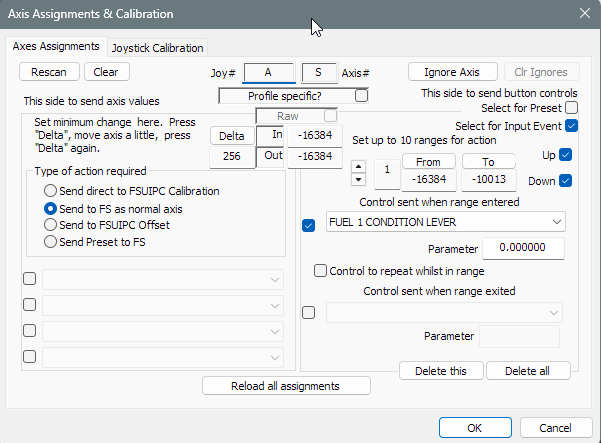
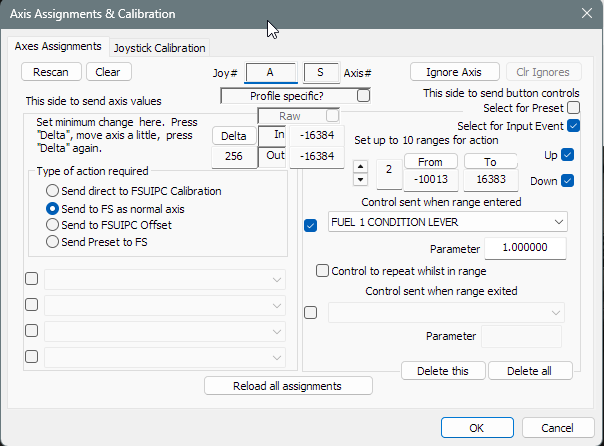
See the 2 attached images of Axes Assignments I've been using in FSUIPC. Through trial-and-error I figured out the the Input Event FUEL 1 CONDITION LEVER was the only control that worked to even get the lever axis to move at all. Parameter 0 = High Idle and Parameter 1 = Low Idle. I also have a Button press assignment for the detent gate of the axis to toggle it between Low Idle and Cutoff, which works flawlessly.
The primary issue I am having is that when I move the lever from High Idle to Low Idle, it just jumps immediately into Cutoff. The axis has a range or -16384 (full forward) to 16383 (0% resting against the detent gate). As can be seen in the screenshots, the lever goes from High Idle to Cutoff, entirely skipping Low Idle, as soon as the lever is moved below -10013.
Several hours of "work" and querying on Google Gemini got me literally nowhere. Has anyway ever mapped a condition lever that 100% works in this situation (FSUIPC, MSFS2024, BKSQ Caravan Professional or some other recent BKSQ Turboprop)??
-
Hi @nomadrc , I'm using Axis and Ohs, not FSUIPC, but hopefully my settings will help you. I also use FUEL 1 CONDITION LEVER; however, I set the axis minimum to 0 and the axis maximum to 2, with the axis reversed. This places position 1/Low Idle exactly in the center of my Bravo lever's range.
-
Hi @nomadrc , I'm using Axis and Ohs, not FSUIPC, but hopefully my settings will help you. I also use FUEL 1 CONDITION LEVER; however, I set the axis minimum to 0 and the axis maximum to 2, with the axis reversed. This places position 1/Low Idle exactly in the center of my Bravo lever's range.
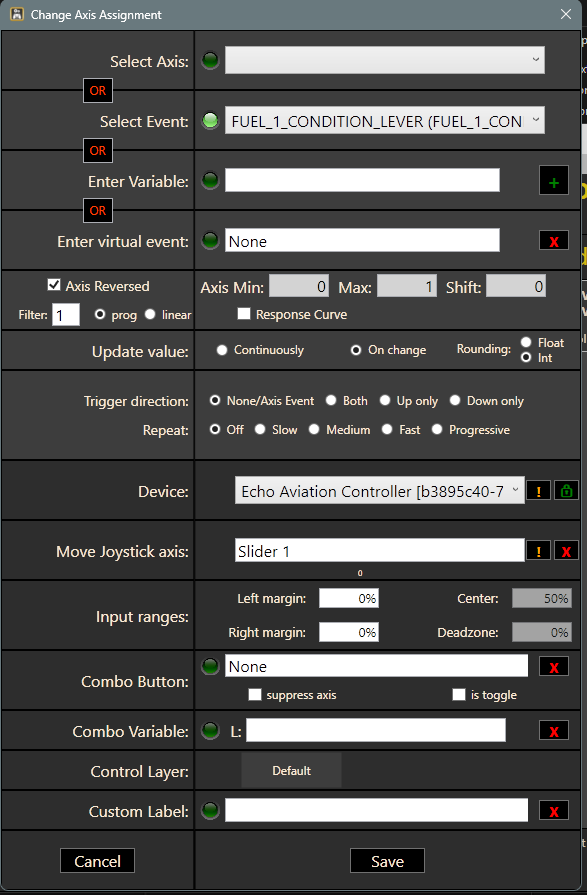
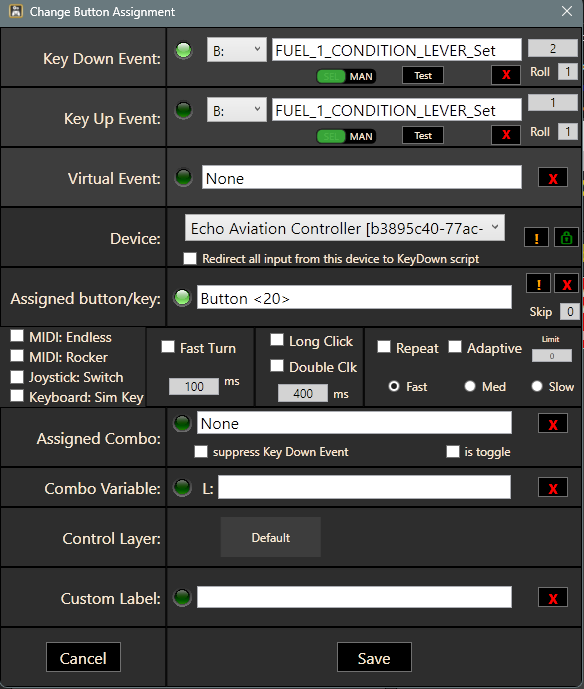
@RPGamerous Thanks very much for the information! After agonizing for days both inside the default MSFS2024 Control Setttings as well as by way of FSUIPC, I finally was able to map the Condition Lever axis and the Detent Gate Button successfully using Axis and Oh's!
I mapped the axis between 0 (high idle) and 1 (low idle), since 2 is cutoff and if I map from 0 to 2 the lever goes into cutoff towards the bottom of the axis range, which I don't want since this could cause me to inadvertently cutoff fuel during flight.
Now the axis moves from High Idle in the top 50% of its range, to Low Idle in the bottom 50% of its range. I button mapped the detent gate to a "Key Down Event" (2)(Cutoff) and "Key Up Event" (1)(Low Idle) ... The axis and the button maps must exclusively use the "MSFS IEs: FUEL_1_CONDITION_LEVER" options.
I will leave this verbose information and these two screenshots here for posterity. Perhaps there is some way to do this in MSFS directly or via FSUIPC, but I don't know what it is. I might just map all my other axes and detent buttons in AAO as well.
-
Glad you finally got it working! I have the ProDeskSim King Air levers for the Bravo. I don't really recommend them overall because the quality isn't good for the money imo, BUT they do have inserts with detents for the throttle and condition levers, so I don't need to worry about buttons -- beta, reverse, and hi/low idle/cutoff are easy to deal with. That right there is the best thing about the levers as far as I'm concerned.
-
Thank you! I just got the Honeycomb Echo Aviation Controller, basically its an X-box style controller but I am surprised how well its laid out specifically for FlightSimming, the elevator and aileron axes are surprisingly precise and tunable. It did take me awhile to figure out how to map reverse thrust, prop feather, and cutoff on the Caravan, but i finally got it, and thanks again for mentioning Axis and Ohs, I had heard about the program numerous times before but was intimidated by the interface, now I realize its a great tool for mapping anything once you get the general hang of it.