
Generator Switch and Inertial Separator Animations
-
After days of reading, studying, trial and error, I have successfully mapped the Caravan's electrical switch panel and Inertial Separator to a couple of peripherals using the Hangar Control App. All functions are working properly, confirmed by the tablet, annunciator panel and the multi meter, however, I get no visual confirmation of the Generator Switch, nor the Inertial Separator. I have seen another post about the generator switch, but I didn't see where there was an actual solution found and @Black-Square didn't chime in on that topic.
I understand that in certain cases there are animations that are activated outside of the Lvars that are being used to control an in-game switch and such, but I have no knowledge of how make them happen. All other animations for the other switches are functioning normally. I'm less concerned about the generator switch animation, as it's only out of it's center position momentarily, and I can easily confirm it's status on the annunciator/meter. The inertial separator is more of a concern as I primarily fly in VR, and if the lever is not visually out, I have no way to confirm it's status without looking at the tablet or feeling for my switch position.
Does anyone have any possible solutions for someone who is not adept at modifying XMLs and the like? Any help is appreciated -
The generator switch situation is as you describe, but I should be able to add the animation pretty easily with the next update. I've already done that for a few other switches too. For the inertial separator, it shouldn't be too difficult to add either. I thought it would already work, but I guess I didn't test it. In the meantime, if you have access to B:Vars in your binding software, then you can try
B:HANDLING_InertSep_Toggle. I'll see what I can do, and if the changes are easy blocks of code, then I will post them here for you to make the modification so you don't have to wait for an update. Let me know if you have any more questions! -
The generator switch situation is as you describe, but I should be able to add the animation pretty easily with the next update. I've already done that for a few other switches too. For the inertial separator, it shouldn't be too difficult to add either. I thought it would already work, but I guess I didn't test it. In the meantime, if you have access to B:Vars in your binding software, then you can try
B:HANDLING_InertSep_Toggle. I'll see what I can do, and if the changes are easy blocks of code, then I will post them here for you to make the modification so you don't have to wait for an update. Let me know if you have any more questions!@Black-Square Thank you so very much! Hoping it's a simple fix for you!
-
@miller39687
Inertial Separator
B:HANDLING_INERTSEP (1 - ON / 0 - OFF) - Animation works just fine. -
@miller39687
Inertial Separator
B:HANDLING_INERTSEP (1 - ON / 0 - OFF) - Animation works just fine.@hangar_101 Thank you! I will try that when I get a chance to sit down at the simulator again! I had used the L:XMLVAR_InterSep listed in the manual. It worked, but without the handle animation.
-
After days of reading, studying, trial and error, I have successfully mapped the Caravan's electrical switch panel and Inertial Separator to a couple of peripherals using the Hangar Control App. All functions are working properly, confirmed by the tablet, annunciator panel and the multi meter, however, I get no visual confirmation of the Generator Switch, nor the Inertial Separator. I have seen another post about the generator switch, but I didn't see where there was an actual solution found and @Black-Square didn't chime in on that topic.
I understand that in certain cases there are animations that are activated outside of the Lvars that are being used to control an in-game switch and such, but I have no knowledge of how make them happen. All other animations for the other switches are functioning normally. I'm less concerned about the generator switch animation, as it's only out of it's center position momentarily, and I can easily confirm it's status on the annunciator/meter. The inertial separator is more of a concern as I primarily fly in VR, and if the lever is not visually out, I have no way to confirm it's status without looking at the tablet or feeling for my switch position.
Does anyone have any possible solutions for someone who is not adept at modifying XMLs and the like? Any help is appreciated@miller39687 For the generator switch, in
CaravanProfessional_INT.XML(there will be two such files in your community folder if you have the bundle), search for the line...<CODE_POS_2> 2 (>L:var_GeneratorSwitch, number) </CODE_POS_2>Immediately afterwards, add:
<OVERRIDE_ANIM_CODE>
	(L:var_GeneratorSwitch, number) 1 == if{
		0
	}
	els{
		(L:var_GeneratorSwitch, number) 2 == if{
			200
		}
		els{
			100
		}
	}
</OVERRIDE_ANIM_CODE>
For the inertial seperator, search for
ASOBO_HANDLING_Lever_InertSep_Template. Delete this block of code (from<UseTemplate Name...to</UseTemplate>, and replace it with...<Component ID="HANDLING_Lever_InertSep" Node="HANDLING_Lever_InertSep"> <UseTemplate Name="ASOBO_GT_Switch_Code"> <ANIM_NAME>HANDLING_Lever_InertSep</ANIM_NAME> <NODE_ID>HANDLING_Lever_InertSep</NODE_ID> <PART_ID>HANDLING_Lever_InertSep</PART_ID> <LEFT_SINGLE_CODE> (L:XMLVAR_InterSep, bool) ! (>L:XMLVAR_InterSep, bool) </LEFT_SINGLE_CODE> <ANIM_CODE>(L:XMLVAR_InterSep, bool) 100 *</ANIM_CODE> <ANIM_LAG>100</ANIM_LAG> <WWISE_EVENT_1>Caravan_Bypass_On</WWISE_EVENT_1> <WWISE_EVENT_2>Caravan_Bypass_Off</WWISE_EVENT_2> <TOOLTIP_TITLE></TOOLTIP_TITLE> <TOOLTIPID>Inertial Seperator</TOOLTIPID> </UseTemplate> </Component>Let me know if you need any help with that! Always happy to fix these things for anyone willing to edit a couple lines of code

-
@miller39687 For the generator switch, in
CaravanProfessional_INT.XML(there will be two such files in your community folder if you have the bundle), search for the line...<CODE_POS_2> 2 (>L:var_GeneratorSwitch, number) </CODE_POS_2>Immediately afterwards, add:
<OVERRIDE_ANIM_CODE>
	(L:var_GeneratorSwitch, number) 1 == if{
		0
	}
	els{
		(L:var_GeneratorSwitch, number) 2 == if{
			200
		}
		els{
			100
		}
	}
</OVERRIDE_ANIM_CODE>
For the inertial seperator, search for
ASOBO_HANDLING_Lever_InertSep_Template. Delete this block of code (from<UseTemplate Name...to</UseTemplate>, and replace it with...<Component ID="HANDLING_Lever_InertSep" Node="HANDLING_Lever_InertSep"> <UseTemplate Name="ASOBO_GT_Switch_Code"> <ANIM_NAME>HANDLING_Lever_InertSep</ANIM_NAME> <NODE_ID>HANDLING_Lever_InertSep</NODE_ID> <PART_ID>HANDLING_Lever_InertSep</PART_ID> <LEFT_SINGLE_CODE> (L:XMLVAR_InterSep, bool) ! (>L:XMLVAR_InterSep, bool) </LEFT_SINGLE_CODE> <ANIM_CODE>(L:XMLVAR_InterSep, bool) 100 *</ANIM_CODE> <ANIM_LAG>100</ANIM_LAG> <WWISE_EVENT_1>Caravan_Bypass_On</WWISE_EVENT_1> <WWISE_EVENT_2>Caravan_Bypass_Off</WWISE_EVENT_2> <TOOLTIP_TITLE></TOOLTIP_TITLE> <TOOLTIPID>Inertial Seperator</TOOLTIPID> </UseTemplate> </Component>Let me know if you need any help with that! Always happy to fix these things for anyone willing to edit a couple lines of code
@Black-Square thank you for sharing this piece of code — it worked perfectly.
-
@miller39687 For the generator switch, in
CaravanProfessional_INT.XML(there will be two such files in your community folder if you have the bundle), search for the line...<CODE_POS_2> 2 (>L:var_GeneratorSwitch, number) </CODE_POS_2>Immediately afterwards, add:
<OVERRIDE_ANIM_CODE>
	(L:var_GeneratorSwitch, number) 1 == if{
		0
	}
	els{
		(L:var_GeneratorSwitch, number) 2 == if{
			200
		}
		els{
			100
		}
	}
</OVERRIDE_ANIM_CODE>
For the inertial seperator, search for
ASOBO_HANDLING_Lever_InertSep_Template. Delete this block of code (from<UseTemplate Name...to</UseTemplate>, and replace it with...<Component ID="HANDLING_Lever_InertSep" Node="HANDLING_Lever_InertSep"> <UseTemplate Name="ASOBO_GT_Switch_Code"> <ANIM_NAME>HANDLING_Lever_InertSep</ANIM_NAME> <NODE_ID>HANDLING_Lever_InertSep</NODE_ID> <PART_ID>HANDLING_Lever_InertSep</PART_ID> <LEFT_SINGLE_CODE> (L:XMLVAR_InterSep, bool) ! (>L:XMLVAR_InterSep, bool) </LEFT_SINGLE_CODE> <ANIM_CODE>(L:XMLVAR_InterSep, bool) 100 *</ANIM_CODE> <ANIM_LAG>100</ANIM_LAG> <WWISE_EVENT_1>Caravan_Bypass_On</WWISE_EVENT_1> <WWISE_EVENT_2>Caravan_Bypass_Off</WWISE_EVENT_2> <TOOLTIP_TITLE></TOOLTIP_TITLE> <TOOLTIPID>Inertial Seperator</TOOLTIPID> </UseTemplate> </Component>Let me know if you need any help with that! Always happy to fix these things for anyone willing to edit a couple lines of code
@Black-Square Thank you again! Last night I tried your suggestion of B:HANDLING_InertSep_Toggle, and it worked perfectly, so I will likely leave that one as it is for now.
I will give the code for the generator switch a try the next time I'm at my simulator! Since @hangar_101 had success with it, it will completely depend on my ability to follow your instructions!
FYI, I'm loving your Caravan Professional so much that this is the switch box I invested in to increase my immersion!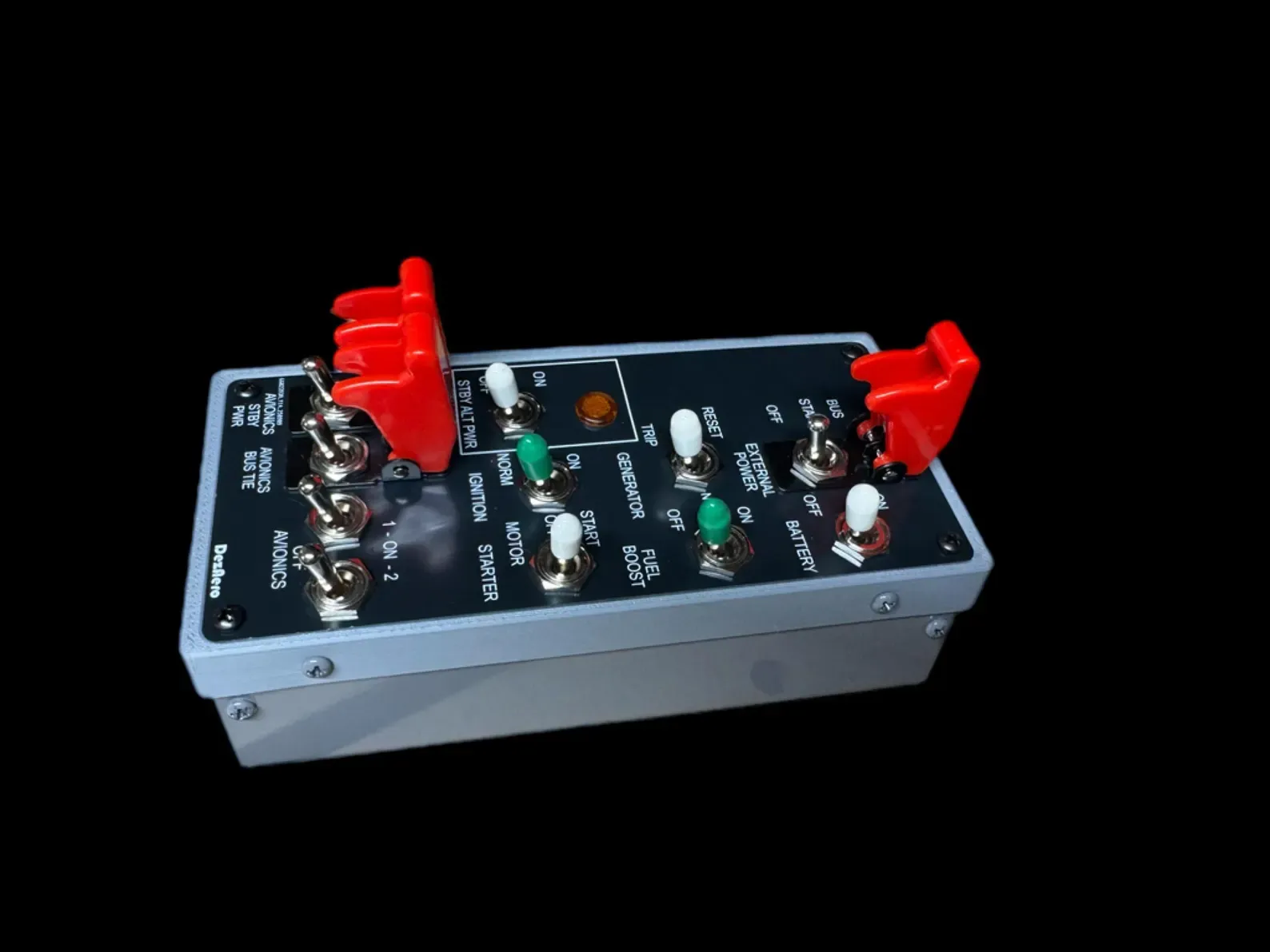
-
@Black-Square Thank you again! Last night I tried your suggestion of B:HANDLING_InertSep_Toggle, and it worked perfectly, so I will likely leave that one as it is for now.
I will give the code for the generator switch a try the next time I'm at my simulator! Since @hangar_101 had success with it, it will completely depend on my ability to follow your instructions!
FYI, I'm loving your Caravan Professional so much that this is the switch box I invested in to increase my immersion!What brand/model switch box is this?
-
What brand/model switch box is this?
@Chimaeira to avoid a post that may be taken as advertising, I'll just say to do a search on ETSY for "cessna caravan switch panel". Fair warning, it isn't cheap, but is VERY well made!
-
@Black-Square Last night I had time to add the code you provided for the generator switch. It worked flawlessly! Thank you very much!
-
@Chimaeira to avoid a post that may be taken as advertising, I'll just say to do a search on ETSY for "cessna caravan switch panel". Fair warning, it isn't cheap, but is VERY well made!
@miller39687 Not cheap indeed
 Thanks for pointing me in the right direction.
 -
@miller39687 Not cheap indeed
Thanks for pointing me in the right direction.@Chimaeira Yes, I muddled it over for a while before deciding to purchase one. Glad I did though, it is a nice piece of hardware.

