
Air Manager panel to match the Black Square Baron Professional?
-
Every year, Altimeter Motives (Ron Sartore) makes a batch of beautiful panel overlays for piston twins, and sells them at FlightSimExpo. Ron calls it a Baron panel, but it is not a close match for the Black Square Baron cockpit. In fact, it is a perfect fit for the Air Manager "Beechcraft Baron 58" panel.
Visible here: https://altimetermotives.com/shop/ols/products/limited-2025-edition-baron-58
The existing Air Manager panel has instruments that are not on the main Black Square panel (e.g. fuel), and lacks others (e.g. radar altimeter). Most other instruments are different versions (e.g. turn coordinator). Sometimes the difference is subtle: fuel flow goes to 30 on one, and 40 on the other. The layout is quite different: the six pack is not in a 3x2 rectangle. The Air Manager site has some instruments that are better matches, but not identical to Black Square’s.
I would love to buy an Altimeter Motives panel that matches the Black Square one. And, if that means I have to make my own Air Manager instruments and panel, then I will. If I did that, I would make my work available for free.
What is Black Square’s position on this sort of thing? Do they actively cooperate, passively allow, actively obstruct, or something in between?
I don’t have specific experience with Air Manager, but I have made some technical animations before, and have watched some YouTube tutorials on creating Air Manager instruments. It looks like it would take a month or two to make something decent.
Or is there already somebody working on this? Or somebody who would like to help?
Ron Stewart
Vancouver, BC -
Every year, Altimeter Motives (Ron Sartore) makes a batch of beautiful panel overlays for piston twins, and sells them at FlightSimExpo. Ron calls it a Baron panel, but it is not a close match for the Black Square Baron cockpit. In fact, it is a perfect fit for the Air Manager "Beechcraft Baron 58" panel.
Visible here: https://altimetermotives.com/shop/ols/products/limited-2025-edition-baron-58
The existing Air Manager panel has instruments that are not on the main Black Square panel (e.g. fuel), and lacks others (e.g. radar altimeter). Most other instruments are different versions (e.g. turn coordinator). Sometimes the difference is subtle: fuel flow goes to 30 on one, and 40 on the other. The layout is quite different: the six pack is not in a 3x2 rectangle. The Air Manager site has some instruments that are better matches, but not identical to Black Square’s.
I would love to buy an Altimeter Motives panel that matches the Black Square one. And, if that means I have to make my own Air Manager instruments and panel, then I will. If I did that, I would make my work available for free.
What is Black Square’s position on this sort of thing? Do they actively cooperate, passively allow, actively obstruct, or something in between?
I don’t have specific experience with Air Manager, but I have made some technical animations before, and have watched some YouTube tutorials on creating Air Manager instruments. It looks like it would take a month or two to make something decent.
Or is there already somebody working on this? Or somebody who would like to help?
Ron Stewart
Vancouver, BC@ronstew said in Air Manager panel to match the Black Square Baron Professional?:
What is Black Square’s position on this sort of thing? Do they actively cooperate, passively allow, actively obstruct, or something in between?
Hi Ron. Broadly, I have nothing to do with any products, mods, or profiles that interface with my aircraft, but I would never actively obstruct anything that improves the simulator experience for even a handful of my users. In the past, I have been contacted by Air Manager for resources and to make modifications to my code to assist the creation of Air Manager profiles. I did everything I could to assist in the process, because I think the Air Manager system is a great way to enjoy my aircraft. I've actually been surprised that I haven't heard much from them regarding my more recent aircraft, but I would always be happy to help.
I hope that answers your question! Let me know if there is ever anything I can do for you!
-
Exciting. Thank you!
I think my next step is a thorough reading of the Air Manager documentation.
This forum does not seem to have private messaging?
@ronstew Unfortunately not anymore. I was told it was a compliance issue. You're welcome to ask any questions here, and if need be, we can always move over to email.
-
Exciting. Thank you!
I think my next step is a thorough reading of the Air Manager documentation.
This forum does not seem to have private messaging?
@ronstew said in Air Manager panel to match the Black Square Baron Professional?:
This forum does not seem to have private messaging?
That is correct. It is, as Nick says, partly about legal compliance but also a choice we've made having observed mulitple abuses of it in the past, both here and on other forums.
-
AVNX has recently announced that they are working on an Air Manager panel for Black Square's Bonanza. I imagine that a Baron will follow. Which makes my idea of making one unnecessary. I am glad and disappointed. It would have been fun, but I could not approach AVNX's quality.
-
@ronstew said in Air Manager panel to match the Black Square Baron Professional?:
What is Black Square’s position on this sort of thing? Do they actively cooperate, passively allow, actively obstruct, or something in between?
Hi Ron. Broadly, I have nothing to do with any products, mods, or profiles that interface with my aircraft, but I would never actively obstruct anything that improves the simulator experience for even a handful of my users. In the past, I have been contacted by Air Manager for resources and to make modifications to my code to assist the creation of Air Manager profiles. I did everything I could to assist in the process, because I think the Air Manager system is a great way to enjoy my aircraft. I've actually been surprised that I haven't heard much from them regarding my more recent aircraft, but I would always be happy to help.
I hope that answers your question! Let me know if there is ever anything I can do for you!
@Black-Square we are taking care of that for your new products Nick. Still very much a work-in-progress, so far from finished. The panels are coming for both the Bonanza / Baron Pro in pilot and co-pilot view.
AVNX Baron Pro
Keep up the great work! The planes fly great and are much fun to fly around with.Best regards,
Pete -
@Derek could you please assist me sir, and remove the broken link image in my post above? I tried to edit it but I passed the time window for that. I placed the updated image on the permalink of the AVNX website itself.
That way users don't end up at broken links or media.Appreciate your help.
Pete -
Hope you like the result @Black-Square
Still testing, polishing, tweaking and so on. So we're not there yet
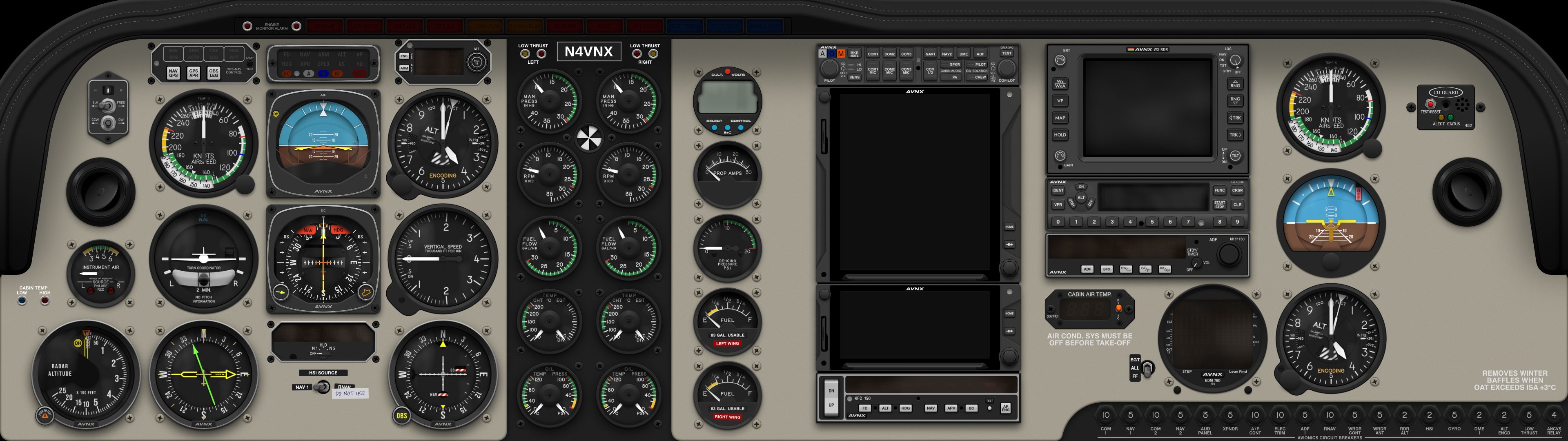
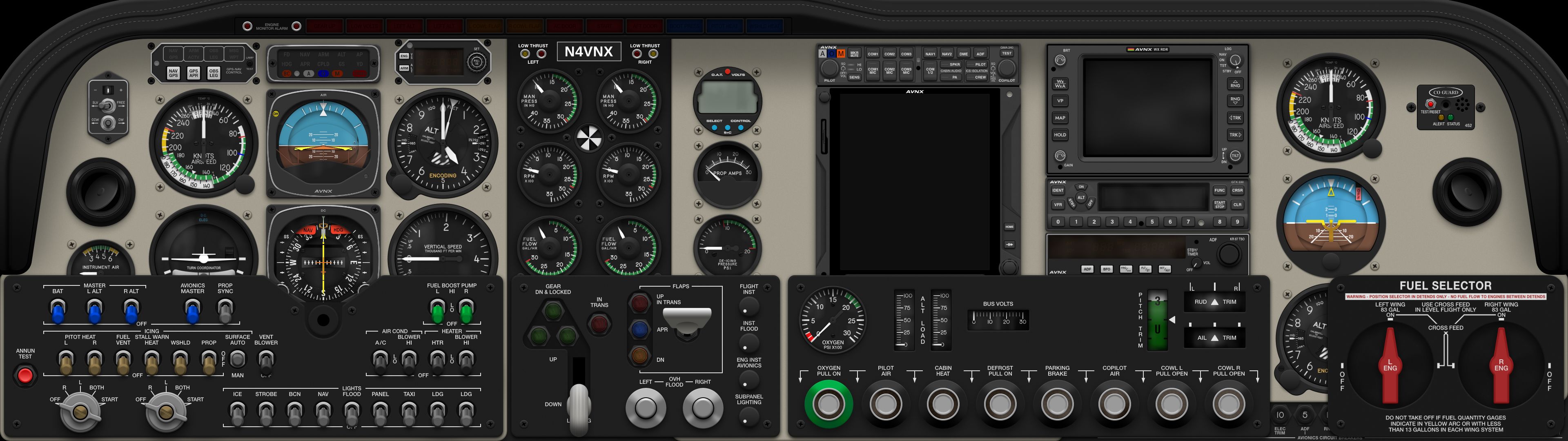
@avnx This looks absolutely magnificent! Thank you so much for sharing. Please let me know if there anything I can do to help!
-
@avnx This looks absolutely magnificent! Thank you so much for sharing. Please let me know if there anything I can do to help!
@Black-Square Thank you man! Really appreciate this feedback and offer for support.
For now we're mainly on piecing the last lose ends together. Things such as the custom digital fonts we've build for all the avionics and fuel computers.
A few more things need to get scripted or we need to improve. And we still have to do a lot of testing and do some polish and improve layouts where needed.I'll post a small note here when it's available on the Sim Innovations website. It can probably benefit some of your users. It will get released in both a Baron and Bonanza version. After that chances are great we'll put some time in your other products. Caravan maybe. Not sure yet.
-
Really looking forward to your release! Recently added the altimeter motives Baron panel to my sim and while I've made a number of mods to the air manager instruments like adding radar altimeter etc this will be a much better starting point
@MiRexer Hi sir! Happy to have caught your message because I'm not actively following the treads here constantly. If all goes well, the Baron / Bonanza panels should be out by the 15th this month via the website of Sim Innovations. A note on "mods" in reference to our panels, just to get you the right expectations.
When you get any of our add-ons, wether they are paid or even free, they always live encrypted on the server. So that means you can use them in the layouts provided by us (which are turnkey solutions), or you can use the instruments inside your custom built panel. Or in your case you can link them to the Baron panel from Altimeter Motives. We did provide, and do continue to provide hardware support for the steam gauges (not for the avionics, or not at this moment.) so that means you can link the instruments in a very simple way directly to your Baron HW panel :).
The only thing you can't do is access the scripting, graphics, sounds, in-house built digital fonts etc etc for alterations. So basically we protect the user (and ourselves) from getting into copyright issuesor grey zone discussions. We are always very approachable to discuss missing features and so forth off course. The hardware integration for panels like you have is one of the items requested on our Discord and has been actively provided for that reason.
Hope this helps and I wish you lot of joy with the hardware panel. I know Ron from Altimeter Motives personally and he makes cool stuff for sure.
Best,
Pete -
Hi @Black-Square
We were finally able to release both panels for your products to the public. We hope you like the final outcome.We'll update and tweak a bit more if we get some reported bugs.
For now focus goes to Caravan and beyond. Appreciate the support!They are available at Sim Innovations store directly.
Bonanza A36
Baron B58Greets,
Pete -
Woohooo
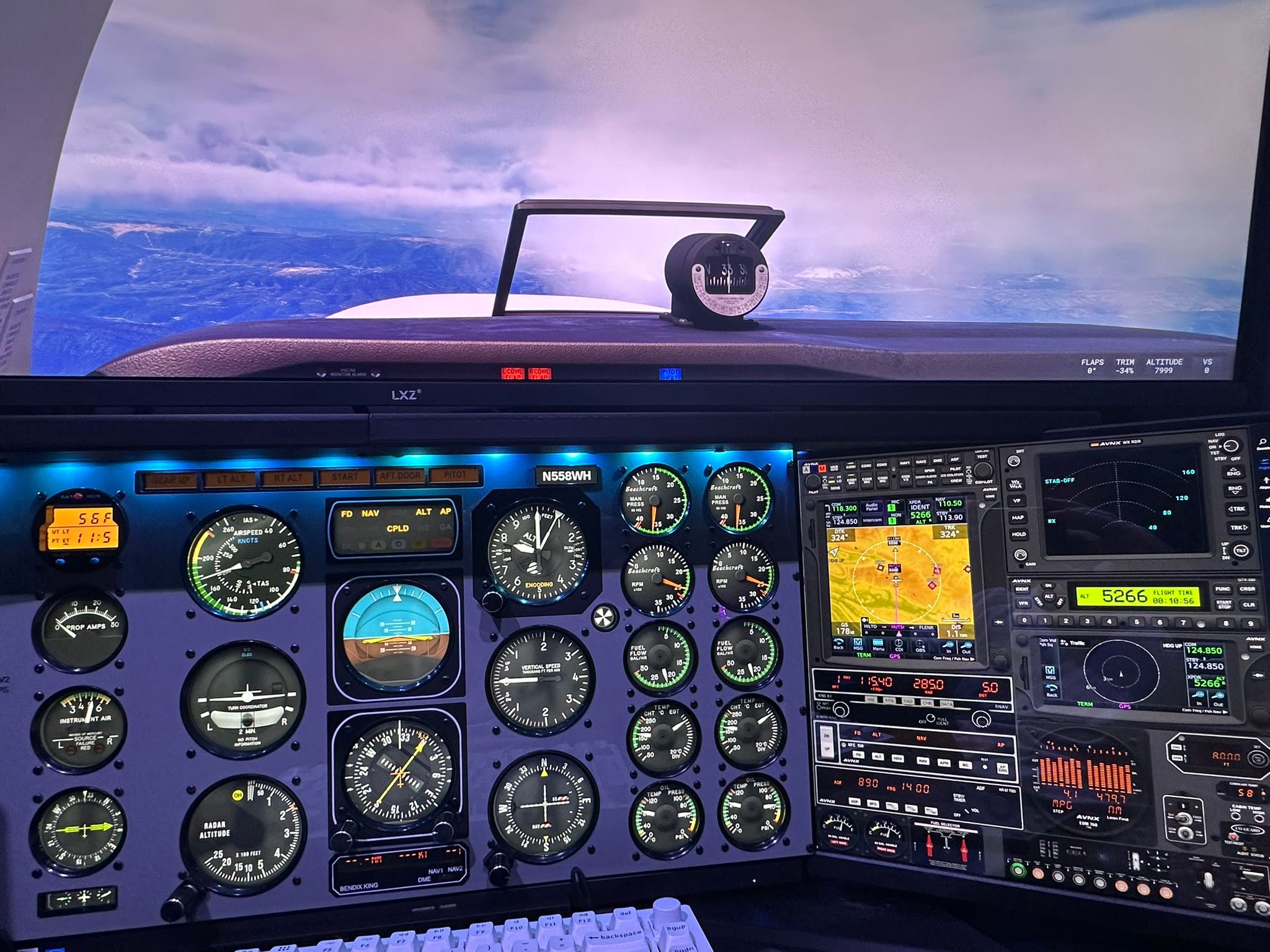
 . Here's my setup with the altimeter motives panel and the AVNX gauges and avionics. Some are swapped out - Airspeed, MP, and RPM have been changed for my modified versions of those for the 58P. All the rotary encoders on the altimeters motives panel are setup and working with it. The only avionics not fully functional now is the KNS 81 - it has the screen from Glass Out but none of the buttons work (it's just a background image other than the screen).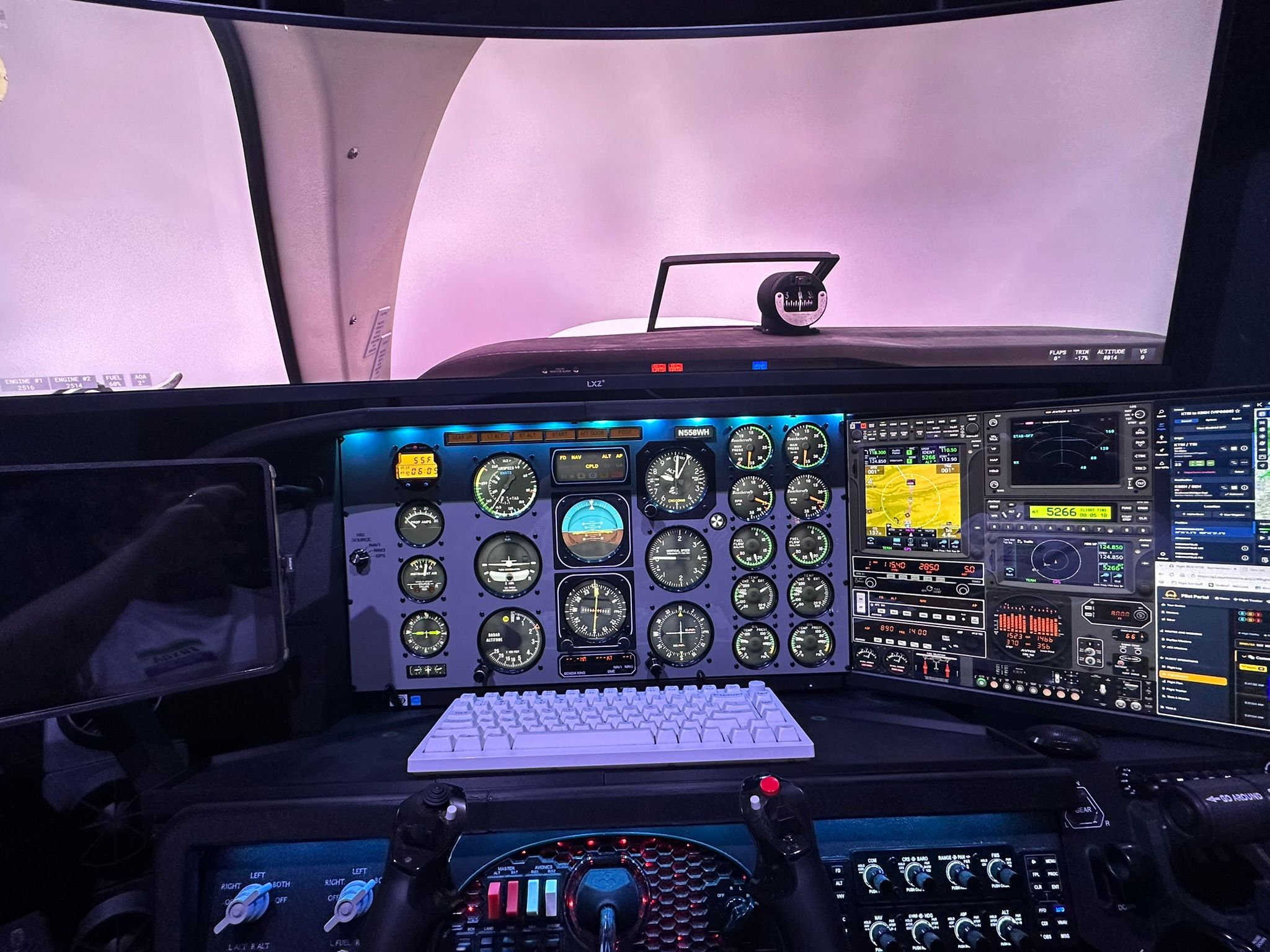
-
Hi @Black-Square
We were finally able to release both panels for your products to the public. We hope you like the final outcome.We'll update and tweak a bit more if we get some reported bugs.
For now focus goes to Caravan and beyond. Appreciate the support!They are available at Sim Innovations store directly.
Bonanza A36
Baron B58Greets,
Pete@avnx Hi Pete! I appreciate them more than you can know! The hyper-realism reminds me of my favorite 2D panels for flight simulators long ago. Thank you so much for designing them and bringing them to life for the community to enjoy. Always, let me know if there is anything I can do to help

-
Some notes for anyone using the avnx panel along with hardware. In air manager if you assign the hardware to the instrument itself (with the instrument selected on the left) it will be with no acceleration. If you assign the hardware instead from the Panel (having the panel selected on the left and there's a hardware section on the right that you can add hardware to) it will have acceleration.
Sometimes it's just a generic setting - for example for the HSI the settings are: Generic - HSI OBS dial and Generic - Autopilot heading. The 2nd NAV/VOR is Generic - VOR OBS dial (and then you assign it to nav 2). Also assigning hardware on the instrument you have to close and restart air manager for it to take effect (at least for me).
AND they did a phenomenal job on the avionics! Awesome having the radar and autopilot fully functioning!
-
@avnx Hi Pete! I appreciate them more than you can know! The hyper-realism reminds me of my favorite 2D panels for flight simulators long ago. Thank you so much for designing them and bringing them to life for the community to enjoy. Always, let me know if there is anything I can do to help
@Black-Square Thank you sir. Really appreciate it.
Yes, the "depth perception" is part of what is called skeuomorphic design in UI/UX design. We also did some testing to make the reflective layer on the gauge glass move based on environment and position but that was only a small test, not for a full panel.
Maybe it's something that one day can find it's way into the products.For now we'll probably need to focus a bit on debugging if someone reports issues. Further development of the digital fonts is schedule, so that 3rd party developers can implement them in their add-ons. And I'm afraid we will need to help out @MiRexer with support for the TC and P variant, so we will need to look into that. Otherwise he is stuck with an ugly RPM and airspeed gauge haha

So lots of to-do's, but I probably don't need to explain this to you.There is one thing I could use your help with. But let's discuss that off forum.
Is it possible to send you an email? I don't see a DM option here.Greets,
Pete -
@Black-Square Thank you sir. Really appreciate it.
Yes, the "depth perception" is part of what is called skeuomorphic design in UI/UX design. We also did some testing to make the reflective layer on the gauge glass move based on environment and position but that was only a small test, not for a full panel.
Maybe it's something that one day can find it's way into the products.For now we'll probably need to focus a bit on debugging if someone reports issues. Further development of the digital fonts is schedule, so that 3rd party developers can implement them in their add-ons. And I'm afraid we will need to help out @MiRexer with support for the TC and P variant, so we will need to look into that. Otherwise he is stuck with an ugly RPM and airspeed gauge haha
So lots of to-do's, but I probably don't need to explain this to you.There is one thing I could use your help with. But let's discuss that off forum.
Is it possible to send you an email? I don't see a DM option here.Greets,
Pete@avnx Unfortunately DM was removed a while back due to some EU compliance, I believe. Please send a message to Just Flight Support saying who you are, and that I said to put us in touch. Sorry for the extra step! I'll look forward to helping you however I can

