Caravan Professional changelog - v1.2 released 05.05.26
-
Changelog details:
Engine Damage & More Sound ImprovementsNew Features:
• Added numerous sounds pertaining to engine damage during startup, shutdown, at all power settings, and several turbine specific engine failures, like compressor stall/surging.
• Added dynamic under-wing registration to default liveries with better feature support for livery painters.
• Sounds for all exterior interactions, like opening and closing doors, are now audible during walkarounds.
• Added seamless support for the native water rudder keybinding while still supporting the tablet interface triggered water rudder cable failure.
• Engine damage will now influence ITT beyond 40% damage.
• Previously, only crew members consumed oxygen, so as to extend the effective range of the aircraft at altitudes where only crew oxygen was required by regulations. Now, passengers will only consume oxygen when the indicated altitude is above 14,750 feet.Bug Fixes:
• Rewrote code relating to the ventilation blowers, as unexpected electrical behavior resulted from old code from the Analog Caravan.
• Fixed visual synchronization problem with the tablet failure interface when failures were triggered from HTML events, in preparation for collaboration with online services.
• Further refinement of propeller and engine sound leveling inside and outside the aircraft.
• Turbine propeller blade angle animation was mistakenly driven from simplified code from previous Black Square aircraft, which has now been replaced with improved behavior in all other Black Square aircraft (except the TBM 850, which will also receive this update).
• The fuel selectors off warning system will no longer activate when the firewall fuel cutoff handle is pulled. The fuel selector off warning horn will also be deactivated when the START CONT circuit breaker is pulled, as the two circuit breakers were previously configured in parallel, not series.
• Increased empty weight of the Cargomaster to 4,040lbs to reflect inclusion of the Cargopod. Useful load and full fuel payload numbers have been adjusted accordingly.
• Yoke-mounted electric trim switches will now only function when the autopilot is powered in addition to the electric trim actuator circuit. -
I have FS2024 Caravan Pro Passenger installed on my PC and I tried to install it using the file provided by the product seller (simMarket). I received two files, "Install_Caravan_Pro_Passenger_MSFS2024_TP_v0.1.2.exe" and another "Install_Caravan_Pro_Passenger_MSFS2024_TP_v0.1.2_1_.exe".
When I tried to run the first one, the following execution error appeared: "An error (-5001 : 0x80070002) has occurred while running the setup."
When I tried to run the second file, Windows failed, claiming it was not an operating system file. -
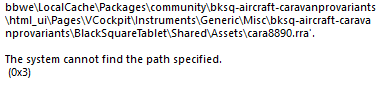
Why not changing the install app? Every single time I wanna install/update something from JF install app, it just doesn't works.. Now I get a install failure that it can't find some file.. seriously fix that install app of yours, or ask Claude how to do it.
-
Why not changing the install app? Every single time I wanna install/update something from JF install app, it just doesn't works.. Now I get a install failure that it can't find some file.. seriously fix that install app of yours, or ask Claude how to do it.
@gustavpicora
I am not sure if this is the case, but as far as I remember this is a windows issue due to long folder names. If you move your community folder to a shorter location it should be fine.f.e. I did move mine to c:\xboxgames\msfs2024….
You can do this from the inside of the sim if I remember correctly. -
Before running the update file, I remove the old version from Control Panel/Programs/Remove.
Then, during the new installation, I choose one of the options to install to my desired location or the default MSFS 2024 location.
But first, I remove the old version.