Cannot for the life of me get the ADF to function on the Caravan Pro
-
Cannot for the life of me get the ADF to function on the Caravan Pro
I have tried to get the ADF system to work on the Caravan Pro and fail to see how it will get the needle to work. Any suggestions ? I'm attempting an NDB approach and the ADF need it to work.
Thanks in advance i'm sure its something simple. AI is being useless and says MSFS doesn't support NDB but that's totally wrong.
-
Hmm it was really odd though many other planes worked. The NDB was 342.5 at EGSH and I was parked right next and just doing circuits. Do you think it’s the .5 issue again - I thought this was fixed I will try again today but just think it’s still not implemented properly in older systems.
If anyone else experienced this in the UK would like to know.
-
We have .5 here in he UK so I’m guessing that might be the issue - I just heard back from my flying club Good question Steve.
“NDBs in Europe have always used 0.5kHz frequencies where in the US they have only ever used whole integer frequencies. However to answer your question, due to the broad band spectrum of the kHz frequency band 0.5khz won’t have much effect on the ADF reception, so feel free to use (for Norwich 342.5kHz) either 342 or 343…. We ding 342 works well.”
-
We have .5 here in he UK so I’m guessing that might be the issue - I just heard back from my flying club Good question Steve.
“NDBs in Europe have always used 0.5kHz frequencies where in the US they have only ever used whole integer frequencies. However to answer your question, due to the broad band spectrum of the kHz frequency band 0.5khz won’t have much effect on the ADF reception, so feel free to use (for Norwich 342.5kHz) either 342 or 343…. We ding 342 works well.”
@sputman101 Unless you're referring to an issue with the frequency spacing in the simulator that I'm unaware of, this might be of interest to you from the manual:
A secondary click on the power knob will increment the standby frequency by 0.5 kHz, indicated with a dot to the left of the frequency.
-
-
Ohh ok - will try today - thanks
@sputman101 I had this issue with a few planes in the past and did some work to dig in to why some planes work and some don't.
Long story short: SOME developers put in an automatic .5 seek. The Just Flight Pipers have this for example...
You set 342 because you physically can't put in a ".5" and it will tune to 342.0 see if the signal is detected, then automatically and silently it'll tune 341.5 and take a second or 2 to see if it gets a signal. If it does it'll lock to that. If not, it'll go back to 342.0 and cycle between them until it gets a signal lock.You can see it happening if you have a way of motioning simvars:
(A:ADF ACTIVE FREQUENCY:1, Number)will show it. You'll see it cycling between .0 and .5, then back to .0 and so on, even though the instrument itself can't show decimals.Just to note that, as Nick says, the Black Square fleet doesn't work like that

But hopefully it'll give you some insight into why SOME planes that show just integer values, still seem to work.
And like you say, in real life the tuning is so broad you could put in .5 or .0 and it would just work. Doesn't work like that in sim though, unless the devs put in that .5 seek cycle, or give a switch like Nick.<Wittering Ends>

-
@sputman101 I had this issue with a few planes in the past and did some work to dig in to why some planes work and some don't.
Long story short: SOME developers put in an automatic .5 seek. The Just Flight Pipers have this for example...
You set 342 because you physically can't put in a ".5" and it will tune to 342.0 see if the signal is detected, then automatically and silently it'll tune 341.5 and take a second or 2 to see if it gets a signal. If it does it'll lock to that. If not, it'll go back to 342.0 and cycle between them until it gets a signal lock.You can see it happening if you have a way of motioning simvars:
(A:ADF ACTIVE FREQUENCY:1, Number)will show it. You'll see it cycling between .0 and .5, then back to .0 and so on, even though the instrument itself can't show decimals.Just to note that, as Nick says, the Black Square fleet doesn't work like that
But hopefully it'll give you some insight into why SOME planes that show just integer values, still seem to work.
And like you say, in real life the tuning is so broad you could put in .5 or .0 and it would just work. Doesn't work like that in sim though, unless the devs put in that .5 seek cycle, or give a switch like Nick.<Wittering Ends>
@Jiblet You know, I've thought about doing that! I didn't know that's what anyone else had done. I have an infinitely tunable analog ADF in one of my upcoming aircraft, which was probably a mistake from a workload perspective, but I think I came up with an elegant enough solution. Unfortunately, without even the ability to tune to the nearest 1Hz reliably, and the slow update time of MSFS radio system from FS98 (I think), it would take too long to automatically seek to the correct frequency.
-
For anyone struggling with this, here are my findings across a few planes. Its an interesting thing I promise

First up:
There are controls you can bind that work even for those ADF units that wont show or let you set decimals:
That'll let you tun +/- 0.1 per button press, so you can make any of the ADF equipped planes work if you need to.
And here's the verdict for various GA aircraft for those of us in the UK and elsewhere with .5 congested frequencies
Tested by sitting on the ground at EGHI and trying to get 391.5 for the EAS NDB less than a mile away
Cessna 172 G1000 (or I assume anything G1000)
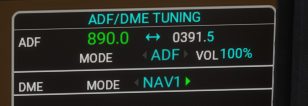
Lets you tune whatever decimal you like. Nice.Cessna 172 Steam
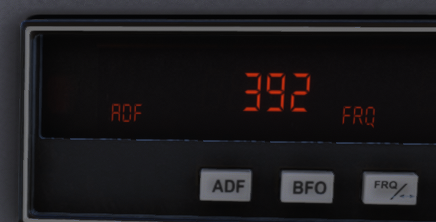
Fail. No Decimal tuning and no auto tuning. (you can use keybindings as above but you wont see the decimal changing - but you WILL see the freq round up to 392 when you set 391.5
Here's my stream Deck output showing(A:ADF ACTIVE FREQUENCY:1, Number)at the very same moment

Cessna 152
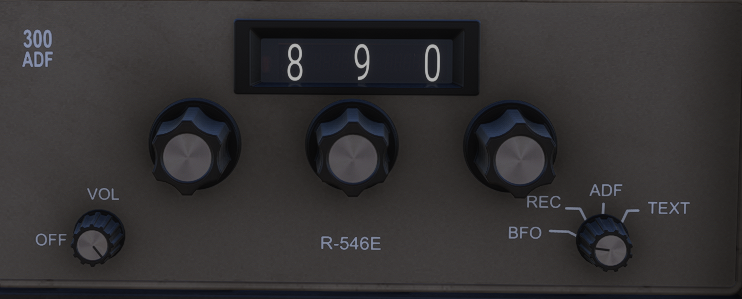
Fail, same as the Steam 172. No decimals but you can use the keys if you can count to 5.
Though interestingly, if you do use the keys it will show you have decimal, just not what that decimal is.
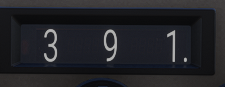
And I can tell you that 391.5 works, but .4 or .6 does not. At all. The needle just dies immediately.JF Tomahawk and JF Pipers
Auto, baby!
Here's the unit... no room for decimals
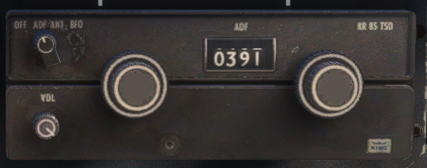
But about 5 seconds after tuning 391.0... We see
(A:ADF ACTIVE FREQUENCY:1, Number)jump to 391.5 and lock, and the needle will move:

Black Square Bonanza and Caravan:
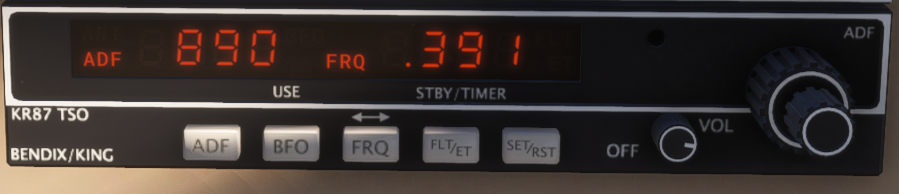
Both let you click the Off/Vol knob to add .5 each time. And have the . feedback to let you know its on .5.
Nice.Black Square Starship

AND
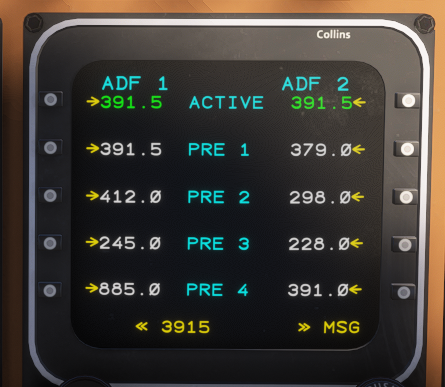
Lets you set the decimal, and lets you do that in 2 different ways, because of COURSE it does. Because it's the best plane the company ever built.Blackbird Cessna 310R, Bagolu's Cessna Bushkit, etc etc
I guess they use the default Asobo ADF KR80TSO unit because it does nothing clever. Here it is set to 391.5 using the keys:
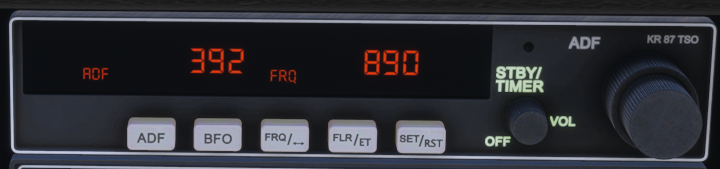
"Not ideal."Key points:
- Not too many people care about ADF especially .5 tuning. But we love those who do, @Black-Square and @just-flight!
- Asobo should implement auto .5 tuning, maybe in both directions, in their KR80TSO
- You can make it work in any ADF equipped plane using keybinds but they're not great.
- I apparently have nothing better to do than clog runways while playing with ADF