Extra lvars for the Bonanza's KAS297B
-
Hi @Black-Square,
You might remember me mucking about with the Starship and the DH and MDA vars, getting them exposed so I could show them on a Stream Deck from this thread
Well you'll be thrilled to hear I've been fiddling again - this time with the Bonanza!

I've been building a Stream Deck profile for the aircraft using PilotsDeck, and following the same approach you kindly helped with on the Starship, I've made some small modifications to KAS297B.js that I'd love to see included in a future update, both to save others the effort, and more selfishly, so that my changes don't get overwritten!
The KAS297B has several internal JavaScript properties that are invisible externally, so I've exposed some of them as L-Vars with the following additions:
-
L:var_kas297b_ArmedVS (feet per minute)
The "pending" vertical speed held in this.armedVerticalSpeed before ENG VS is pressed. Updated in each of the 100_INC, 100_DEC, 1000_INC, 1000_DEC knob cases, and also in the Update() loop where armedVerticalSpeed is synced from the AP var. -
L:var_kas297b_OptionalArming (0/1)
Exposes this.optionalArmingMode. Updated in the ArmButton case (both true and false branches), and in the Update() loop where it's reset when VS hold becomes active. -
L:var_kas297b_ArmAnnun (0/1)
Mirrors the ARM annunciator state. Set at the end of the ARM annunciator block in Update(). -
L:var_kas297b_AltAlert (0/1)
Mirrors the ALERT annunciator state. Set in both branches of the altitude alerting block in Update(). -
L:var_kas297b_CaptAnnun (0/1)
Mirrors the CAPT annunciator state. Set at the end of the capture annunciator block in Update().
All changes are purely additive and don't change any existing logic. The L-Vars only update when the underlying values actually change, so the performance impact should be negligible - they're driven by the same conditionals that already drive the screen annunciators.
I'd be happy to share the full modified file or a diff if that would make it easier.
For reference, here's a summary of all the new L-Vars:
L-Var Type Description L:var_kas297b_ArmedVS feet per minute Pending armed VS value before ENG VS is pressed. Matches what the unit displays on screen. L:var_kas297b_OptionalArming 0/1 Whether optional arming mode is active (ARM button pressed manually). L:var_kas297b_ArmAnnun 0/1 Mirrors the ARM annunciator on the unit display. L:var_kas297b_AltAlert 0/1 Mirrors the ALERT annunciator (aircraft within 280–1020ft of selected altitude). L:var_kas297b_CaptAnnun 0/1 Mirrors the CAPT annunciator. Thanks again for everything you do for the community - and for being so generous with your time helping users like me dig into the internals... probably a little too much!
Here's an unfinished example of what it's all for, straight from the Stream Deck:
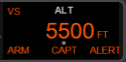
And from the cockpit:
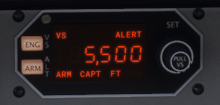
Thanks!
Jiblet -
-
That's wonderful! I always enjoy seeing my users take things into their own hands to get exactly what they're looking for from my aircraft. Yes, please share the file, and I will take a look. I can't image why we shouldn't be able to include this in the base file, assuming you're willing to contribute. If you use something like pastebin, you can set an expiratory date of even just one day, and I should be able to get to this tomorrow. Thank you! I also appreciate the documentation you wrote here so I can see all your changes when I go through the file

-
Thanks so much for the positive response - I'd be absolutely delighted to contribute, and it would be great to see these changes make it into the base file! They should work in other KAS297B equipped planes too unless your code changes wildly between them.
Here's the modified KAS297B.js on Pastebin: https://pastebin.com/N2zwz8ia
I've not changed any formatting, so it should diff nicely. And all my additions are commented with //Jiblet:
I've added a bit of explanation inline either for you, or for future me when I need to go back and see why I did what I did.I think its as performant as possible but I've not written a line of production code in about 15 years, so I make no promises that I haven't done something daft!
I've spent some time this morning completing the Stream Deck version of the KAS297B, in case I needed any other vars exposed but it looks like we're good and I'm done with it, bar any minor formatting/position tweaks as I give it some testing:
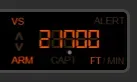
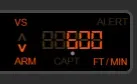
It's a silly little thing but I'm quite please with it!
The little extra grey dot is just to show if you're changing 100s or 1000s (using the upper/lower knob) as the Stream Deck only has single knobs, not dual.Thanks again! It's a great to be able to contribute something back, even if it's tiny!
-
Thanks so much for the positive response - I'd be absolutely delighted to contribute, and it would be great to see these changes make it into the base file! They should work in other KAS297B equipped planes too unless your code changes wildly between them.
Here's the modified KAS297B.js on Pastebin: https://pastebin.com/N2zwz8ia
I've not changed any formatting, so it should diff nicely. And all my additions are commented with //Jiblet:
I've added a bit of explanation inline either for you, or for future me when I need to go back and see why I did what I did.I think its as performant as possible but I've not written a line of production code in about 15 years, so I make no promises that I haven't done something daft!
I've spent some time this morning completing the Stream Deck version of the KAS297B, in case I needed any other vars exposed but it looks like we're good and I'm done with it, bar any minor formatting/position tweaks as I give it some testing:
It's a silly little thing but I'm quite please with it!
The little extra grey dot is just to show if you're changing 100s or 1000s (using the upper/lower knob) as the Stream Deck only has single knobs, not dual.Thanks again! It's a great to be able to contribute something back, even if it's tiny!
@Jiblet Absolutely wonderful. I have saved the file to review later. Your comments will be helpful. I will review for performance, but luckily it shouldn't be too critical in the KAS297B equipped airplanes, as opposed to Starship for example. Thanks again! I will add your L:Vars to the manuals too. If you would like to be credited in my changelog, just let me know
-
That's very kind, thank you @Black-Square! A name drop in the manual would be a point of pride so I'll take you up on that offer, thanks! Just "Jiblet" would be fine by me. Sweet!
-
I've just had a look at this. There are optimizations that could be made so that var_kas297b_AltAlert and var_kas297b_ArmAnnun are not updating every frame, but since those are the only two updating that often, and, like I said, the aircraft with the KAS297B are not as complex as some others, I think that's acceptable. I will add your code to all my aircraft that can use it. Thanks again
-
That's fantastic, thanks @Black-Square! I really appreciate you taking the time to look at this for my derpy little Stream Deck dial
I've had a go at addressing that using the same change-detection already used for lastVs, lastVsAdjustMode etc.
- Added lastAltAlert and lastArmActive tracking properties to the constructor, initialised to -1 so the first frame always fires and correctly initialises the L-Vars
- Both SetSimVarValue calls are now gated behind a comparison against the previous value, so they only fire when the state actually changes
- The diffAndSetText calls for the screen annunciators are unaffected and still update every frame as before
New file is here if it's helpful: https://pastebin.com/9ptzAmjk
I've given it a quick blast in the Bonanza and the Baron professionals this morning (what else is there to do when you cant sleep at 5am on a Saturday? The light over the south of England was beautiful!) and all seems well
Obviously feel free to make whatever changes you like/need. I just wanted to have a stab so that my version doesn't suck my already-sometimes-sucky frames.
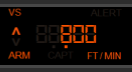
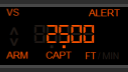
The dial is complete!
-
By the way @Black-Square, would you be happy for me to share the altered KAS297B.js file along with my Stream Deck profile on flightsim.to with appropriate caveats?
Caveats like "no support from Black Square for this" and "backup the original file!"If not, I'll see what I can do to make a semi-functional dial, but without exposing the "armedVS" value it makes it a bit clunky on the Stream Deck.
-
Thanks again for this! I went through the new file, and everything looks perfect. It's those SetSimVarValue calls that really seem to affect performance when in great number, so the simple conditional is usually better. I will include this in my next updates, and I've already updated the manuals with the new variables.
You're more than welcome to share the profile! Usually I worry about conflicts later down the line when a mod is made incorrectly, but in this instance, since you will be overwriting only the one file, and with the exact same code that will be in the next update, I think it's mostly safe. You're welcome to make your own package, or wait a month or two until my usual round of summer updates for all my aircraft. There are lots of little new features for all of them, so this will be a nice addition too! Thanks again.
-
K kbulus referenced this topic on