
Black Square Custom Failure Notes
-
@Black-Square
On Pilot Edge the developer has added a function to the Pilot Edge Tracker that allows third parties to trigger unique Black Square Failures to client aircraft. I'm creating this thread to jot down notes about the experiences we have with the failures with the intent that any inconsistencies can be adjusted to align closer to real world expectations.All Black Square Aircraft - Failure trigger from any HVAR remotely will cause the selected failure to occur and the tablet will indicate a "Red" failure. Triggering the same HVAR will reset the failure functionally and reduce the failure counter by 1 but, the red failure item in the tablet will not reset from red to grey. It would be nice to know what the HVAR is for the tablet button labeled "Reset All Failures".
All Baron models - Using the TDS GTN750 and 650. Failing the Com 2 Circuit fails both the GTN750 and the 650. Using the KX155s, failing Com1 or Com2 circuits only fails the appropriate radio. Is there any way to get the failure of the Com2 to fail just the 2nd GPS instead of both the primary and secondary GPS?
-
I'll check on your first point, because I don't think it should behave like that, so maybe I missed something. Perhaps, does that happen when you have show only active failures selected? I can imagine how that might happen.
On the second point, is that really just with the Baron? The electricity variable for the TDS GTN appears to be set correctly. I'll double check that one too for you.
-
I'll check on your first point, because I don't think it should behave like that, so maybe I missed something. Perhaps, does that happen when you have show only active failures selected? I can imagine how that might happen.
On the second point, is that really just with the Baron? The electricity variable for the TDS GTN appears to be set correctly. I'll double check that one too for you.
@Black-Square said in Black Square Custom Failure Notes:
I'll check on your first point, because I don't think it should behave like that, so maybe I missed something. Perhaps, does that happen when you have show only active failures selected? I can imagine how that might happen.
On the second point, is that really just with the Baron? The electricity variable for the TDS GTN appears to be set correctly. I'll double check that one too for you.
It does show the same behavior when active failures is selected, but toggling "Active Failures" resets the "Red" to indicate properly.
It probably isn't just the Baron, but that was the aircraft that we were conducting the tests with.
Also, it would be helpful to know the HVAR for the "Reset All Failures" button to give the remote user the ability to do so.
-
Oh, I didn't think I had an event to reset all failures, but I do! It's
H:BKSQ_FAILURE_RESET_ALL_FAILURES. I'll check on the rest soon. -
There are a couple of sync issues with the sync of the display when H:Event are used to toggle failures.
Here are 2 use cases specifically:USE CASE 1, "show only active failures ENABLED"
- Here are two failures being toggled remotely in the TBM (causing them to enter FAIL state, as expected)
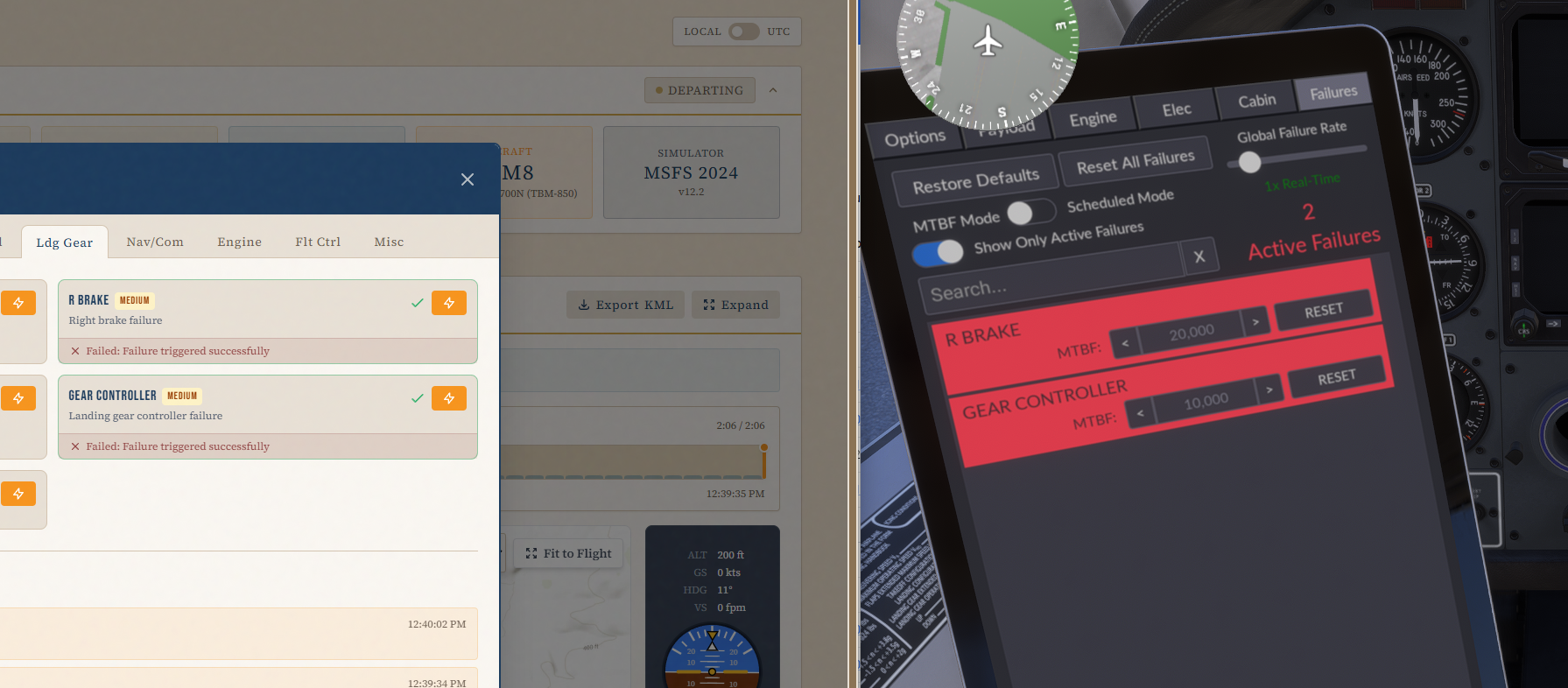
The tablet shows the state correctly.
- I then toggle the R BRAKE, causing it to be fixed...
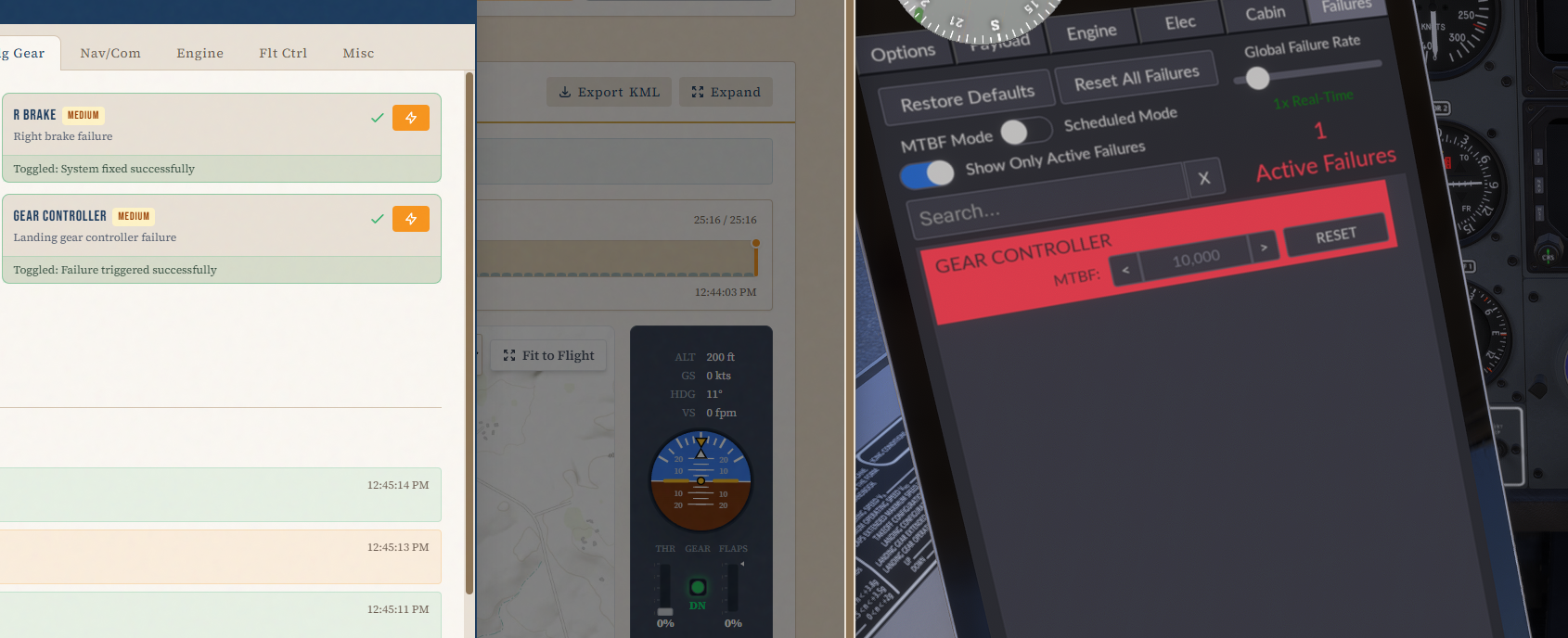
ALL GOOD SO FAR.
-
Lastly, I toggle the GEAR CONTROLLER, which was the only remaining failure. This fixes it as expected however the LAST item isn't cleared from the list and remains in red. Notice ACTIVE FAILURES is 0, which is correct:
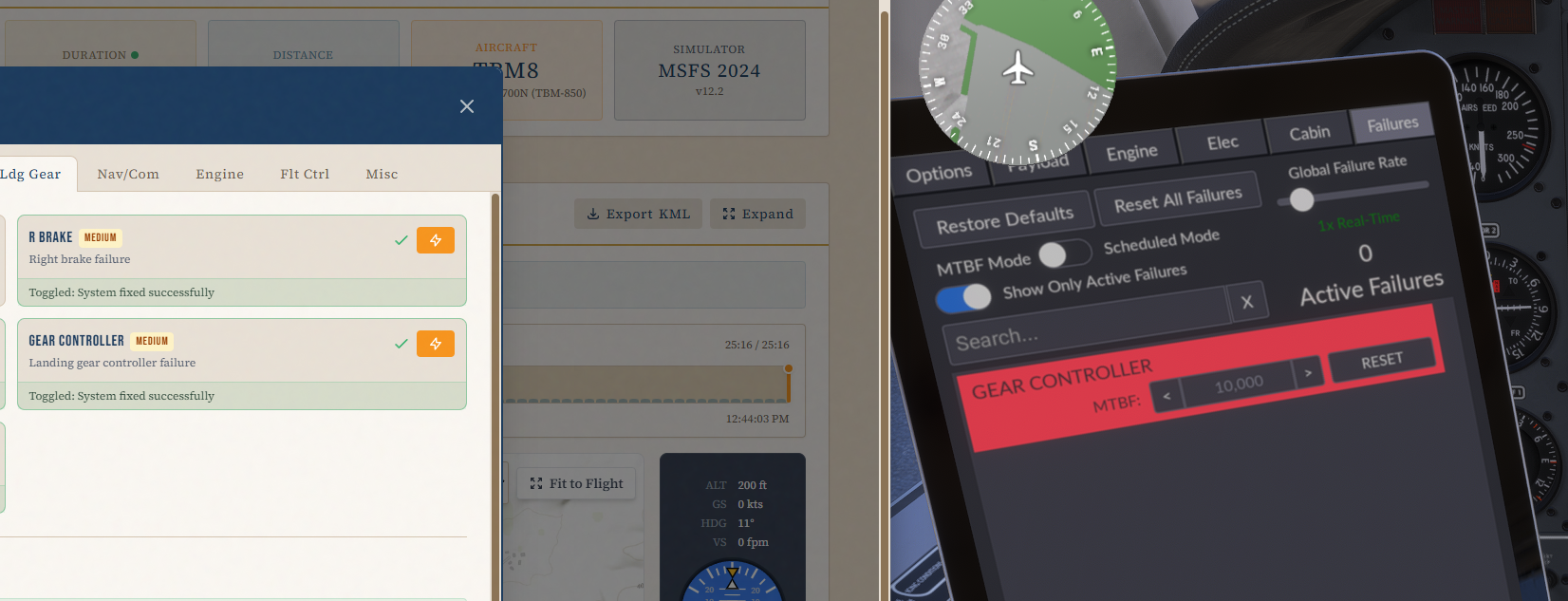
-
if I click RESET on the tablet....it actually triggers the failure... (photo taken after clicking RESET)
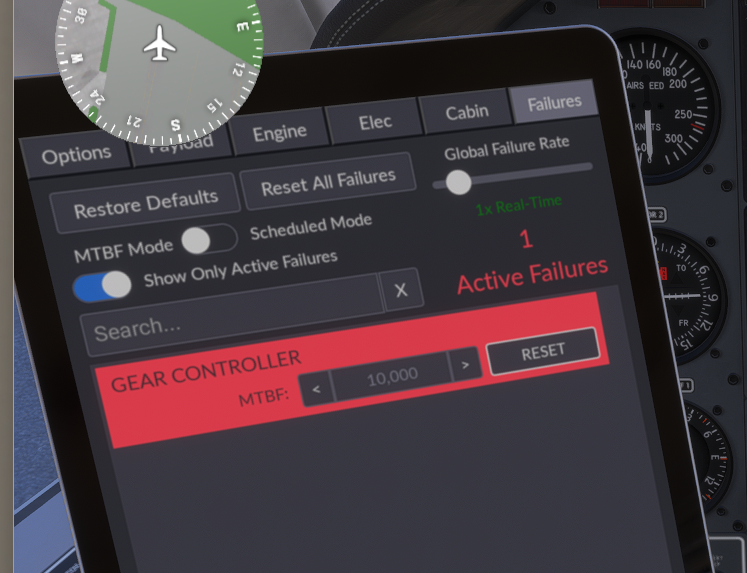
-
if I click RESET on the tablet AGAIN...it works as expected, 0 failures and clear panel:
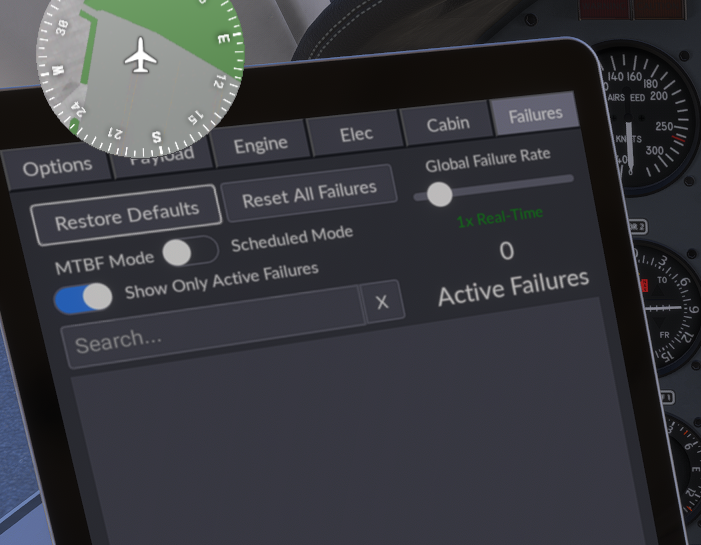
USE CASE #2: "Show only active failures DISABLED"
-
I click R BRAKE and toggle remotely (triggers a fail, as expected)
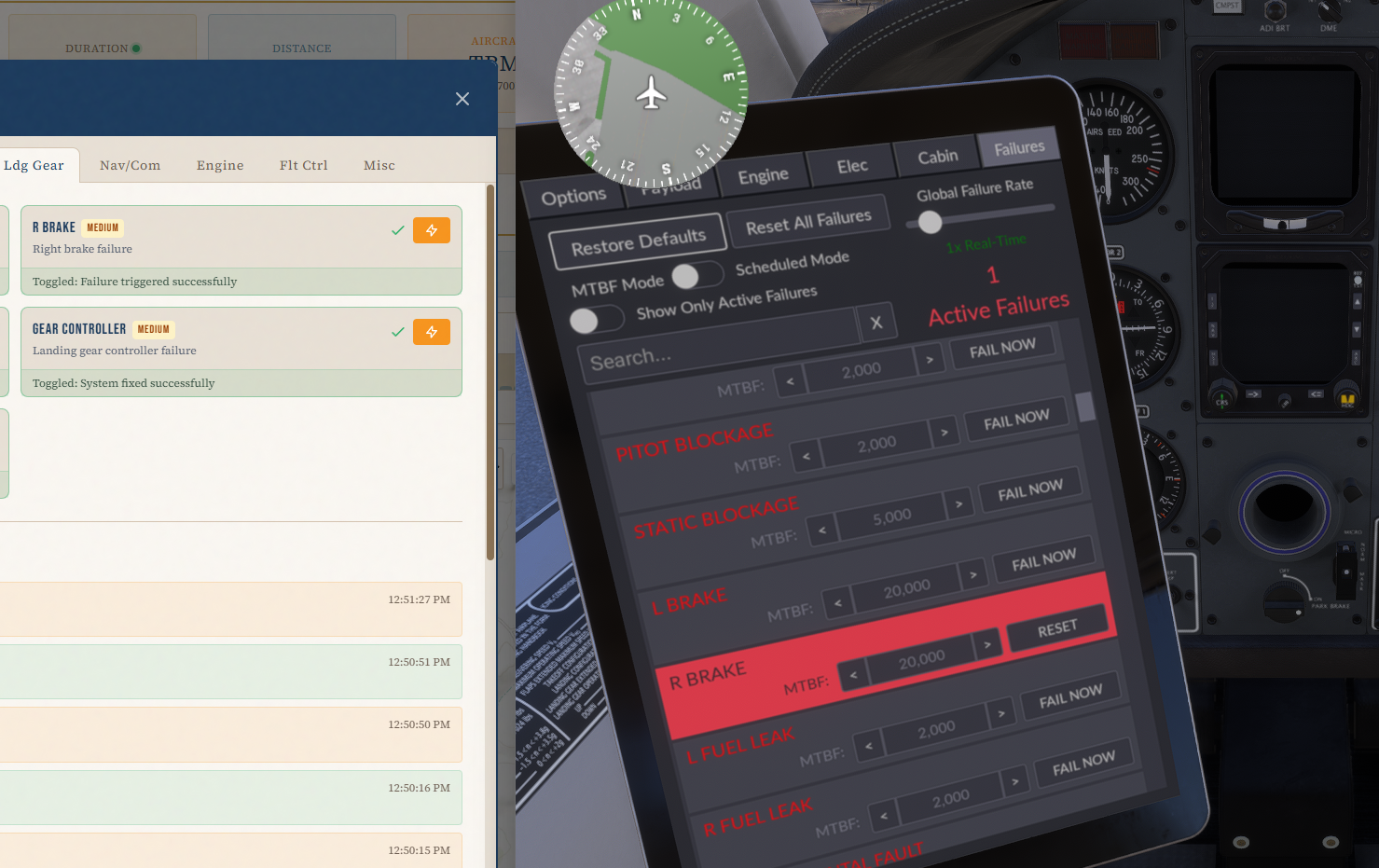
-
I click R BRAKE and toggle (triggers a fix, as expected). Notice the tablet remains RED for that item, despite Active Failures correctly updating to 0.
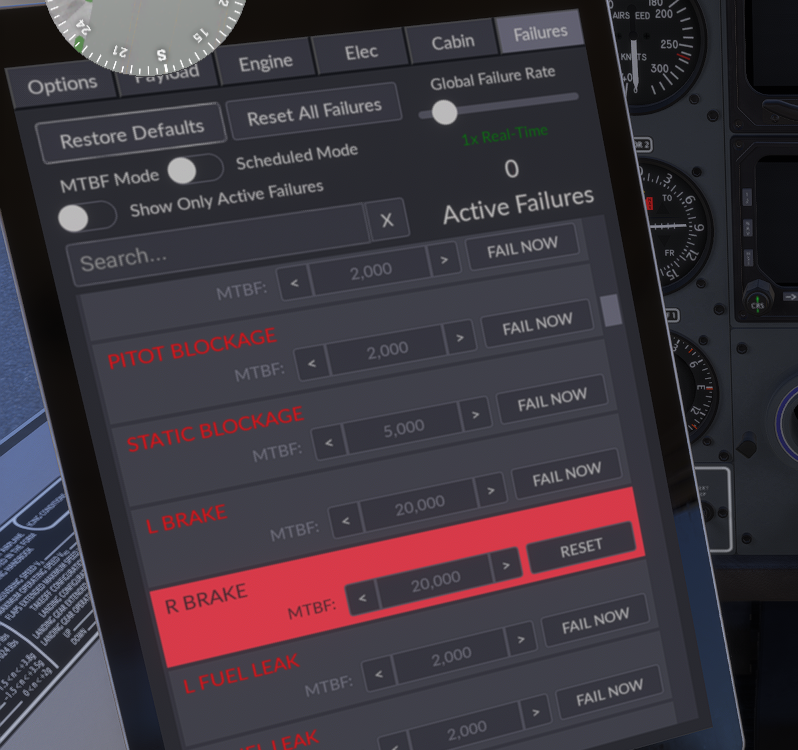
The same behavior from use case #1 also happens here where if I click RESET on the tablet, it things it's resetting but it's actually toggling to fail mode...it then takes ANOTHER reset to clear.
Keith Smith
PilotEdge - Here are two failures being toggled remotely in the TBM (causing them to enter FAIL state, as expected)
-
Turbine Duke - Prop Governor Failure
During a failed prop governor, with indications showing an inability for the governor to push the prop to fine pitch (Lower RPM than set with prop lever) we would expect to see a drop in oil pressure to confirm due to a leak at or before the governor. With the TDuke, a Governor failure causes a drop in RPM, (Inability to drive the prop to fine pitch), but we still have prop control along the lower band of the prop lever, which would indicate a low oil pressure condition at the governor. Maybe a fix in the future, or atleast corrected for any future Turboprops? -
All Black Square Aircraft - Pitot Blockage
When a "Pitot Blockage" is triggered, the pitot heat switches get locked in the current position, regardless if they are on or off. Would it be possible to free up the switches from there locked state after a pitot tube blockage so that we can work through the failure procedure? -
All Black Square Aircraft - Pitot Blockage
When a "Pitot Blockage" is triggered, the pitot heat switches get locked in the current position, regardless if they are on or off. Would it be possible to free up the switches from there locked state after a pitot tube blockage so that we can work through the failure procedure?@Buzz said in Black Square Custom Failure Notes:
All Black Square Aircraft - Pitot Blockage
When a "Pitot Blockage" is triggered, the pitot heat switches get locked in the current position, regardless if they are on or off. Would it be possible to free up the switches from there locked state after a pitot tube blockage so that we can work through the failure procedure?https://community.justflight.com/topic/9708/pitot-blockage-disables-the-pitot-heat/4?_=1775437463744
That one is a sim issue.
-
@Buzz said in Black Square Custom Failure Notes:
All Black Square Aircraft - Pitot Blockage
When a "Pitot Blockage" is triggered, the pitot heat switches get locked in the current position, regardless if they are on or off. Would it be possible to free up the switches from there locked state after a pitot tube blockage so that we can work through the failure procedure?https://community.justflight.com/topic/9708/pitot-blockage-disables-the-pitot-heat/4?_=1775437463744
That one is a sim issue.
-
There are a couple of sync issues with the sync of the display when H:Event are used to toggle failures.
Here are 2 use cases specifically:USE CASE 1, "show only active failures ENABLED"
- Here are two failures being toggled remotely in the TBM (causing them to enter FAIL state, as expected)
The tablet shows the state correctly.
- I then toggle the R BRAKE, causing it to be fixed...
ALL GOOD SO FAR.
-
Lastly, I toggle the GEAR CONTROLLER, which was the only remaining failure. This fixes it as expected however the LAST item isn't cleared from the list and remains in red. Notice ACTIVE FAILURES is 0, which is correct:
-
if I click RESET on the tablet....it actually triggers the failure... (photo taken after clicking RESET)
-
if I click RESET on the tablet AGAIN...it works as expected, 0 failures and clear panel:
USE CASE #2: "Show only active failures DISABLED"
-
I click R BRAKE and toggle remotely (triggers a fail, as expected)
-
I click R BRAKE and toggle (triggers a fix, as expected). Notice the tablet remains RED for that item, despite Active Failures correctly updating to 0.
The same behavior from use case #1 also happens here where if I click RESET on the tablet, it things it's resetting but it's actually toggling to fail mode...it then takes ANOTHER reset to clear.
Keith Smith
PilotEdge@ksmith Hi Keith! Thanks for posting this here. I'm sorry that I haven't been as responsive over email as I have been here. Just a habit of what I check and when. My apologies.
I believe I've fixed this for you guys. Pretty simple solution if you want to try it yourself. If you search for
BlackSquareTablet.js, and then the comment containingInitiating HTML Failure for:, add the following block of code right before the nextreturn;if(this.onlyActiveFailuresSwitch.checked) this.updateFailureFilter(); this.updateFailureBlock(this.failureMatrix[i]);I'm pretty confident that should fix all the synchronization problems you noted, so I will add that to all my other aircraft too. Let me know if that works, and if there is anything else I can do for you!
- Here are two failures being toggled remotely in the TBM (causing them to enter FAIL state, as expected)
-
@ksmith Hi Keith! Thanks for posting this here. I'm sorry that I haven't been as responsive over email as I have been here. Just a habit of what I check and when. My apologies.
I believe I've fixed this for you guys. Pretty simple solution if you want to try it yourself. If you search for
BlackSquareTablet.js, and then the comment containingInitiating HTML Failure for:, add the following block of code right before the nextreturn;if(this.onlyActiveFailuresSwitch.checked) this.updateFailureFilter(); this.updateFailureBlock(this.failureMatrix[i]);I'm pretty confident that should fix all the synchronization problems you noted, so I will add that to all my other aircraft too. Let me know if that works, and if there is anything else I can do for you!
-
@Black-Square That fixes both use cases, thank you.
@ksmith Wonderful! Thanks for the feedback. Let me know if there's anything else I can do for you guys!
-
Blacksquare Baron P.
When an alternator check is done during runnup, taking one of the two alternators offline prompts an annunciation light. When a single alternator failure is triggered, we lose voltage for the failed alternator but we receive no annunciation light even though the failed alternator is not putting out any voltage.
Once voltage drops below a certain threshold, we should receive a light.
-
Blacksquare Baron P.
When an alternator check is done during runnup, taking one of the two alternators offline prompts an annunciation light. When a single alternator failure is triggered, we lose voltage for the failed alternator but we receive no annunciation light even though the failed alternator is not putting out any voltage.
Once voltage drops below a certain threshold, we should receive a light.
@Buzz Easy fix. Thanks.
