Skip to content
  • Categories
  • Recent
  • Tags
  • Popular
  • Users
Collapse
Just Flight Community Forum
  1. Home
  2. Just Flight
  3. MSFS Products
  4. Black Square Add-Ons
  5. Piston & Turbine Dukes
  6. Instrument Air shows Source Failure….where can I fix this?

Instrument Air shows Source Failure….where can I fix this?

Scheduled Pinned Locked Moved Piston & Turbine Dukes
6 Posts 2 Posters 35 Views 1 Watching
  • Oldest to Newest
  • Newest to Oldest
  • Most Votes
Reply
  • Reply as topic
Log in to reply
This topic has been deleted. Only users with topic management privileges can see it.
  • S Offline
    S Offline
    Sword
    wrote last edited by
    #1

    IMG_0125.jpeg

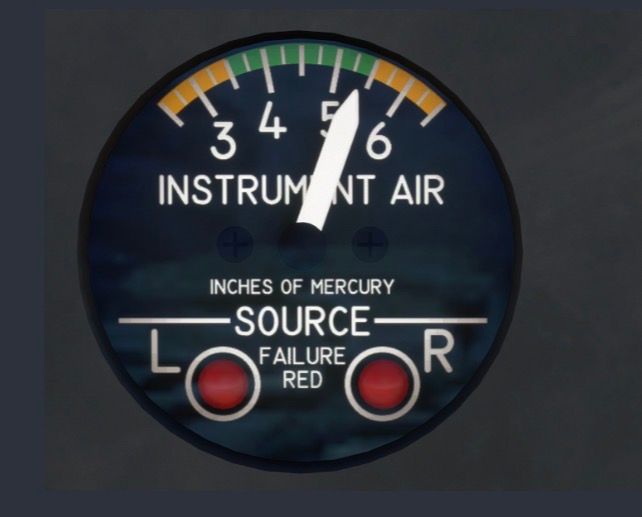
    In my latest flights the Instrument Air indicator shows a source failure on both sources.

    Maybe I missed this in the manual but I have no clue how to fix this.
    Would appreciate if anybody could point me to the solution.

    1 Reply Last reply
    0
    • Black SquareB Offline
      Black SquareB Offline
      Black Square
      Black Square Developer
      wrote last edited by
      #2

      Before I continue the line of thinking that I was about to, are you seeing evidence of this failure elsewhere, such as inoperative gyroscopes or deicing systems? Given the instrument is reading 5.4 inHg, I would not suspect there is actually any failure. The indicator lamps do not seem particularly illuminated to me, but perhaps I'm wrong.

      1 Reply Last reply
      0
      • S Offline
        S Offline
        Sword
        wrote last edited by
        #3

        The picture that I posted here is just taken from the handbook. In the SIM it shows both red lights on and the indicator is all to the left.

        Furthermore, I can confirm that the gyroscopes do not work properly. So I thought I maybe missed some button that I would have to turn on, but honestly, I assumed that he should work out out of the box without having to activate anything.

        1 Reply Last reply
        0
        • Black SquareB Offline
          Black SquareB Offline
          Black Square
          Black Square Developer
          wrote last edited by
          #4

          Ah, okay. I will continue my line of questioning, then 🙂 Have you checked the failures page on the tablet interface to see if there is a failure to reset?

          1 Reply Last reply
          0
          • S Offline
            S Offline
            Sword
            wrote last edited by
            #5

            I will do so - although myself I had not activated any failures. But I will check

            1 Reply Last reply
            0
            • S Offline
              S Offline
              Sword
              wrote last edited by
              #6

              So now I had time to check - sorry it was my bad. Too stupid question. In the failures tab there was activated "1x Realtime" and so I had a failure with this compressor. I did not expect this. But now I know that I should check this each time I fly. I love the study level details of your aircrafts....was just too stupid to realize this.

              1 Reply Last reply
              0
              Reply
              • Reply as topic
              Log in to reply
              • Oldest to Newest
              • Newest to Oldest
              • Most Votes


              • Login

              • Don't have an account? Register

              • Login or register to search.
              • First post
                Last post
              0
              • Categories
              • Recent
              • Tags
              • Popular
              • Users