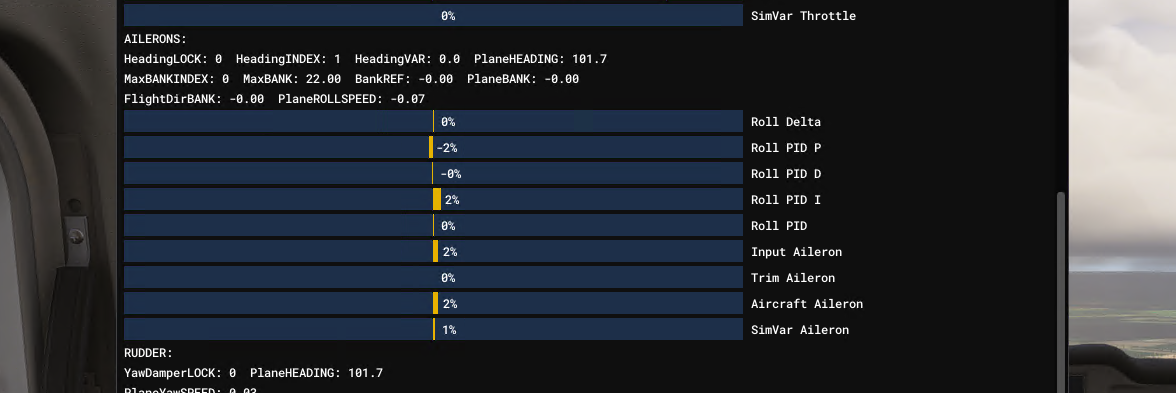
Autopilot goes from VOR to ROLL when tracking VOR
-
The code was working, but the sound was only triggering once. Try this:
(L:var_AutopilotSource, bool) ! (L:var_ActiveNavSource_L, number) 2 < and
(L:var_AutopilotSource, bool)   (L:var_ActiveNavSource_R, number) 2 < and
or
(A:AUTOPILOT BANK HOLD, Bool) (A:AUTOPILOT WING LEVELER, Bool) or and
(A:AUTOPILOT MASTER, bool) and
if{
	(L:lastApNavMode, bool) if{
		1 (>L:var_AutopilotDisconnectTone, bool)
	}
	els{
		0 (>L:var_AutopilotDisconnectTone, bool)
	}
}
(A:AUTOPILOT NAV1 LOCK, bool) (>L:lastApNavMode, bool)
I added some extra features for you while I was at it. It should only trigger when you're using VOR navigation now too.
Thanks for putting me back in Starship for just a couple minutes. What an absolutely magnificent machine.
@Black-Square said in Autopilot goes from VOR to ROLL when tracking VOR:
Thanks for putting me back in Starship for just a couple minutes. What an absolutely magnificent machine.
Indeed it is, and I'll have more to say on that in another thread. But for openers...
YES! YES! Happy dance underway. It works! Gave me a bit of a scare, as I'd forgotten to update layout.json after editing the interior.xml, and the first time I loaded in, the cockpit had been eaten! After a brief moment of panic, I got that sorted.
A couple of quick tests near my local VOR (it's still weird to me flying Starship near my home), and we have a winner! Here's the test results:
NAV-ROLL Failover - Enhanced Version - Functional Test
Test environment:
Win 11, MSFS 2024
Departure: KRDG
Destination: KPHL
Intermediate VOR: PTW 116.50, CRS 126 deg, 21 nm from KRDGNav preset and pre-selected prior to departure.
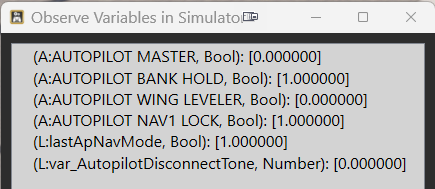
Autopilot engaged, NAV in FMS mode, climbing to altitude (3500 AGL)
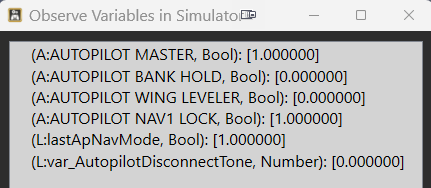
Autopilot engaged, NAV in FMS mode, ALT mode engaged
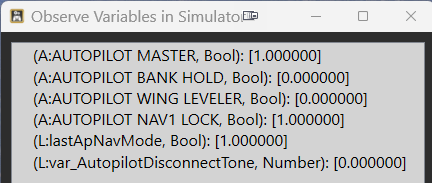
Autopilot engaged, NAV in VOR mode, tracking inbound to VOR, ALT mode engaged
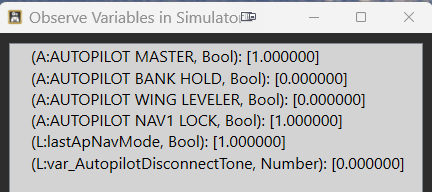
Autopilot engaged, overflew VOR, failover to ROLL mode (cone 'o' confusion), ALT mode engaged.
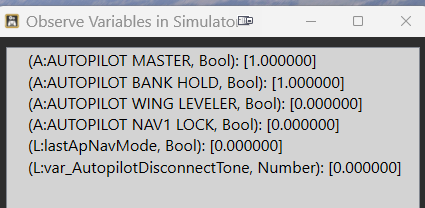
The only change I would make, is to keep the disconnect alarm sounding until silenced by the pilot, just like a normal autopilot disconnect, rather than the one-shot alarm that's in there now. It is easy to miss, like the MDA alarm (at least for me).
Next step for me is to roll this into my "personalization" mod where I've changed a few things to better suit how I'd leave the plane if I actually owned one. (I would pay genuine cash money just for the opportunity to sit in the cockpit and preflight one of these for real.)
Although I've not experienced this in any of your other aircraft, this should be adaptable into the Caravan's interior.xml for those experiencing the issue there, would you agree?
-
Hi,
While searching for solutions for switching from NAV to ROL on the MSFS KAP 140, I came across this thread.
I'm part of AVNX, and we develop touch panels for the air manager software. We created a free Cessna 152 and integrated a KAP 140 into the touch panel. We activated it via a mod by enabling the autopilot in the system.cfg file. The only problem is tracking a VOR in Nav mode. There, the autopilot occasionally switches from Nav (Nav Hold) to ROL (wing leveler).
To minimize this, I've adjusted the autopilot parameters several times in the system.cfg file. There, by entering values such as these, you can significantly influence the autopilot:
nav_proportional_control_ex1=10
nav_integrator_control_ex1=1
nav_derivative_control_ex1=5
nav_integrator_boundary_ex1=5
nav_derivative_boundary_ex1=10It works quite well now. However, the autopilot still occasionally switches from NAV to ROL, though much less frequently than before.
Since the interactions of these parameters are not described in the SDK, I would be interested to hear if anyone has already found a solution. I am currently 51 NM at 2500 ft outbound from a VOR, and it has only switched once.
-
Hi,
While searching for solutions for switching from NAV to ROL on the MSFS KAP 140, I came across this thread.
I'm part of AVNX, and we develop touch panels for the air manager software. We created a free Cessna 152 and integrated a KAP 140 into the touch panel. We activated it via a mod by enabling the autopilot in the system.cfg file. The only problem is tracking a VOR in Nav mode. There, the autopilot occasionally switches from Nav (Nav Hold) to ROL (wing leveler).
To minimize this, I've adjusted the autopilot parameters several times in the system.cfg file. There, by entering values such as these, you can significantly influence the autopilot:
nav_proportional_control_ex1=10
nav_integrator_control_ex1=1
nav_derivative_control_ex1=5
nav_integrator_boundary_ex1=5
nav_derivative_boundary_ex1=10It works quite well now. However, the autopilot still occasionally switches from NAV to ROL, though much less frequently than before.
Since the interactions of these parameters are not described in the SDK, I would be interested to hear if anyone has already found a solution. I am currently 51 NM at 2500 ft outbound from a VOR, and it has only switched once.
@FlightEngineer1 Thanks for your input. As an old real-time industrial automation engineer, I really wish they'd expose the tuning parameters in real-time, so those of us who truly understand how to tune a PID loop using one of the formal methodologies (aka "the right way"), as opposed to just guessing, winging it, or using the defaults as so often seems to be the case with some other aircraft.
</rant>
Edit to add: and they've been missing filter constants forever. Geez.
-
@FlightEngineer1 Thanks for your input. As an old real-time industrial automation engineer, I really wish they'd expose the tuning parameters in real-time, so those of us who truly understand how to tune a PID loop using one of the formal methodologies (aka "the right way"), as opposed to just guessing, winging it, or using the defaults as so often seems to be the case with some other aircraft.
</rant>
Edit to add: and they've been missing filter constants forever. Geez.
-
Hi Mark,
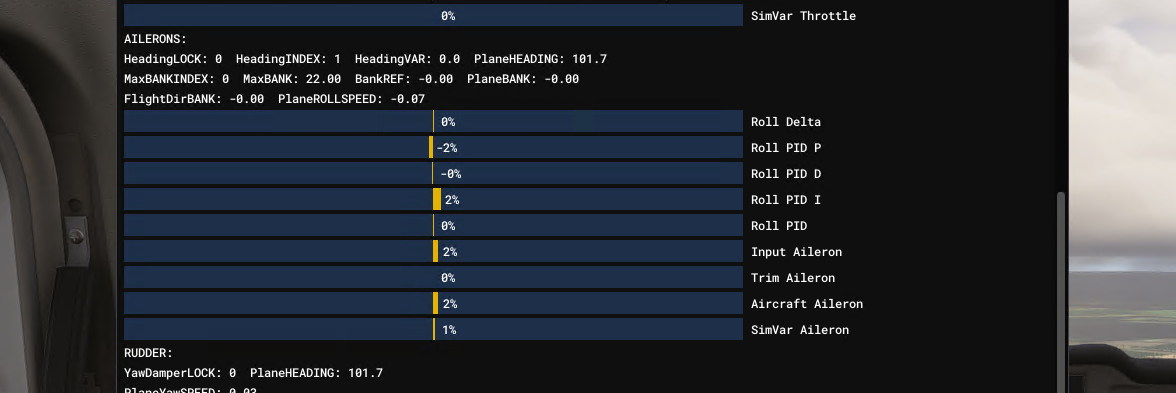
You can view the operation of the autopilot parameters in debug mode. Unfortunately, that's not very helpful for me.
-
Hi Mark,
You can view the operation of the autopilot parameters in debug mode. Unfortunately, that's not very helpful for me.
@FlightEngineer1 yeah, no. I want an external interface where it reads/writes those vars in real time over SimConnect. Old-school me wants an Excel plug-in so I can run proper Ziegler-Nichols analysis tools. I keep dreaming, and nothing keeps happening.
-
@FlightEngineer1 yeah, no. I want an external interface where it reads/writes those vars in real time over SimConnect. Old-school me wants an Excel plug-in so I can run proper Ziegler-Nichols analysis tools. I keep dreaming, and nothing keeps happening.
@MarkS Yes, it would be nice if one could quickly determine reasonable PID values without constant testing. Strangely, this only occurs with the autopilot activated in the Cessna 152 when tracking VORs; everything is fine when tracking the GPS flight path. Therefore, I wondered if MSFS had artificially degraded the signal using a random number generator.
But that can't be the case, since the C172 doesn't have this problem.
What always works is the cone of confusion and, of course, the maximum range. To avoid triggering an error due to the missing line of sight, I also tested this at higher altitudes in flat terrain. Sometimes the autopilot tracks 50 NM without interruption, and then it cuts out for no apparent reason.
There's also a peculiarity with the C152 that I only discovered by constantly monitoring the bus voltage variable. For a few milliseconds, the bus voltage drops to zero. You can't see it on the instruments. But since a missing bus voltage triggers a restart of my autopilot in my LUA script, it keeps restarting. The autopilot in the Cessna remains switched on.
In summary, this means to me that clean tracking can only be achieved with correct PID values for navigation, roll, etc.
-
@MarkS Yes, it would be nice if one could quickly determine reasonable PID values without constant testing. Strangely, this only occurs with the autopilot activated in the Cessna 152 when tracking VORs; everything is fine when tracking the GPS flight path. Therefore, I wondered if MSFS had artificially degraded the signal using a random number generator.
But that can't be the case, since the C172 doesn't have this problem.
What always works is the cone of confusion and, of course, the maximum range. To avoid triggering an error due to the missing line of sight, I also tested this at higher altitudes in flat terrain. Sometimes the autopilot tracks 50 NM without interruption, and then it cuts out for no apparent reason.
There's also a peculiarity with the C152 that I only discovered by constantly monitoring the bus voltage variable. For a few milliseconds, the bus voltage drops to zero. You can't see it on the instruments. But since a missing bus voltage triggers a restart of my autopilot in my LUA script, it keeps restarting. The autopilot in the Cessna remains switched on.
In summary, this means to me that clean tracking can only be achieved with correct PID values for navigation, roll, etc.
Hi,
After spending a lot of time troubleshooting the abrupt switch from NAV to ROL of the autopilot, I've discovered the following:
In the system.cfg file, MSFS 2024 only uses a few parameters from the [autopilot] section; all others are obsolete. (https://docs.flightsimulator.com/msfs2024/html/5_Content_Configuration/CFG_Files/CFG_Files_Obsolete_Parameters.htm)
Instead, it uses the parameters from the ai.cfg file that are in the [STICKANDRUDDER] section for the autopilot. I'm currently testing the following settings for the C152.
;pitchPID = 1.8, 0.07, 2.4, 0.7, 10 rollPID = 1.9, 0.22, 2.4, 6, 100 headingPID = 1.5, 0.005, 1.6, 0.1, 1 ;verticalSpeedPID = 0.42, 0.035, 0.28, 250, 1000 nav_ex1PID = 3.0, 0.025, 6.0, 0.008, 50 nav_yawPID = 0.05, 0.02, 0.003, 1, 360 glideSlopePID = 5.8, 0.04, 2.4, 1.2, 60 The problem is just the fine Tuning. Sometimes I can fly 50 NM in NAV mode and then it disconnects. The most important setting for the aircraft is "nav_ex1PID". -
Hi,
After spending a lot of time troubleshooting the abrupt switch from NAV to ROL of the autopilot, I've discovered the following:
In the system.cfg file, MSFS 2024 only uses a few parameters from the [autopilot] section; all others are obsolete. (https://docs.flightsimulator.com/msfs2024/html/5_Content_Configuration/CFG_Files/CFG_Files_Obsolete_Parameters.htm)
Instead, it uses the parameters from the ai.cfg file that are in the [STICKANDRUDDER] section for the autopilot. I'm currently testing the following settings for the C152.
;pitchPID = 1.8, 0.07, 2.4, 0.7, 10 rollPID = 1.9, 0.22, 2.4, 6, 100 headingPID = 1.5, 0.005, 1.6, 0.1, 1 ;verticalSpeedPID = 0.42, 0.035, 0.28, 250, 1000 nav_ex1PID = 3.0, 0.025, 6.0, 0.008, 50 nav_yawPID = 0.05, 0.02, 0.003, 1, 360 glideSlopePID = 5.8, 0.04, 2.4, 1.2, 60 The problem is just the fine Tuning. Sometimes I can fly 50 NM in NAV mode and then it disconnects. The most important setting for the aircraft is "nav_ex1PID".@FlightEngineer1 Wait until you find out that most of the tables in ai.cfg are also unused, or are used in ways that their names suggest the exact opposite. I'm not convinced that anyone knows how those work anymore, to be honest. For instance, some of the PIDS are used in inner-loop control to drive the control surfaces, and some are used for outer-loop control to drive the flight director. Which ones are which depends on the autopilot mode selected. There also appear to be some guardrails on the loops, which interfere with the performance of the PID, and not all variables and windup are actually reset when they're supposed to be, so they are often impossible to tune externally. This is one of the most confused parts of the entire simulator, at least that I've encountered, so buckle up.
Sorry, that aside, thank you so much for your interest in this problem, and willingness to research it. Unfortunately, I believe that if this problem only exists in MSFS 2024, and depends on a PID loop that is otherwise able to steer the aircraft in a full circle to intercept, I think there is just something wrong at the simulator level that should be addressed, rather than crossing our fingers that some lateral guidance variable will remain within the desired bounds.
Either way, whatever you find here, I am happy to report to Asobo on the developer forums and try to get us a solution.
-
Hi,
After spending a lot of time troubleshooting the abrupt switch from NAV to ROL of the autopilot, I've discovered the following:
In the system.cfg file, MSFS 2024 only uses a few parameters from the [autopilot] section; all others are obsolete. (https://docs.flightsimulator.com/msfs2024/html/5_Content_Configuration/CFG_Files/CFG_Files_Obsolete_Parameters.htm)
Instead, it uses the parameters from the ai.cfg file that are in the [STICKANDRUDDER] section for the autopilot. I'm currently testing the following settings for the C152.
;pitchPID = 1.8, 0.07, 2.4, 0.7, 10 rollPID = 1.9, 0.22, 2.4, 6, 100 headingPID = 1.5, 0.005, 1.6, 0.1, 1 ;verticalSpeedPID = 0.42, 0.035, 0.28, 250, 1000 nav_ex1PID = 3.0, 0.025, 6.0, 0.008, 50 nav_yawPID = 0.05, 0.02, 0.003, 1, 360 glideSlopePID = 5.8, 0.04, 2.4, 1.2, 60 The problem is just the fine Tuning. Sometimes I can fly 50 NM in NAV mode and then it disconnects. The most important setting for the aircraft is "nav_ex1PID".@FlightEngineer1 yes, I'm aware of ai.cfg. I have used this to enable and tune (to an extent) autopilots in planes that don't have them natively, with mixed success but usually well enough to pass muster. This often also entails adding an autopilot electrical circuit to systems.cfg, and checking engines.cfg (why there?) to make sure that the param DisableAutopilotControls=0; sometimes a dev will explicitly set it to 1 and then no autopilot.
Maybe I'm just old and slightly bitter at this point, but I have no faith that Asobo will ever address this, are aware of it, or even know what they're doing in this regard. There are core algorithm parameters that were REQUIRED when I was doing industrial process control PIDs, which are utterly absent here. Which brings into question the form of the equation they are using. They're never going to expose the maths, and I have better things to do.
-
Re: the original post (VOR tracking goes from NAV to ROL spontaneously), I created a bug in the FS2024 Official forum. Feel free to add to that discussion.
One important piece of info is that it seems only to happen when one is using an external control mapper like Spad.Next or FSUIPC.
https://forums.flightsimulator.com/t/bug-multiple-planes-change-from-nav-to-rol-hdg-mode-when-tracking-vor/762974