
MC60 and GNS 530 Interaction Issue
-
@fizzboy @Zacke I just wanted to let you guys know that I added some code to fix this tonight. From the looks of it, I was initially scared to do this because I found a CTD lurking in the MSFS GPS code during my development of Starship. Feel free to share with the Official Forums, since I know it came up there recently.
EDIT: I would love to test that code, but I can't seem to reproduce it right now, not matter what I try. I could swear I know the message you're seeing, but I've tried exactly what you've described above, but I can't get it to trigger. Could I convince one of you guys to make the small code edit on your end to make sure it works, please?
Look for the following file... [Your Community Folder]\bksq-aircraft-commander114\html_ui\Pages\VCockpit\Instruments\Generic\Radios\bksq-aircraft-commander114\DigitalLocalizers\DigitalLocalizers.js
Search for the following line:
SimVar.SetSimVarValue("L:var_MC60_From", "Bool", activeGpsSource...Immediately after, add the following lines of code:
if(!SimVar.GetSimVarValue("GPS OBS ACTIVE", "bool")){
    SimVar.SetSimVarValue("K:VOR1_SET", "degrees", SimVar.GetSimVarValue("GPS WP DESIRED TRACK", "degrees") % 360);
}
Sorry to ask for help, but I want to make sure it's a good solution before the next update. Thank you!
@Black-Square awesome. my next flight is on Tuesday night (Monday is Big Walk night with friends) so I'll have that patched in by then so that I can report how well it works with the 530.
-
New member here. After posting about this issue on the MSFS forum I was pointed at this thread. Glad to see that there is a fix coming. I am not comfortable editing JavaScript files so I would probably wait for the next release of the aircraft, unless it is a long way out. Which leads to the question: any indication when we can expect the release with the fix for this issue?
Thanks!
PS: just LOVE this aircraft which I flew a few times IRL in the 80's.
-
New member here. After posting about this issue on the MSFS forum I was pointed at this thread. Glad to see that there is a fix coming. I am not comfortable editing JavaScript files so I would probably wait for the next release of the aircraft, unless it is a long way out. Which leads to the question: any indication when we can expect the release with the fix for this issue?
Thanks!
PS: just LOVE this aircraft which I flew a few times IRL in the 80's.
@SlabsFly Welcome, new friend
 I'm glad I could improve your flying experience with such a small fix. Editing the file isn't too difficult, if you want to give it a try! I'm happy to help.
I'll be updating the rest of my aircraft soon, but I don't have much a changelog for the 114 yet. If you really didn't want to try editing the file, you could contact Just Flight Support, and I could have them send you the file. That might just take a little while (sorry, I can't send files through this forum due to European regulatory compliance, I believe.)
-
@fizzboy @Zacke I just wanted to let you guys know that I added some code to fix this tonight. From the looks of it, I was initially scared to do this because I found a CTD lurking in the MSFS GPS code during my development of Starship. Feel free to share with the Official Forums, since I know it came up there recently.
EDIT: I would love to test that code, but I can't seem to reproduce it right now, not matter what I try. I could swear I know the message you're seeing, but I've tried exactly what you've described above, but I can't get it to trigger. Could I convince one of you guys to make the small code edit on your end to make sure it works, please?
Look for the following file... [Your Community Folder]\bksq-aircraft-commander114\html_ui\Pages\VCockpit\Instruments\Generic\Radios\bksq-aircraft-commander114\DigitalLocalizers\DigitalLocalizers.js
Search for the following line:
SimVar.SetSimVarValue("L:var_MC60_From", "Bool", activeGpsSource...Immediately after, add the following lines of code:
if(!SimVar.GetSimVarValue("GPS OBS ACTIVE", "bool")){
    SimVar.SetSimVarValue("K:VOR1_SET", "degrees", SimVar.GetSimVarValue("GPS WP DESIRED TRACK", "degrees") % 360);
}
Sorry to ask for help, but I want to make sure it's a good solution before the next update. Thank you!
-
@Black-Square So far so good on a 1h 45m flight with the GNS 530. No flashing MSG indicators the entire trip. I'll keep testing the change over the next couple of evenings.
@fizzboy Thanks for letting me know!
-
@fizzboy Thanks for letting me know!
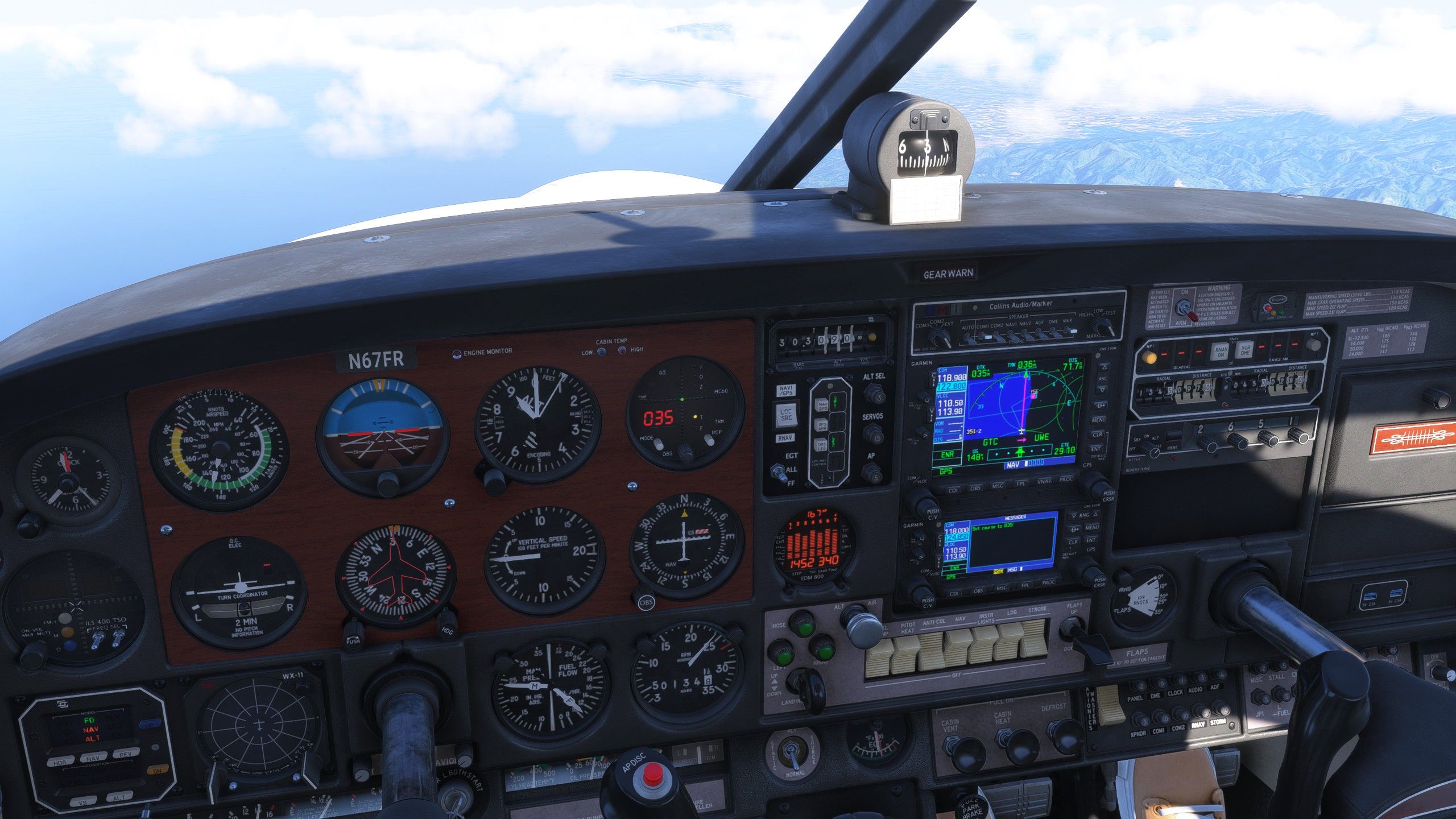
@Black-Square Ah... Well I did a second flight with the change above but this time with the 530/430 combo (I normally only fly with the 530 and the MX 170B) and I got the MSG notification again but this time just on the 430.
I'm starting to get the gut feeling that there may not be a simple workaround that works in a general sense. I'll keep testing regardless.
-
@Black-Square Ah... Well I did a second flight with the change above but this time with the 530/430 combo (I normally only fly with the 530 and the MX 170B) and I got the MSG notification again but this time just on the 430.
I'm starting to get the gut feeling that there may not be a simple workaround that works in a general sense. I'll keep testing regardless.
@fizzboy Did you try setting the second localizer to the desired track? I could look into Working Title's code, but perhaps they linked unit 1 to OBS 1, and unit 2 to OBS 2.

