
Autopilot Panel, Controls and Displays issues
-
Hi all, I am submitting these observations in a spirit of constructive cooperation, with the sole objective of helping make this aircraft model as realistic and accurate as possible. Please note that all the tests and observations described below were conducted exclusively on the ground and not during flight.
-
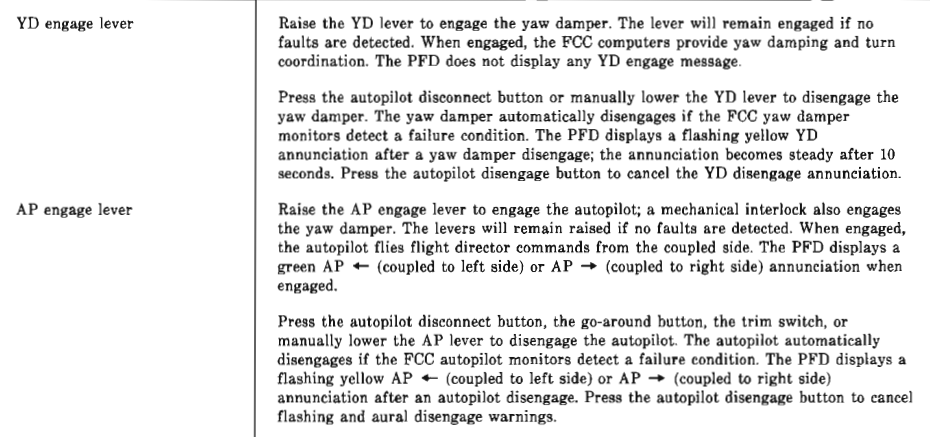
Issue with Yaw Damper (YD) Disengage Annunciation: according to the official documentation (Starship 1 Avionics System - System Manual.pdf downloaded from Robert Scherer's site), after a yaw damper disengagement, the Primary Flight Display (PFD) is supposed to show initially a flashing yellow "YD" annunciation, which becomes steady only after 10 seconds.
The behavior I am observing is different: the annunciation is always steady. -
Issue with AP/YD Mechanical Interlock: According to the official documentation, raising the AP engage lever engages the autopilot, and a mechanical interlock simultaneously engages the yaw damper. This don't happen, I have to engage manually the YD.
-
Issue with Autopilot Disengagement: the autopilot should disengage when pressing the autopilot disconnect button, the go-around button, the trim switch, or when manually lowering the AP lever. It is not possible to configure the go-around button on any button of Honeycomb Bravo. The autopilot doesn't disconnect when I use the trim switch.
Attached an image of the section of page 3-7 of the manual I'm referring to:
-
-
Cool info, thanks for sharing. I can recommend a few thoughts for the time-being:
-
The "Autothrottle to GA" default MSFS key-bind should work with the TOGA button, but I and other users have reported issues with it intermittently not working lately. I personally don't think this is a black square specific issue as I recall having it on another aircraft recently as well (I forget which plane...). It may be fixable by Nick though, as I have no issues on aircraft like the FFX hawker and Synaptic A220 that I have been using a lot lately.
-
For Autopilot Disconnect the correct default key-bind in MSFS is called "Autopilot Off" which does work. Double clicking that input will also silence the disconnect alarm/alert in all aircraft I use it with.
-
You could potentially bind the MSFS Yaw Damper Key-bind to both the Bravo Autopilot button and the Autopilot disconnect/off button that you use effectively allowing those buttons to work as they do IRL. *Note: I am not sure if Yaw Damper On/Off key-binds exists which would be ideal... if not this could potentially all be set up properly in a 3rd party key-bind software...
-

