Skip to content
  • Categories
  • Recent
  • Tags
  • Popular
  • Users
Collapse
Just Flight Community Forum
  1. Home
  2. Just Flight
  3. MSFS Products
  4. Black Square Add-Ons
  5. Commander 114
  6. RNAV 511

RNAV 511

Scheduled Pinned Locked Moved Commander 114
11 Posts 7 Posters 265 Views 1 Watching
  • Oldest to Newest
  • Newest to Oldest
  • Most Votes
Reply
  • Reply as topic
Log in to reply
This topic has been deleted. Only users with topic management privileges can see it.
  • B Offline
    B Offline
    Benji124
    wrote last edited by
    #1

    I thought the RNAV511 issue was resolved: NAV1 WPT1 and NAV2 WPT2. However, if I set a WPT2 on NAV2 and—while doing so—prepare a WPT1 on NAV1, the C114 changes direction as soon as I activate NAV1.
    Not fully fixed?

    Black SquareB 1 Reply Last reply
    0
    • B Benji124

      I thought the RNAV511 issue was resolved: NAV1 WPT1 and NAV2 WPT2. However, if I set a WPT2 on NAV2 and—while doing so—prepare a WPT1 on NAV1, the C114 changes direction as soon as I activate NAV1.
      Not fully fixed?

      Black SquareB Offline
      Black SquareB Offline
      Black Square
      Black Square Developer
      wrote last edited by
      #2

      @Benji124 I'm afraid you might need to explain a little further what you're doing here, and what you think is going wrong. NAV2 should not be involved with RNAV navigation at all anymore.

      1 Reply Last reply
      0
      • B Offline
        B Offline
        Benji124
        wrote last edited by
        #3

        Thank you for your reply. In other words, is it confirmed that on the RNAV511, WPT1 is guided solely by the VOR1 frequency and, conversely, WPT2 is guided solely by the VOR2 frequency?
        The reason I ask is that I get the impression there is some interference.
        Thanks, and have a good day.

        1 Reply Last reply
        0
        • S Offline
          S Offline
          SkipperMacz
          wrote last edited by
          #4

          I'm no expert, but my understanding is that both WPT1 and WPT2 are dependent on the VOR frequency tuned in NAV1. In other words, you can prepare TWO separate RNAV offsets from a single VOR.

          1 Reply Last reply
          0
          • R Offline
            R Offline
            RPGamerous
            wrote last edited by
            #5

            I believe the way it is meant to function, which is how I've been using it, is that regardless of WPT1 or WPT2, the VOR data is driven by NAV1. You can set up waypoints derived from different VORs, you'll just have to have one of them tuned as the active NAV1 frequency, and the second tuned as the standby NAV1 frequency. Or, you can have two waypoints derived from the same VOR, but it must be tuned on the NAV1 radio.

            1 Reply Last reply
            0
            • R Offline
              R Offline
              rinkerbuck
              wrote last edited by
              #6

              Yeah in the previous version they were split between Nav1 and 2, now both waypoints are on Nav1. Pluses and minuses to both setups.. I just hope this one is the true to life one.

              1 Reply Last reply
              0
              • B Offline
                B Offline
                Benji124
                wrote last edited by
                #7

                Thanks for your replies, but I have a friend who claims to fly using the NAV2 as well, and it works. Are there any other accounts?
                Thanks again.

                1 Reply Last reply
                0
                • S Offline
                  S Offline
                  SkipperMacz
                  wrote last edited by
                  #8

                  From the manual, p.115:
                  "...the RNAV511 does not have its own navigation receivers. Instead, waypoint 1, and waypoint 2 (left and right sides of the unit) are driven by the NAV1 receiver in the aircraft, whether this be the MX-170B’s, GNS 530, or GTN 750."
                  BOTH waypoints are driven by the NAV1 receiver - NAV2 is not involved.

                  1 Reply Last reply
                  1
                  • fizzboyF Offline
                    fizzboyF Offline
                    fizzboy
                    wrote last edited by fizzboy
                    #9

                    If I have the GNS 530 as the primary GPS and the MX170B as the secondary avionics, WPT 1 on the RNAV computer reads the VOR signal from the NAV1 receiver and WPT 2 is reading the VOR signal from the NAV2 receiver.

                    Screenshot 1: WPT2 is selected on the RNAV. 117.4 is dialed in to NAV1 on the GNS 530 and 114.0 (which is out of range) is on NAV2. The RNAV computer acts like it has no signal.
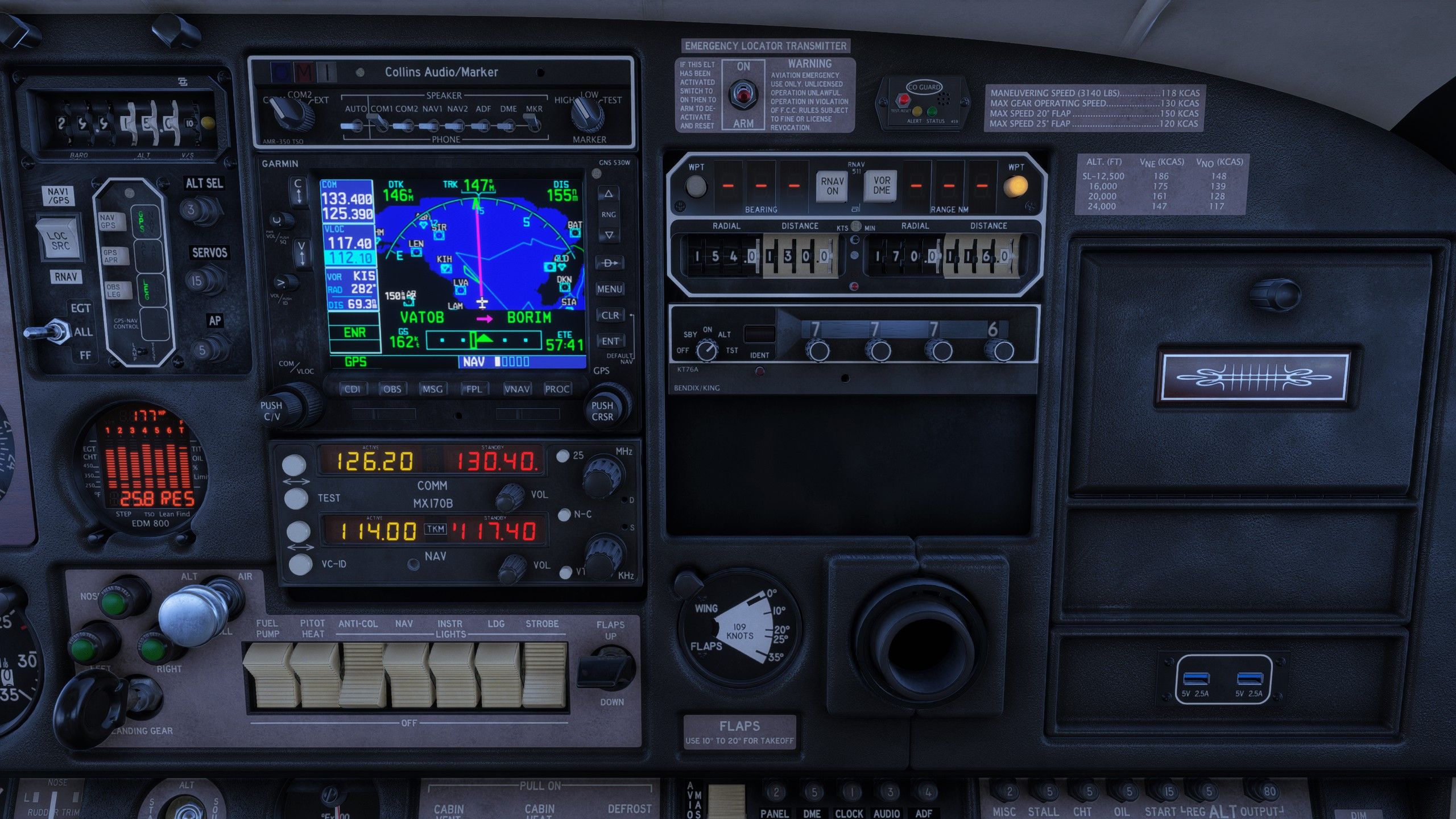
                    20260908225925_1.jpg

                    Screenshot 2: WPT2 is still selected on the RNAV but 117.4 is now active on NAV2. The RNAV now shows the correct bearing and range to the waypoint.
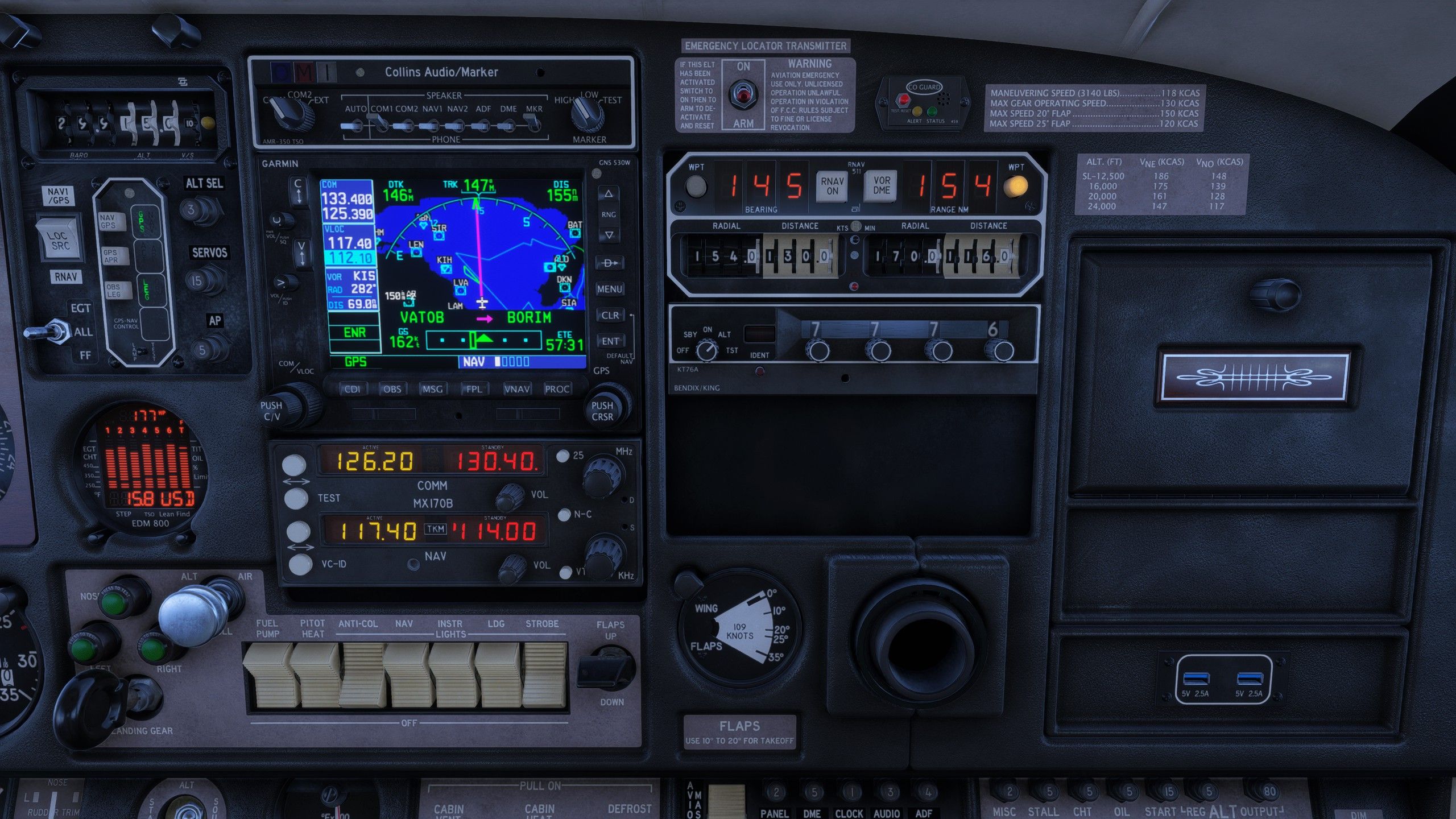
                    20260908225936_1.jpg

                    If I set some out of range station on NAV1 like 114.0, the RNAV on WPT2 still shows the bearing and range to the waypoint from the VOR dialed in to NAV2.

                    I'll double-check this by uninstalling and reinstalling the airplane from the most recent installer just to make sure it's not some stale or out of date file.

                    1 Reply Last reply
                    0
                    • N Offline
                      N Offline
                      NavyNhok
                      wrote last edited by
                      #10

                      Configuration: Primary: RNAV 511 and Secondary: MX170B (NO GPS)

                      Selector: LOC/SRC on RNAV and GPS/NAV on RNAV

                      When I tune a VOR frequency on NAV 2 of the MX170B and enter the radial and distance into the WPT Right of the RNAV 511, it's OK and the aircraft follows the autopilot NAV mode.

                      For information: on NAV 1 of the MX170B, there is no nearby VOR frequency tuned. The RNAV operates normally.

                      An when I set a frequency on VOR 1 on MX170 and Radial & Distance on WPT LEFT on RNAV511, It,s ok too

                      1 Reply Last reply
                      0
                      • fizzboyF Offline
                        fizzboyF Offline
                        fizzboy
                        wrote last edited by
                        #11

                        @Black-Square ok. I deleted the aircraft and reinstalled from the 0.1.1a installer and RNAV WPT2 is still only working with NAV2 instead of NAV1 with the GNS530/MX170B combo.


                        1 Reply Last reply
                        0
                        Reply
                        • Reply as topic
                        Log in to reply
                        • Oldest to Newest
                        • Newest to Oldest
                        • Most Votes


                        • Login

                        • Don't have an account? Register

                        • Login or register to search.
                        • First post
                          Last post
                        0
                        • Categories
                        • Recent
                        • Tags
                        • Popular
                        • Users