Echo19 TBM850 Coming Soon!
-
Wow! Spamming? That's what I call a "professional" reply! Off to PayPal for a refund. Treat your customer with respect! Totally shocking! I bought something that is apparently broken - yet you immediately point fingers and expect me to detour to Discord! I am not on Discord. First and last purchase from you.
This post is deleted! -
If anyone is having issues with the Echo19 sounds not playing (other than the installer itself failing):
It appears that the BKSQ TBM aircraft must be in the Community2024 folder alongside the Echo19 sound files. My BKSQ TBM installer always seems to point it towards Community by default, however everything works after moving bksq-aircraft-tbm850 manually.
Also move any livery folders you were using as well.
-
Everything works fine to me without having to move any folders. Great sound pack! Super visceral and immersive!
-
If anyone is having issues with the Echo19 sounds not playing (other than the installer itself failing):
It appears that the BKSQ TBM aircraft must be in the Community2024 folder alongside the Echo19 sound files. My BKSQ TBM installer always seems to point it towards Community by default, however everything works after moving bksq-aircraft-tbm850 manually.
Also move any livery folders you were using as well.
Thanks, yeah we are going to look into a software based fix but yes - the sounds/liveries need to live in the same community folder due to how the sim loads addons
-
Glad to hear you folks are enjoying the new sounds
 Thanks for the support and positive comments
 -
How does the headphone simulation work? Is there a clickspot? I have skimmed through a couple of youtube videos, but found nothing. I havn't bought the audio pack for now, so I cannot check the manual, if it even exists.
-
How does the headphone simulation work? Is there a clickspot? I have skimmed through a couple of youtube videos, but found nothing. I havn't bought the audio pack for now, so I cannot check the manual, if it even exists.
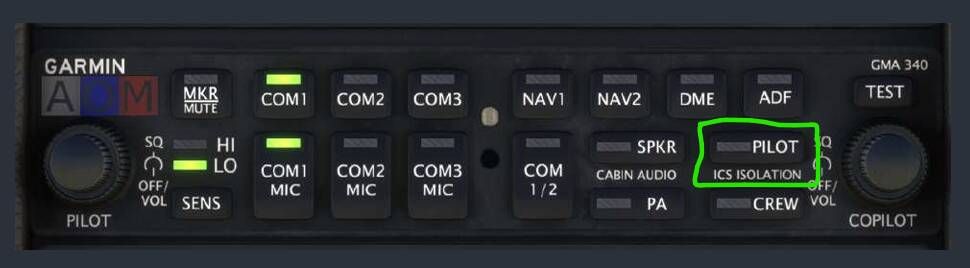
You click the “Pilot” button on the ICS panel (intercom) to enable it
-
You click the “Pilot” button on the ICS panel (intercom) to enable it
@echo19tyler
Hello, I'm having trouble finding the click spot, would you mind sending me a screenshot of the location?Thank You..
-
@echo19tyler
Hello, I'm having trouble finding the click spot, would you mind sending me a screenshot of the location?Thank You..
-
I'm absolutely shocked at the drama from earlier in this thread... For the record, I do not see defusing while being friendly and polite as "unprofessional"
@echo19tyler sound pack is definitely an improvement. No issue's with release from me. I also finally got around to buying the TBM which I hadn't owned yet (no less because of the default sounds
 )
) -
@echo19tyler
Thank you for that, to be honest I cant tell the difference between on and off....maybe I'm doing something wrong? -
@echo19tyler
Thank you for that, to be honest I cant tell the difference between on and off....maybe I'm doing something wrong?@Meandgolly You will hear a verbal annunciation when you turn it on (noise suppression on) and off (noise suppression off), if your Echo19 sounds are installed correctly.
-
ok, I'm not getting a verbal annunciation...I think I need to try re-install....
-
That's better, all working now...thanks for your help..
-
I saw this pop up on the msfs marketplace today. The last line of the description suggest that this may conflict with the default TBM 930. Has anyone tested it?

Yes, the sounds overwrite the default TBM 930 sounds because the Black Square uses the same files. We chose to do this because of compatibility with future updates and minimizing the amount of configuration files we needed to redistribute.
-
Hi I just wanted to say that this is my very sound pack so I don't have anything to compare it with.
But I decided to treat myself and got the TBM with this soundpack and I nearly pass out with the blissful sound it brings.
Seriously it sounds like the best ambient music.
I'm deaft in one ear do I thought sound packs were not for me ohh how wrong I was. -
Hi I just wanted to say that this is my very sound pack so I don't have anything to compare it with.
But I decided to treat myself and got the TBM with this soundpack and I nearly pass out with the blissful sound it brings.
Seriously it sounds like the best ambient music.
I'm deaft in one ear do I thought sound packs were not for me ohh how wrong I was.Many thanks for the kind words and appreciation! Even with being partially deaf it’s amazing to hear how it has changed your experience for the better.
-
Just picked up the E19 sound pack. Outstanding! The TBM was always one of my favourites but lately haven’t used it much due to the dull default sounds which have sounded increasingly poor as newer models become available.
All the sounds are top notch, but they’ve really added a new dimension to flybys.
Only slight disappointment is the additional two liveries not being available to me. I think it’s down to the plane being bought via the Marketplace and a file name mismatch (from what I’ve read on the web, need to spend some time checking).
Summary: Highly recommend the sound pack. Completely rejuvenated the excellent TBM850