
Autopilot keeps disengaging NAV mode (VOR-to-VOR navigation)
-
Interesting, as I've seen this behavior in I think all BKSQ aircraft, including the Commander.
I've got a couple of scenarios I want to try tonight:
-Try using the RNAV receiver with distance = 0.
-Start with SPAD, track VOR, wait for it to disconnect once, then kill SPAD and see what happens. (I think I've tried that before, and the disconnects continued, but that was months ago.) -
@Black-Square
Thanks again for taking the time to take a look at my issue.
I'm afraid I don't know an awful lot about the magic behind the interacting between add-on airplanes and the simulator, but I understand what you're saying. I don't use FSUICP but use SPAD.neXt instead to manage my hardware. In this case I use the Honeycomb Bravo's autopilot feature.I must say this is the first time I run into this. I have a fair collection of Black Square aircraft and I don't recall I saw any disconnection issue before. I am not sure about the Dukes and Starship but I did quite a lot of hours in the TBM 850 and the Bonanzas.
What I will do is empty my Community folder except for the Commander 114 and do a test flight without SPAD.neXt or any other program running besides MSFS2024. Then I'll do a flight with my "normal" setup in one of the Bonanzas to see whether it occurs or not. After that, I'll report back.@HansDeVlieger Hans, I read your post and wondered if you have tried using ‘empty” hardware control profiles in MSFS to find the problem, not just an empty Community folder?
I had a related problem with the Honeycomb Bravo where commands pre-assigned to the default Honeycomb Bravo controller profile conflicted with a command that I was trying to assign in Axis and Ohs (similar keyboard software to Spad.next).
Once I created an empty hardware profile for the Honeycomb Bravo, my problems disappeared. After that I was able to add commands back in step by step. I only mention this as the Bravo fires commands constantly and the default Bravo profile contains commands for all of the autopilot controls and something there could potentially by causing your problem.
I could also be completely wrong but wanted to let you know my experience and how I solved it, in case it helps you too.
-
I tested as follows: used Spad, climbed to 11000 feet. It took a while, but finally got a disconnect. Turned off Spad, eventually got another. It seems at higher altitudes, there are much longer intervals between disconnects than my current flight at 6000 feet, have had six disconnects in about 12 minutes all with SPAD. I'm using SPAD to output a voice when it runs my auto-reset to NAV mode code. (In fact, as I type, it's now up to 11 instances.)
Anyone else note a correlation between cruise altitude and disconnect rates?
-
@HansDeVlieger Hans, I read your post and wondered if you have tried using ‘empty” hardware control profiles in MSFS to find the problem, not just an empty Community folder?
I had a related problem with the Honeycomb Bravo where commands pre-assigned to the default Honeycomb Bravo controller profile conflicted with a command that I was trying to assign in Axis and Ohs (similar keyboard software to Spad.next).
Once I created an empty hardware profile for the Honeycomb Bravo, my problems disappeared. After that I was able to add commands back in step by step. I only mention this as the Bravo fires commands constantly and the default Bravo profile contains commands for all of the autopilot controls and something there could potentially by causing your problem.
I could also be completely wrong but wanted to let you know my experience and how I solved it, in case it helps you too.
@toby23 Thanks for joining.
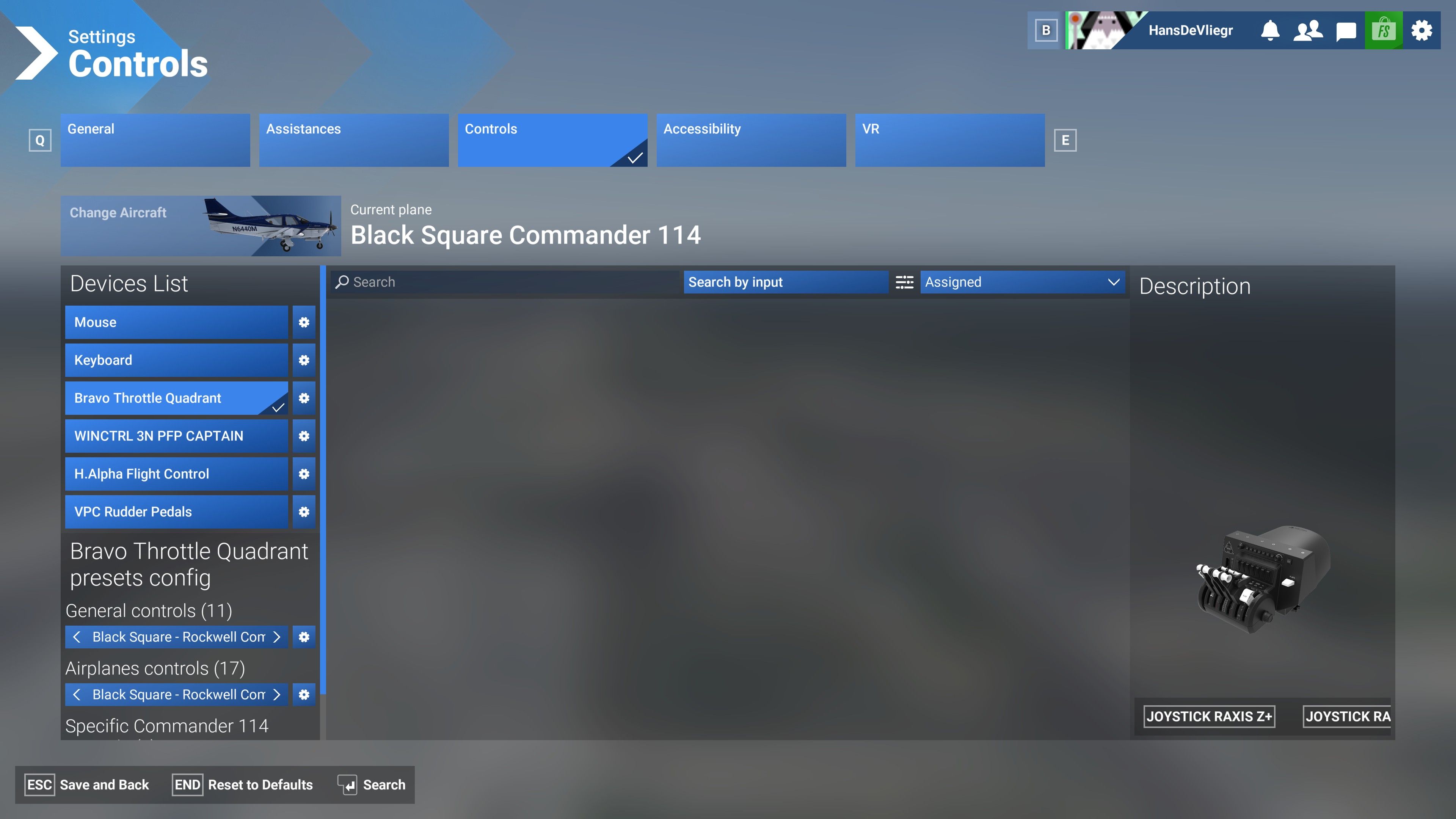 Yes, I empty any MSFS hardware profile for the Honeycomb Bravo with any new aircraft as I use SPAD.neXt (only exception: for some aircraft I use the standard axes bindings). Conflicting bindings are very often the root cause of strange behaviour of the sim, so I agree with you to look for those first.
 -
I tried using the RNAV receiver, tuned to a 0 distance so essentially VOR mode, never had any disconnects for an hour long flight.
@SteveKane That sounds very interesting. Not only as a work-around but it could also point into the direction of isolating the cause of this. I'll try to confirm this later today.
-
I tried using the RNAV receiver, tuned to a 0 distance so essentially VOR mode, never had any disconnects for an hour long flight.
@SteveKane said in Autopilot keeps disengaging NAV mode (VOR-to-VOR navigation):
I tried using the RNAV receiver, tuned to a 0 distance so essentially VOR mode, never had any disconnects for an hour long flight.
Yes, I can confirm that. With RNAV receiver I never had problems.
And for me, it does not seem to be altitude depend, but I didn't actually test that. -
@SteveKane That sounds very interesting. Not only as a work-around but it could also point into the direction of isolating the cause of this. I'll try to confirm this later today.
@HansDeVlieger said in Autopilot keeps disengaging NAV mode (VOR-to-VOR navigation):
@SteveKane That sounds very interesting. Not only as a work-around but it could also point into the direction of isolating the cause of this. I'll try to confirm this later today.
Yes, a good work-around, though not for aircraft that don't have RNAV. Like the PMDG DC-6.
-
@HansDeVlieger said in Autopilot keeps disengaging NAV mode (VOR-to-VOR navigation):
@SteveKane That sounds very interesting. Not only as a work-around but it could also point into the direction of isolating the cause of this. I'll try to confirm this later today.
Yes, a good work-around, though not for aircraft that don't have RNAV. Like the PMDG DC-6.
@George-Curious
@SteveKane
You're right of couse about this working only for RNAV equipped airplanes (including the KLN-90B I suppose).
Well, I did some more testing again today and I can confirm the issue occurs when navigating directly to a VOR station. As soon as you switch to RNAV the AP NAV mode doesn't disengage, no matter what radial/distance you set.
I also didn't notice any difference at various altitudes. -
Hi, just a thought. When an aircraft like the Commander 114 is performing VOR signal degradation is it only doing it when the in game setting is ON (as per attached) or is it just doing its own thing? So in other words does the in game setting interfere with the Commander's own logic at all?

-
Hi, just a thought. When an aircraft like the Commander 114 is performing VOR signal degradation is it only doing it when the in game setting is ON (as per attached) or is it just doing its own thing? So in other words does the in game setting interfere with the Commander's own logic at all?
@Woolies Hi, I think this setting refers to ATC communication, but I just finished a test flight to see if I can discover some interference anyway.
Well, I must say that with the VHF signal degradation set to OFF, the AP NAV mode still disconnects at the same random intervals. To bad, it would have been nice to discover a lead
Have a nice evening. -
@HansDeVlieger said in Autopilot keeps disengaging NAV mode (VOR-to-VOR navigation):
What I will do is empty my Community folder except for the Commander 114 and do a test flight without SPAD.neXt or any other program running besides MSFS2024. Then I'll do a flight with my "normal" setup in one of the Bonanzas to see whether it occurs or not. After that, I'll report back.
This will be greatly appreciated! Unfortunately, I think this is going to be a deep simulator level issue, but I've found that unless we can really pinpoint the issue, bug reports are likely to be sidelined. I will really appreciate even one more data point!
@Black-Square
I did another two test flights today to see if I could discover some pattern.-
I took the standard Piper Dakota for a VOR-to-VOR flight at 6500 ft.
Empty Community and Community2024 folders.
No external programs running (no SPAD.neXt, TrackIR5, MSFS AutoFPS, Navigraph Charts, Little NavMap etc.).
All standard MSFS2024 hardware bindings and mouse control.
Observations: Autopilot NAV did NOT disengage during climb-out and cruise (1h30m). -
Second flight was with the Just Flight BAe146-100 on the same VOR-to-VOR route at 7500 ft.
Selected applicable and my usual "standard" Add-ons in Community and
Community2024 folders via Addons Manager.
External programs running: SPAD.neXt, TrackIR5, MSFS AutoFPS.
Observations: Autopilot V/L Mode did NOT disengage during climb-out, cruise and ILS approach (about 50 min).
Conclusion: standard aircraft (only one tested: Dakota) and some but not all third-party aircraft don't show this issue, while several third-party aircraft are affected. It seems to me that a relationship between the Commander 114 (amongst others) and the disengaging NAV mode can not be excluded.
This NOT an accusation that something is wrong with the aircraft. On the contrary, it might be the perfectionist and advanced design of the systems that proof to be too good or sensitive for what MSFS2024 can deliver. But I am convinced Nick has taken that into consideration. It just came up as a thought …...
BTW one advantage of doing so many test flights is that you get to learn and enjoy this wonderful gem of an aircraft. For me this is the best and most enjoyable single engine GA aircraft, though I must say the TBM850 comes very close.
-
-
Did some flying today flying in South Africa in the Commander with twin MX 170B and the RNAV 511, weather was LIVE and clear and fine.
First leg was FAPA to FAEL (57nm) and set the 'ELV' VOR as my NAV1 to get me to FAEL. I initially climbed to about 2000ft and the NAV dropped once, understandable as quite low altitude tbf. I then continued climbing to 6000ft and during cruise it dropped again, cant remember exactly but 30nm out. It then also dropped NAV about 15nm out with me at 6000ft with clean line of sight which seems unlikely that it would be a poor signal? I also had NAV2 tuned the same and the needle seemed rock solid and not showing signs of signal loss.
Second leg was from FAEL to FAUG using the same VOR for outbound. Weirdly as I climbed out it dropped again at about 15nm on the outbound.
In other legs I used the RNAV 511 and this 'holds' signal all the time but it does seem to lose signal SOFT lock and then CAP again and stays in NAV. So still I guess losing signal briefly but does its best to recapture and then proceed.
Conclusion, not really sure but the degradation does seem to either be over sensitive or there is some other factor at play. I really couldn't see a reason for losing signal and NAV at about 15nm in and out at decent altitude and clear line of sight.
Apart from that it was 6hrs of bliss touring around South Africa in the 114 ... such a great aircraft.
-
@Black-Square
I did another two test flights today to see if I could discover some pattern.-
I took the standard Piper Dakota for a VOR-to-VOR flight at 6500 ft.
Empty Community and Community2024 folders.
No external programs running (no SPAD.neXt, TrackIR5, MSFS AutoFPS, Navigraph Charts, Little NavMap etc.).
All standard MSFS2024 hardware bindings and mouse control.
Observations: Autopilot NAV did NOT disengage during climb-out and cruise (1h30m). -
Second flight was with the Just Flight BAe146-100 on the same VOR-to-VOR route at 7500 ft.
Selected applicable and my usual "standard" Add-ons in Community and
Community2024 folders via Addons Manager.
External programs running: SPAD.neXt, TrackIR5, MSFS AutoFPS.
Observations: Autopilot V/L Mode did NOT disengage during climb-out, cruise and ILS approach (about 50 min).
Conclusion: standard aircraft (only one tested: Dakota) and some but not all third-party aircraft don't show this issue, while several third-party aircraft are affected. It seems to me that a relationship between the Commander 114 (amongst others) and the disengaging NAV mode can not be excluded.
This NOT an accusation that something is wrong with the aircraft. On the contrary, it might be the perfectionist and advanced design of the systems that proof to be too good or sensitive for what MSFS2024 can deliver. But I am convinced Nick has taken that into consideration. It just came up as a thought …...
BTW one advantage of doing so many test flights is that you get to learn and enjoy this wonderful gem of an aircraft. For me this is the best and most enjoyable single engine GA aircraft, though I must say the TBM850 comes very close.
@HansDeVlieger
I did tests some time ago with several aircraft. Here is a copy of what I found from the related MSFS forum entry:
Found the same problem with the following aircraft:BKSQ Caravan PMDG DC-6 NAMS YS-11 Default Beech King Air C90 GTxHowever I did NOT find the problem with the following aircraft:
Beech Baron G58
Beech King Air 350i
Beech Bonanza G36
Saab 340
Cessna Citation CJ4
Cessna Caravan EX
SWS Kodiak
TBM 930
I did all tests “Ready for take-off” from KSNA with 115.3 OCN Oceanside VOR, flying to and from the VOR in about 3-5000 ft.
-
-
@HansDeVlieger
I did tests some time ago with several aircraft. Here is a copy of what I found from the related MSFS forum entry:
Found the same problem with the following aircraft:BKSQ Caravan PMDG DC-6 NAMS YS-11 Default Beech King Air C90 GTxHowever I did NOT find the problem with the following aircraft:
Beech Baron G58
Beech King Air 350i
Beech Bonanza G36
Saab 340
Cessna Citation CJ4
Cessna Caravan EX
SWS Kodiak
TBM 930
I did all tests “Ready for take-off” from KSNA with 115.3 OCN Oceanside VOR, flying to and from the VOR in about 3-5000 ft.
@George-Curious Do you use FSUIPC, SPAD. neXt, MobiFlight or Axis-and-Ohs, just to try to zoom in? In any case, the issue doesn't seem to be related to any aircraft or developer in particular then.
-
@George-Curious Do you use FSUIPC, SPAD. neXt, MobiFlight or Axis-and-Ohs, just to try to zoom in? In any case, the issue doesn't seem to be related to any aircraft or developer in particular then.
@HansDeVlieger
I don't use any add-ons besides aircraft and sceneries. -
So, also those won't probably cause the issue.
-
@George-Curious Interesting that the Default Asobo King Air does this. I'm away-from-sim for a few days, but I might try to repro that. If I'm able to, I'll tag the moderators on my original bug post in the FS2024 forums.
I also might try to whip up a quick .NET app that monitors some of the NAV/VOR SimConnect variables and see if there's anything interesting going on. My hypothesis is that the VOR signal is intermittently dropping for a short period of time (seconds? milliseconds?), and since the autopilot can't receive it, it reverts to ROL or some other default mode. Perhaps some autopilots have a longer polling interval for receiving the signal than others, and are more resilient to signal drops. Since BKSQ likely uses common code for most/all planes, it might explain why I'm able to repro this behavior on all of them. All wild guesses, but it sort of makes sense as I think about this.
-
By they way, it seems like we pretty much ruled out everything (SPAD, FSUIPC, signal degradation, many different plane developers, hardware bindings and valid in-sim situations)...
I'm slowly getting desperate. During flight I can just substitute NAV with HDG and it's not a biggie, but it repeatedly disconnected nav/gs on ILS approaches, which almost run me into mountains
 As such... did any one of the impacted people try reinstalling the sim or at least "repairing files"? I prefer to ask before trying it myself because I pretty much have the same install since MSFS2024 appeared and I'm not sure anymore if I didn't tinker with it in some way.


