
Autopilot keeps disengaging NAV mode (VOR-to-VOR navigation)
-
Today I did two more flights in this wonderful little air-plane (the normally aspirated variant). I am having such a good time in it, it brings me the illusion of flying a real plane (of course I'm just an arm chair pilot).
But … I ran into something strange on both flights: I like navigating old school VOR-to-VOR so I was cruising towards a VOR station, autopilot on [alt] and [nav] and all went well. On both flights the autopilot [nav] keeps disengaging after a short time (varying from 30 seconds to just over 6 minutes during this flight) without any apparent reason. I can engage it again until it disengages by itself after a short while again.
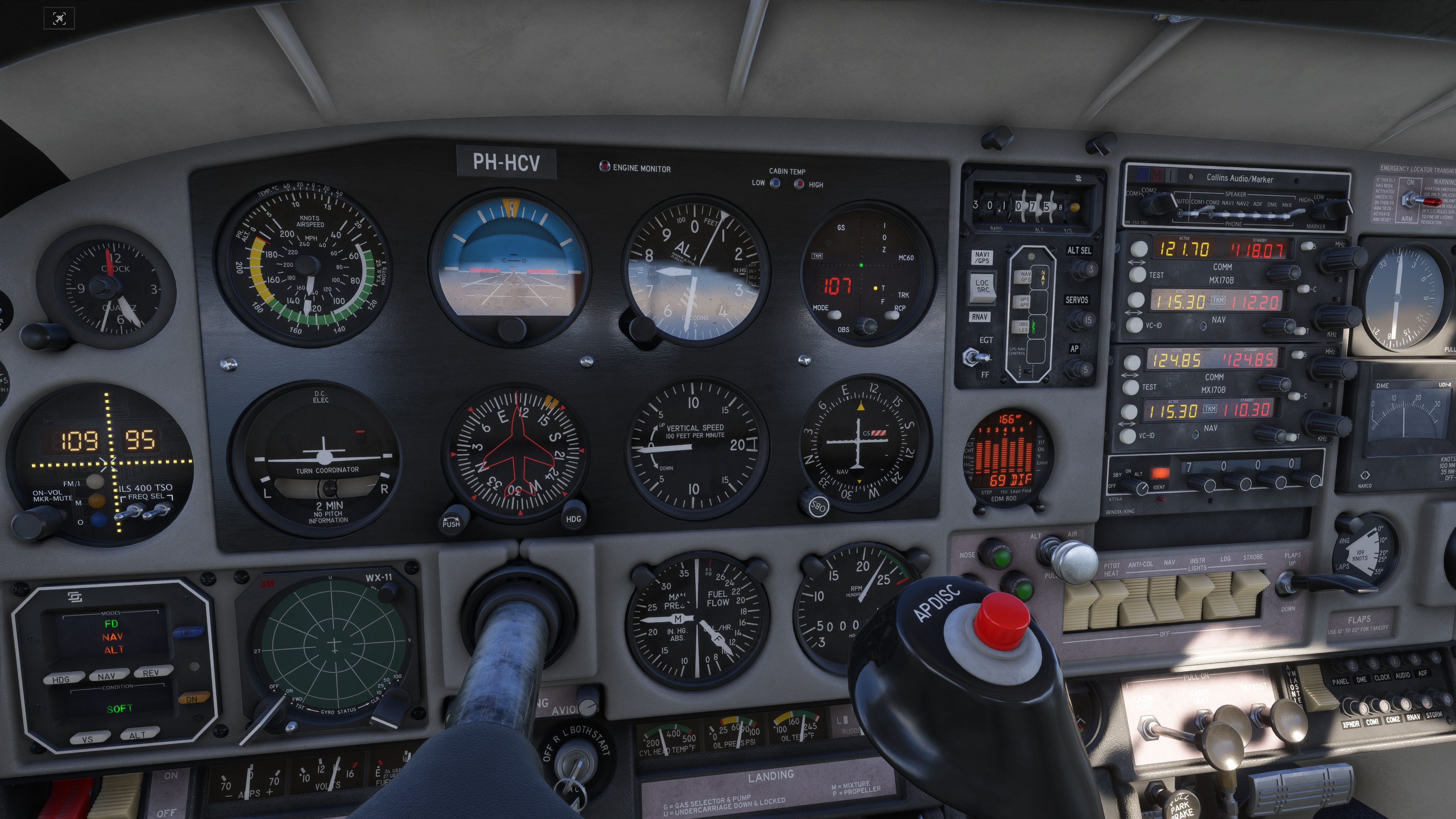
I couldn't find a pattern, it seems to happen randomly.What I did (also see attached screen print):
cruising at 12500 and 7500 feet respectively
MX-170B NAV1 tuned into various VOR stations, in this case MEN 115.30 MHz in France and well in range (stable signal)
MD41-328 LOC SRC switch set to NAV1/GPS
TKM MC60 set to OBS mode and set to the appropriate radial (107° in this example)
S-TEC System 60-2 Autopilot engaged in [alt] and [nav]This behaviour doesn't seem normal to me, but – since I'm not a pilot and just learning to “fly” this air-plane – it is very well possible that I am overlooking something here.
Is anyone on the forum having a explanation for this?
Thanks very much for your help.
@HansDeVlieger So far, the only plausible explanation I have seen for this is that some third party applications like FSUIPC are polling the variables and somehow causing it to disconnect. I do not believe there is any setting in my aircraft that could, or should, be causing this. I have seen posts on the official forum about this with other developer's aircraft too, but none of them have gained traction with Asobo. Unfortunately, I have never experienced this myself, so I'm not sure what troubleshooting I can do, or what that tells us about the problem.
-
I am experiencing this issue as well. NAV gets disabled without me noticing so many times I discover it after a few minutes. I do not use FSUIPC, but I do use SPAD.next which polls the nav variable in order to light up the NAV button of my Logitech flight panel.
-
@HansDeVlieger I know this is an issue people have posted with other planes. If it makes you feel any better, NAV mode has proven to be not so reliable to me IRL so I never use it personally, especially with VOR navigation due to signal sensitivity... I believe the issue occurs due to a temporary signal loss for some reason, tho I cannot see how black square aircraft would have any issues that default planes wouldn't...
My best recommendation is use hdg hold and make small course adjustments every once and a while to stay on course. Just like you would do IRL...
@SadBucket
Thanks for your real life insight. I guess the signal quality in general depends also on the place on the planet that your flying in (geographically for example). I know and experience this feature in Black Square's aircraft that mimic signal degradation which adds greatly to the immersion. It's this attention to detail that make me appreciate Black Square aircraft so much. So yes, I do use hdg hold already when it comes to switching between VOR stations that are not that dense in comparison to the earlier days. And of course when crossing a station to pick up a outbound radial later on. I guess that I'm going to follow your suggestion when the problem persists. I pretend that it's all about realism
-
@HansDeVlieger So far, the only plausible explanation I have seen for this is that some third party applications like FSUIPC are polling the variables and somehow causing it to disconnect. I do not believe there is any setting in my aircraft that could, or should, be causing this. I have seen posts on the official forum about this with other developer's aircraft too, but none of them have gained traction with Asobo. Unfortunately, I have never experienced this myself, so I'm not sure what troubleshooting I can do, or what that tells us about the problem.
@Black-Square
Thanks again for taking the time to take a look at my issue.
I'm afraid I don't know an awful lot about the magic behind the interacting between add-on airplanes and the simulator, but I understand what you're saying. I don't use FSUICP but use SPAD.neXt instead to manage my hardware. In this case I use the Honeycomb Bravo's autopilot feature.I must say this is the first time I run into this. I have a fair collection of Black Square aircraft and I don't recall I saw any disconnection issue before. I am not sure about the Dukes and Starship but I did quite a lot of hours in the TBM 850 and the Bonanzas.
What I will do is empty my Community folder except for the Commander 114 and do a test flight without SPAD.neXt or any other program running besides MSFS2024. Then I'll do a flight with my "normal" setup in one of the Bonanzas to see whether it occurs or not. After that, I'll report back. -
I am experiencing this issue as well. NAV gets disabled without me noticing so many times I discover it after a few minutes. I do not use FSUIPC, but I do use SPAD.next which polls the nav variable in order to light up the NAV button of my Logitech flight panel.
@Voxen
Do you experience the issue only in this aircraft or also in others? -
@Black-Square
Thanks again for taking the time to take a look at my issue.
I'm afraid I don't know an awful lot about the magic behind the interacting between add-on airplanes and the simulator, but I understand what you're saying. I don't use FSUICP but use SPAD.neXt instead to manage my hardware. In this case I use the Honeycomb Bravo's autopilot feature.I must say this is the first time I run into this. I have a fair collection of Black Square aircraft and I don't recall I saw any disconnection issue before. I am not sure about the Dukes and Starship but I did quite a lot of hours in the TBM 850 and the Bonanzas.
What I will do is empty my Community folder except for the Commander 114 and do a test flight without SPAD.neXt or any other program running besides MSFS2024. Then I'll do a flight with my "normal" setup in one of the Bonanzas to see whether it occurs or not. After that, I'll report back.@HansDeVlieger said in Autopilot keeps disengaging NAV mode (VOR-to-VOR navigation):
What I will do is empty my Community folder except for the Commander 114 and do a test flight without SPAD.neXt or any other program running besides MSFS2024. Then I'll do a flight with my "normal" setup in one of the Bonanzas to see whether it occurs or not. After that, I'll report back.
This will be greatly appreciated! Unfortunately, I think this is going to be a deep simulator level issue, but I've found that unless we can really pinpoint the issue, bug reports are likely to be sidelined. I will really appreciate even one more data point!
-
@Voxen
Do you experience the issue only in this aircraft or also in others?@HansDeVlieger said in Autopilot keeps disengaging NAV mode (VOR-to-VOR navigation):
@Voxen
Do you experience the issue only in this aircraft or also in others?I don't recall having seen this issue before, but lately I flew only the A2A Comanche that does not have a NAV button.
-
I bought the plane last night and did a vor vor from Stornoway to humberside using the mx170b and it was constantly disconnecting just like you said.done anther flight today and same thing.swaped over to the turbo version with the gtn 750 and using GPS it never disengaged once
-
Also have it since around SU4. For me it's happening only in Blacksquare planes and the C310 from Blackbird. Have observed it like a 100 times as I'm doing a radio-navigation only world tour with the Baron

While I don't think it's caused by anything that is wrong in the plane itself some planes seem more susceptible to it, because for example with the Justflight F28 and Bae146 I never had this happen, despite mostly flying them VOR-VOR.
-
Also have it since around SU4. For me it's happening only in Blacksquare planes and the C310 from Blackbird. Have observed it like a 100 times as I'm doing a radio-navigation only world tour with the Baron
While I don't think it's caused by anything that is wrong in the plane itself some planes seem more susceptible to it, because for example with the Justflight F28 and Bae146 I never had this happen, despite mostly flying them VOR-VOR.
@Tadeus72 The manual clearly states that BlackSquare simulates radio signal propagation and does so quite accurately, just like A2A. In real world operations, pilots rarely use the autopilot in NAV mode tracking a VOR. More commonly, they fly in HDG mode, adjusting the heading according to the VOR indications whenever the signal is available for example, when flying through mountainous terrain or other areas where reception can be affected.
There are countless tutorials and training materials available online explaining how radio navigation actually works. Because of that, it’s not reasonable to compare this product with more simplified implementations where VOR guidance works perfectly all the time. If it always works flawlessly regardless of conditions, that’s actually unrealistic behavior.
Unfortunately, many other aircraft developers including the default MSFS/Asobo aircraft prioritize convenience over realism in this area. As a result, they often teach incorrect expectations and poor operating practices.
Best, Seb
-
@Tadeus72 The manual clearly states that BlackSquare simulates radio signal propagation and does so quite accurately, just like A2A. In real world operations, pilots rarely use the autopilot in NAV mode tracking a VOR. More commonly, they fly in HDG mode, adjusting the heading according to the VOR indications whenever the signal is available for example, when flying through mountainous terrain or other areas where reception can be affected.
There are countless tutorials and training materials available online explaining how radio navigation actually works. Because of that, it’s not reasonable to compare this product with more simplified implementations where VOR guidance works perfectly all the time. If it always works flawlessly regardless of conditions, that’s actually unrealistic behavior.
Unfortunately, many other aircraft developers including the default MSFS/Asobo aircraft prioritize convenience over realism in this area. As a result, they often teach incorrect expectations and poor operating practices.
Best, Seb
-
@SebAvi Thanks, but I don't think it's about signal degradation. It also happens when the signal is strong and uninterrupted, as well as in planes that don't have custom signal degradation.
For everybody who have issue with VOR make this simple steps. In my opinion blacksquare birds working as expected, in msfs vs reality possibilities.
- Position the aircraft approximately 10–20 NM from a known VOR station and at an altitude that provides a clear line of sight to the transmitter. Best without any hills, min 5000 ft AGL.
- Enter the VOR frequency manually instead of relying on automatic tuning.
- Enable the NAV audio and listen for the station’s Morse code identifier.
- Check the CDI indication, the TO/FROM flag, and verify that the needle responds correctly when you rotate the OBS knob.
- Repeat the test in another pro dev aircraft A2A , blackbird etc preferably comparing an aircraft with analogue instruments to one equipped with a G1000 - Cows DA40/42.
- Test the same VOR after restarting the simulator with all Community folder add-ons disabled.
- If using Navdata, check that the latest AIRAC is installed.
If the VOR works with the G1000 but not with an analogue CDI, the issue is likely related to the specific aircraft or instrument implementation. If only certain VOR stations do not work, the navigation database may be the cause.
-
@HansDeVlieger said in Autopilot keeps disengaging NAV mode (VOR-to-VOR navigation):
What I will do is empty my Community folder except for the Commander 114 and do a test flight without SPAD.neXt or any other program running besides MSFS2024. Then I'll do a flight with my "normal" setup in one of the Bonanzas to see whether it occurs or not. After that, I'll report back.
This will be greatly appreciated! Unfortunately, I think this is going to be a deep simulator level issue, but I've found that unless we can really pinpoint the issue, bug reports are likely to be sidelined. I will really appreciate even one more data point!
@Black-Square OK, I did some more testing and these are my findings:
I am on MSFS2024 SU5.1 and flew 5 different scenario's on the same route: LFSL (Brive-la Gaillarde) -> MEN VOR 115.30 MHz (Mende) -> VOR CFA 114.35 MHz (Clermond-Ferrand-Auvergne) -> LFLC (Clermond-Ferrand).
Altitude 7500 ft MSL.
NAV-data: Navigraph AIRAC cycle 2607 (2608 came out during my "investigation").
PC restart between flights.-
Commander 114 - MX-170B radios, MC60 Digital Localizer and ILS 400, Narco DME UDI-4, S-TEC Programmer,
Blank (=empty) Community and Community2024 folders, except <<black-square-commander114>>
No external programs running (no SPAD.neXt, TrackIR5, MSFS AutoFPS, Navigraph Charts, Little NavMap etc.)
Observations: Autopilot NAV disengaged every couple of minutes (variable) without apparent reason during climb-out and cruise. -
Commander 114 - MX-170B radios, MC60 Digital Localizer and ILS 400, Narco DME UDI-4, S-TEC Programmer,
Selected apliccable and my usual "standard" Add-ons in Community and Community2024 folders via Addons Manager
External programs running: SPAD.neXt, TrackIR5, MSFS AutoFPS
Observations: Autopilot NAV disengaged every couple of minutes (variable) without apparent reason during climb-out and cruise. -
Bonanza TC - KX-155B radios, KI 525A HSI and KI 229 RMI, KDI 572R DME, KFC 150 Autopilot,
Selected apliccable and my usual "standard" Add-ons in Community and Community2024 folders via Addons Manager
External programs running: SPAD.neXt, TrackIR5, MSFS AutoFPS
Observations: Autopilot NAV disengaged every couple of minutes (variable) without apparent reason during climb-out and cruise.
Autopilot NAV disengaged during ILS-approach. -
Daher TBM 850 - KX-155B radios, KI 525A HSI and KI 229 RMI, KDI 572R DME, KFC 150 Autopilot,
Selected apliccable and my usual "standard" Add-ons in Community and Community2024 folders via Addons Manager
External programs running: SPAD.neXt, TrackIR5, MSFS AutoFPS
Observations: Autopilot NAV disengaged 7 times without apparent reason during cruise. -
Just Flight - Piper PA28 Turbo Arrow III- KX-170B radios, HSI, VOR1 / ILS and VOR2 indicators, KN 62A DME, standard Autopilot unit,
Selected apliccable and my usual "standard" Add-ons in Community and Community2024 folders via Addons Manager
External programs running: SPAD.neXt, TrackIR5, MSFS AutoFPS
Observations: Autopilot HDG and NAV physical switches switched off 9 times (variable interval) without apparent reason during climb-out and cruise.
A spilt second before HDG and NAV switch off the aircraft banks slightly to the right or left.
In all scenarios CAP and SOFT indicator lights on the AP panel dim or turn off/on - off/on - off/on regularly (might be intentional?).
NAV disengages at random moments in time and distances from/to different VOR stations (with ranges of 60, 100 and 150 NM), also when unobstructed line of sight.
DME seems to work fine all flight long, no interruptions or misreadings observed.My conclusion is that the disengaging of NAV is not likely to be related to any particular aircraft (I didn't test a stock MSFS2024 aircraft though), nor having anything to do with the signal degradation feature in Black Square's aircraft. Which by the way for me adds a lot to the illusion of "flying" a real aircraft. I do take this degradation into account when flying VOR-to-VOR (use of AP HDG when the VOR signal is not yet stable or transitioning between to/from legs or from VOR1 to VOR2).
So, even the TBM 850 and the Arrow III show the issue and I am quite confident that this didn't occur before SU5 or SU5.1.@SebAvi I am aware of how radio navigation actually works in the real world and I know how ASOBO actualy implemented the unrealistic signal "on-or-off" behaviour. But I also do appreciate the fact that I can rely on an Autopilot to track a VOR radial. As stated before I am not a pilot. This is my hobby, I am not flying a real airplane with real threats and challenges (I wish I could!). The life of a average flightsimmer comes with having to walk the dog, feed our cat, change our grandson's diper, make a coffee and a couple of sandwiches during that 4-hour flight etc. and then to be able to use a simplified version of the real world is a usable shortcoming. And for adding back in some realism, we have our quality developers like Black Square. Thanks Nick!
-
-
Maybe this post is important. SU6 solve this issue perhaps.
https://forums.flightsimulator.com/t/vor-range-often-incorrect/406277/85
@SebAvi That might very well be related. Let's hope so. Thanks for the heads up.
-
Doesn't seem related at all, but maybe they will fix something in the code by mistake when adding/fixing those longer range VOR stations
In general I'm not sure if Asobo is even aware (and how it was described to them). There was a longer discussion on this topic in the Aircraft section of the official forums. But the only report I have seen was a user trying to report it and the answer from the mod was that this doesn't qualify as a report in this form. Not sure if the user re-tried in another form.
-
What I don't know is if developers have a feedback channel with Asobo where they can report the issue. After all they are the ones who get the feedback from their users / customers (questioning their product, not me btw
). Maybe Nick can comment on this. -
Found the report I was writing about.
Commendable effort on the side of the user, but I think he gave up in the end
https://forums.flightsimulator.com/t/bug-multiple-planes-change-from-nav-to-rol-hdg-mode-when-tracking-vor/762974/10
BTW. It not happening for me in the F28 and Bae146 might be suggesting that it's about the standard AP units. Both planes are larger and have the AP functions spread over the cockpit, with probably some custom coding involved to make it happen - and not just a standard AP panel.- decided to withdraw the conclusion as I just realized the 114 also has a custom AP panel and it also happened with the StarshipEither way, have some examples from YT (link should point to the specific moment):
https://youtu.be/1a-g3UMooCs?t=4393
On glideslope for some time now, clear view of the runway, APR randomly moves back to ROLL (the popped breaker is not about this, it's an icing sensor and was known).
Here a similar situation:
https://youtu.be/300F3IcCAqM?t=3593The same, but with only a localizer.
Normally it happens with VORs, was just easier to remember and find those two.
-
Found the report I was writing about.
Commendable effort on the side of the user, but I think he gave up in the end
https://forums.flightsimulator.com/t/bug-multiple-planes-change-from-nav-to-rol-hdg-mode-when-tracking-vor/762974/10
BTW. It not happening for me in the F28 and Bae146 might be suggesting that it's about the standard AP units. Both planes are larger and have the AP functions spread over the cockpit, with probably some custom coding involved to make it happen - and not just a standard AP panel.- decided to withdraw the conclusion as I just realized the 114 also has a custom AP panel and it also happened with the StarshipEither way, have some examples from YT (link should point to the specific moment):
https://youtu.be/1a-g3UMooCs?t=4393
On glideslope for some time now, clear view of the runway, APR randomly moves back to ROLL (the popped breaker is not about this, it's an icing sensor and was known).
Here a similar situation:
https://youtu.be/300F3IcCAqM?t=3593The same, but with only a localizer.
Normally it happens with VORs, was just easier to remember and find those two.
-
Yep, that was my original post in the MSFS forums about this issue, and yes I've just lived with this for some months.
 I am also getting this behavior in the Commander.
I have a workaround I've set up in multiple planes with some Spad.Next trickery, where I can activate/deactivate monitoring for when Nav mode is lost. When that happens, it quickly turns it back on again. It works pretty well.
Ironically, it seemed that if I didn't have SPad.next running, this problem didn't happen in the first place. It makes me think that Spad simply listening or polling certain variables might be causing this, but it would take some deep debugging to troubleshoot this.
Feel free to add observations to that thread for visibility to Asobo. I'm doing a VOR tour of Alaska in the Commander (before it gets too cold/icy for this plane), so maybe I'll experiment a bit this weekend.


