
Trouble with S-TEC altitude/vs select programmer
-
I hope someone can help me with this. First of all, is the scale on the altitude bug correct, or a mistake?
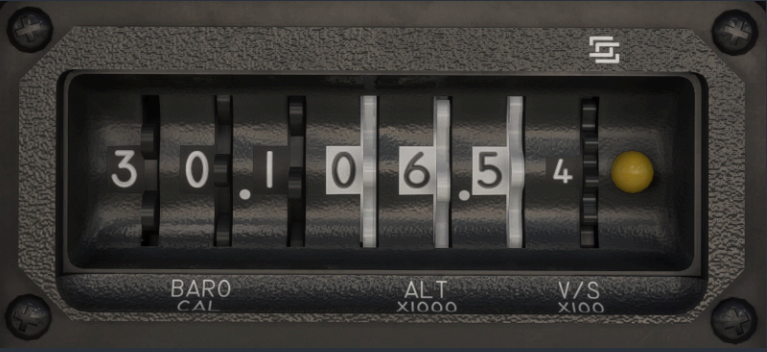
If its correct, then the range of the altitude bug only goes up to 9,900 ft? That seems really odd. Like in the screenshot there it is set for 6500 feet? Or is the BARO part only 3 digits and the next 3 are all for the altitude bug? Secondly, I don't seem to be able to get it to work reliably. I swear I have once or twice, but the most recent flight I took, it just wouldn't capture any of the altitudes I was putting, pressing the VS button on the main AP panel would use the VS I set on the thumbwheel, but it would pass right by the altitude, which I was putting in assuming the x1000 is correct.
-
Baro is black, altitude is white. 6.5 x 1,000 = 6,500. I haven't had any trouble capturing altitudes myself. Always feel free to send a video if you need any further help!
-
In the screenshot, the selected altitude is set to 6,500 ft. The S-TEC altitude selector can be programmed up to 99,900 ft, but its BARO window only has three digits.
If the BARO setting on the S-TEC does not exactly match the altimeter's barometric setting, the aircraft will level off at the altitude calculated using the BARO value entered on the S-TEC. Since the S-TEC only displays three digits while your altimeter uses a four-digit setting (for example, 30.15 inHg), there will be a small discrepancy between the altitude at which the aircraft levels off and the altitude indicated on your altimeter.
The aircraft will level off automatically unless you manually control the vertical speed using the UP and DOWN buttons. If you want the autopilot to capture the selected altitude automatically while climbing or descending in VS mode, you must use the VS mode on the S-TEC rather than manually adjusting the vertical speed with the UP and DOWN buttons.
-
Thanks for the clarification, didn't realize the BARO was only 3 units, that probably explains what was going wrong for me. I put in 30.17 and 3.5 for example thinking that was 3500 feet, but I was actually specifying 73,500 ft!
-
I want to bring a problem around this device. Whatever I do, i am not able to move the dails.
Now I thought that has something to do with the cockpit interaction settings, but changing it will not solve the problem (its only giving blue marking around the gauge but does not move the dails). I am in FSFS2024.May be somebody knows a solution?
-
I want to bring a problem around this device. Whatever I do, i am not able to move the dails.
Now I thought that has something to do with the cockpit interaction settings, but changing it will not solve the problem (its only giving blue marking around the gauge but does not move the dails). I am in FSFS2024.May be somebody knows a solution?
@Bentree-0 I suspect you have the "Control ALT SEL with Hardware Events" option selected on the tablet's options page. Let me know if that fixes it for you.
