Skip to content
  • Categories
  • Recent
  • Tags
  • Popular
  • Users
Collapse
Just Flight Community Forum
  1. Home
  2. Just Flight
  3. MSFS Products
  4. Black Square Add-Ons
  5. Starship
  6. Top of Descent marker

Top of Descent marker

Scheduled Pinned Locked Moved Starship
4 Posts 3 Posters 26 Views 1 Watching
  • Oldest to Newest
  • Newest to Oldest
  • Most Votes
Reply
  • Reply as topic
Log in to reply
This topic has been deleted. Only users with topic management privileges can see it.
  • toby23T Online
    toby23T Online
    toby23
    wrote last edited by
    #1

    I imagine marking TOD on the screens was probably a bit flashy for the 80's when everyone was so good at maths but does the Starship have a way to mark TOD on any of the 14 screens or am I going to have use my brain and calculate it myself?

    Ryzen 5800X3D, 64GB RAM, RTX 4090, Windows 11

    1 Reply Last reply
    0
    • Black SquareB Online
      Black SquareB Online
      Black Square
      Black Square Developer
      wrote last edited by
      #2

      I recall looking into this to see if it was added in one of the later software updates, but I believe the answer was no.

      1 Reply Last reply
      0
      • toby23T Online
        toby23T Online
        toby23
        wrote last edited by toby23
        #3

        It would be so lovely to get a 'special' software update to add the top of climb/ bottom of descent marker and a TOD marker on the flightplan. Not because I'm lazy but because safety is a real issue and flying in the sim is not as easy as in real life - SayIntentions didn't clear me down quick enough after I told them I was ready to descend (they kept me too high for too long) and I ended up testing the max descent rate of the Starship, only to forget completely to lower the gear... Thank god for simulators.

        Ryzen 5800X3D, 64GB RAM, RTX 4090, Windows 11

        1 Reply Last reply
        0
        • M Online
          M Online
          MiRexer
          wrote last edited by MiRexer
          #4

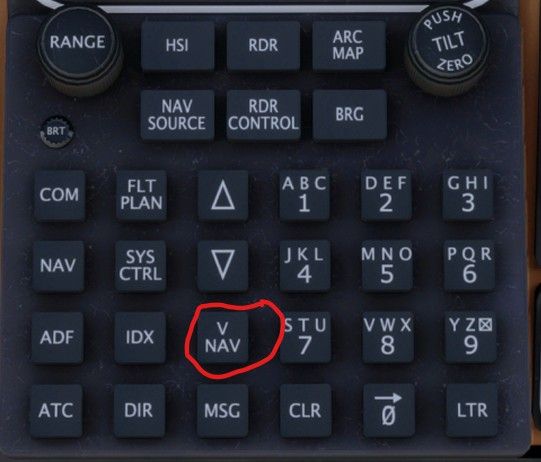
          What I do is use the vertical nav button on the CDU and set the altitudes for the STAR and approach waypoints and then shoot for a 2000 fpm descent. It'll give you a needed descent rate and you can watch that count up as you get closer.

          Screenshot 2026-07-23 005956.jpg

          1 Reply Last reply
          0
          Reply
          • Reply as topic
          Log in to reply
          • Oldest to Newest
          • Newest to Oldest
          • Most Votes


          • Login

          • Don't have an account? Register

          • Login or register to search.
          • First post
            Last post
          0
          • Categories
          • Recent
          • Tags
          • Popular
          • Users