F100 - ATS and Landing behaviour
-
@Crabby A/T seems sluggish, but I don't think it's supposed to allow the speed to drop by as much as 30 knots below the selected value, leading to speeds even below VMA.
And then, according to the manuals:
ATS is supposed to be used in all flight modes, all the way to landing.As the manuals says:
"ATS during Landing
During landing, automatic thrust lever retardation to idle occurs below 50 ft AGL.
The FMA will show RET in the thrust window."And also:
"AUTOMATIC GUST CORRECTION
During approach in gusty wind conditions, ATS will control to a speed not below VMA +8. VMA and VSEL at the PFD are not affected."So, Guys and Gals, these passages give me reason to believe that, as sluggish as the AT may be, it shouldn't be that imprecise....
@pedropolak I am still not through with the actual FCOM, however, straight from the US Airways FCOM:
LANDING
Except for autoland approaches, switch off the ATS at 50 feet or above.
Start to initiate a flare at approximately 30 feet for a manual landing.
For autoland approaches, monitor the thrust lever movement to idle. For all
other approaches, retard the thrust levers manually back to idle. After an
autoland, the autopilot has to be switched off before 60 knots.Just got done scanning the Alliance FCOM and it reads the same. I understand the manuals provided may say different (I have not read them past recommended settings. I have various FCOMs and that is what I learn on), however there is no FCOM recommendation to use the ATS from start to finish.
Granted, there could be another operator SOP that says ATS is to always be used. I know that is the case for the 777. I just can't find reference to that in real documents.
-
I experience the same. Using MSFS 2024. The aircraft struggles to maintain speed, the autopilot seems to be too slow in response, resulting in unrealistic large pitch oscillations and large thrust corrections. It would be nice if JF could tweak this behaviour and make the autopilot more responsive.
-
Wanted to step in here too to report a surprisingly large variation of speeds during an approach in calm weather conditions.
Approach speed varies in a range of like 20 to 30kt when handled by ATS and I've found it to be super super difficult to manage energy on approach an landing.
I've done three flights so far and every APP was messed up to an extent that I should have gone around.
Been flying various sims and different aircraft (yep, Boeing and Airbus) for 20 years now and always been able to quickly get used to new environment. Sure, a part of my bad approaches are due to differences between Fokker and A/B which I just have to get used to but it feels like some parameters of the addon could use a little fine tuning too. -
I'm not sure it's all the ATS' and A/P's fault. I'm not sure how it's calculated in the real aircraft, but I've seen that the speed trend indication is very very responsive, much more so than in any other aircraft I've flown. I usually never use ATS on final (in any plane), but I've basically having to force myself to disregard the speed trend indication or I would end up doing some very excessive and unnecessary throttle changes myself (something that did happen for the first half of my first approach, before I noticed).
Also, even though it's slightly off topic, since someone mentioned FLCH, if you fly manually and have the F/D vertical mode in FLCH you'll see that the flight director has a similar problem, the commands are very large and vary very quickly. Maybe this can throw off the A/P and ATS?
Next flight I do I'll try to get some footage of both of these things.
-
Is there any fix for the "nose down at ap disconnect" and massive trim up needed on the horizon?
-
Is there any fix for the "nose down at ap disconnect" and massive trim up needed on the horizon?
@storemaster For a moment I thoguht Flaps 25 instead of 40 was a way around, but talking to friend that looked like just a coincidence.
-
Had a vAPP of 121kn today and I didn't manage to perform a stable approach.
Aircraft accelerated to 160kn and even higher as you can see on this screenshot (wasn't able to record a video quickly enough):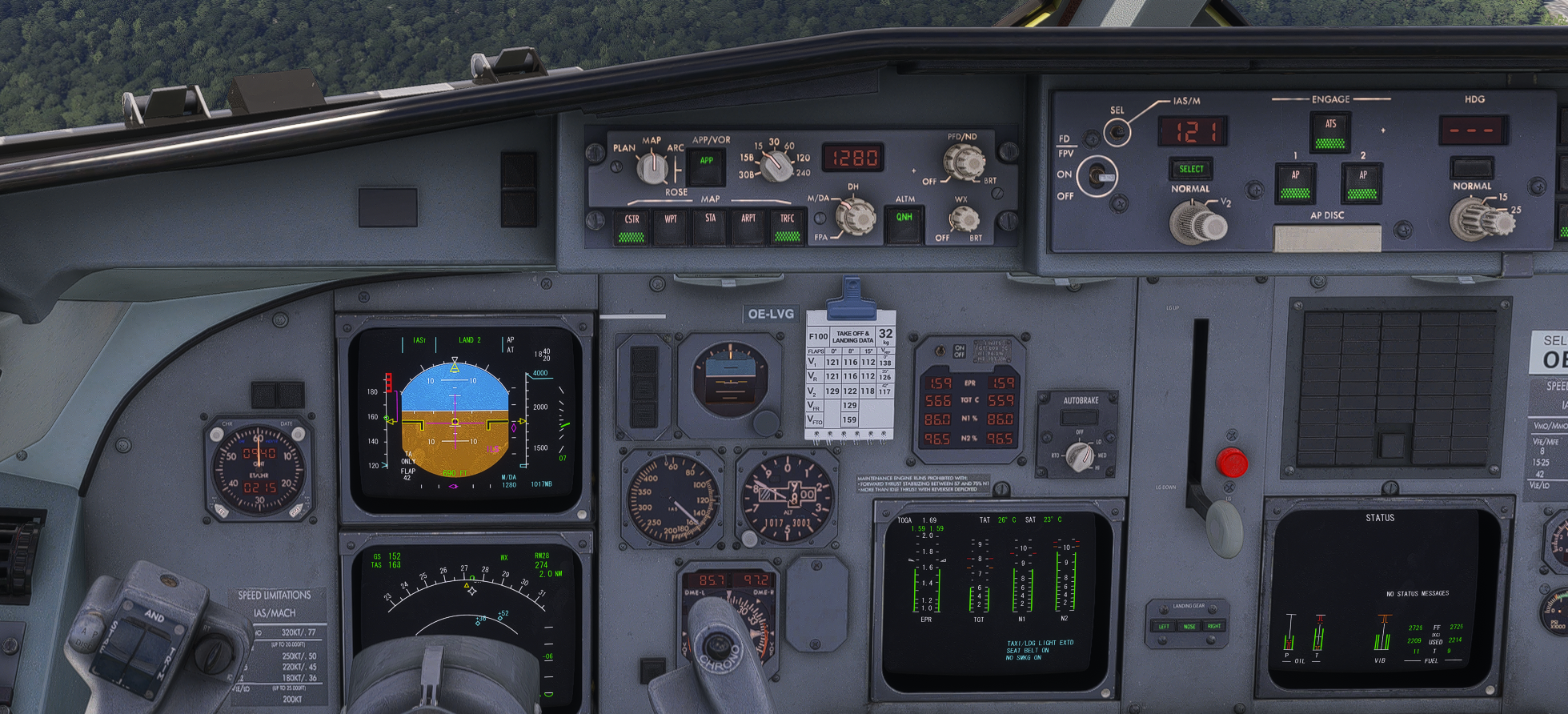
@OELVA Second this. I had erratic speed changes up to 160kts, all the way from 121kts which was selected.
-
I would like to chip in here with my modest observation - this might be an issue occurring only on MSFS 2024, imho.
I flew F100 in MSFS 2024, LOWW-EPKK, the turbulence settings set to low and nearly no wind, the plane climbed in profile mode, was unable to follow FMS selected IAS. Oscillations were always +/- 20 kts. The throttle was stable in climb thrust, but the plane was unable to follow the FD properly and was overshooting the selected speed until a cruise altitude was reached.
I flew F100 in MSFS 2020, the same route, the same conditions, the plane kept the speed in profile climb without any issues (tiny variations due to the wind, absolutely normal).
I also flew F70, only in MSFS2020 on LOWW-LZKZ-LOWW, different cruise altitudes and speeds, always flown accurately. Did not fly F70 in MSFS2024.
The ATS is sometimes slightly sluggish, but as Mark says, that is to be expected, and I did not find the ATS behaviour in MSFS 2020 particularly problematic (would say that 737s by a famous developer have a similarly sluggish auto throttle).
Could it be the difference between simulators?
@MichailusB
Can anyone else who uses MSFS 2020 confirm this? I use MSFS 2024 and the plane can't maintain speed on climb ( even on descent in LVL change mode it oscillates a lot ). If this is a case of only in MSFS 2024 issue then it needs to be investigated. -
Hi all!
I had huge problems flying the f100/f70 in real weather. Approach speeds fluctuating wildly and incontrollable aircraft. But, I found a solution in the internet which seems to work on my pc. It’s a windows problem (!). The OS clock synchronization, didn’t work well (but check also DNS and IPv6). It caused MSFS2024 to mess up winds, particularly during last 500 feet AGL of the approach.
The link is here:
https://forums.flightsimulator.com/t/extreme-crosswinds-and-wind-swings-close-to-the-ground-on-final/728054Many thanks to paulofranca89!
-
Do these issues still persist?
According to the change log for v1.2 the trim issue should be sorted out.
However, I cannot find anything regarding the ATS-hunting issues.These reports regarding the ATS-inaccuracies prevent me from purchasing the F70/100.
Best regards
-
In the few flights I did with V1.2, I haven't paid attention specifically to the out-of-trim state when disconnecting the A/P on the ILS, but I haven't had the impression that it still exists.
Aircraft feels in trim when you disconnect the AP.
ATS is still an issue for me.On my last flight so far, I've selected IAS250 and LVLCH in descend. From what I've read on the manual, throttles should go back to idle and the aircraft maintains 250 IAS just by vertical speed just like your average Boeing or Airbus. What happened was the aircraft going into a >4000ft/m steep descend while being at 270IAS and further accelerating by down pitch, while, for my understanding, the aircraft should have pitched up to reduce speed until the set 250 IAS in FLCH mode is reached and not going even faster by pitching down.
On reddit, someone told me that's a normal behaviour in a TOGA condition... I've even provided a screenshot showing the aircraft in CLB and IASE modes. -
Thank you.
Does this apply to MSFS 2020, MSFS 2024 or both of them?
-
Hi all!
I had huge problems flying the f100/f70 in real weather. Approach speeds fluctuating wildly and incontrollable aircraft. But, I found a solution in the internet which seems to work on my pc. It’s a windows problem (!). The OS clock synchronization, didn’t work well (but check also DNS and IPv6). It caused MSFS2024 to mess up winds, particularly during last 500 feet AGL of the approach.
The link is here:
https://forums.flightsimulator.com/t/extreme-crosswinds-and-wind-swings-close-to-the-ground-on-final/728054Many thanks to paulofranca89!
@venemair I experienced a combination of the poor ATS response, but more notably the crosswind issue just before landing using historic weather (Active Sky) on approach to 28L at EIDW. On first attempt I went around as was certainly not a stable approach. On 2nd attempt exactly the same issue, but carried on to land (not pretty) as was out of time for the evening!
Because I was using ActiveSky for the weather injection I don't think this can be the system clock issue, but might be a corrupt weather file? As regards the ATS, I had this disengaged for the final approach, but find I keep fighting it as it turns itself on to protect speed. TBF, I think I was in the amber, but how do you tell the computer that it's within parameters for the approach? The correct flap setting was set with an approach speed of 141Kts which I was maintaining, so not really sure what I'm getting wrong if anything...
I have done some good landings in the Fokker 100 (in fact some my best), but it does seem very inconsistent.
-
@Gisbourne just tried in real wx to land in a F100 at EIDW 28R, winds 020/20. ATS on until touchdown. Vapp (fmc) + 5 due to xwind. At 500’ I noticed ground effect and turbulence, but nothing too bad. Auto pilot off at 400’ needed some trim up but the result: a normal, reasonably soft landing. ATS did it fine. I do not have AS. Also did good landings today at EGGD and LFMN with xwind in CB. All with ATS on until touchdown, but a/p off. Turbulence realistic, real wx. I know how frustrating is can be. My confidence is slowly coming back regarding the fokkers of justflight.
-
@Gisbourne just tried in real wx to land in a F100 at EIDW 28R, winds 020/20. ATS on until touchdown. Vapp (fmc) + 5 due to xwind. At 500’ I noticed ground effect and turbulence, but nothing too bad. Auto pilot off at 400’ needed some trim up but the result: a normal, reasonably soft landing. ATS did it fine. I do not have AS. Also did good landings today at EGGD and LFMN with xwind in CB. All with ATS on until touchdown, but a/p off. Turbulence realistic, real wx. I know how frustrating is can be. My confidence is slowly coming back regarding the fokkers of justflight.
@venemair thanks for your reply
 . My experience echoes your own as flew back to EGNX from EIDW last night and no such issues. I was keeping a much closer eye on the amber band on the speed tape and the ATS handled things fairly well, all be it with a bit of hunting when heading downwind, but it did a reasonable job of maintaining the speed. Wind on finals was realistic and did a pretty smooth landing, so inconsistent, but will keep persevering!
 -
Had a vAPP of 121kn today and I didn't manage to perform a stable approach.
Aircraft accelerated to 160kn and even higher as you can see on this screenshot (wasn't able to record a video quickly enough):@OELVA I just had this happen twice in a row. It didn't happen before on dozens of flights. Somehow I now have this bug and it's quite annoying.
Did you happen to find a fix?